
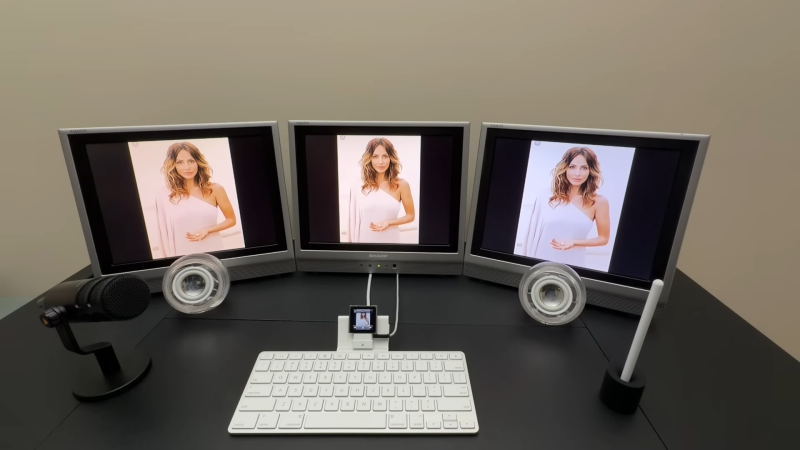
Triple monitor workstations are pretty common these days, particularly for those wishing to maximise screen space for greater productivity. [Will It Work?] has put together a sillier take on this concept, however, hooking the diminutive iPod Nano up to three monitors instead.
The 6th-generation iPod nano brought forth a new form factor – it’s the postage stamp-sized one that you could clip to your workout gear. It’s not typically what you’d call a productivity device, but there is a way to get more out of it. The trick is to grab a 30-pin Keyboard Dock, which allows access to the composite video signal from the iPod. It was originally designed for the iPad, but it works with the iPad nano too with a 30-pin spacer adapter – just don’t expect the keys to do anything. This setup also allows access to the 3.5mm four-pole jack, which handles audio input and output. With a bunch of additional cables and adapters, the iPod was able to be hooked up to three screens, a set of Apple Pro speakers, and three Sharp LCD monitors.
What can you do with this setup? Fundamentally, not a whole lot. You can’t use the keyboard with the iPod Nano, so you’re limited to interacting with the tiny touchscreen. There also aren’t exactly a lot of apps to run on the platform, either. You can basically listen to music, watch a slide show, or record voice memos, while looking at the iPod’s display spread identically across three TVs. Still, it’s a fun joke build, because at a glance it genuinely looks like you’ve set up a triple-monitor workstation running off a tiny iPod from over a decade ago.
If you want to blow the mind of your next podcast guest, consider recording your next episode on this rig. Alternatively, explore some of the other hacks we’ve seen for the platform. Video after the break.












As long as they show the same content, I can hook up anything to n-monitors. Where n is only limited by time and money budget.
That was my thought exactly. What is even the point of having multiple monitors if they display the same output.
And that’s exactly my problem with what is nowadays defined as a “hack”. Years ago, it meant modifying something to make it do something useful. On the plus side this broadens significantly the options available as there are many more ways to make something useless than something useful.
I’ll pass on the Youtube typical clickbait title, because “triple-monitor workstation” it isn’t.
If the goal is to display what is playing overhead, and have different rooms still be able to see what is on the iPod, then this becomes insanely useful… Like display the iPod and primary monitor at it’s control source, and run second monitor to a display in a lobby of a daycare so that parents can see what’s going on before the kids enter… And a third monitor to The play area on a giant screen for the kids…
Just an idea for this setup
Something like that, this setup would be awesome 😎 to the OP this was a great post… Gave me some interesting applications to think about.
I would argue that many years ago “hack” meant “modify something to do something interesting“.
You could have passed this off as a hack back in the day so long as it was for making the 30-pin dock connector out of paper clips or something.
Stuff like this is why I always roll my eyes when people insist it’s extremely difficult for smartphone manufacturers to include the ability to hook up an external display to phones.
I know the adapter’s basically a small computer and is doing the bulk of the heavy lifting and I don’t want to hear it tbh. We can get a bloody esp32 to output video; there really isn’t an excuse at this point.
I suspect with the US going insane and banning huge swaths of networking equipment we may see devices being forced to rely less on streaming video over networks.
(also ew video summary slopicle ew ew)
Still most of the phones can’t use an externel display because they’re still usb2 in a usb-c form factor.
The adapter isn’t doing much of anything except converting composite video to HDMI or whatever those screens use.
You can get a cable that has the iPod 30 pin at one end and the usual 3 x RCA at the other and plug it straight into a TV. I’ve got a couple in my junk box if you want one.