
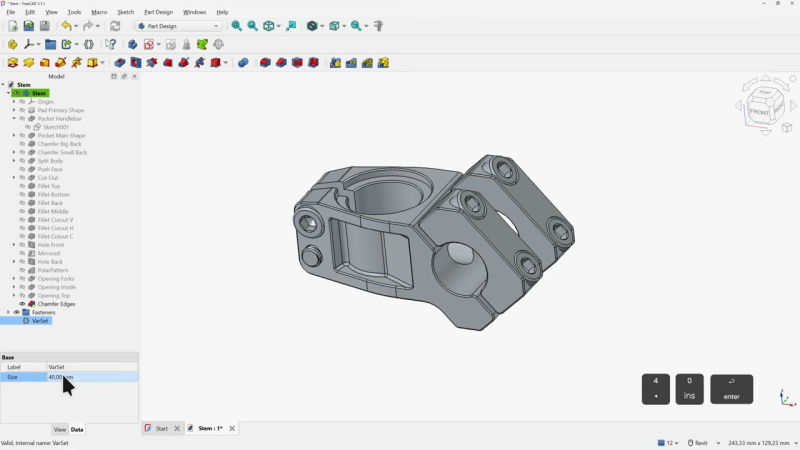
If you’ve been interested in FreeCAD but haven’t known where to start, here’s a wonderful video tutorial for FreeCAD 1.1 by [Deltahedra] aimed squarely at how to model a 3D part from scratch while also following best engineering practices for part design. It focuses on a concise and meaningful workflow that respects your time and doesn’t make assumptions about skill level. It even starts by taking a few moments to explain how to navigate the interface, a courtesy many will appreciate.
FreeCAD can do quite a lot, so a tutorial that focuses on a specific yet broadly-applicable task with a clear context is a great way to narrow the scope into something manageable, and be comprehensive without getting bogged down in minutiae. [Deltahedra] does this by exclusively using the part design workbench, demonstrating what to do to make a part step-by-step, and showing common mistakes that can happen and how to fix them if they occur. Beyond that, it’s left up to the curious hacker to delve for themselves into what else FreeCAD has to offer.
Since 1.1 is (at this writing) the latest stable release, one can also be confident that the tutorial will match the user interface and features one sees on their own screen. After all, it can be frustrating to attempt to follow a tutorial only to find out things are a few versions behind and nothing is where one expects it to be.
Best practices aren’t just fussy rules about how to do things, and [Deltahedra] demonstrates this by showing how certain procedures just plain make more sense when designing shapes. Our own Arya Voronova has also shared best practices for FreeCAD, so check that out for some added perspective. You’ll be wielding FreeCAD in confidence and comfort in no time.
Thanks for the tip, [Vik Olliver]!












In the tradition of FreeCAD tutorials, this is un-versioned.
When FreeCAD again, following opensource tradition, changes how to do things, this tutorial will hang around, like all the others, polluting search results and wasting time.
From the YT Page: “Learn FreeCAD 1.1 from absolute zero by modeling a real bike stem from scratch. No fluff, no basic shapes, just real engineering, step by step. Perfect if you’re just getting started.”
So you follow each link to each page and check?
This isn’t from nowhere.
Current search results are full of tutorials for old FreeCAD versions.
None versioned up front, some in the audio, some in the discussion.
“polluting search results and wasting time”, much like your posts.
I do come here to waste time.
Fair cop.
What’s your excuse?
I find HaHa’s posts both insightful and fun. On the other hand, and since you started it, your posts often come off much less so.
Besides that, he is correct in his comments for this particular article. While your post is just condescending, uncalled for, and offers nothing to the subject.
Try a bit harder next time…
I, an absolute novice, tried to follow instructions on laptop, while creating model on desktop but frustrated around action #6 or so when found that the item selected-‘Coincident constraint tool’ did not exist in the selection listed on either of my PC’s.
There should be a linked ‘workbench’ with requisite tools-provided together with instructions.
FreeCAD 1.1 is mentioned in the video description.
reminds me that i’m still mad about the state of alsa documentation, decades after it completely replaced the old “OSS” sound interface
That one is more acceptable to be annoyed by in my opinion – a guide even to an old version remains very very useful as the core CAD best practices and logic of the GUI isn’t likely to ever change in FreeCAD. So even a rather older guide will at least steer you very firmly in the right direction, let you know what the developers have called a feature in the past and thus find what you need in the newer version’s documentation or a more updated guide. And the documentation of FreeCAD itself is pretty good and always has been in my experience, it is 95% of how I taught myself to use FreeCAD god knows how early a version.
But when the core documentation is as fragmented and nonsensical as ALSA seems last time I looked at it, and it never gets updated/fixed, and yet somehow it remains so important as the foundation of the sound stack…
Yep. People freak out about the workbenches, but you can accomplish all your typical mechanical CAD needs in just one workbench: Part Design. I spend 99% of my FreeCAD time there. Only if I’m doing something less common for me, like working with STLs or needing laser cut stuff do I ever open another bench. Just imagine the workbenches like those tabbed ribbon thingies that they put into MS Office programs a while back. Instead of a single jumbled mess of small icons, you get contextual icon sets. That’s basically the current state. I doubt I’ll ever learn another CAD program. FreeCAD does everything I need and more.
Then why do we need to bother with workbenches at all?
Just have one, Part Design, and embed the other tools and functions into that. Most of the basic tools are going to be common between the workbenches anyways. Like most other CAD packages do.
That way, when you need to do something special for a bit, you don’t need to switch to an entirely different environment that is built and maintained by a different team that doesn’t coordinate or communicate with the others, to the point that different workbenches might as well be different CAD software entirely because the models they create aren’t cross-compatible.
I watched this and it was great. I tried FreeCAD a few years ago, and it was a bit awful, but I realised that it wouldn’t get worse than that, and would only get better. And here it is. I could follow the tutorial easily, and the subset of operations it used are basically all you need. Explore the other stuff at a later date. I could build something based on this tutorial right now – it was very motivational. Thanks.
My criticism of the video is:
1) They didn’t explain why the sketch was drawn with a hole around the origin. Usually you want your reference point to be some physical corner instead of an abstract point hanging in the air, because you’re going to be using that point to check your tolerances and align your material in whatever machine you’re using. You also don’t want to stack your dimensions, you want to refer them to the same point to make the machinist’s life and your own easier, so in that regards this video does not represent best practices in all cases.
2) The tutorial has you split the model into multiple floating pieces. While FreeCAD allows this, this is generally a no-no for modeling in feature editing style (Part Designer) because it’s one way to cause topological reference problems and dependency loops that can break your model entirely.
A Part Design Body with multiple disconnected pieces is a hack that is just technically possible because they left the option in. You can build a model like this, but beware that using these methods can cause you headaches. At least remember, never try to join the separate pieces back together again.
The correct way to do it is to model each separate piece on their own and then combine them in assembly. In most other CAD packages you wouldn’t need a separate workbench for adding things like fasteners either, because that too would be handled in the assembly context. Unfortunately FreeCAD does not support assembly very well.
Have they yet fixed the confusion between parts and assemblies? Do we get actual assemblies now?
That is not the topic of the video.
That’s why I’m asking you.
We’re not talking about that here right now. You should probably ask your question on a FreeCAD forum, or read the documentation yourself.
I’m sorry. I wasn’t aware I was talking to the manifestation of the collective consciousness of the HaD comment section.
Though, it kinda is the topic of the video, because the reason why you would want to model multiple floating pieces in one Part Design Body is because you lack proper assembly tools. It’s a hack to get around the deficiencies of FreeCAD, and you’re not really supposed to do that because it’s liable to cause problems in your models.
You sure speak authoritatively about a lot of FreeCAD things in these here comment sections for someone who has no idea if there is built-in assembly functionality. https://letmegooglethat.com/?q=FreeCAD+assembly
If you want assemblies similar to how solidworks does it (which is my preferred way) there’s the Assembly3 plugin which works quite well
I think they have.
Switching to FreeCAD from another CAD package feels like taking language classes with a tutor who throws your workbook out the window until your accent is indistinguishable from a native speaker.
I haven’t tried FreeCAD 1.1, but 1.0 still had big enough bugs to star in their own kaiju movie. I plan to give 1.1 a try at some point simply because I don’t have the budget for a commercial CAD package and hope it’s a bit better.
FreeCAD’s fans have had an odd tendency to simultaneously claim it can go toe to toe with commercial offerings while blaming drafters for running into the bugs when they expect a program on the same level as a commercial CAD package.
Learnin fusion360 after coming from SOLIDWORKS was like learning new language from tongueless teacher with Down’s and tourette’s syndrome on lethal dose of magic mushrooms.
Free as was much easier to adapt to, even in 0.21 when I started.
Deltahedra publishes some of the best (most professional and thorough) FreeCAD tutorials I’ve watched. FreeCAD itself is getting to a point where it’s competing against some of the big names on merit (in most simple generic designs. You know, like beginners projects).
In all fairness, SolidWorks has its fair share of bugs as do most commercial software packages. Some things are better; some things are worse. It really depends on what you’re trying to produce.
Bah, spent time learning the software years ago, now I find all other CAD software painful to use. It might be me, but FreeCAD way of doing things is kind of logical.
No I agree entirely it is the most logical seeming CAD structure and GUI, though it is a big culture shock to unlearn the ‘wrong’ expectations. And maybe OpenSCAD is more logical in some ways, but at the same time it isn’t the same sort of CAD package at all, and both are better at different things.
Even the much maligned workbenches just make so much more sense than the other options too once you get used to the concept – I get to pick which tools I wish to see relative to the task I’m doing by using the workbench for that task, none of this hugely nested or messy UI full of almost never used buttons or ‘context sensitive’ menus that will be trying to guess likely incorrectly what I actually wanted this time.
I did my first serious CAD on CATIA many years ago, starting with Dassault’s extensive training manuals. FreeCAD, for all its faults, is the first CAD package I’ve gotten along well with since CATIA. Now if we could just get chamfers and fillets working…
No surprises there, since FreeCAD is directly inspired by CATIA. The trouble is, the rest of the CAD industry moved away from the whole separate workbenches with different tools approach as confusing and cumbersome to the users.
For all the engineers I’ve talked with, CATIA is almost universally hated. Myself included. I started training with it back in the day, but I can’t remember for the life of me how to actually do anything with it anymore.
Every time the topic comes up, someone has an engineering horror story about CATIA and the companies that insist on using it.
I would describe it more as “indoctrination”. You need active training and extensive tutorials simply to get into it in the first place, but, once you’ve gone through all that trouble to master the system and memorize all the tricks you need to pull, then it’s easy.
Which is exactly the same as the other CAD packages they just tend to be more comparable to each other, even if they still have upsetting to the really ‘indoctrinated’ users.
Most software can be blamed on that point. Some just have a steeper learning curve and more bugs to dodge.
Indeed, but complexity is usually the root of these steeper learning curves and bugs, so you must be more accepting of this reality to use/change these tools.
When even the brain dead level of simple in comparison yet seemingly endless debate on the best text editor and coding IDE exists, and it is rather hard to really switch between most of them that is no surprise. If something that comparatively simple can be rather tricky CAD, especially once you start adding CAM tool paths, fluid dynamics simulations etc that is very very very complex was always going to have that learning curve.
The problem generally is the user – your expectations that it will be Solidworks (etc) means you do things ‘wrong’ and get into trouble that you wouldn’t if you actually learned FreeCAD’s methods and best practice first. I did the same to start with, and its not like I was a super ingrained with any particular commercial CAD package for decades type user, I’d only really been doing CAD stuff at all for a few years, maybe even not more than 2 and still got into plenty of trouble approaching things ‘wrong’.
Not like the commercial CAD is ever bug free either, and some of those bugs have lingered a very very long time. However those bugs are familiar to you (if you ever stray into that part of the package) so you just automatically fix or avoid it without even needing to think about it.
So while I do agree with you somewhat, and maybe you particular needs have run into a ‘real’ bug the FreeCAD fan does also have a very valid point in many cases.
“The problem generally is the user…” Almost always :-)
But seriously, what’s a hacker to do? Solidworks is a tad beyond my budget. Fusion360 was recommended to me as a good option, but I saw the enshittification coming a long way off. So, open source tools it is, just like with KiCAD. (I’m an EE not an ME, but I feel that mechanical CAD would be helpful for packaging, etc).
I’ll accept the bugs and slower improvement as part of the cost of a free tool. My experience with commercial tools indicates that improvements may not come faster no matter how much you pay for a license.
There is probably something wrong with it, but, man, do I like Onshape. It worked for me right a way in ways the freeCAD did not when I tried it.
“In addition to negatively affecting those inside the system, the system attracts to it people who are optimized for the pathological environment the system creates.”
-John Gall, General Systemantics
I’ve come to understand that FreeCAD is by/for people who prefer to follow exact procedures. What things are called, how they are organized or explained, doesn’t matter because you learn the exact actions like you were following a cookie recipe. Once you’ve mastered each, it doesn’t matter that the procedure is illogical, or buggy, because you’ll know exactly how to go around that. You don’t extrapolate from your existing knowledge or try to pick up hints from the UI, and you don’t except some fundamental principle or logic out of it – you watch a tutorial to learn the exact procedure to accomplish what you need to do.
The system is teaching the novices a certain way of thinking and selecting users based on fit to this thinking. Those people who are experienced in other CAD systems, people who are used to a level of consistency and refinement in the paradigm and logic of operations, basic features, common conventions and standards, or just the user interface being helpful, take one look at it and run away. The people who remain don’t understand why any of this is a problem, because you just watch the tutorials and then you know exactly what to do – easy.
It doesn’t matter if “extrude” is called “pad”, or that parts are actually assemblies that are themselves parts, or if the whole program crashes when you click that thing – you just follow the instructions and don’t click on that thing. Don’t ask why, just do it, and it will be easy.
Classic “Dude” post. I still am on the hunt for the first positive post on ANY topic from this guy. I’ll keep my eyes open. It will happen eventually…
On the topic: As a guy who earns his money using CAD tools all day I have to disagree with the 2. and 3. paragraph.
I am using SolidWorks for my everyday work and can easily switch to Inventor, Solid Edge or whatever and get my stuff done. The same is true with FreeCAD. I don’t fkin care what the features are called, they do the exact same thing in all CAD packages.
I had no problem getting started and getting my stuff done in FC. Yes, assemblies are a hassle still but that will be solved in the future, too.
If you watch tutorials and all you remember is the exact way and clicks to get anything done it’s your fault of not wanting to learn. Instead if you remember “basic paths” you will have no problem switching between CAD systems.
FC is not SolidWorks, Inventor or whatever anytime soon but it gets much better with every release, it’s completely free and anyone who wants to can get stuff done with it in a breeze.
It’s gonna be a rare event indeed, because I don’t comment if all I have to say is “Yay! Everything is great here!”. What would be the point? If I don’t have anything to say, I’m not gonna say it.
I think that was exactly my point. You don’t look at how the program is presenting things – you actually ignore the system and just do what needs to be done. You’re not a novice in this – you know what needs to happen, and all you need to learn is how to make it happen. You don’t need the software to tell you how things work, so it doesn’t matter if the UI is crap or the internal logic is inconsistent.
You see, there’s a difference between theory in principle and theory in use. One is what you say you do, and the other is what you actually do. You have a mental model of what you’re doing, and then map that onto what you have to do in FreeCAD to actually perform the task, and the two may be completely different. That is you “not caring what the features are called”.
For a novice who hasn’t fully learned the theory in principle or theory in use, the discrepancy between the two is very confusing. They have to resort to learning things step by step, and the mental model they’re building, their “theory in principle”, will be equally confused and contradictory, not useful for extrapolating beyond the case they’ve just learned.
You have managed to abstract the procedure by experience and exposure to different systems, to the point that the implementation, the theory in use, becomes irrelevant. A novice does not have that benefit and them learning FreeCAD is more like learning a bag of magic tricks instead of learning CAD.
It may get better over time, but it’s going to have to give up being a sloppy copy of CATIA and abandon all the bad practices it has inherited from that line of thinking.
Just for the record, others may have different opinions, but here’s mine: I have no problem with caustic and negativistic, as long as it is sometimes insightful and accurate. This clears that bar, easily.
There’s something of a hierarchy of problems.
Weird tool names like Pad? Ok, whatever.
A tool from one workbench won’t work on an object made in another one? “Just imagine the workbenches like those tabbed ribbon thingies that they put into MS Office programs a while back. Instead of a single jumbled mess of small icons, you get contextual icon sets.” So if I make a part in the Part workbench, I can grab the fillet tool from Part Design and put it on the part, right? Right? Well, I’ve wasted a lot of time making that part, but at least I can figure out not to try that again.
A tool that flat out doesn’t work and the manual actually said it doesn’t work, but it was left in the “stable” release? I don’t know in what universe that is considered good user interface design, but I bet Spock has a beard there.
And then there’s all the nonsense that happened here: https://youtu.be/t8FvWHrzGM4?si=SV0VYQGmfHOUXNJ7 I can understand if this part hit one bug or two when I modeled it, but this is a disaster.
It’s as easy as “don’t use any other workbench than PartDesign”. For doing “normal” CAD stuff it’s the only workbench you’ll need. I’d love to have a drawing of the part the guy wanted to create and try it myself.
I was close to a stroke watching his video…
Trouble is some of the official walk-throughs said to start in the Part workbench. It is not clear from the UI why you can’t grab a tool from another bench and use it; the part looks the same to a drafter even if the code sees something wildly different.
“It’s buggy, but it’s free!” Is an understandable defense. That’s why I use it. Insisting the bugs aren’t there, or that a reasonable user should be able to anticipate the bugs I hit in that video, is less understandable.
Sorry, I don’t have a full drawing of the part in that video. I was working from the part with measuring tools.
Then why have any other workbench in the first place?
If there are special features that you sometimes need from the other workbenches, then integrate those tools into Part Design rather than force the user to use incompatible workflows.
You’re quoting me, but not in reply to me. Thanks.
First of all, what version are you running because I hated my first foray into FreeCAD around v.21 or so, and since v1, most of those problems have vanished. I’m pretty sure you can fillet things from the Part workbench, but while it may not be explained clearly wherever you have looked, the Part workbench differs from the Part Design workbench in that Part focuses on Solids and Primitive Solids using boolean functions, and Part Design focuses on sketches that become solids. The underlying mechanism is different, so you have to use your brain a little to figure out what is a good target for certain tools. You wouldn’t pad/extrude an axis, so maybe don’t fillet a sphere, stuff like that. It is often recommended to use fillet last, but I don’t follow that rule myself very strictly. I usually fillet things when a part is almost done.
Keep in mind it is a work in progress. Not every bad idea has been forbidden, yet. Again, try to use reason and logic and things are less frustrating. But like with anything else, experience is required before it becomes a smooth process.
I’ll watch your video when I get home. It sounds like it might be a fun watch, and I’ll provide any help I can after watching if you like.
Please remember, it’s probably not your fault if something didn’t work out for you in FreeCAD. The tools are willing to work in ways they’re not intended to work at times. Those edge cases are slowly being blocked or fixed. Try the forums or submit bugs and everyone wins. They do fix bugs quickly if well documented.
The very first remedy would be to call a spade a spade, and name these workbenches to reflect their function: CSG vs. Feature editing.
The reason why you need Part (CSG) at all is because feature editing doesn’t work well with models that have “floating” parts. It’s intended for contiguous objects, whereas CSG is suited for assembling models out of individual pieces that don’t necessarily need to be connected. Note the word assembly, which is lacking proper official support in FreeCAD, so the Part workbench remains as a sort of historical relic for achieving what more modern CAD suites would do with the equivalents of Part Design and an Assembly workbench.
This historical baggage is also the reason why the logical part object in FreeCAD is actually an assembly, and a “body” in FreeCAD is what other software would call a “part”.
You can take an object from Part to Part Design, but it has to become a single solid and lose the internal references to the constituent primitives. Likewise, you can take a body from Part Design and move it to Part, but it becomes a single solid and loses access to the underlying feature definitions.
The reason why other CAD packages don’t need a separate CSG workbench is because they implement the boolean operations in the Assembly context.
That way they retain the ability to edit each part feature and still combine them in a CSG-like fashion, instead of doing two parallel and incompatible workflows like in FreeCAD.
In reply to “The reason why other CAD packages don’t need a separate CSG workbench…” – Autodesk Inventor (and Fusion, I believe) uses CSG for its basic features such as Extrude and Revolve, implying their parts are native CSG and whatever FreeCAD’s logic for the Part Design workbench either doesn’t exist there or it has no problem performing CSG operations on it. Since Fusion also won’t whine if you use Extrude to make a non-contiguous part, I’m guessing it’s working in the CSG world and just has no difficulty putting fillets on a CSG.
Feature editing starts with some primitive, and as long as you’re not stacking references from feature to feature then it acts like CSG.
Creating a fillet in CSG implies that you generate a new object the shape of the fillet and subtract it from the underlying model. The fillet is not referencing the underlying model as a feature, but exists as an object in its own right. That also means it’s not automatically re-generated when the underlying model changes.
In feature editing, you reference previous features and geometries. You start with a single solid and then keep stacking features on features. You can have multiple solids with their own identities, because there’s no technical reason you can’t, but then you’re likely to run into problems of reference and contradictions that break your model.
That behavior is mostly resolved. Now most people accept that if it allows you to do something, you’re not doing it wrong, and it the results are unexpected, it’s either ignorance of the results or a bug. Mostly it is working rather well. Some things are still a little hacky at times, but most are maturing rapidly.
Awesome reply function. This was in response to the question about whether FreeCAD veterans still blame the user for bugs.
I attempted to use FreeCAD for a while and found it difficult when you’re given too many options to perform a single function. Also, when I asked a question on their forum, they were very rude. No thank you!
What huge bugs are you referring to? I use FreeCAD all the time and while it is indeed extremely quirky, it definitely can get the job done. Not trying to pick on you in particular, but I see comments like this all the time and generally no one lists these godzilla-level bugs, despite claiming they are kaiju huge.
This kind of negative evidence often means that the person in question gave up or found a tool that was more suitable to them, leaving only a bad (and fading) memory of their experiences with FreeCAD.
This isn’t a value judgement, I haven’t needed this class of tool in a few generations, so my experience is stale.
Instead, it’s just how people work. And sometimes what gets in the way isn’t a defect in the tool (or the user), it’s just an impedance mismatch between the two. In that sense, much the same as mouse/trackball/nipple/touchscreen users, who often find all but one of those to be very frustrating.
Negative evidence is the most difficult form of evidence to reason from, and requires special care. Otherwise, you might come to the conclusion that the places where surviving airplanes don’t have holes are places that don’t need armor ;)