
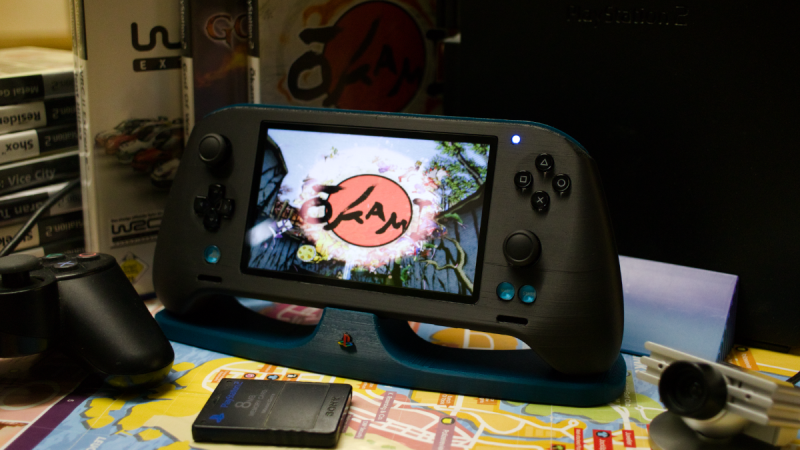
As time marches on, the retro gaming community gets more and more access to older systems. This is partially a product of modern computing having much more power to emulate more demanding systems, but also because many in the community have spent more time with their favorite systems. Such is the case for [tschicki] who has spent considerable time and effort reverse engineering the Playstation 2 to come up with this custom mainboard for a handheld version that still uses some of the original chips from the console.
This Playstation 2 handheld console is designed almost completely from the ground up, not just including the impressive main board but also its modernized features, including USB power delivery handled by an RP2040, digital video output, support for modern storage media like SD cards, a customized boot ROM, and upgraded audio. The DualShock 2 controller is also implemented within the handheld, and the case itself is designed to be 3D printed. It’s an impressive effort which preserves the original feel of the console without relying too much on ancient hardware for everything.
Before jumping in to building one yourself, though, [tschicki] cautions that this project is not for the faint of heart, as it requires some specilized tools and a high degree of skill, but for those still wishing to attempt this build all of the instructions are available on the project site. For such a popular console it’s no surprise we’ve seen plenty of other handheld PS2s before, from this one which uses an original PS2 mainboard to this one we featured way back in 2010.
Thanks to [raz] for the tip!












Firstly, I care nothing about a PS2.
More importantly, wow. That’s quite an accomplishment.
“How to Build
I would highly recommend not to build one, […]”
–tschicki
Noted, sir. And heeded.
To nitpick just a tad, that’s not a dual shock, that’s an xbox controller. Dual shock has the sticks on the same horizontal line, next to each other in the middle of the controller. Xbox has them staggered like that. The glyphs on the buttons are irrelevant.
This is just outright wrong.
The internals are from a Dual Shock controller. Thumbstick placement does not change the parts used.
It’s neither, the RP2040 emulates a dual shock 2 but is made from a mix of parts custom and the PSP vita
Jaw dropping, amazing project, so much work, so much effort.
Desoldering the components from a working PS2 to assemble one of these must make you feel like a criminal… However, the board looks very professional and well-made.
So, there’s a couple questions, the ps2 is really really weird. I see another commentor mentioning xbox controllers being used, does that mean OG? Because for the controller on this thing to have full feature we need pressure sensitive buttons there’s also the mention of certain r1 and l1 having slight press.
I’m amazed to be alive to see this and I would love a version that doesn’t require cannibalism. It’s amazing.