
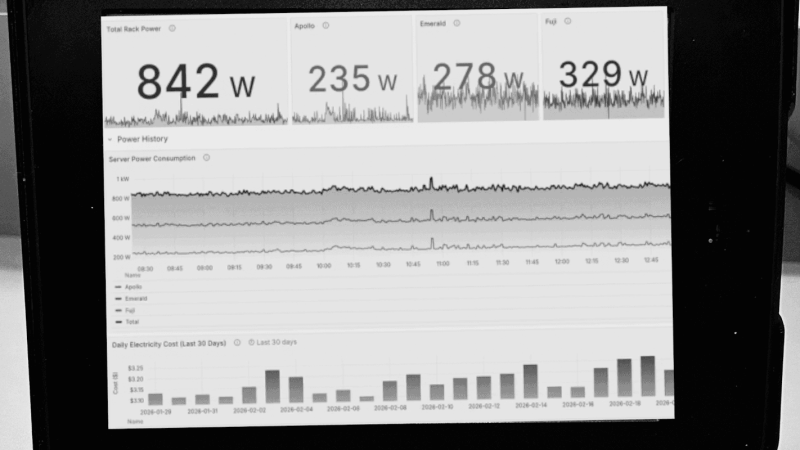
People have been attempting to turn Kindles into more than e-readers since the first devices came out nearly two decades ago. The e-ink displays are low-power and great for displaying information that doesn’t refresh too often, and with Amazon continuing their trend of bricking their older devices there will be more of these devices available. [Hemant] built a weather dashboard with one of his, but since then had requests for other types of e-reader dashboards and has a guide for making more general-purpose use of an old Kindle.
The first approaches outlined here involve the installation of a dashboard client on the Kindle and pointing it at a server that hosts a PNG image of whatever information needs to be displayed. The client simply displays that image and refreshes it at predetermined intervals. There are a number of options for creating that server as well, including using Home Assistant for those who already have a home automation system deployed. The benefit of using Home Assistant is that it’s much more straightforward to gather data for the dashboards from sensors and other peripherals that are already installed.
Installing a client like this might seem straightforward, and it can be, provided that the Kindle involved is jailbroken or capable of being jailbroken. An Amazon update recently broke many modern devices’ ability to execute the jailbreak, so not every Kindle can do this anymore. But [Hemant] goes into detail about this and also outlines some methods for using generic e-ink displays instead, and also dives into the hardware and software behind building a server to host the dashboard images for those without Home Assistant already running. It’s a great overview for those who have always wanted something like this but never knew where to start.












Quite a while ago I wanted to buy an e-reader. I read the eula of Kobo (all your data is ours) and put it back in the store front. I assume kindle is the same or worse. Then I bought a “pocketbook”. Eula is mostly apache and GPL, and they don’t hide they’re running Linux (although they don’t advertise it either). I also has a short peek at their git repositories, and saw some source code of extra applications, such as their notes application, sudoku and chess, which are all standard installed. Those applications probably are a big help when you want to write your own applications or extensions, but because of … “other reasons” I never got around to actually doing so.
But I did buy the pocketbook. “Vote with your money”.
I have a pocketbook NoteAir. It runs Android not Linux directly. It is very easy to write you own application for example with Qt and install it. I think from zero to an app with a quit-button in 30min or so. Oh, and just in case you like amazon, it is possible to install kindle-app there, too.
Would you mind sharing a link to one of those Pocketbooks? I’m new to this topic and can only find an “BOOX Note Air” or an “PocketBook E-NOTE”.
I’m using my old kobo glo without internet…
So all data are mine.
Kindle is indeed the same closed piece of shit. I have purchased one second hand..will never do that again
Some buy it for the parts.
I use mine to read pdf’s on holiday. PDF loaded on with my PC, it never goes near their servers.
I’ve been wondering, would it be possible to have Home Assistant send a dashboard to a raspberry pi as a PNG and still respond to touches? Even a Pi4 struggles when you have lots of items showing various data outputs. Having it just show and PNG every second or so and return touch locations would be much less processor intensive, having HA process the image locally (to be fair I am running HA on a full X86 machine so have cycles to spare!)
Would also mean being able to use much older PIs as well?
In theory, sure. This is pretty much exactly what the “shiny” R (and presumably Python) packages for making interactive apps out of statistical/data science analyses and plots do. Great for quick and dirty interactivity, terrible for scaling – but that’s not the point.
“Even a Pi4 struggles when you have lots of items showing various data outputs.”
my god
A terribly bloated web stack (to render the lines) is my guess.
No-one has figured yet how to bypass the whole electronics of the Kindle and interface with the e-paper screen yet? That would be much simpler for hobbyist, just buy a small driver board off Aliexpress and use that, instead of having to jailbreak, run custom software and have a complicated stack with a server on the other side of it.
I have an old kindle which shows our family calendar in the kitchen. It draws in the details from Google or any iCal. The only snag is that it polls a raspberry pi zero every 5 minutes to receive updates and this drains the power after a few days. Does anyone know how to fix this issue to get the kindle to respond to a push, rather than a pull? If you can help, details are at:
https://github.com/andywestthorp/KindleCalendar