
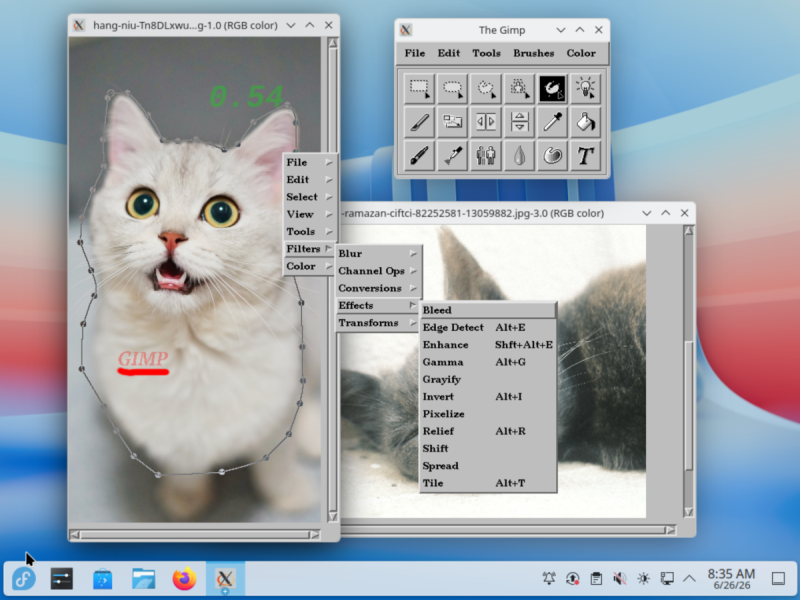
Although there’s probably no good reason to want to run image editing software from 1996 other than for nostalgia’s sake, if you ever wanted to run the GIMP version 0.54 from back when Windows 98 was still called Windows 97, you can do so now from the comfort of a modern-day Linux desktop. What enables this is a Flatpak version of a beta release, assembled by [balooii] for everyone’s enjoyment.
It wasn’t a simple matter of compiling the old software’s code and packaging it up, with the repository for the project containing a series of patches that were required to make this possible. Also of note is that this is the first version of GIMP with full surviving source code. Back then, GIMP used the Motif widget toolkit. Later on, it switched to the GIMP Toolkit (GTK).
Bundled with this Flatpak release are a lot of plugins and tutorials that were created at the time, making it a veritable time capsule of a more innocent era. As noted by [balooii], this version of GIMP was very much Beta software, with all of the UI quirks you’d expect. It also features the multiple unconnected windows (not MDI) approach to its UI – dropped in more recent GIMP releases — that has enraged proponents of the single window approach, as used by all commercial competitors, including Paint Shop Pro and Photoshop.












I don’t understand why I should do, because I even run xv on my actual linux. If you like to stay in the past, you should do it right! :-D
Please share how. I miss xv. All the replacements I found so far are… lacking.
Gimp always feels like it’s 1996. I suspect there to be little fundamental difference.
This reminds me of a blogpost where someone built 2008 versions of blender and a bunch of other programs using nixOS: https://blinry.org/nix-time-travel/ . With nix you can even try it yourself with just one command!