
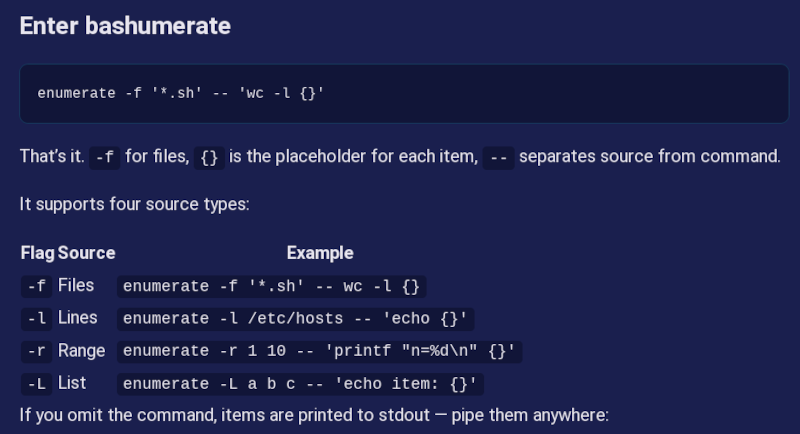
What if you want to do something in Linux for a lot of files? [Numerator] was tired of using xarg and other ways to handle this job and created bashumerate.
Some examples in the post of the “other ways” include:
find . -name '*.log' | xargs rm
find . -name '*.sh' -exec wc -l {} \;
You can, also, use a for loop, and if you are a programmer at heart, you may well do this:
for f in *.txt; do
  wc -l "$f"
done
Bashumerate handles all of the common cases in one tool and uses the same syntax for multiple kids of enumerations.
For example, the above translates to:
enumerate -f '*.sh' -- 'wc -l {}'
The -f means enumerate files. You can also enumerate lines, numbers in a range, or lists. What’s even more interesting is that you can add your own source. As an example, there’s an add-in function that enumerates running docker containers.
The source is all in bash, so it should be very portable. Will you try it? What’s your favorite way to enumerate in shell? Let us know in the comments. You know how we love strange bash tricks.












Please be aware that not escaping things can lead to issues, so it’s often better to do
find . -name ‘.log’ -print0 | xargs -0 rm
and not
find . -name ‘.log’ | xargs rm
And you probably want a “-type f” in there because directories can end in the letters “log” It’ll just throw an error, but it’s probably not what you intended.
I just use rm *.log
Less keystrokes.
OP’s is recursive, yours is not.
rm **/*.log
The whole point of xargs is if the * shell expansion is more arguments than the command can handle.
Your version doesn’t do subdirectories
There’s also
find ... \+, to give it a list of results, instead of executing the command for each match (example: rm).Edit: right, rm bad example; use
-delete.My memory sometimes….
It’s also pretty useful to include a ‘–‘ argument for the commands that accept one.
find . -name “.log” -name “.log.*.gz” -print0 | xargs -0 rm —
otherwise, touch ‘foo -R . .. /‘ and see what happens when you use the find :)
(It is or can be safe in some environments, depending on the details of your xargs, but you can’t universally assume that it is safe without the — (“stop parsing argument switches and treat the rest of the args literally”). In the case of that nasty filename, it’s not an attack on the shell, but an attack on rm: absent –, a file literally named ‘foo -R . .. /‘, on some shell-based version sof xargs, will get seen by rm as
rm <previous filenames> -R . .. '/*'(execve-based xargs are immune from this).That last ‘/‘ *probably won’t shell-expand, depending on the environment. But if anything in the execution chain is splitting args at whitespace or shell expanding, at the very least rm would recursively delete the current and parent directories.
rm — -R . .. ‘/‘
would complain that ‘-R’ file not found, and that . and .. are directories, and almost certainly that there is no ‘‘ file in the root directory.
If you’re purely using a modern linux, this doesn’t matter.
If working with very old linux, retro unixes, or random unix-like toolchains on other platforms, all bets are off.
Determining if bashumerate is more or less vulnerable to this is an exercise left to the reader ;)
Seems a Linux Powershell version of Bashumerate would be interesting.
Linux Powershell. Something inside me just died.
Given Powershell is so insanely overengineered and bloated, adding Linux on top of Powershell would probably be more easily emulated through aliases…
vi ListOfFilesInRightOrder.txt
Strg+v (visual block mode, mark the first column)
Shift+i “mv 0 ” Esc
Strg+v (mark the zeros)
g Strg+a (increases the n-th number by n, the g may be omitted for an increase of one everywhere or replaced by a number for an increase of number)
add leading zeros as needed (may this be automated? Starting with multiple zeros enumerates in octal)
:wq
chmod +x ListOfFilesInRightOrder.txt
./ListOfFilesInRightOrder.txt
maybe not very beautiful, but useful for occasional enumerations
You should check out “vidir” :)
Find can delete (“-delete” action) by itself, no needs to use xargs…
RTFM! (man find)
There are a few common points at which I decide, this is too much for a shell script, I’m doing it in perl, and needing xargs is one of them.
I prefer a fish for loop:
for file in *
wc -l “$file”
end
The part that trips me up occasionally is when I want to edit a bunch of files, and do:
ls *.txt | while read $f; do vi $f; done
only to be told that STDIN is not a terminal.
When I should rather do: for f in *.txt; do vi $f; done or better: vi $(ls *.txt)
Doh, and I should quote my arguments. vi “$f”
i imagine hackaday markup (i really wish there was a reference handy in the comments section!) would eat proper backticks…
any reason you don’t like
while backtick ls *.txt backtick; do …
That does not work with file names containing spaces, unfortunately.
I use pretend backticks in the example below and hope the real backticks work
Oops, I meant to say:
Don’t pipe ls. File names can contain linefeeds and other nefarious stuff that breaks your script. find handles them securely.
Just a note: while the for loop does work (and I use all the time), it’ll fail if there’re a lot of matches because the shell (bash at least) will run out of space allocated for arguments
For the four modes, i use four different basic utilities. find, cat, seq, and echo. Since each one roughly does one thing and does it well, for example, seq is easier to remember than enumerate -r. echo is easier to remember than enumerate -L. the -l vs -L distinction alone means i would take years of frequent use to actually remember the proper commandline. And since i want to know each of those 4 separate utilities in any case, it is a pretty easy cognitive load. This is “improving” on something that doesn’t need improvement.
The reality is unfortunately harder than the laboratory…i want a command i can use everywhere…for example, about 25 years ago i started using a “ren” (file batch rename) command that uses regex in the lhs and #1 #2 #3 … sort of substitutions in the rhs. And that turns out to be a niche solution, seems like i’m the only guy who has heard of that utility…so one one of my PCs, i religiously build it from source again each time i re-install. But i don’t generally bother with my laptops etc. And at work, of course not. So on my debian PCs, package util-linux provides a rename command, which isn’t as powerful and which i don’t know how to use. And on a lot of the systems i use, even that isn’t available. So i’m generally better off with using sed or awk or shell script or whatever, depending on the specific need.
So it’s hard to see how this utility would help…you might think you only have to learn this one utility which does 4 tasks sort-of-well. But then, unless you live in some sort of utopian shell environment, you will have to learn the original 4 tools every time you work outside your own home.
Really i just think it provides a good excuse for re-stating the unix prinicple :)
It gets worse. That util comes with a bunch of very specialized dependencies and internal automations (the version bump is hard coded to the repo) which makes it even less transportable.
The whole code structure is so anti-bash I don’t even know where to begin.
I am totally with you:
Learn the core utils, read the man pages and if you need something more than three times: write a single file script that wraps a special use case into one neat
_$ supertool this
minimal args, no special syntax, no libs, help and tests inside and lots of hard fails.
I prefer to use fd but i also know
findby heart.A step closer towards the elusive Year of Linux.
Excuse me, is this the right room for an xargument?
You’re not looking for an argument.
A tool in search of a purpose. Read the xargs manual page and you’ll discover why the world doesn’t need a longer-named replacement.
Or nushell:
ls | get name | par-each { wc -l $in }(alternatively,each, if parallel execution is not your thing)