
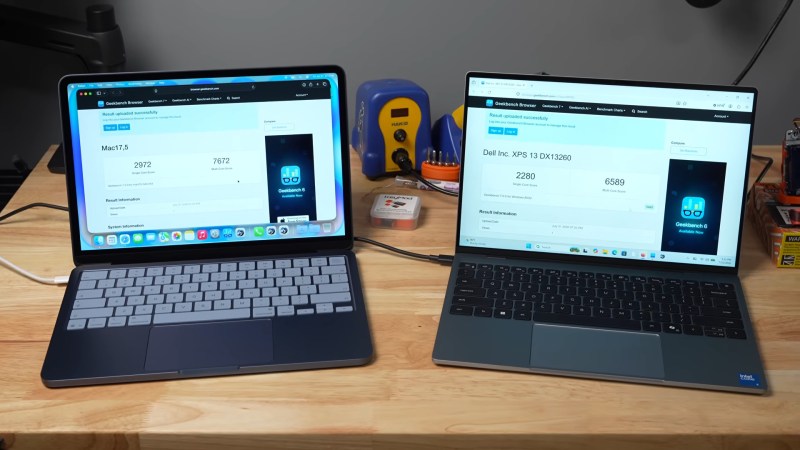
With a title like “Intel Just Matched Apple Silicon. Seriously.“, the latest video from [Jeff Geerling] makes some pretty bold claims. But as we’d expect from [Jeff], he’s got the benchmarks up on GitHub for both the MacBook Neo and Dell’s latest XPS 13 to back it up.
We’ve embedded the full video below, which has [Jeff]’s comparative review of the two laptops. The Mac wins on iGPU, sound, and not shipping Windows, while the Dell gets points for being able to load Linux and having a backlit keyboard. But the figure we were hoping to see is the efficiency. After all, it’s ARM’s ability to crank out gigaflops on fewer watts that won them the mobile market and got Apple interested in that architecture in the first place. If Intel is catching up, that’s news.
On [Jeff]’s version of the Top500 benchmark — the same HPL Linpak test used for Supercomputers — the MacBook cranked out 57.012 Gflops at 10.6W, for 5.38 Gflops/W while the Dell managed 127.91 Gflops at 20.6W, for 6.21 Gflops/W. That’s just astounding, considering the historical data all goes the other way. This Dell also beats out both M4 and M3 Mac Studios, only failing to the M4 Mac Mini at 7.57 Gflops/W. Even when not crunching big numbers, say at idle or web browsing, the XPS matches the MacBook sip for sip in energy efficiency.
Some people have been saying for a few years now that ARM’s observed advantages in power consumption have more to do with the chips themselves than the instruction architecture, and it looks like the Core 5 320 chip in this Dell proves them right when it comes to x86.
While you might think you need to code in Assembly or C to maximize those efficiency gains, your choice of language may not be as important as you think.












Have to say having recently changed from an M1 MBP 16″ to an M5 MBP 16″ (both with the base CPU but with 32 GB then 48 GB) I was expecting a marginal increase in battery life given the 4 years that have passed. Oddly, comparing my experience with the previous machine’s now 4 year old battery directly with the new machine I only feel that the new machine drains faster.
This being a case of coming home from work then doing the same stuff as usual. Previously I’d more often than not survive a regular evening without needing power. Now most evenings I need to reach for power before I’m done for the night. Not impressed…
Screens have got brighter, which has a big impact.
I’ve got auto brightness disabled and the brightness level isn’t any different to what I had previously(although yes it can go brighter).
I leave my new macbookpro plugged in all the time when I use it now. My previous macbookpro stopped working after the magic 1,000 recharges mark and for my convenience apple started to auto-shutdown at 99% battery life even plugged in…made it unusable.
That’s one reason I’ve been happy sticking with the M1, even if it’s getting a bit long in the tooth for some of my work.
If all else is identical between the machines, I bet the problem is that the efficiency/performance tradeoff decisions that Apple made are just a bad fit for what you do.
Apple claims the m5 battery should last about 3 hours longer in their movie watching and web browsing tests, but those aren’t stressing the CPU or GPU too much.
If they tested max battery life on something CPU/GPU intensive, the M1 would probably win handily.
That’s because the among other things, the m5 has almost twice as many CPU cores and a bigger, slightly more power hungry GPU. Unofficial estimates suggest the m5 may be able to pull 15-20 watts more at peak load than the m1.
That said, the base model m5 pro is a more power efficient chip than the m1 per core. I don’t know how much of that is improved architecture If nothing else, there are significant gains from moving fabrication to the latest & smallest process node.
Of course, the idea is that both sides are a win – you’ll see more battery life for the less-demanding tasks, and still get more usable battery life for a lot of the demanding ones, since your code compiles faster, video renders faster, LLM can answer faster, etc.
.. but in reality, there are plenty of random things that just use more CPU/GPU power because they can for reasons that don’t make anything meaningfully faster.
Interestingly, the power consumption differences between the Neo and XPS 13 actually have a similar tradeoff, but in the other direction: the m5 has a lower TDP and the system is slightly more efficient at idle. The XPS 13 may be much more efficient per watt when the CPU is getting a workout, but it also consumes more watts overall. But the XPS 13 also has a much larger battery which presumably mitigates these concerns.
My experience moving from a M1 to an M5 max ys that I have gained marginality speed against battery life and fan noise,
Apple is currently trying to eke out more performance, while trying to decrease the amount of memory. This is of course because of the current memory shortage, which is not something that will pass in a few months, but is likely to impact everyone for at least another year or two.
With fewer memory, it means that there will be more swapping, and that must be costing some extra power.
How much memory did your M1 have, and how much does your M5 have? I’m interested.
I have an M2 Max with 32GB at home, and an M5 Pro with 24GB at work. Sadly I can’t compare battery life because my M2 Max is 14″ and my M5 Pro is 16″, meaning that the M5 Pro has a slightly larger battery (or so I assume). But if I can, I’ll try to run Jeff’s benchmark on both and see if there is any difference.
My feeling says: yes.
I’m also running a local LLM on both, and one thing that disappointed me is that I can run a bigger model on my M2 Max than on my M5 Pro, simply because my M2 Max has more memory.
I think the Dell is available with Ubuntu pre-installed so you don’t have to pay for Windows if you don’t want it.
But both laptops rule me out as a customer because of the little tiny arrow keys – I have adult male sized fingers. It’s a real concentration breaker when you hit the wrong one during some high-concentration coding.
Perhaps you should learn the Vi style of navigation on the letter keys unless you have hit one of the text editing modes, or something similar. I can’t say I’m actually good at VIM for lack of persistent enough practice for it to really stick, but it is a really functional way to use a keyboard with text that means you don’t really have to take your fingers off the home row ever. And seems popular enough I’d bet your IDE of choice has it as either a plugin or built in option.
I do agree though tiddly little keys for shift/tab/arrows/backspace are infuriating.
I think the Dell is available with Ubuntu pre-installed so you don’t have to pay for Windows if you don’t want it.
But both laptops rule me out as a customer because of the little tiny arrow keys – I have adult male sized fingers. It’s a real concentration breaker when you hit the wrong one during some high-concentration coding.
Currently, Linux only ships with xps14, not with xps13.
Panther Lake (and the cut-down version tested here, Wildcat Lake) is available in things other than Dells. Odd that the claim is that Dell did this, and no mention anywhere of the architecture that made it possible.
Linux still not support wifi out of the box in 2026? :D Well that says it all
Er… Fedora does support WiFi after the first update, which any sane person is going to do as part of the installation (which is out of the box as far as I am concerned).
Nonsense. I am currently sitting in front of five very different Linux machines, one being a brand new AMD-based Dell 16. They all have different WiFi cards that worked “out of the box”. Zero issues, solid as a rock.
The only issues I’ve had with WiFi on Linux is a Mediatek wifi chip that works fine with Ubiquiti and Aruba access points, but has atrocious latency and connection reset issues when connected to Cisco access points. My other laptop with an Intel wifi chip performs perfectly across all access points tested. Haven’t tested with windows to see if it’s a Linux issue or if the mediatek hardware just has an issue.
2006 or 2026?
Used to be a huge nuisance, but I install Linux (Debian distros or nixos) to random hardware 1-10 years old and haven’t had a single out-of-the-box wifi driver issue in probably 5 years (except once on a 2016 MacBook)
This particular laptop is an outlier there, which is why it was worth pointing out. If you always needed to do it that way, it wouldn’t be worth mentioning: man bites dog vs dog bites man, if you can dig it.
Right? High time for the manufacturers to create open Linux drivers.
That is hardly fair, brand new hardware that didn’t even exist (at least as far the developers or public are concerned) when your OS was configured and compiled is bound to be a problem – unless you run bleeding edge rolling releases new hardware is generally not going to work fully, and running those you will find the bugs come out to play from time to time…
Linux and wifi support out of the box is generally flawless with Intel wifi far as I can see, there are some chipset out there that are less well supported, but on the whole even the worst of those still do the basics out of the box as a rule – Its the weirder edge cases and less needed features like supporting Mirracast that might be missing, but the core functionality that is all most folks actually need…
Interestingly the last time I happened to run into such things recently was installing linux on an old Macbook
I have an old Dell XPS of my own, and a work HP, and I like the HP keyboard better because it has dedicated Home, End, PgUp, PgDn keys, while these need Fn-Arrow combinations in the Dell. I don’t need or want or like a separate numeric area, but these keys are very practical for coding, and switching from the HP to the XPS is painful.
After these endless decades of Intel (i.e. x86/ x64), I just want it to die. I think that there are, inevitably architectural advantages with RISC designs, so all other things being equal, it would win. But all other things aren’t equal in that Intel could always throw far more engineers into an implementation.
However, I suspect that if Apple feel they’re losing the MIPS/W battle, they’d put more of an effort into addressing it.
The CISC/RISC comparison is pointless nowdays. On all modern x64 CPUs most complex instructions are implemented in microcode. ARM has introduced all sorts of extension and starting with Thumb (variable size instructions) it cannot be considered a RISC design.
RISC, as defined by its foundational textbook, is about reducing the instruction set based on measurement of actual execution profiles. Back in the eighties it did lead to few simple instructions, but later on requirements drove all the extensions, like thumb for memory constrained systems, and floating point, followed up by vector and now tensor/matrix extensions. It’s all driven by experimental data from execution simulation. By the way, Cisc designers do this also, maybe with more historical baggage limiting them, so they have more false starts like SSE vs AVX
You said x86 but I think you meant x64.
Most correct is x86-64, as it’s the 64 bit extension to the x86 instruction set.
I feel it is a bit hard to make any serious CISC vs RISC claims with so many other factors (mainly the different components other than the CPU) could be affecting this test. It’s just not an apples to apples comparison.
Technically it’s an apples-to-dells comparison.
i do think intel has made some great strides in efficiency in the last decade or so. but this write up really doesn’t touch the things that are interesting to me from an end-user perspective.
it only shows peak performance & consumption, and the intel is much higher in both. as an end user, i may care about peak performance (maybe the intel wins), or i may care about peak battery use (maybe the mac would win). but in practice, most of us probably don’t use the peak very often, and so we may look at something like overall battery life, heat, or fan sound. for most users, these will be influenced much more strongly by the lowest idle mode than by the highest peak.
to me, it is not about MIPS/W, it is about a low number of W (i want good battery life, light weight, no fan) combined with a suitable number of MIPS (which, for me, can be very low indeed). in principle, a very fast chip that has a good idle mode could serve me perfectly. but in practice, i have only found low-end chips to have suitably low idle consumption (outside of cellphones). i’m not sure why the gap is so large — i really would expect every chip to be able to run cool if you turn off all but one core, set it at 300MHz, and spend 99% of your time in HLT or WFI. but that only appears to be true for phones.
so i’ve found a sweet spot at the rockchip rk3288…but the newer rockchips seem to get super hot even when idling! but also (getting back on topic), the intel celeron n4000. the n4000 is much higher peak performance than the rk3288 but has a similar low consumption when it’s idle. amazing! an intel!
Jeff has that idle mentioned in both the video and write up (I tend to listen to Jeff in the background and then read the article he writes when its interesting enough).
So for you this machine may be the perfect have your cake and eat it, pretty impressive idle and peak performance. Though it isn’t fanless I rather doubt the fans would actually run much if at all for your described usage – dissipating that 3 odd watt in chassis really won’t need the fans to run.
I have been finding the real issue is the laptop manufacturers do not trust the end user to know what they want and just make the choices for them.
Instead of putting the numbers explicitly on a data sheet and giving access to sane Fan RPM curves and TDP limits we have to purchase the device and test it to see what they have done.
In fairness most users don’t know about any of this. But the only machine I have seen get this right lately is the SteamDeck. Reasonable TDP, Reasonable performance, reasonable price (when it came out), and reasonable battery life and noise levels.
if you’re going to criticize someone or something at least provide some sort of context.
Nice computer, but missing a 2.5 mm headphone jack is a deal breaker for me. I get it people love Bluetooth these days, but the battery life sucks. And by removing the 2.5 mm audio jack it makes the physical PCB and case assembly cheaper.