This Week In Security: Another Record Patch Tuesday, LAME Is More Secure, Secure Boot Is Less Secure, And Milk Malware

Following the reports last week using the Windows Global Device ID (GDID) in tracking a malware operators behavior, here is a comprehensive write-up about what goes into the GDID and how it is used. It’s worth noting that the GDID itself was not used to catch the malware operator, however once a suspect was identified, the GDID was used to correlate behavior across various Microsoft products on the Internet.

The GDID is generated and assigned during a Windows install, but a re-install of Windows will generate a new GDID. Developer [SmtimesIWndr] tracks the generation and tracking of the GDID through the various Windows libraries and services, identifying where it appears to be created and how it is passed to other services like Azure.

Worth noting is your GDID is a unique, personally identifiable piece of information; if you go exploring and extract it from your Windows install, be sure to keep it private!

LAME mp3 updates

Those of us who were around for the dawn of MP3 files may remember the LAME encoder and library. After almost 10 years, there is a new LAME release.

Notably, this includes two security fixes, one for a stack buffer overflow based on malicious input to the Blade encoder, and an integer underflow in the AIFF header parser. Both of the fixed bugs feel very old-school, which seems appropriate given the age of the library and most of the related code.

Buffer overflows impacting the stack are some of the simplest and most direct forms of vulnerabilities, where it is possible to write past the end of a buffer and control how the function returns and instead execute arbitrary code. Integer under-flows, similarly, impact memory management; usually caused by allowing a variable that stores the size of a buffer to go negative. Since sizes are typically unsigned positive numbers, a negative is interpreted as an enormous positive number, writing past the proper buffer length.

Despite the new findings, the LAME codebase has been extremely resilient over the years, and considering the number of programs that likely still use LAME under the covers to process audio, seeing the project wake up with security fixes is great news.

Recovering Passwords from BIOS

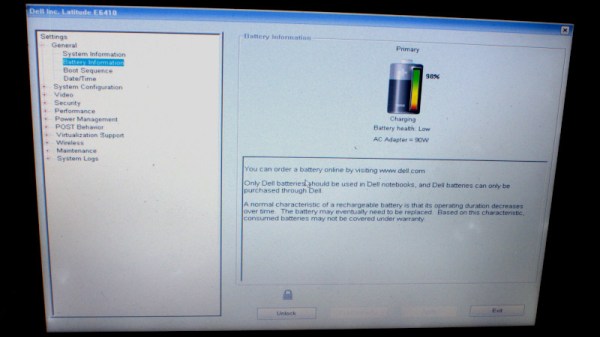
Researchers have found a vulnerability in Dell BIOS code that allows extraction of the administrator password from the BIOS flash chips, either with physical access via a flash programmer, or via administrator or root level access to the operating system and reading the contents of the flash chip.

Dell used a 20 byte key to encrypt a 32 byte password field: for any admin password of 12 characters or fewer, the password is stored in completely plaintext. For longer passwords, characters beyond the first 12 are encrypted – but the random bytes are computed from the first character of the password mixed with fixed device data, yielding only 256 possible encryption seeds for the remaining bytes.

Using the BIOS admin password for evil requires local access, so the attack surface is small, however as the researchers note it controls the boot order and may allow an attacker with physical access to then boot an unsigned OS or bypass full-disk encryption, so it’s serious.

Continue reading “This Week In Security: Another Record Patch Tuesday, LAME Is More Secure, Secure Boot Is Less Secure, And Milk Malware”

Thin Client And Smartphone Step In For 3D Printer’s Raspberry Pi And Touchscreen

It’s no secret that Raspberry Pi’s are a little hard to come by these days. Unless you had the foresight to stock up before the supply dried up — and if you did, we want to talk to you — chances are good that you’ve got a fair number of projects that use the ubiquitous SBC on indefinite hold. And maybe that’s got you thinking about alternatives to the Pi.

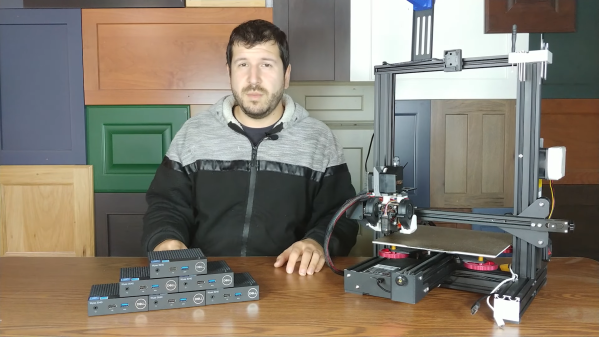
That’s apparently what was on [Crimson Repair]’s mind lately, the result being the discovery that an old thin client PC makes a dandy stand-in for a Raspberry Pi, at least in some cases. The video below is on the long side, true, But it’s chock full of command-by-command instructions for getting a Dell Wyse 3040, a thin client that can be found on the secondary market for $25 or so, up and running as a Klipper alternative for a 3D printer. These machines, which usually see use in point-of-sale applications and the like, sport a 1.4-GHz Intel Atom processor and a couple of gigs of RAM, and the form factor is just right for tucking into the base of an Ender 3.

Getting one up and running is a matter of getting a Debian image onto a USB key and configuring the thin client to boot from USB. After that it’s a simple matter of installing Klipper and wiring up a buck converter to power the machine. It’s not exactly rocket surgery, but why muddle through the process when someone has already been down the path ahead of you? And if you want to take it further, the second video below walks you through all the steps needed to add a touchscreen using an old Android phone. With a 3D printed bracket, the whole thing is a nicely complete printer control solution.

Continue reading “Thin Client And Smartphone Step In For 3D Printer’s Raspberry Pi And Touchscreen”

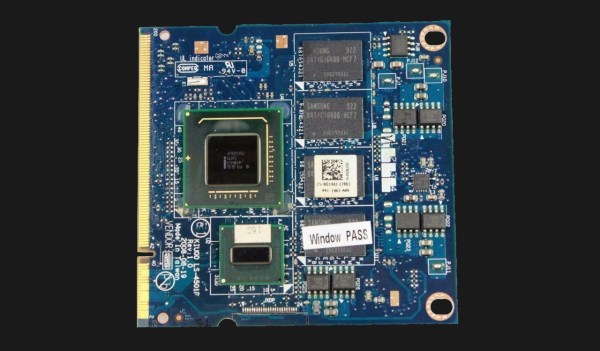
the SoM module used to power a Dell Mini 1210, in an extended SODIMM form-factor

When Dell Built A Netbook With An X86 System-on-Module

Just like with pre-touchscreen cellphones having fancy innovative features that everyone’s forgotten about, there’s areas that laptop manufacturers used to venture in but no longer dare touch. On Twitter, [Kiwa] talks a fascinating attempt by Dell to make laptops with user-replaceable CPU+RAM modules. In 2008, Dell released the Inspiron Mini 1210, with its CPU, chipset and RAM soldered to a separate board in an “extended SODIMM” form-factor – not unlike the Raspberry Pi Compute Modules pre-CM4! Apparently, different versions of such “processor cards” existed for their Inspiron Mini lineup, with varying amounts of RAM and CPU horsepower. With replacement CPU+RAM modules still being sold online, that makes these Dell netbooks to be, to our knowledge, the only x86 netbooks with upgradable CPUs.

You could try and get yourself one of these laptops or replacement CPU modules nowadays, if you like tinkering with old tech – and don’t mind having a subpar experience on even Linux, thanks to the Poulsbo chipset’s notorious lack of openness. Sadly, Dell has thoroughly abandoned the concept of x86 system-on-module cards, and laptops have been getting less modular as we go – we haven’t been getting socketed CPUs since the third generation of mobile Intel boards, and even RAM is soldered to the motherboard more and more often. In theory, the “CPU daughterboard” approach could improve manufacturing yields and costs, making it possible to use a simpler large board for the motherboard and only have the CPU board be high-layer-count. However, we can only guess that this wasn’t profitable enough overall, even with all the theoretical upsides. Or, perhaps, Google-style, someone axed this project internally because of certain metrics unmet.

If you think about it, a laptop motherboard is a single-board computer; however, that’s clearly not enough for our goals of upgradability and repairability. If you’re looking to have your own way and upgrade your laptop regardless of manufacturer’s intentions, here’s an old yet impressive story about replacing the soldered-in CPU on the original Asus EEE, and a more recent story about upgrading soldered-in RAM in a Dell XPS ultrabook. And if you’re looking for retrocomputing goodness, following [Kiwa] on Twitter is a must – last seen liveblogging restoration and renovation of a Kaypro someone threw out on the curb.

Linux Fu: The Ultimate Dual Boot Laptop?

I must confess, that I try not to run Windows any more than absolutely necessary. But for many reasons, it is occasionally necessary. In particular, I have had several laptops that are finicky with Linux. I still usually dual boot them, but I often leave Windows on them for one reason or another. I recently bought a new Dell Inspiron and the process of dual booting it turned out to be unusually effective but did bring up a few challenges.

If you ever wanted a proper dual-booting laptop, you’ll be interested in how this setup works. Sure, you can always repartition the drive, but the laptop has a relatively small drive and is set up very specifically to work with the BIOS diagnostics and recovery so it is always a pain to redo the drive without upsetting the factory tools.

Since the laptop came with a 512 GB NVMe drive, I wanted to upgrade the drive anyway. So one option would have been to put a bigger drive in and then go the normal route. That was actually my intention, but I wound up going a different way.

Continue reading “Linux Fu: The Ultimate Dual Boot Laptop?”

Hacking Dell Laptops To Use Off-Brand Chargers

Dell, along with many other manufacturers, have begun to implement smart features into their laptop charging circuitry. This leaves the user out of luck if they wish to use an off-brand part, or get caught short when their original charger fails. [Neutrino] was in just such a position, and decided to hack around the problem.

The laptop verifies the identity of the attached charger by a third pin. This communicates with a One-Wire IC embedded in the charger, which reports the charger’s identity when queried by the laptop. When [Neutrino]’s charger broke, an attempt was made to use an off-brand charger, with the third pin hooked up to the original failed unit. This tricked the laptop into charging successfully.

For a more permanent workaround, [Neutrino] harvested the One-Wire IC from inside the original charger, and instead hooked it up inside the laptop, directly to the charge port. Thus, the laptop always thinks a Dell charger is connected when power is applied. There is some risk, in that if the user plugs in a lower-power charger than the original, there could be an overload event, but that’s just the risk inherent in the hack.

It’s a tidy workaround for an annoying problem that is all too common in the post-DRM world. Laptop chargers are often prime candidates for failure too; we’ve seen fixes as creative as repairing a Magsafe with a pistacchio nut before!

[Thanks to Levi for the tip]

Old Laptop Gets New Lease On Life With Raspberry Pi

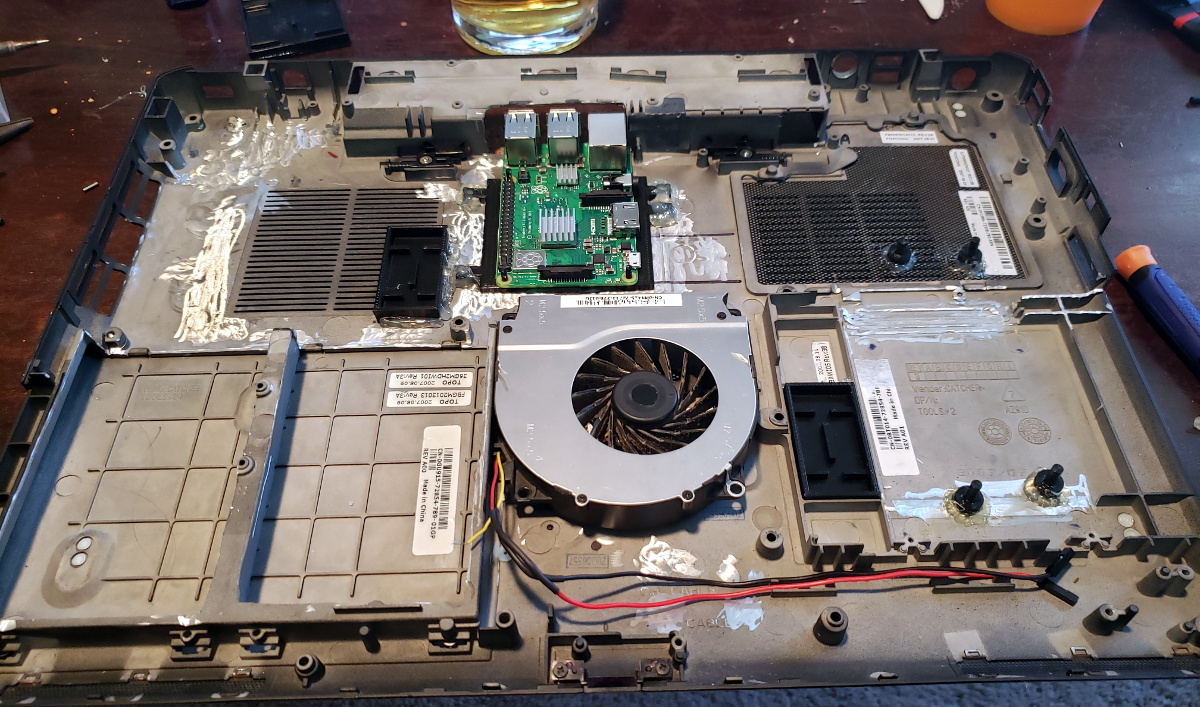
It seems not a day goes by that we don’t see somebody cramming a Raspberry Pi into some unwilling piece of consumer electronics. But despite being a pretty obvious application for the diminutive ARM board, we don’t often see it installed in an actual computer. Which makes this very clean Raspberry Pi laptop conversion by [Sherbethead2010] all the more interesting.

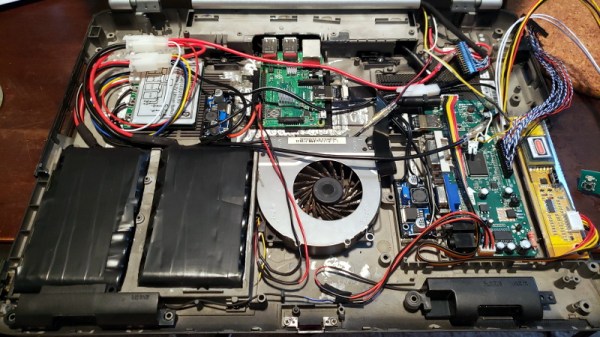
The first step involved taking a Dremel to the Dell’s chassis and essentially leveling out the entire internal volume. The only component that got reused was the fan, and even that appears to be relocated, so all the mounting posts were just standing in the way of progress.

[Sherbethead2010] mounted the Raspberry Pi towards the rear of the case so its USB and Ethernet ports would be available from the outside, and installed a driver board for the original Phillips LP171 LCD panel in the old drive bay. Power is provided by two custom 18650 battery packs connected to dedicated buck converters, along with an onboard charge controller to safely top them off.

Rather than trying to adapt the original input devices, [Sherbethead2010] decided to take the easy route and installed a Rii K22 wireless keyboard with integrated track pad into the top of the laptop. It turned out to be an almost perfect fit, and beyond the keys being slightly off-center, at first glance it looks like it could be stock.

The last time we saw a Raspberry Pi so well integrated into a real laptop, it was to create a functioning version of one of the props from Hackers. While that build was a joy for its own reasons, it’s hard not to be impressed with how unassuming this computer looks after all the work that’s been done to it.

Dumpster Finds Combined Into 4K Desktop Monitor

Dumpster diving is a time honored tradition in the hacking community. You can find all sorts of interesting hardware in the trash, and sometimes it’s even fully functional. But even the broken gadgets are worth taking back to your lair to strip for parts. If you’re as lucky as [Jamz], you might be able to mash a few devices together and turn them into something usable.

In this case, [Jamz] scored a LG 27UK650 monitor with a cracked display and a Dell OptiPlex 7440 “All-in-One” computer that was DOA. Separately these two pieces of gear were little more than a pile of spare parts waiting to be liberated. But if the control board could be salvaged from the monitor, and the working LCD pulled from the Dell…

After taking everything apart, [Jamz] made a frame for this new Frankenstein monitor using pieces of aluminum channel from the hardware store and 3D printed side panels. With the Dell LCD mounted in the skeletal frame, the control board from the LG monitor was bolted to the back and wired in. Finally the center section of the LG monitor’s back panel was cut out and mounted to the new hybrid display with a 3D printed frame.

Admittedly, these were some pretty solid finds as far as trash goes. You won’t always be so lucky. But if you can keep an open mind, the curb is littered with possibilities. How about some impressive home lighting that started life as a cracked flat screen TV?