
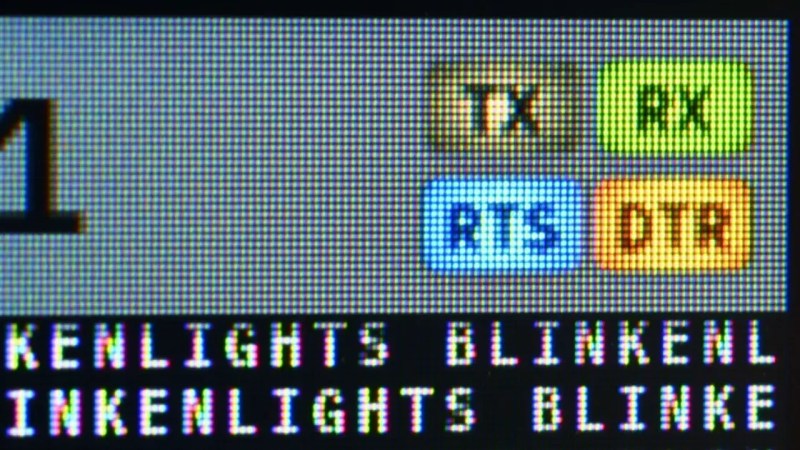
The TermDriver 2 is a USB-to-serial interface with a twist—it has a built-in screen for displaying relevant information. It can run at anywhere from 100 bit/s to 2Mbit/s, while showing you what’s happening on the wire. [James Bowman] worked on the TermDriver 2, and paid special attention to one feature—the visual look of the status indicators on the display.
[James] had hoped to make the status indicators look a little more old-school, a little more analog. His inspiration was the classic indicator panels from Apollo-era space hardware, which used bulbs behind plastic indicators. Incandescent bulbs don’t switch instantly on and off; they take time to warm and cool. This behaviour is both more pleasant, visually speaking, and would aid in making short-duration events on the TX, RX and other indicators more visible. Thus, [James] set about giving the LCD UI elements sixteen steps of brightness from off to fully on. The simulated bulbs get brighter the more rapidly activity is happening on a given pin. The indicator graphics, while tiny, are also given a nice superellipse shape, to recreate the warm centered glow of an incandescent indicator.
If you’re a UI fanatic who loves to make things as visually pleasing as possible, the work [James] has done is well worth looking at. We’ve featured other great GUI projects before, too, like this particularly visually pleasing effort. If you’ve had grand ideas in this space, be sure to tell us over on the tipsline.











Excellent philosophy there.
Now, if only car makers would extend that same design aesthetic to tail lights and turn signals. So very few modern LED signals work well.
That’s an interesting case, though. Because at least with brake lights, you probably DO want them to be instant-ON, at least. Fading them in would mean delaying how quickly information reaches drivers behind you. OTOH, a delayed-off or fade-out response on the other end would probably be useful.
I also thought about using brightness to indicate how HARD the driver is hitting the brakes (since the car already knows that), but problem is that with visibility conditions being so varied and unpredictable, it’s the same problem as a fade-in effect: Illuminating brake lights at anything less than full brightness (initially) is likely to be dangerous.
Newer regulations allow 4 short flashes when applying brakes, however the only cars I have seen it on are some Honda and Acura vehicles ?
Lots of modern cars will flash the brake lights in an emergency stop, many will also turn on the hazard indicators.
There’s a fair chance the various standards agencies even have rules or guidelines about it – they do have one for EV’s using regenerative braking about when the brake lights must come on even if the brake pedal isn’t pushed.
Some cars had an option to flash 2 of the 4 brake lights when braking hard. It’s disabled in most places because it’s not legal. E90 BMWs have the feature hidden behind factory coding.
Instant on, fade out led brake lights would be good. LED indicators should fade in and out.
Don’t get me started on the front indicators that turn off the corresponding DRL when activated.
I’ve never seen that. My dads previous car however, flashed the turn signals when braking hard.
Further in the comments I saw that American cars have shared turn/brake lights. I was talking an EU spec Renault in this case, with orange turn signals.
Back when manual transmission cars were a little more prevalent, I thought having a light pulse of the brake lights would have been nice to let the guy behind you know you were on the clutch.
(I realize technically you mentioned tail lights, not brake lights. I’m not sure it really matters for tail running lights, they’re typically only switched on or off once or twice per trip.)
Tail lights in many modern vehicles (especially American ones, that stupidly share red brake and indicator lights) are pulse modulated: they flicker. Cadillac is especially bad in this regard.
Turn signals that turn hard-on/hard-off are annoying because it’s much more difficult to localize them in peripheral vision, compared to ones that fade out like tungsten.
Fast-on LED brake lights are great, especially the ones that intensity-modulate with a POP-on, then settle down in 200 milliseconds to a tolerable brightness. I installed those in a previous car and it made a noticeable difference in behavior of Detroit tailgaters. BMW had a version that did modulate brightness depending on brake effort. I don’t know if they are still currently offered.
Cute and I do like it for what it is and for how well done it is, but it reminds me of old Windows programs that would try to emulate 7 segment LCDs with particular fonts, including not having them go completely black, or simulated LEDs on machine tool interfaces. For me it just made for hard -to-read ambiguity. Arguably, this is better than those old ones were. Anybody else remember interfaces like this?
Skeumorphism is the word you’re looking for.
I don’t care much for 7-segments or LEDs.
The worst offenders were those knobs used for adjusting volume or something. Especially if they didn’t support actuation by mouse scroll.
Have a look at those illuminated buttons at e.g. https://apolloinrealtime.org/11/