
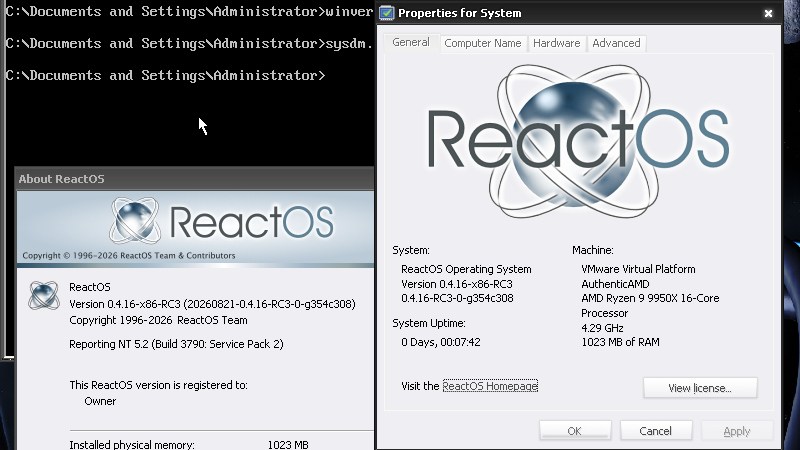
A perennial in the esoteric operating system space is ReactOS, a project with its roots in the 1990s which is doing a pretty good job of creating an open source clone of 32-bit Windows. They have a new version out, and it’s acquired some useful features.
Top of the list is a new graphical installer, removing the need for separate live and install ISOs, followed by improvements in video bug fixes and high definition audio drivers and subsystems. There’s a headless server install too, in which the GUI is suppressed. Perhaps most interesting, they are working on version syncing the open-source projects such as WINE on which they rely, meaning with luck that any improvements there will show up in ReactOS.
A while back we took a look at using ReactOS as a daily, and found it to be quirks aside, as usable as you’rd expect a Windows XP clone to be. Given that there are plenty of pieces of hardware and software around that still need an early-2000s era Windows to run, this remains an OS to keep an eye on.












Nice idea, but in its current state is 25 years too late.
That’s pretty good considering its state was 10 years too late when it aimed for windows 2000. . . And failed to deliver
I call BS on that statement. NT kernel didn’t change much since XP. It was the bloated UI and apps that kept slowing the subsequent releases.
Um of what? XP or react os (and you can turn 90% of that ui off in xp)
They sure are, haven’t even managed to add mandatory accounts and a bunch of ads and AI buttons everywhere.
:D
I tried ReactOS in late 2000s and early 2010s and it already ran most of my daily Win32 applications by that time.
Winamp, IrfanView, DOSBox, Firefox, Open Office, MS Works 7, VLC, some desktop games and emulators, Visual Basic 5/6, Delphi 3..
It wasn’t any worse than Windows NT4 or early Windows 2000 in terms of Win32 compatibility.
Personally, I think that the “alpha stage” is kept in order to not rise everyone’s expectations too high.
Many things technically do work, but it’s still a work-in-progress and it probably shouldn’t be carelessly used in sensitive applications yet.
It shouldn’t be used simply as a drop-in replacement to Windows yet.
Not in a critical application, such as hospital or a factory etc.
Because there might be still some bugs and because the development team is rather small and can’t fix everything in time.
So declaring the project as “alpha stage” solves that issue from a liability point of view.
Really? Traditionally, by the turn of the millennium, many applications/devices had these OS requirements:
Win98 (SE)/ME/2000/XP, Linux 2.4 or higher, macOS 8.6 or higher (OS X 10.1 or higher)
For nowadays (well-written) Windows applications, it should look like this:
Windows 9x/ME/2000/XP/Vista/7/8/8.1/10/11
Maybe we could be adding Windows 95 to it, even, since .NET Framework has been ported to Win 95.
And with kernel extensions, even Win 98/XP can run Windows 7+ applications.
The only downside is that they remain limited to 32-Bit Windows applications by now.
An CPU emulator would be needed to run Win64 applications on x86 build of Windows.
it will be ready in time to be used as the operating system for the first commercial fusion plant.
As long as ReactOS hasn’t moved to 64 bit, it’s pretty useless imho. It would be funny if some large MS competitor would finance ReactOS to push it to usability.
32 bits turns out quite restricting when you realize that old windows applications only get 2 GB of memory and part of that is assumed to be reserved by the system anyhow.
There’s supposed to be some way to “patch” them to get them the full 4 GB, but I can’t remember how that works.
http://reactos.org/forum/viewtopic.php?t=13231
With today’s ridiculous RAM prices and pricy new PC hardware, purchasing multiple used units with 4G RAM and using for a single app purpose could be a sensible approach.
eBay example less than $65 Dell Optiplex 7020 SFF i7-4790 3.60 GHz 4 GB RAM No HDD/OS
Ah c’mon, aside from games there was never a need for more than 2 GB per application.
There might be now, with webbrowsers and their engines shoved everywhere. But this will die off as soon as something better comes along, because the browsers-in-disguise are unmaintainable if Google loses interest.
There are some programs that do legitimately need more than 2GB like 3D modeling, video editing, CAD and multi threaded compilers.
Modern web browsers are basically running a complete operating system for each tab. Unfortunately, all of that RAM hungry isolation is needed for security.
Most other programs should be using megabytes, not gigabytes though.
VMs, such as Virtual PC 4 (runs on OS/2 and Windows 98) or Virtual PC 2004/2007 (2k/XP).
They run on 32-Bit versions of Windows. VPC 2007 als has a 64-Bit version.
On Windows XP, it’s possible to use an PAE enabled kernal to overcome 4 GB system RAM limit of 32-Bit Windows.
Big applications and hypervisors then could see 2 GB, 3GB of RAM or more depending on the(ir) settings.
But it’s not without issues. Some device drivers don’t like that.
With a RAM expansion past roughly between 14 and 16 GB things can get weird, too.
Some applications nolonger start etc.
Using a server edition of 32-Bit Windows is the cleaner solution, maybe.
Windows Server 2003, for example, is Windows NT 5.2 and closely related to Windows XP.
Large image editing, video editing, unless you want to grind your scratch disk to bits.
PAE (Physical Address Extension). It would let you address more than 4gb of RAM total, but each application was limited to 4gb. There was a while where you might be better off using PAE over 64-bit on a 64-bit capable machine simply because the software for 64-bit was still a crap shoot in the early thousands.
There’s plenty of old hardware (not PCs, stuff that had PCs embedded in them) that ran on Windows but of course wasn’t upgradeable in any way since drivers/apps aren’t available for it on newer OSes.
i wonder why nobody ever thought to disassemble the drivers. there are entire youtube channels for doing this to games. and drivers from those days were tiny.
There has been work on this tho, and according to that page, it compiles:
https://reactos.org/wiki/AMD64
Well, it has 16-Bit support now, which is great IMHO.
MOD4Win and many shareware games from the 90s should now run on ReactOS!
16-Bit installers used by Win32 applications nolonger need a swap of the installer binary, either.
Be worth trying, as said, there is a lot of legacy equipment that functions but does not work on current versions of Windows or the dreaded Linux.
there is value in an os you can just install and forget about. im disappointed there aren’t more options for airgapers.
i feel like a lot of that equipment might get linux drivers eventually, as you pretty much have to do major reverse engineering if something should fail. if that gets documented you can probibly get some linux code working. the alternative is you would need to dip into precious stockpiles of e-waste, err, retrocomputing artifacts, to make all that stuff work again. usagi style.
What I miss about Linux is that the whole distribution nolonger is available as CD-ROM set or DVD-ROM set.
There was a time when you could buy a Linux distro in a big cardboard box and you would get a whole mirror copy of the server on discs.
Including a thick printed manual.
That was a momentary snapshot of a distribution, basically.
Fully being independent of the internet. 🙏
I wished Linux distros would still provide a complete set of ISOs (or UDFs?) on their servers.
So users could download the equivalent of a complete CD-ROM set/DVD-ROM set.
As a base package with a “known good” selection of applications.
Later, updates still can be downloaded from the internet, of course.
If the distro was smart it would have the option to mount the ISOs on the desktop,
so that the package managers could use them.
A direct ISO mount feature inside the package managers would be great, too.
Anyway, trying to be as much as possible being independent from the internet is priceless. 🙂
Things should always work locally first, then have an optional internet link.
Originally, the internet was a bridge between various, independent networks.
It also connected large LANs (intranets) to the outside world.
Debian stable still does? – you do need to run a tool, but it will then generate a bunch of 4.7GB iso’s for writing to DVD and installing completely offline.
The current “complete offline install iso” for USB drives is something like 18 GB last I checked.
Ubuntu is only any good because it’s based on Debian, every version as they go, just more stale (Apart from their snap crap, and “edge computing” nonsense).
If you want more recent kernel than Debian stable has, there’s xanmod or Liquorix. Throw contrib and nonfree and you can apt install steam flatpak, get protonup-qt with flatpak and apt native steam can use newer protons including the cachyos one if you like.
If you’re stuck with an NVIDIA gpu there’s a keychain .deb which will setup apt to get official binary blob NVIDIA drivers relatively painlessly. Be aware that you may need to be patient and wait for the DKMS build system to finish: it can run in the background, which is confusing and may cause you to reboot earlier than its ready for, leaving you with a black screen! (Standard NVIDIA caused problems, doesn’t happen with Intel or AMD gpus: for those the procedure is…. Nothing. They just work. Out of the box. Better and Faster than windows. )
Debian is still so much better online, but you can run it isolated if you have to.
I have multiple Debian embedded machines without internet access. I have an isolated LAN over which I can access to/from them with ssh, and with proxychains and an sshd running somewhere with access to both isolan and internet, it’s possible to run apt and have it work through the intervening sshd system, reasonably securely.
Everything else on those systems and that whole network can’t reach the internet at all. The rule is anything with internet is never set to do routing between the connections or to “share” the internet. Which is fortunately the default for most OS.
I have an WAP gateway with the WAN port open which runs DHCP and provides a convenient webgui for getting the MAC ID of anything attaching even temporarily to the ISOLAN, whilst providing a honeypot to trap any ‘smart’ devices trying to phone home through it. That WAP box itself doesn’t have any access out at all.
Nmap from one of the Debian boxes can do OS fingerprinting/guessing for anything showing up on the network, which is handy, as well as finding all open ports on each thing.
still not in beta. il give it a shot i got an old comp just sitting there on my floor in want of an os. i wonder if it will run on real hardware this time.
Hi, I’m optimistic that it will work if its a Windows NT 4 friendly PC.
That’s because Windows 2000 (ReactOS’ original role model) was built on NT 4 technology.
Windows 2000 (-and to some extent XP-) can still use the “static” NT4 drivers, for example.
Those from before the WDM introduction..
So ReactOS can install them without much trouble (the NT4 SB16 driver for example).
NT4 drivers also aren’t requiring DirectX, because NT4 ran that in software.
So yeah, a good old PC with a WSS, SB Pro or SB16 (ideal) soundcard,
an S3, Tseng or Cirrus PCI VGA card and an NE2000 or 3com EtherLink compatible NIC would be something traditional.
An PS/2 mouse and keyboard would be nice, too. 😃
its about a third gen i7 machine with 8gb i think. i think there is even a 750ti in there. this is my oldest computer.