
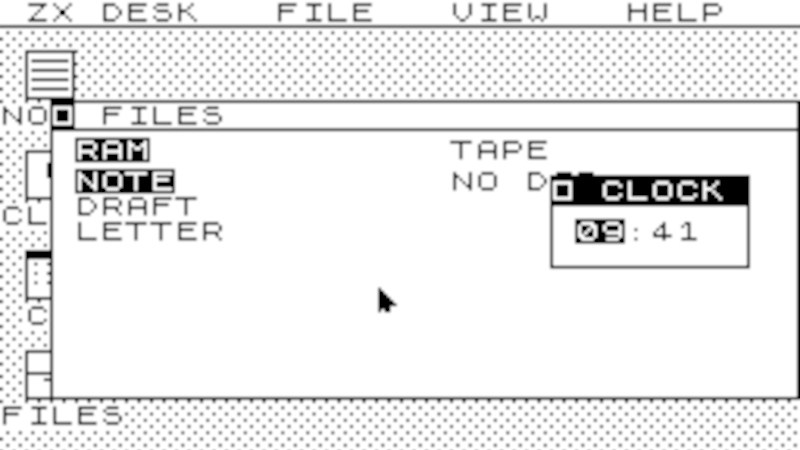
Of the popular 1980s 8-bit computers, it’s fair to say that Sinclair’s ZX Spectrum punched above its weight. Sir Clive’s love of squeezing more functionality out of less hardware meant the compromises he made left it less powerful than competitors from Apple, Commodore, or Acorn. Still, the brightest programmers of the age took the little machine to heart and made it do some very impressive things. A desktop GUI, though, surely that would be pushing things too far. Never say never because now [mindbox77] has done it.
ZXdesk is an assembly language program for the 48k Spectrum that gives you something that looks a lot like GEM. It’s got all the things you’d expect from a desktop GUI, with menus, windows, and applications, and we find ourselves suitably impressed.
For all that, though, is it really an operating system? If you take an OS to be a general-purpose host for executable programs run independently from disk, like the one you’re almost certainly using right now, then of course not. Though Amstrad would eventually produce a Spectrum with a 3″ disk drive, the Spectrum 48k that this runs on does not have any form of disk. Thus the applications are built into the GUI rather than existing as separate programs. On the other hand, aside from the impressive feat of making the ZX do a GUI, it’s probably the closest to an OS we’ve ever seen on this classic rubber-keyboard home computer.
Long-term readers will note that this isn’t the first time the Spectrum has seen an impossible achievement made real.












My first encounter with a GUI was with the Spectrum game Shadowfire:
https://en.wikipedia.org/wiki/Shadowfire_(video_game)
You moved the pointer to a UI element with your joystick or the keyboard and clicked. I didn’t realise then the depths of the ocean into which I had dipped my toes.
It’s as much OS as those Windows 95 imitations for keyboard Famiclones are.
Um, you mean those commonly seen Famicom-based keyboards with a cart slot on top?
But there are Famiclones with a 3,5″ micro floppy disk drive, too.
They can boot an 6502 based DOS and “Windows”.
Examples:
Batong 686
https://www.youtube.com/watch?v=fzg2XlJ0Lg8
Subor SB-2000
https://www.youtube.com/watch?v=kp4Rr7CJBAI
git was such a revolution in my life that i am distressed that uploading the finished project as a zero-history single commit to github seems to have become the norm for ‘hacks’
When I’m developing by myself, I don’t even bother to use git, I just throw a copy of the code into an OLD folder every day before starting to make edits.
I don’t want my unfinished mess of code to be public, and if it isn’t public then why would I be sending it to the cloud? I already have local backup so I wouldn’t have to send all my data to some US corporation.
nobody forces you to push a commit in the cloud. git comes with so many benefits that even for a personal, work-in-progress , it seems – to me – silly not to use it.
Like what? It’s just version management, and most of the time all I ever need is just a backup of what I finished on the last session. Ctrl + click and drag makes a copy, that’s good enough for me.
Things I find useful with git: “git diff” to see what local changes I have made (to review my changes before committing them); “git log” to see a list of previous changes; “git blame” to see where a particular line of code came from (i.e. in what context I wrote it), “git stash” to temporarily sideline some changes so I can work on something else for now and come back to them later (via “git stash pop”), “git show” to review what I changed previously, “git checkout” to abandon a set of changes that wasn’t working out, “git branch” to fork my codebase into a separate version that I can develop independently, etc.
I just remember all that stuff, or write myself notes in the comments in the file header.
Why would you publish your git repository if you don’t want to? You can use the full power of git for version control without ever setting up a remote. And even if you want a remote, there’s nothing saying it has to be in the cloud, or even on a different computer!
git initjust makes a .git folder with a hash-addressed filesystem for storing your OLD copies with a change log and only having to store the parts the changed.Yes – I know. I’m just saying, if I’m not uploading something to github why would I use git at all?
I don’t use the “full power of git” for version control for simple personal projects.
I 2nd this, even as someone that benefits from git daily. Some activities fit better with simpler approaches. I don’t even think we usually see the extra complexity it brings with it as actually unneeded in cases where it does fit the activity…we just endure the minor pains. Good on you for picking what fits you there.
“You can use the full power of git for version control without ever setting up a remote.”
And you can use the power of releasing your code to the public on Github without using it’s versioning system.
Maybe you have your own local versioning system… Who knows? Who cares?
retrocomputing every day huh
Every hobby project I start with
git initis a well-documented history of my embarrassing mistakes, so I understand this approach really well ;-)This is very cool. I can’t wait for the Spectrum Next port that the author teases in his github writeup!
Hi, there was the ZX MicroDrive, however.
It was an endless tape, so no rewind was needed and “files” could be loaded/stored within an endless loop.
So it provided a pseudo random access, basically.
https://en.wikipedia.org/wiki/ZX_Microdrive
It was also a lot faster than tape, as it provided 2 tracks with a speed of about 15-20kBytes/s. But programs couldn’t be loaded that quickly in practice, because sectors weren’t consecutive and normally it’d end up with several full spins round the 85kB tape to load a 48kB program.
Still it was faster and up to 8 drives could be attached in theory. I still have some Microdrive cartridges for my Sinclair QL, which still load data from the mid-1980s.
Similar “desktops” existed for years. They are simply useless on 48k of RAM. Back in 1990 for example, I coded a clone of Norton Commander that allowed direct file editing. It was very convenient for applying hacks/cheats (we called them “pokes”) for games.