
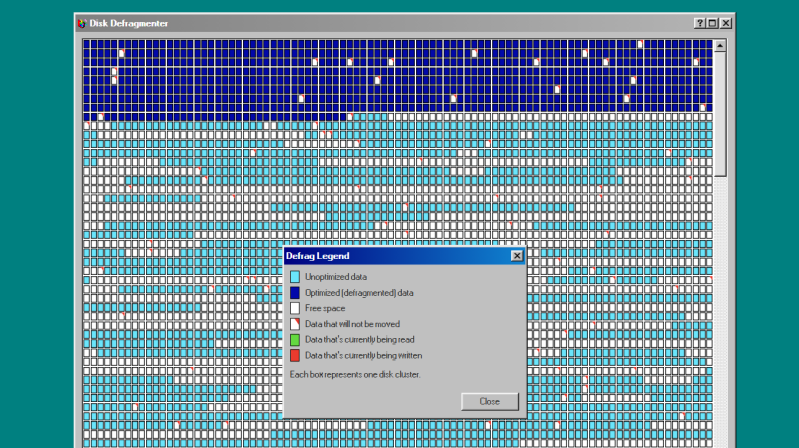
Disk Defragmenter was a wonderful utility that Microsoft included with Windows back in the day. Back then, you’d use it to theoretically speed up disk access. Today, you can run a fun simulation right in your browser thanks to [Dennis Morello].
The theory behind defragmenting hard disks was simple. Your hard drive would store data on spinning magnetic platters. Sometimes, a given file or group of files would end up with their different parts scattered across different parts of a platter, or even multiple platters, as the file system tried to slot everything into the space available over time. On a drive accessed with a literal physical mechanism, this fragmentation of files across multiple areas of a disk could cause functional read speeds to drop. To solve this, you could defragment the drive, wherein a utility would grab disparate bits of different files and put them physically closer together on the drive platters, such that the read heads could access larger contiguous chunks of files more easily.
[Dennis’s] project does none of that. It just simulates the visuals and sound of running Microsoft’s disk defragmenter tool from Windows 98. It’s got the little rows of squares that get rearranged, blue for unoptimized data, dark blue for defragmented data, and white boxes for free space. It’s got the progress bar along the bottom, too, and a nice little simulated sound of a hard disk ca-chunking away as it shuffles little bits of data to and fro. This was the kind of thing you’d do on a rainy Saturday afternoon in the 1990s, just watching your PC make itself a few percent faster while you drank coffee and wondered if your ex-wife Jacinta was ever coming back. She never did, but you did notice that Age of Empires II loaded a fair bit quicker after you ran a full defrag on your main drive. Sometimes, that’s as good as it gets.
Modern file systems are better at managing issues like fragmentation, and the virtually instant seek speeds of solid-state drives essentially eliminated the need for defragmentation for good. Still, it’s fun to visit an ancient tool from yesteryear and remember what it meant to us way back when. Maybe you could give Jacinta a call, too, just for old times sake, and discuss that time a Janet Jackson song started crashing brand-new Windows laptops right out of the box…












Hi! On DOS 6.x there also was DEFRAG. It was based on a Symantec tool.
In the 80s and 90s, the rival product was PC-Tools COMPRESS.
Here are examples how they looked..
Defrag (DOS, ASMR video): https://www.youtube.com/watch?v=Nidwz3BzFCM
Compress (v6, DOS, real HW): https://www.youtube.com/watch?v=cDDh7l3uXXM
Compress (v7, DOS): https://www.youtube.com/watch?v=FIwrCLJSbRg
That defrag video is really odd. The disk starts out nearly empty; then magically fills ups with a lot of data. Not sure what is being optimized there. Painful to watch. Also the legend isn’t correct either. I recall the yellow hue, but wasn’t that in the legend as well?
Hi, on a closer look I noticed that, too! Thanks for pointing it out! 🙂
I mainly choosed the video because of the ASMR tag.
I thought people would enjoy that..
Here’s another one, a retro PC (CRT, real HDD) running DOS Defrag.
https://www.youtube.com/watch?v=lhjgVovLkXY
FreeDOS has a similar looking defragmenter, interestingly.
https://www.youtube.com/watch?v=dB10Rokgnnw
The only thing I can imagine is that in the legend there is no distinction between an empty block and a partially filled one, which would be strange. But the frantic head seeking noises continue after the disk has been fully defragmented, which doesn’t make any sense either.
Yah, that DOS based defrag always worked way better. There were always files the windows based one couldn’t touch because they were busy being accessed by Windows. Plus the Windows one would restart a lot when files get accessed.
The original Defrag was part of the excellent Norton Utilities created by Peter Norton, who seemed to know more about DOS than Microsoft did.
Norton Utilities was then bought by Symantec.
The irony that running a disk defragmenter on a modern computer would just shorten the lifetime of its SSD.
Hi! Well, yes and no. It depends, I think. 🙂
While defragmentation on a regularbasis surely does wear an SSD down, it’s not exactly destructive per se.
If I remember correctly, a defragmentation once a year or so isn’t bad.
It also helps to clean up the filesystem..
Especially older ones, which were not designed to have a file splittered into a thousand pieces.
(But yeah, the SSD itself doesn’t care about filesystem. It’s all about LBA sectors to it.)
Doing a disk defragmentation on 90s PCs and Macs (Norton Utilities?) might be recommended, thus, even if it has a CF/SD card or an SSD.
Again, not on a regular basis! Just once the filesystem has reached a very messy state.
In Mac world, without third-party tools (Norton, iDefrag etc),
a drive content was simple copied from A to B (to A) to cause a defragmentation effect.
Because on drive B, the copied files were written in an orderly fashion.
Or maybe I’m just talking nonsense here. It’s been a while! 😅
Newer SSDs tend to self level, prolonging their operating time. Sometimes they have more capacity than they actually display, using a chunk for replacing worn out areas. It’s all managed in the background and generally people can’t see or control the behaviour. I bet the spy agencies like it though.
I think the idea is to clean up the extra filesystem fragments which can reduce the number of I/O operations needed to read the files.
On Windows (10 & 11 at least) the defrag utility can recognize SSD’s and run TRIM on them instead of the normal defrag.
to think a defrag is in the past is fairly silly..
Both ext4 and NTFS need defrag on spinning disks, and spinning disks aren’t going anywhere!
There was a brief time that ssd’s looked like they were going to replace spinning disks for data – the ssd price/GB was really starting to get there. But during the AI bubble that is simply not the case – I could buy a car (a reasonable one) for the same price that it would take to replace my spinning rust with ssds..
So defrag is alive and well – it makes quite a lot of difference to how fast your access is if the files are 1) in contiguous tracks 2) near each other on the disk, and 3) near each other in the MFT (for NTFS)…
The you read them in the right order – I do ‘platter’ walking on both ntfs and ext4….
yes, bott drive and a working directory might (should) be on a ssd, but lot’s of data isn’t…
intuitively, this strikes me as bogus. i believe — for no reason i can put my finger on — that ext2 and above do a good enough job at avoiding fragmentation in the first place, especially if your filesystem is not chronicly 95% full (like mine always was before about 2010). so i’m curious if you have any sense of actual improvements from defragging ext4??
but the real reason i know it doesn’t matter for me is that almost every read() comes from cache. that’s why i love having insanely large 32GB of RAM. maybe it was fragmented the first time it was read but that was literally months ago.
you obviously haven’t had a few million files on a ext4 partition.. And 32Gb of ram is smaller than I’ve used for quite a while…
Platter walking – on ext4 and ntfs – makes an reading many small files very very much faster..
indeed, i have not had millions of files. but i didn’t think huge numbers of small files really benefitted from defrag anyways? it really requires a different filesystem design entirely if you want to overcome the inefficiency of minimum block size?
i’m trying to understand if you’re having a fantasy or a real situation. if i had an unusual application that created millions of small files, i would optimize its storage / indexing long before i would worry about defragmenting the underlying filesystem. in fact, i’ve done exactly that before.
and i’d still expect gigabytes of data to live in ram cache :)
You lost all credibility with your assumption in the age of AI that 32gb of ram is “insanely large”. No, it’s not even usable, double that and that’s the baseline at a minimum, just to LOAD. Unless you’re idea of computing is what your browser tabs can handle, then sure.
I remember reading somewhere (not sure if true) that Microsoft removed that particular visualization from the defrag tool because it proved very hypnotic. Anecdotally, I do remember watching it for what felt like hours at a time back in the early naughties. Same kind of feeling as looking at a fire burn.
I have fond memories of just zoning out watching defrag do its thing.
More than a few times I was startled awake by drool on my chin.
There are more basic ways to achieve the same thing. In the very early days of my using DOS computers I used to back up the entire file system to a QIC tape, then format the drive and write it all back. Of course, it took a while, but that way you got a backup and defragmentation in one ;-)
Did you use SyTOS software by any chance?
I remember it from a version of the late 1980s..
It supported SCSI based streamers, I think.
The Windows/Windows NT backup program and the one part of PC-Tools had some streamer support, too, I vaguely remember..
In the 90s, there were 3,5″ and 5,25″ streamer models, I vaguely remember.
The 3,5″ ones used a special high-speed floppy controller card, I think.
But I think I was more used to the bigger sized “QIC DC 600A cassette” type of tapes..
https://en.wikipedia.org/wiki/Quarter-inch_cartridge
haha i’m relieved that you have happy memories of this process but it gives me the heebie jeebies! when i am making backups i am always aiming to increase the number of copies of each file. here, you’ve gone from only one copy on HDD to (temporarily) only one copy on tape. my nerves wouldn’t be able to handle it :)
Back in those days, I regularly ran defrag to increase my odds of successful data recovery in case some disaster wipes the file allocation table.
Ah yes. I remember those days. Good times. (And Jacinta never came back, thank God).
🤣 What ever happened to Jacinta…
She’s probably using the Nam-Shub to hide her tracks, wherever she went after that incident on the Raft…
I got ahold of her last night. She says hi and to stop playing videogames. Same old Jacinta.
Come on, this simulates the best-case scenario. The UI stays responsive, it doesn’t hang for ages – or forever, it doesn’t crash, and you can run it again and again without reinstalling Chrome. That’s not how defrag actually worked!
It actually crashes if you try to close the window ;) Also, there’s a “Realistic mode” that does exactly what you’d expect from the original defrag utility.
Ah defrag, the recommended step when you wanted to get rid of user complaints.
90% of the time users were told to do it it was just to get rid of them.
“90% of the time users were told to do it it was just to get rid of them.”
And the modern version of that on the Microsoft support forums is “Please run SFC /scannow” (they don’t add “…then take a homeopathically-diluted dose of Echinacea” but they might as well)
My work system regularly gets into a state that requires sfc to unbork.
Must be one of those new fancy 7200 RPM drives, I remember it being much slower :)
Fragmentation and the management of it was a scourge, I can’t believe anyone has fond memories of it
Why not? I remember running Compress v6 on my 286 PC somewhen in the evenings in the 1990s.
Watching it on a color monitor tidying up the old 80 MB Conner HDD (CP30084e ?) was so relaxing..
The humming and clicking of the HDD was like watching a kitten purr.
Civilization II was the first game I ever figured out how to modify, and I played it OBSESSIVELY for years during a difficult time in my teen years. In 2010 or so I was bemoaning the superiority of Civ II over the modern versions III, IV, and even V. I decided to set up Civ II and give it a play just like I had as a kid. IT SUCKED. It was clunky. Tedious. The lack of borders, lack of hotkeys, and a bunch of other game design decisions made it PAINFUL to play compared to modern Civ.
I still look back at that time fondly because I enjoyed it for what it was, and what it meant to me, even the lousy parts, because that’s how nostalgia works.
Well, Windows (the main target of disk defragmenters) still uses the same old NTFS. Which still benefits slightly from defragmenting, even on SSDs, due to how it works (badly).
Zoe, beyond the nostalgia of defragging and this project, what a writeup! Very colorful, imaginative and interesting.
Note: it was essentially the move from FAT file systems to NTFS that made defragging redundant, however one could argue that the final nail in the coffin was the move away from IDE as write speeds and cache increased.
Ah, the famous internet-bollocks.