
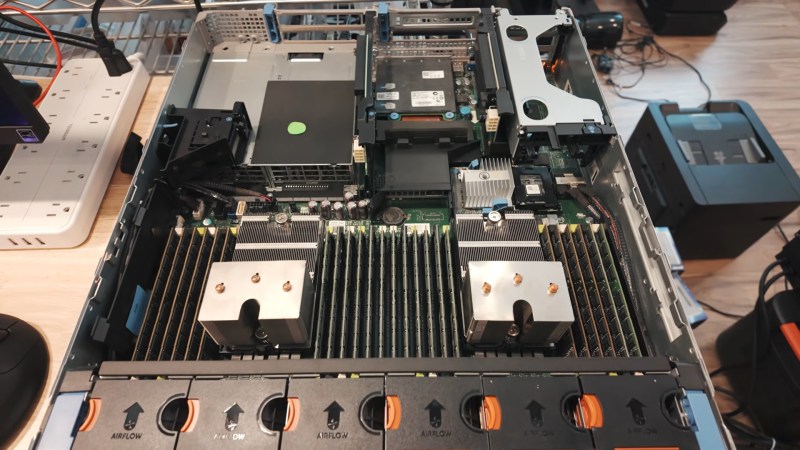
There are lots of reasons to run LLMs locally, from privacy concerns to just wanting to futz about with the technology, but if you want to run the big models, the standard logic is that you need big money for lots and lots of VRAM. [MattMo] is calling that into question with his recent video — embedded below, naturally — in which he gets GLM 5.3 Flash, Qwen 3.8 Flash and Qwen 3.8 27B all running on a 14-year-old server without a single GPU.
The secret, if you can call it that, is that they aren’t running very fast: four tokens per second was about the max. Those four tokens are excreted from the twin Xeon processors of the vintage Dell PowerEdge R720 server, with the models living in its 348 GB of DDR3 system memory. That’s enough even for the largest flagship models, but as you can see by the speed, things are a bit bottlenecked by having only 20 threads available between the two processors. Said processors are also old enough to lack certain instructions that might have helped speed things up. Still, [MattMo] argues in the video that this is more than just a dancing bear: there are workloads where batch-processing at 4tps might make sense, and there are people who already have servers of this class laying around in their homelabs. The intersection of that Venn diagram is probably pretty lonely, but if that’s you — hey! [MattMo] says it’ll work, so give it a shot.
If you had to buy the hardware, well, it’s also quite reasonable on the second-hand market, with [MattMo] estimating about $600 given prevailing prices. He also points out that the newer models may still get some optimization to improve speeds, but don’t expect real-time conversations with Hal 9000. Still, in terms of local LLMs, it certainly beats the pants off toy models running via Llama on the PSP or the C64.












I have tried this. Dual Xeon X5675’s and 48GB of RAM let me run a selection of small models slowly. Filed as an ‘interesting experiment’.
This is only worth it if you are not concerned with paying for electricity
WHAT? I CANT HEAR YOU OVER THE 12k RPM OF THE WHINING BLOWAMTRONS.
I love to see old hardware getting used for new tasks or being experimented in, but short of the glut of ram in this machine it’s largely a waste if electricity for this particular task.
The dell poweredge r720 doesn’t support AVX2, which significantly helps with the matrix multiplication LLMs use. Further still, using this particular machine with its dated CPUs means that you can’t use the new 1bit and ternary models that have been released that work quite well on CPUs in GPU-less machines, but only if they support AVX2 and/or AVX512. Those 1bit/ternary models also retain up to 95% of their accuracy when compared to their original fp16 versions, so there’s little loss in using them.
Again, I’m glad to see old hardware find a new life, but a four core i7 4790 with 32gb of ddr3 running at a measly 1333mhz for the ram speed would net you 7-8 tokens per second using a 27b ternary model and be more than usable for coding or basic reasoning, all while only drawing 80-90w of power on the CPU, 100w for the whole system.
It’s probably wise not to do what the person in this article has done. Save that old non avx2 server for something like a bad or low end web server.
Huh, that i7 would have a better token/$ figure along with being faster, I suspect. The poweredge is more of a dancing bear than I suspected.
Do you know of a current guide to help the broke and/or cheap set up the best token/$ setup? It’d be a great thing to share.
I have been teaching myself all this stuff as I’ve been experimenting. Which hardware you pick is entirely dependent on what your end goal is. Alternatively, you may be limited by what hardware you have or what you can obtain. That’s where things get tricky. The simple answer is this; if you want to do complex LLM work without shifting to a 1bit or ternary model, you need a relatively recent gou, though GPUs as a old as ten years ago with a good chunk of vram are not entirely unusable.
If a capable GPU is off the table, then you can shift to CPU only inference. In this case, so long as the CPU supports AVX2 or better and you have sufficient system ram, you can run all the same models you would on a GPU, but with a massive performance hit.
The one exception is the afore mentioned 1bit and ternary models. Those use strictly integer addition only, because it’s literally single bits being added together. They still require avx2 or better, and system ram speed and size is a major factor in speed. In that case, the newest CPU (mid range or better) you can find that supports avx2/AVX512, combined with the fasted and largest amount of RAM you can throw at it will get you working with some fairly large models with decent, usable speed. 32gb is a good starting point, and it doesn’t matter if it’s DDR3, that new the better but DDR3 will do just fine.
That 4790 I mentioned is from the very first generation of CPUs that makes this even feasible as that generation introduced AVX2. So anything newer than a Intel 47xx CPU should work just fine, just make sure you check the avx2/avx512 support before you commit to it, as some new Intel CPUs cut it from the mid to low ebd to force people to buy more expensive CPUs.
Hope that helps.
I feel GPUs are really the best cheap way to get usable compute.
For example, I use an AMD Radeon RX6800xt (16GB RAM, ~6 years old, under $400) and get 90 tokens/second running the gpt-oss:20b model (~13GB in size). Of course, you still need some sort of machine (or eGPU) to put the card in, it doesn’t need to be “beefy”, but will add some cost.
Likely there are better (tokens/$) GPU options. Particularly if you are only going to running smaller models and just need 8GBs of RAM (or less). Of course, this is going depend a lot on your application and requirements.
I tried to repurpose me ol’ dual 2650v1 xeons with 128gb ram, it was useless as llm housing. Ended up getin a single socket machinist board for 30 bucks, made a headless docker app server with 32gb ram, this will crunch happily probably next 15 years in the basement
I’m using a Xeon 2696v4 with 22 real cores (HT disabled), 160GB DDR4, and get around 10 to 14 tps on MoE models, however I’m using a 5060ti in this machine, and the bottleneck is not the PCI-E 3 x8 bus, but the CPU work and memory movement. 10 to 14 is usable, just, perhaps a conversation or to bounce ideas off, but for real work forget it.
Thanks for sharing. Curious which models are you running? Also, which 5060ti do you have?
I’m getting 90tps running gpt-oss:20b on and AMD RX6800xt GPU. I would expect the 5060ti to be at least as good, if not noticeably better.
If anyone is thinking of running a LLM server, you’re are better off running it on a used office computer than a crusty server. It uses less RAM than you actually think, and benefits more from a newer CPU and RAM interface, instead of a decade old flagship.
I tried running llama.cpp with old 32 core opteron server, and results were pretty abysmal. Performance maxed out at just 6 cores, and adding more cores didn’t help. But that was with mainline llama.cpp, not ikllama.cpp. Just running Qwen 3.6 35B A3B model on my laptop (11th gen intel 64GB DDR4) was much more performant (and less energy usage). But I haven’t tried intel xeons yet. I did buy supermicro X9 dual Xeon motherboard with ATX power sockets for very low price ( and same two 10 core Xeon cpu ) so I might give it a shot.
I added a tesla p100 to my r730xd for <$100 including the eps power cable. Can do a v100 for around $250. Only downside is fan noise keeping the passive cards cool.
I use an old R 710 as my VM server for about 10 Linux VMs for various tasks. They work great for that.
348 GB is a lot of RAM, especially in the retrofuture we now find ourselves in. does that really fit in a $600 budget, even if it is DDR3?
I recently bought 128GB DDR3 for £80 and a xeon 2686v4 for £25. There’s not really much demand for DDR3 cause the fastest CPUs compatibile are weird xeons that draw 3x the power of a ryzen 5600 while being quite a bit slower.
I have some old HP Elitebooks that require DDR3 laptop ram — that’s the only use I have for it. those laptops are plenty good for everything I use a computer to do, though I don’t know how well they would host an LLM. they cap out at eight gigabytes
This illustrates why quantized models are so important. The normal process to run an LLM is prohibitively resource heavy, imagine writing hello world in C and running a loop that reads and writes to every register on the CPU (it would be pointlessly slow to do this and possibly lockup the system). Lowspec devices can run small param models if those models are quantized enough.
Running LLMs on older hardware can work quite well. For starters, not everyone is running LLMs in fully interactive mode where they’re doing literally nothing but waiting for each response in real time, so slower but with hardware you already have is often an excellent choice.
Half of the work of using LLMs is selecting good LLMs for a given purpose, and people end up spending hours or even days making certain models work in the memory sizes of GPUs, only to figure out that the model they’re trying isn’t working for their tasks. When you have tons of memory, even a slow LLM that you can just run – no futzing – is much handier than one that you have to keep tweaking to run in your GPU’s memory.
While I have a Ryzen 9800X with 160 gigs for running certain things, an old AMD Bulldozer with 64 gigs can run most things just fine, so long as you can queue up work and do other things while it runs.
I have a Gen 8 HP DL360p running an LLM to shorten weather forecast text to fit on a wall mounted screen.
Don’t care about speed because it only updates every 15 minutes.
Don’t care about power because I have battery backed solar.
Don’t care about resource utilisation because while the server has plenty of tasks, none are that time critical.
Good, now go and learn to shard your model over all of the compute on your LAN, you get a proportional speed up until you hit network bandwidth saturation. Netboot your machines after-hours using a custom Linux distro with everything you need and only what you need to turn each machine into a compute node. I have done this, Grok knows how to help you set it all up and utilise it. Never forget the fundamental space-time tradeoff in most compute but also that it applies to indivisible tasks, and much of inference can be both temporally and spatially sharded. The full LLM is a pipeline, that is mostly the temporal axis, compute on layer sections is the most obvious spatial sharding opportunity. Mixture of Experts (MoE) architectures are also a very good target. For dense models, the formula is strictly Active Parameters × 2 = Inference FLOPs per token, so you can calculate your total LAN compute rate and plug that it to get an idea of potential token rate for the entire beast.
I’m running a E5-16xx V2 processor on a 64GB DDR3 machine, with dual P100 16GB cards. Yes they’re ancient. But I get about 15 t/s on the Qwen 3.8 27B Q4 model, and 80 t/s on the various 30B A3B models. GPT-OSS 20B is really fast too. I usually run a 200k context on it. I run the cards limited to 175W each. I run a custom version of LLAMA set up with the P100 optimization patches.
I did the exact same a year ago — R720, 16 cores, though only 64GB RAM. (I couldn’t justify even $1/GB for what’s essentially a toy, particularly since I wanted the full 1500 GB but those large “LR” DIMMs are slower than smaller DIMMs.)
Anyways, for testing and experimenting, I found adding even a derpy little 1050 Ti to the server made AI many times faster.
What I don’t quite get is that they added the ability to map/swap the graphics card and regular RAM with MMU’s many years ago, so why can’t people just map extra regular RAM to the GPU and just be slower? Or did they remove all those capabilities at some point, Google-style?
Because if you still can and have a lot of RAM then you might do something like this article, only faster.
I mean (regular) DDR5 is blazing fast compared to DDR3 surely, even when not so fast as recent LPDDR5.
on a related note, can someone tell me if LLM’s access RAM completely randomly or is there a pattern to it based on the kind of query? I guess I should ask some AI and then live with the quantum experience of having knowledge or not having knowledge and not knowing which it is, and live in that superposition like the rest of the western world.
I’ve tried something similar with similar results. In my homelab I have an old, used server from about the same time period as the one in this article with ~128GB RAM. I also have a modern threadripper server that I built JUST BEFORE RAM got expensive with, again, about 128GB RAM. The older DDR3 computer w/ the CPU that lacks the latest vector ASM is slow as running through pudding. The newer server, no GPU, is slow to load the model into RAM. But once the model is in RAM, it seems about as responsive as the commercial models. I run other stuff on that server, so I’m not trying to saturate it with local AI, but qwen3-coder with only about 32k of num_ctx runs well enough that I was able to use it a little over the past few days to make some changes to small code bases; one written in Golang and one written in Python.
What I’m curious about, when it comes to homelabbers (not companies), at what point does the money make sense for actually getting some decent GPUs for local AI vs just paying $20/mo for OpenAI, Anthropic, Google, or SpaceX’s models? Additionally, I might just be too new to mucking about with this on my local server, but the only way I’ve seen to give my models internet access is to tie them into SerpAPI. (this is limited on the free plan) Anyone else know how to get models to search the net for free?