
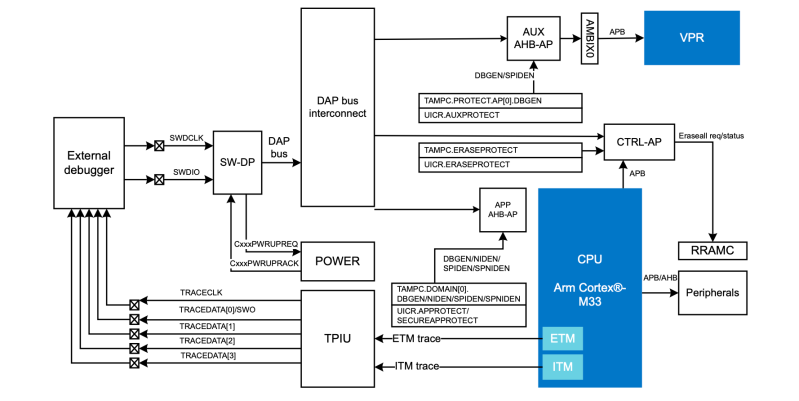
In a recent blog post by [Daniel Mangum] he goes over a scenario observed while debugging the Cortex-M33-based nRF54LM20, reading and writing values while running through a few scenarios. After initially it seemed to go seemingly without any issues, suddenly the GDB debugger would happily return values that suggested that a previous operation had not succeeded. Or, as the case turned out to be, stale cached values were being returned.
What follows is a very technical and low-level breakdown of how this MCU functions inside, especially its cryptographic features and Key Management Unit, which is used for storing sensitive information. The most amusing part is probably you can bypass the cached data by explicitly specifying the access port and memory address along with other parameters.
This ReadMemAP command supported by the JLinkGDBServer used here showed the right value, whereas the normal GDB read command using x kept returning the cached values. This raised the question of which cache was doing this. The direct read from the AHB-AP access port worked fine, so the suspicion is that the J-Link software’s own caching, with a run without the J-Link caching indeed working fine.
J-Link has had some hardware-related issues too, with this new issue pointing to an awkward software bug that could be table-flip-and-rage-quit worthy depending on how much time it wastes during a debug session. Fortunately [Daniel] seems to have caught this one quickly and had an easy way to bypass it, but we aren’t all that lucky.












I have never liked JLINK, something just stinked but i couldn’t figure out what it was.
I much more prefer the BMP (black magic probe). I like STLink a lot too, despite it being just another SWD debugger, the tooling just seems cleaner to me for whatever reason.
But most of all, i wish JTAG was more common instead of SWD
What does jtag get you other using more pins?
In case you ever come back. Boundary scanning. Boundary scanning is incredible if you either do not know the physical pin out and want to scan. Or if you are the designer and want a quick post fab test without firmware.
We avoid Nordic, because they force Zephyr down your throat weather you like it or not…
Yeah the previous SDK really wasn’t that great to say the least, but forcing Zephyr onto those ultra low power microcontroller is just bonkers.
I hate zephyr too but now with LLM services like chatgpt and Claude, i simply refuse to deal with zephyr myself and let the LLM write the code.
Let the two monstrosities fight it out amongst themselves, i suppose. It’s great for my mood and blood pressure levels.
Since you’ve mentioned both Zephyr and Claude, your remark should come with a trigger warning. I usually don’t day drink, but now that the pair are stuck in my head, I might just make today an exception.
Uhhhh – let’s establish rules for HaD drinking game! :D
Like when reading “This Week in Security”:
1. SQL injection = shot of at least 50proof rum.
2. RCE …
3. no cert pinning/checking
4. hardcoded credentials
5. use-after-free
and so forth
Just imagine the combos!
Well, Espressif also force FreeRTOS down your throat. Yet people seem like it a lot
FreeRTOS is beloved because of how minimal and unobtrusive it is. Its just a scheduler with basic utilities, a queueing system, timers, semaphores, mutexes etc. I could get a driver written for a 20 year old sensor from another project and get it working with FreeRTOS in minutes because it doesn’t care about drivers or peripherals at all. Zephyr on the other hand is opinionated, and very rigid.
Zephyr is disliked because it infects every single codebase that it works with (or made to work with). The nested macros system is just hellish and difficult to debug, the error messages mean nothing. It claims to be batteries included and has a lot of drivers but the drivers are skin deep. They only allow the happy path’ and if you want to do anything even slightly complicated or not the obvious use case, you will have to edit the driver yourself. And fighting with the compile time flags, painful.
That reminds me, Zephyr is absolutely terrible for hard realtime applications. How many motor drivers or software controlled power supplies with Zephyr have you seen? I’ll go out a limb and answer, probably not a lot. Its always shiny BLE IoT gadgets. Probably a circular PCB with Nordic MCU, battery powered with an accelerometer (likely an LSM6 from ST?), and a BME pressure sensor from Bosch. Its a caricature at this point. FreeRTOS however works for all these hard realtime applications.
I could go on and on but you get the point. If you can make Zephyr work, I have a lot of respect for you (and sympathy).
“…with this new issue pointing to an awkward software bug…” – Daniel’s article doesn’t mention any SW bug at all. He mentions that he found specific text in Segger’s documentation that describes the behavior and allowed him to change it:
“Though the documentation on JLinkArm.dll, the underlying library that most J-Link tooling depends on, is fairly light, there is a list of supported command strings that gives a clue as to its internal caching behavior. Specifically, the SetEnableMemCache command is defined as controlling memory caching mechanisms, and is on by default.”
Daniel also shows the command to turn the caching off:
“(gdb) monitor exec SetEnableMemCache = 0”
Clickbait as usual.
PS: I have multiple ARM debuggers for Cortex-M and Cortex-A (you name it, I’ve got it), including Segger’s J-Link. I can assure you that for commercial projects I’m doing on, I always use the J-Link, as don’t have time to waste to debug the debugger and it’s openocd incarnation (hello Espressif and RPi !!!).
Still I regularly use openocd (and the cheaper debuggers) for most of my personal projects, and I’ve sent some patches to the upstreams. It takes a couple of years to get a new release. Not that JLinkGdbServer is flawless, but Segger’s team pushes new releases every 3-4 weeks with tons of fixes, which I deeply respect.
And let me tell you – if you think J-Link is expensive, think twice – in my younger years we had to use in an automotive projects some ultra-expensive ARM debuggers that costed ~10-12k EUR, but I forgot the brand… Probably Lauterbach…
Dunno what you believe what constitutes a bug, but in our business (CAD) having a piece of software not operating how a reasonable user would expect it to operate, even though it might be hidden deep down in the documentation, is considered a bug.
Happily the SW world is not driven by your expectations and considerations, but by requirements and specifications.
I have had nonsense like this with every embedded toolchain. I consider it a part of why we’re so expensive.
Well, in GDB’s RSP docs there’s explanation why some some values from the CPU architectural state may need to be cached – because otherwise the debugger performance tanks.
After each debug step the debug client needs to update all reg/memory/view values and this happens through the RSP protocol (which I take the personal liberty to dislike to the bottom of my heart). JLinkGdbServer is basically forced to implement the standard RSP in order to be compatible with all the usual debug clients, and I can assure you that implementing a sh1tty protocol doesn’t make your SW beautiful.