
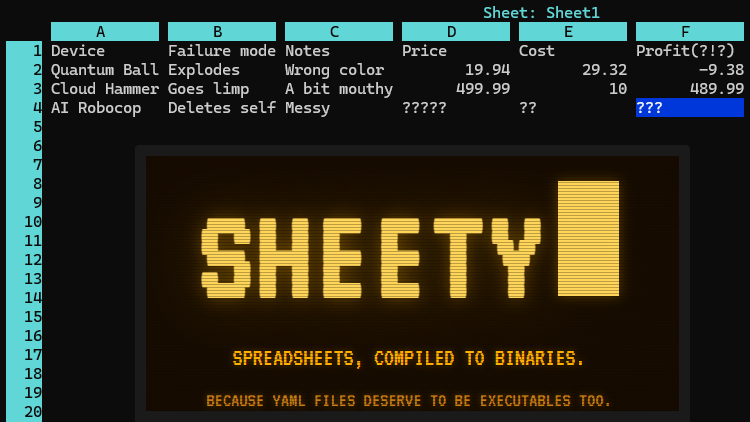
Ever wanted a spreadsheet as an executable with a built-in terminal interface? No? Well, that’s a pity because [Roberto Alsina]’s Sheety project does exactly that.
Sheety compiles spreadsheet definitions into a self-contained, executable binary with zero runtime dependencies. It presents a simple terminal application (with mouse support) in which one can browse and edit data and formulas with a simple interface. As far as formats go it can import and export Excel files, or a human-readable .yaml file.
When Sheety runs, the data and formulas defined are compiled into a self-contained executable with the formulas baked in, and that’s actually what one sees and uses. If a formula gets changed in the UI, a new and updated version is created on the fly to reflect the changes.
Sheety is perfectly functional, though it does have some limitations. Can the display width of cells be resized? They cannot. Does anyone actually need this? Probably not, as [Roberto] happily admits. Is it a fun project? Absolutely.
Be warned that while Sheety supports the Excel format, it understandably doesn’t support every single function Excel has added in the over forty years it has been around.
Sheety is written in Crystal and the GitHub repository has everything you need if you’d like to give it a try for yourself.












For viewing a spreadsheet in a terminal and even playing with the formulas, this looks very useful! Given the right bash command, this could be used ro view uncompiled excel files on the fly. I’d use it if I wouldn’t simply have a windows machine with MSoffice nearby.
Anyone remembering dBase III+?
Yes!
Wasn’t fox also abouty to make executables?
Abouty = able
Only because it’s still in production where I’m employed, it was built long before I was of working age.
In former East Germany dBase II was called Redabas. :)
Have fun opening these spreadsheets after 10 years.
Er…why? Sheety compiles spreadsheet definitions into a self-contained, executable binary with zero runtime dependencies.
Yeah because linux has a tradition for running old executables without any problems. NOT
There have been so many breaking changes to even basic APIs in the past 10 years. Usually most of this is hidden behind libc, but I’d guess that no dependencies also means no libc.
And running an executable for old libc on new libc is a pain in the ass by its own.
Just go ahead, pull some simple old package without dependencies from debian or whatever you like, extract it to some temp folder and see how it fails.
A binary in ELF format with no system call usage beyond filesystem interaction and only a terminal interface should only require POSIX calls that are guaranteed to remain unchanged basically forever (
stat()/fstat(),open(),seek(),read(), etc.), plus terminal escape sequences that haven’t changed much in 30 years. (Or LONGER, the mouse support is probably the newest feature dependency.)I’m with you on library changes breaking software — it’s one of the reason AppImages are a bad idea, because building for the OLDEST system possible and relying on forward compatibility to remain supported on modern systems is a nice fantasy, but doesn’t work in practice. But the degree to which that’s a problem is proportional to the complexity of the application, and the range of libraries it depends on. A simple terminal program that’s only linked with libc and maybe libm isn’t in much danger of losing access to the APIs it uses.
Using older software is actually a bigger problem with UN-compiled code. Building a 10+ year old codebase with a modern compiler can be a nightmare, since they’ll frequently do things that modern compilers treat as errors. (Storing and passing around function pointers without their arguments explicitly defined, or with mismatching argument types, is a big one. Newer compilers will shut that right down.) But if a binary is already built, your chances are a lot better.
Actually the syscall interface is very stable. New syscalls and syscall parameters are added, but old functionality is not broken. When building Glibc, you give it access to new kernel headers and tell it what the oldest kernel is that shall still be supported. Workarounds for missing functionality in older kernels is then omitted.
Towards the application Glibc is also extremely good at staying compatible. If the behavior of a function changes, a copy is made and a version is attached to the symbol. Old binaries will use the old symbol and new binaries will use the new one. E.g. timer_create currently exists in three versions: one with GLIBC_2.2.5 symbol, one with GLIBC_2.3.3 symbol, and one with GLIBC_2.34 symbol.
Then you are still left with an ABI mess; armel, armhf, arm64 or even x86/amd64 as 32bit support is being removed from distros. And Risc V is looming around the corner to add a few new tuples.
Unless you want to pull out Qemu in some years it’s a bad idea to represent data as code. And when you have to do it please use something that is actually stable, like (I never through I’d say that) javascript. You can still run old HTML with Javascript from 1997 in modern browsers.
Don’t get me wrong, I’m not a web guy, but backward compatibility is better there.
You can compile to fully static binaries which will work FINE 25 years from now.
That’s why I mainly target MS-DOS for my release binaries, because I know in 100 years it will still run in some fork of DOSbox.
You know how many businesses have processes that involve pasting data into an excel sheet and pulling the results from various formulas back out? If this could be made up automate those sorts of processes without fully rebuilding the logic… It would be super useful. Or if it could fully extract the logic and apply it to a dataset elsewhere? Gold.
I second that.
I would wager no less than 1/7th of the world economy runs on some kind of spreadsheet with formulas, with the result of calculations copy-pasted back and forth. (personal obervation, some places who madly outsourced their wares in the 2000s now rolling back to their original spreadsheets and virtual sneakernets, ie, emailing those spreadsheets, because it proved to be a stable and simple solution – everyone know Excel and has email).
On a separate thought, I’ve looked into exactly that, ie, extracting all the formulas and porting them elsewhere, and I’ve automated that, too, with some VBA scripting that i copied from stackoverflow. I was lucky, formulas were fairly simple, and data entry was fairly consistent year to year. The budget was thin, so I went with the static-HTML/JS solution; it wasn’t the best, just the simplest one I could generate from Excel directly, and run locally without needing entire web server. We’ve also looked into sending data for storage and doing basic/naive stats/audit, since one can generate SQLite database inside the browser (all major browsers now come with SQLite baked in), but the project was abruptly cut short.
(as a side note, Excel has “Export to HTML” feature, which should be avoided at all costs; it seem to be some kind of forgotten/unmaintaned legacy wish fulfillment, and generates horribly overbloated static HTML – no formulas, just static representation of each sheet, terrible inline formatting, etc. If one decides to go that route, he will be spending million workhours tidying it all up; I wasted few hours looking through the HTML goo looking for recyclable things, no, it is mostly garbage in garbage out; go with the VBA extraction instead and skip this unnecessary step).
It could do useful things if someone wants it to.
I would so like to send data to my coworkers in this form. Just for a laugh. I don’t think any of them would figure out how to open it though. Unless I could link it with Wine to make a .exe file… Hmmm…..
Can I input to a few specific cells and get the result back in a bash oneliner? That sounds like a great use case.
I think the article is being a too hard on Sheety’s creator. “Baking” a light weight, stand-along spreadsheet like app may well have solid applications. If Sheety doesn’t already, an option to turn off the ability for end users to update formulas would be helpful. Then you can deliver fixed, tested functionality to end users.
Unless your users have a crystal toolchain, you are limited to editing values because editing formulas crashes :-)
It looks exactly like Lotus 1-2-3
That is not an accident :-)
The reason is self-explaining, no dependencies.
Makes me think if the original DOS Lotus 123 wouldn’t have grown into a behemoth, it could have found second life running on baremetal ESP32-P4. I see no reasons why it couldn’t, while doing, say, mundane/boring General Ledger kind of things.
I run Lotus 1-2-3.exe V1.1a (security hacked) running under Magic DOSbox lite on an Android 15 tablet with 4G RAM and 4G virtual flash… I have an amortization spreadsheet written 45 years ago just as to show the code actually functioning.
One of my projects (1995, I think, or maybe 1997) we weren’t sure which one will win out, so maintained two copies of the same spreadsheet in Lotus 123 and Excel. The differences were mostly superficial, since it was tallying up an bracketing data, but I remember Lotus handling thousands of rows no problem, whereas Excel kept crushing. There was massive memory leak issue in Excel that was rendering it useless, so we had to divide data into arbitrary chunk that were later rolled into one massive tally. Long story short, Lotus was superior product and could easily go rounds around Excel at the time.
Funny enough, I still have floppies with Lotus backups, test data, obviously. Not sure if they are still readable, by now probably deteriorated beyond recognition, but I am kind of curious. Might as well dig them up this weekend and give it a try. Yes, I also have my very first computer I ever bought, Windows 3.11 and all, and it still has Lotus 123 installed : ] It might even run.
… Ah, remembering CA-Clipper, code blocks, and the macro (&) operator… Passing the DOS run line to the Clipper exe could produce a nice utility to calculate a math expression from the run line.
Sheeeet (as said by Clay Davis in The Wire). That should be the start up sound effect.
Could be an interesting application for some use cases.
I’d rather see spreadsheets (and word processors) use databases instead of the usual zip archive. What possibilities would that open up…
Spreadsheets are already capable of being used to run full game engines as a fookin Easter Eggs almost a more than two decades now. A better question would why hasn’t this been done or has it.
http://excelunusual.com/