Floating-Point Addition And Subtraction On Intel’s 8087

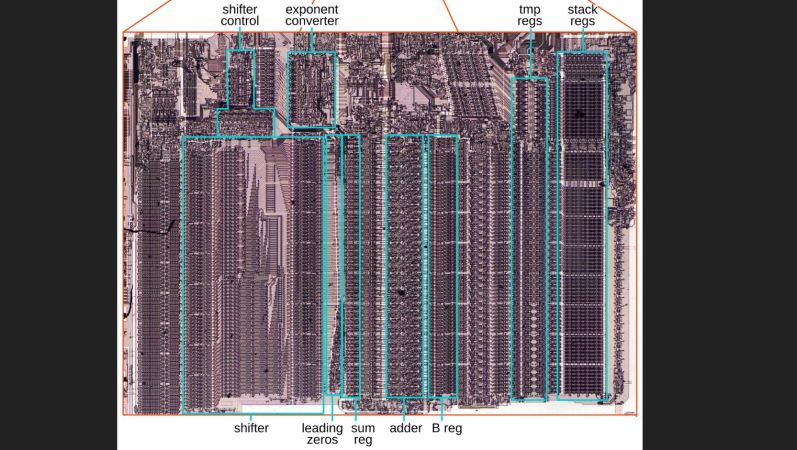
Although you can do basic floating point format operations like addition and subtraction just fine on any CPU, having specialized hardware for it can provide a significant speed boost. Here Intel’s 8087 was the first mainstream floating-point coprocessor to provide this option to a wide audience, with [Ken Shirriff] recently reverse-engineering using an 8087 die how these basic operations were implemented.

The real-world speed-up of even simple operations like adding two floating point numbers compared to the 8086 CPU was on the order of a hundred times, which is very relevant the moment you start doing interesting things with spreadsheets, not to mention rendering 3D scenes in CAD software or even games.

As always, the devil is in the details, with sneaky infinities and edge cases also providing the biggest potential for speed-ups in dedicated silicon, along with the large circuitry spent on the shifter. With floating point values being very much about aligning values with shifting by a number of bits, this circuitry along with the detecting of over- and underflows is the key element why the 8087 and its successors were so crucial in making floating-point operations at all feasible in PC applications.

How this shifting works in theory is detailed in the article by [Ken], along with how the 8087 implements this in its circuits. Naturally, a large part of this is implemented in microcode, the listing for which is also provided. From this it’s quite clear how what seems like a simple set of operations is actually quite complex, making even the now much maligned x87 ISA an improvement over doing it all in integer-based software.

Trying To Get Linux Running On A Nokia E6

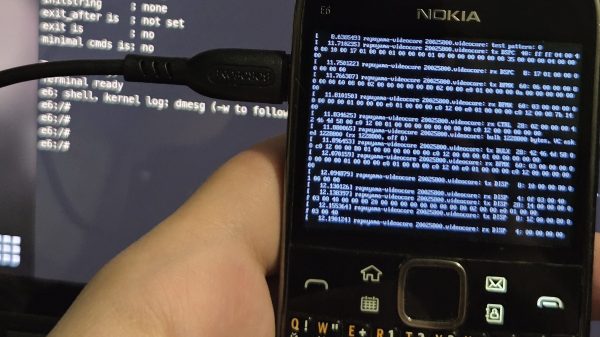
The Nokia E6 is a smartphone from back in the old days when Symbian was a thing. [fluffleswaffled] has been doing the work to get the ancient handset running Linux instead, because that’s ultimately cooler than what the phone shipped with out of the box.

There isn’t an unlocked bootloader on the E6, so instead, [fluffleswaffled] used an altogether different route to boot Linux. A Symbian app is used to load the kernel and device tree into RAM, at which point the MMU and caches are turned off and the device jumps into Linux. It’s a one-way trip, from which there is no way back to Symbian without a power cycle. The setup nets a terminal on the phone’s own screen, and the hardware keyboard and touchscreen are functional. The display is controlled by a Broadcom VideoCore III, with [fluffleswaffled] capturing messages from Nokia’s original display driver to create a custom kernel driver that replays them.

There’s an issue, though. The phone doesn’t stay in Linux land for long — it always resets within a couple minutes of booting into the alternative OS. [fluffleswaffled] believes this is because the phone’s baseband chip is supervising the application processor, and killing things once it’s detected that the Symbian mobile stack has stopped running. They’re hoping that someone with experience with Nokia basebands or the relevant hardware can point them in the right direction to get this hack running for more than 3.5 minutes at a time.

There probably isn’t a great deal of utility in getting Linux running on a 2011 smartphone, but we love the hustle nonetheless. We’ve seen this done before, though, and it’s always interesting to learn what it takes to get the OS booting on a new platform. If you’re whipping up similar hacks in your home lab, don’t hesitate to let us know on the tipsline.