Hackaday Podcast Episode Ep 358: Soft Displays, LCD Apertures, And Mind Controlled Toys

For today’s podcast Elliot Williams is joined by Jenny List, and we’re pushing the limits of mobile connectivity as Jenny’s coming to us from a North Sea ferry. We start by looking forward to the upcoming Hackaday Europe, with a new location in Lecco, Italy. We hope you can join us there!

There’s a bumper collection of hacks to talk about, with a novel soft pneumatic display, a CRT-based VR headset, an LCD photographic aperture, and a novel time-of-flight sensor array in the line-up.Then there are 3D printed PCBs, Scotch tape for a lens, and a project to map farts. We kid you not. Finally we wrap up with mind controlled toys, and a a treatise on requirements and specifications in an age of AI.

Or download it yourself in glorious 192 kbps MP3.


Continue reading “Hackaday Podcast Episode Ep 358: Soft Displays, LCD Apertures, And Mind Controlled Toys”
HD On A VHS Tape? How Did They Do It?

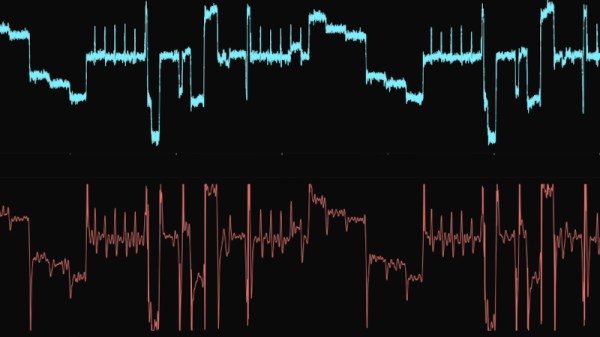
There was a period from the 1970s to the mid-2000s or so when a fixture underneath the family TV set was a VHS videocassette recorder. These were a masterpiece of cramming a color video signal into the restricted bandwidth of an affordable 1970s helical-scan tape deck, which was achieved by clever use of frequency shifting and FM carrier modulation. Very few of us will have had the ultimate iteration of the VHS format though, W-VHS, which managed the same trick but with HD video. But how? [Superchromat] is here with the answer.

W-VHS used a frequency modulated carrier, but instead of splitting luminance and chrominance in the frequency domain like its VHS ancestor, it did so in the time domain in the same way as some 1980s satellite TV standards did. Each line first contained the color information, then the brightness. Thus it sacrificed some color resolution and a little horizontal image resolution, but kept a much higher vertical image resolution. In the video below the break we go into significant detail about the compromises required to pull this off, and if you watch it through you’ll learn something about magnetic tape recording as well as FM.

The W-VHS standard is largely forgotten now as a last hurrah for the format, but it’s still in the sights of the VHS Decode project. The work in this video is helping them retrieve the highest quality images from these tapes, by capturing the raw RF from the heads and using DSP techniques to decode them.

Continue reading “HD On A VHS Tape? How Did They Do It?”

The Raspberry Pi As A Studio Camera

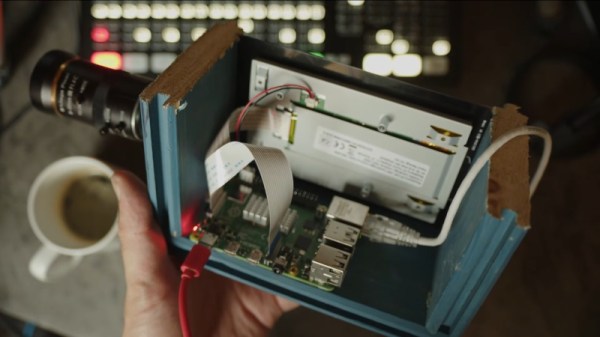
The Raspberry Pi has brought digital camera experimentation within the reach of everybody, with its combination of an accessible computing platform and some almost-decent camera sensors. If there’s a flaw in the Pi as a camera though, it lies in the software, which can be slow and frustrating to use. [Martijn Braam] is here with an interesting project that might yield some useful results in this direction, he’s making a Raspberry Pi studio camera.

His camera hardware is very straightforward, a Pi 5 and touchscreen with the HD camera module in a rough but serviceable wooden box. The interesting part comes in the software, in which he’s written a low-latency GUI over an HDMI output camera application. It’s designed to plug into video mixing hardware, and one of the HDMI outputs carries the GUI while the other carries the unadulterated video. We can see this used to great effect with for example OBS Studio. It’s for now a work in progress as you can see in the video below the break, but we expect that it can only get better.

The video below exposes the obvious flaw in many Pi camera setups, that the available lenses don’t match the quality of the sensor, in that good glass ain’t cheap. But we think it’s one to watch, and could provide competition for CinePi.

Continue reading “The Raspberry Pi As A Studio Camera”

A Novelty Clock Makes The Best Tiny Mac Yet

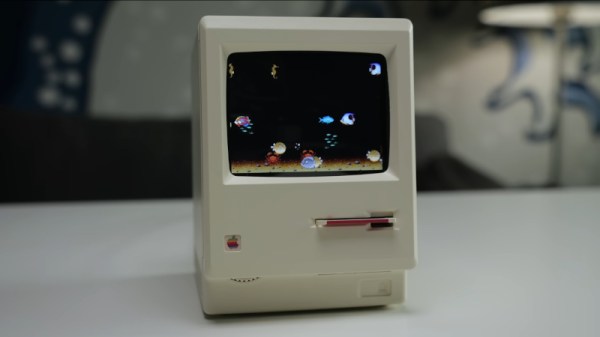
We’re lucky enough in 2026 to have cheap single-board computers fast enough to emulate machines from the 1990s, touching on the 32-bit era. We’ve seen a few projects as a result, emulating the Apple Macs of the 68000 era, but even with the best 3D printing, they can disappoint when it comes to the case. So when [This Does Not Compute] saw a novelty alarm clock using a very well-modelled mini replica of an early Mac, putting a Mac emulator in it was the obvious way to go.

The project uses a Raspberry Pi with a small colour LCD.  The video below the break takes us through the process of gutting it and mounting the Pi and display on a custom 3D-printed bracket. In an unexpected touch, parts of the original LCD are used to give the curved corners, which owners of an original Mac will remember. It may have a little further to go in that its fake floppy drive is begging to be converted to an SD card slot, and it has a now-unused brightness dial. But we’d say it’s one of the best little Mac emulators we’ve seen so far, if perhaps not the smallest.

Continue reading “A Novelty Clock Makes The Best Tiny Mac Yet”

Nobody Can Complain When You Fart, If It’s For Science!

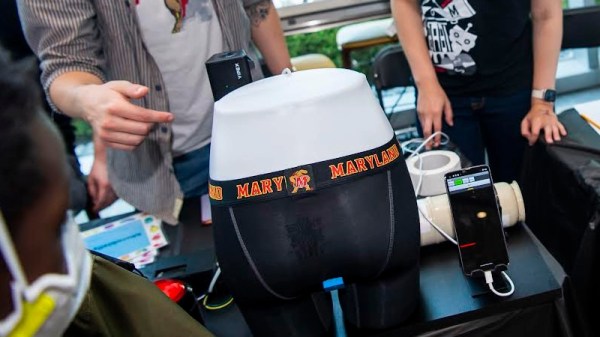
There are some stories that you can tell a writer has enjoyed composing, and, likely, whoever wrote the piece for Medical Express reporting on new smart underwear to measure human flatulence was in their element. It follows a University of Maryland project to create a clip-on hydrogen sensor that can be attached to a set of underwear to monitor gaseous emissions.

Lest you think that this research has a non-serious tone to it, it seems that gastroenterologists have incomplete data on what constitutes normal activity. The aim of this research is to monitor a large number of people to create a human flatus atlas that will inform researchers for years to come. Better still, they’re recruiting, so if you’re a regular Johnny Fartpants who misspent their youth lighting farts while drunk and would like to atone, get in touch.

We know that gut problems can be no fun at all, so fart jokes aside, if this research makes advancements in their study, it can only be a good thing. Meanwhile, if you are one of those superproducers they mention, perhaps you need to build the FartMaster 3000.

Vintage Film Editor Becomes HDMI Monitor

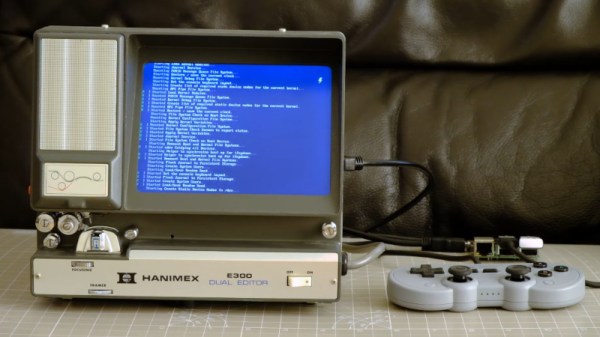
With the convenience of digital cameras and editing software, shooting video today is so easy. But fifty years ago it wasn’t electronics that stored the picture but film, and for many that meant Super 8. Editing Super 8 involved a razor blade and glue, and an editing station, like a small projector and screen, was an essential accessory. Today these are a relatively useless curio, so [Endpoint101] picked one up for not a lot and converted it into an HDMI monitor.

Inside these devices there’s a film transport mechanism and a projection path usually folded with a couple of mirrors. In this case the glass screen and much of the internals have been removed, and an appropriate LCD screen fitted. It’s USB powered, and incorporates a plug-in USB power supply mounted in a UK trailing socket for which there’s plenty of space.

There’s always some discussion whenever a vintage device like this is torn apart as to whether that’s appropriate. These film editors really are ten a penny though, so even those of us who are 8 mm enthusiasts can see beyond this one. The result is a pleasingly retro monitor, which if we’re honest we could find space for ourselves. The full video is below the break. Meanwhile it’s not the first conversion we’ve seen, here’s another Hanimex packing a Raspberry Pi.

Continue reading “Vintage Film Editor Becomes HDMI Monitor”

The Best USB To VGA Converter For The Job

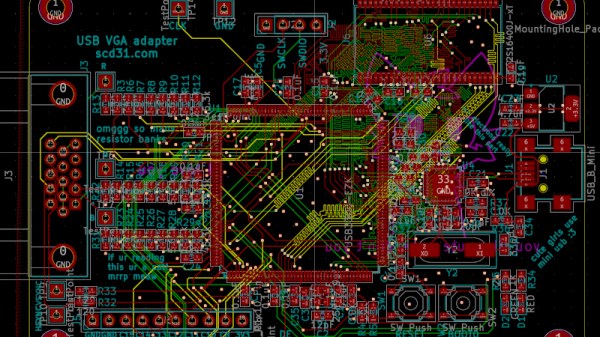
There are many adapters, dongles, and cables designed for interfacing display standards, and no doubt some of you have them in the glue of your entertainment system or work space. They’re great for standards, but what about something that’s not quite standard? [Stephen] has an arcade cabinet with a CRT that runs at an unusual 336 by 262 pixel resolution. It can be driven as 320 by 240 but doesn’t look great, and even that “standard” resolution isn’t supported by many dongles. He’s shared the story of his path to a unique USB to VGA converter which may have application far beyond this arcade machine.

We follow him on a path of discovery, through RP2040 PIOs, simple resistor ladder DACs, and home-made kernel modules, before he arrives at GUD, a USB display protocol with its own upstreamed Linux kernel driver. It’s designed to be used with a Raspberry PI deriving an LCD or HDMI display, but for his task he implemented the protocol on one of the more expensive STM32 series microcontrollers. The result after several false starts and some fiendish PCB routing is a standalone GUD-based USB-to-VGA converter that delivers perfect 34-bit colour at this unusual resolution, and also presumably others if required. It’s a worthwhile read for the many hints it gives on the subject of driving displays, even if you’re not driving an odd cabinet monitor.