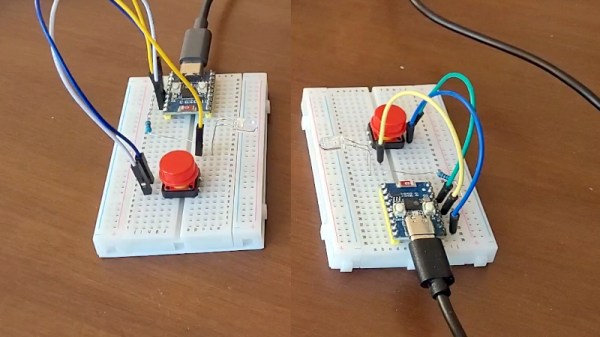
Every now and then in our travels we come upon a project with such an obvious need that it’s almost a surprise nobody has thought of doing it before. So it is with [Elehobica]’s project, an audio recorder for S/PDIF audio streams. It’s the device you could have used, years ago!
S/PDIF, or its optical fiber cousin TOSLINK, is the digital output you’ll find on the back of Hi-Fi equipment, it’s a serial encoding of an uncompressed digital audio data stream dating from the era when CDs were new. Its relative simplicity may be what’s given it longevity — it’s easy to implement so it plugs into pretty much everything.
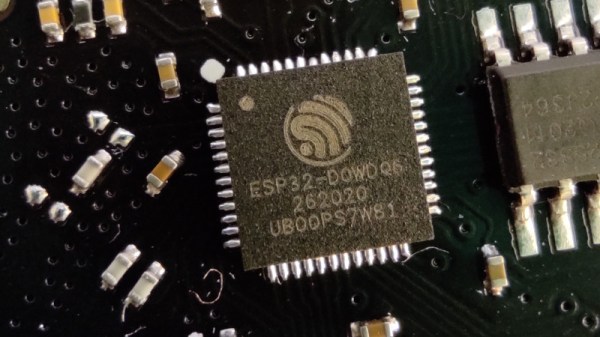
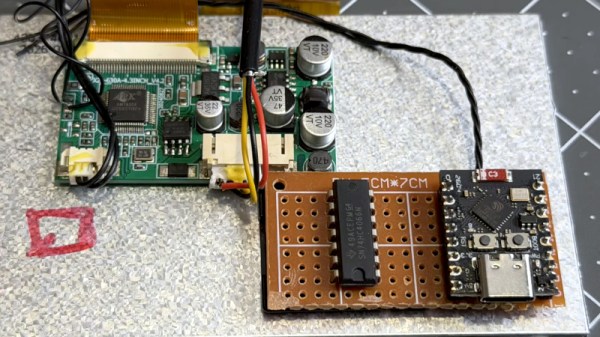
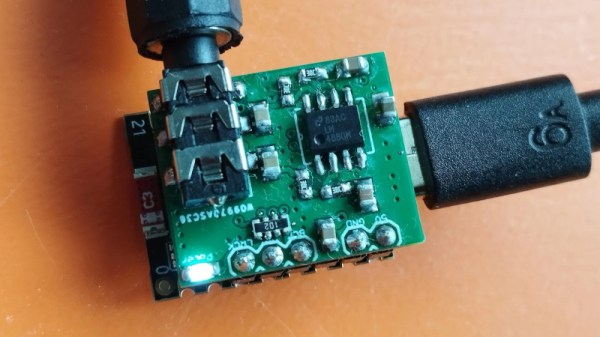
Perhaps back in the day it might have been a pain for an 8-bit microprocessor to handle, but in 2026 it’s no bother for a Raspberry Pi Pico. The project is a small PCB with the Pico, a few interface components, and an SD card socket, and it sends what it hears on the input to the card as WAV files. We particularly like its smart sample rate and bit depth detection, and the way it cuts up tracks based on periods of silence. If you work with SPD/IF, this is going to be a useful tool.
Since the first electronic hobbyist wired up a multivibrator to a keyboard many decades ago, electonic synthesisers have been a staple of home-made projects. Now with the proliferation of significantly powerful microcontrollers it’s possible to make a synth that surpasses many of the high-end models from days gone by.
Among those we’ve seen of late perhaps none does this better than [Povle] with their Spark portable keyboard. It’s a tiny thing that reminds us of those little Casio synths of the 1980s, but in its 3D printed case it packs a load of features.
Hardware wise it’s an ESP32 with a 3D printed keyboard using keyswitches. There are a load of pots for sound adjustment, and buttons for functions. A small OLED display shows what’s going on. Software wise it relies upon the AMY synth library, and there are repositories for both its hardware and software.
There’s a demo video we’ve placed below, and in it you hear the keyboard at work. And here maybe we’ve saved the best until last, because alongside being a fully featured synth, it’s also a sampler and a Bluetooth MIDI keyboard. Is there nothing this thing can’t do!
Here at Hackaday we cover the world of retrocomputing, which means that we see all manner of older computers in our everyday work. We might even claim that we’ve seen them all, were it not that every now and then something comes along which surprises us. [Tynemouth Software] has done just that, with an unexpected Commodore. It’s a Commodore 4064, something that was new to us, but which is best described as a Commodore 64 in a PET case. He’s bringing this one back to life.
For those with weak early-Commodore-fu, maybe it’s worth a quick recap. The PET was Commodore’s big hit from the late 1970s, and it took the form of an all-in-one machine with a CRT display built in. They packed a 6502, BASIC, blocky monochrome graphics, and unexpectedly an IEE-488, or GPIB port. Meanwhile the 64 was the company’s smash hit early 1980s home computer in a compact console design, with high-res color graphics for the time on your TV, and a synthesizer chip that’s still legendary in 2026. Combining a 64 mainboard with the super-robust PET case appears to have been part of Commodore’s business and education offerings.
This one appears to have been in the damp, because that board is definitely more than a bit grubby. After a lot of debugging its power and video circuits, including an unexpected sync splitter board to drive the non-composite monitor, he narrows down the problem to a dodgy ROM and some memory errors.
It seems there’s some question in Commodore enthusiast circles as to whether these machines were assembled from surplus PET parts, but he puts that one to bed by pointing out the custom metalwork and the few custom Commodore 64 features on the board. All in all it’s an interesting dive into an unusual 8-bit machine.
We’re used to seeing technologies move with the times, and it’s likely among Hackaday readers are the group who spend the most time doing that and are most aware of it. There’s one which we’ll all be aware of which has quietly slipped away for most of us almost without a word, I speak of course of 32-bit computing. For most of us that means 32-bit computing on x86 machines, and since the 64-bit x86 instruction set we all now use has been around for nearly a quarter century, its 32-bit ancestor is now ancient history.
In the world of software that means we’re now in an era of operating systems and browsers dropping 32-bit support, so increasingly keeping a 32-bit machine up to date will become a challenge. That sounds like something just painful and difficult enough to subject to a Daily Drivers piece, so just how practical is it to use a 32-bit machine for my daily work in 2026?
2005 Just Gave Me A Computer
Not looking too bad for a 21 year old laptop.
On my desk I have a Dell Latitude D610. It was made in about 2005 in the days when Dells were solidly made, and with its 1.6GHz Pentium M and 2Gb of memory it represents roughly the final throw of the dice for a 32-bit Intel laptop. Just over a year later it would have been replaced by one of the Intel Core series with the 64-bit instructions grudgingly adopted from AMD, but at the time it was a respectably useful machine.
It came into my possession about eight years ago when I used it to test the Revbank bar tab software for my hackerspace, and for the past six years it’s languished unloved in my box there. It’s got an ancient Ubuntu distro on it, so my first task is to pick a 32-bit replacement from 2026. That’s now a dwindling selection, so it’s time to start digging though some minimalist distros. With the supply of those based on mainstream distros drying up as they drop 32-bit support, it’s time to look into more esoteric offerings. This fits well with the ethos of this series, we’re all about the unusual here.
Cutting out the mainstream based distros certainly narrows the field, and out of the promising contenders in the minimalist field, I went for SliTaz. It uses Busybox and the Openbox desktop, that runs from RAM. I was looking for good application support in the repos, and this distro has the things I need. Download it, stick it on a USB stick, and let’s see what it can do. I know one thing, I wouldn’t have been able to download that ISO in five seconds with the internet connection I had in 2005. Continue reading “Jenny’s Daily Drivers: Going 32-Bit With SliTaz In 2026”→
Odd things sometimes pop up in the feed of a Hackaday scribe, not hacks as such, but stories with a meaning in our community. One such that’s come our way from a variety of sources over the last week features Ursa Ag, a small machinery manufacturer based in Alberta, Canada. The reason they’re in the news is because they have gained bulging order books by taking on the likes of John Deere with a tractor more like the one their customers’ parents bought back in the ’80s or ’90s. It’s a basic machine without much in the way of electronics, and certainly without all the DRM lockdown that has made those big manufacturers so unpopular.
It’s clear that Hackaday isn’t in the business of shilling Canadian tractors, but it should be of interest to readers because it represents an alternative route to challenge the DRM lockdowns than the legal and consumer routes we’ve previously reported on. The Ursa Ag tractor may be as niche Albertan as a Corb Lund CD, but it’s not the tractor itself but the idea which matters. We doubt much sweat will be shed by John Deere execs over a tiny company out on the prairies making a basic spec tractor, but given that Ursa Ag customers are reported as buying them because they have no DRM, the prospect of larger upstart competitors taking note and offering machines without it may cause them some sleep loss. The free market is held up to outsiders as perhaps the most American of ideals, and for it to eventually prove to be the means by which something intended to limit it might be defeated, is sweet justice indeed.
The problem with tube based audio is that it has so often been hijacked by people for whom the bragging rights of having a tube amplifier outweigh the benefits, or the sheer fun of building the thing. [Bettina Neumryr] makes a speciality of building projects featured in old electronics magazines, and her latest, a tube amplifier from 1955, is a fantastic antidote to the gold-plated silliness of audiophile tube amplifiers.
Design wise it’s relatively straightforward, with a preamplifier before a two-tube transformerless splitter circuit driving a push-pull output. She dives into the circuit a little, noting its feedback circuit to the cathode of the first splitter tube. There’s an accompanying power supply, a classic tube rectifier design that incorporates a hefty low-pass filter with a giant choke.
We particularly like her choice of chassis — while it’s possible to pay silly money for a tube chassis in 2026 she’s taken a much more down to earth approach with a pair of baking trays. We’re being honest here, they look surprisingly good. Component choices are limited by what’s available so most parts come from the junk box including the output transformer which causes her issues later. There’s a lot of mumbo-jumbo about tube amplifier layout, and she wisely sidesteps some of it.
The result after a few mishaps and a bit of unintended oscillation, is an amp which shows promise, but has distortion due to that transformer. We think she’ll have no problems sourcing a better one, which should bring that distortion figure into the acceptable range. You can watch the whole video below the break, and if that’s got you hooked, you can see one of our own youthful follies.
We use CAD packages in our 3D work, and it’s likely that many of us have become annoyed by the limitations of controlling the view of a 3D object using a 2D interface, our mouse. Joystick-like 3D controllers exist for this purpose, but [David Liu] found them inconvenient. He tried a trackball, but that didn’t improve matters. His response was to take the trackball and change the way it controlled the software, turning it from the equivalent of a ball rolling over a surface to a ball representing the object on the screen itself. He can turn and rotate the object intuitively just by moving the ball.
He started with a Kensington off-the-shelf trackball and adapted its electronics and handy twin optical sensors such that it worked in the required fashion. There was a lot of iterating and tuning to get the control feeling right, but he’s ended up with a peripheral that replaces both mouse and 3D joystick, and leaves the other hand free for those keyboard shortcuts.