A Nostalgic Look At A Kid’s Shortwave Receiver

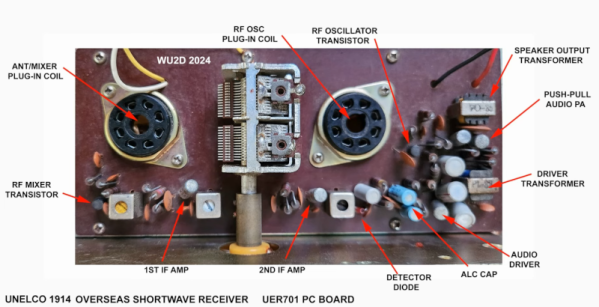
[Mikrowave1] had a Unelco shortwave receiver as a kid. This was a typical simple radio for the 1960s using germanium and silicon transistors. It also had plug-in coils you had to insert into sockets depending on the frequency band you wanted to receive.

While simple AM radios were all the rage, they didn’t have to operate at higher frequencies. [Mikrowave1] shows some of the design tricks used to allow the radio to operate in the upper part of the spectrum. Otherwise, the radio is the usual superhet design using lower frequency germanium PNP transistors in the IF stage. You get a look inside the radio and a peek at a similar schematic along with notes on where the radio is different.

But how does it work? For an old single-conversion receiver, it works well enough. Of course, when the radio was new, there were many more interesting stations on shortwave. Today, he had to settle for some ham radio stations and CHU, the Canadian time and frequency station.

There were six pairs of coils built on top of tube sockets. The coil was actually more than a coil. There were other components in the case that adjusted other radio parameters based on the frequency.

[Mikrowave1] has been on a toy kick lately, and we’ve enjoyed it. This radio looks simple compared to the Radio Shack one that every kid wanted in the 1970s. Well. Every hacker kid, at least.

Continue reading “A Nostalgic Look At A Kid’s Shortwave Receiver”
Secrets Of The Old Digital Design Titans

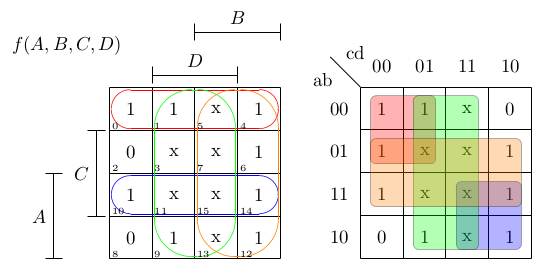
Designing combinatorial digital circuits seems like it should be easy. After all, you can do everything you want with just AND, OR, and NOT gates. Bonus points if you have an XOR gate, but you can build everything you need for combinatorial logic with just those three components. If all you want to do is design something to turn on the light when the ignition is on AND door 1 is open OR door 2 is open, you won’t have any problems. However, for more complex scenarios, how we do things has changed several times.

In the old days, you’d just design the tubes or transistor circuits you needed to develop your logic. If you were wiring up everything by hand anyway, you might as well. But then came modules like printed circuit boards. There was a certain economy to having cards that had, say, two NOR gates on a card. Then, you needed to convert all your logic to use NOR gates (or NAND gates, if that’s what you had).

Small-scale ICs changed that. It was easy to put a mix of gates on a card, although there was still some slight advantage to having cards full of the same kind of gate. Then came logic devices, which would eventually become FPGAs. They tend to have many of one kind of “cell” with plenty of logic gates on board, but not necessarily the ones you need. However, by that time, you could just tell a computer program what you wanted, and it would do the heavy lifting. That was a luxury early designers didn’t have. Continue reading “Secrets Of The Old Digital Design Titans”

Remembering Seymour Cray

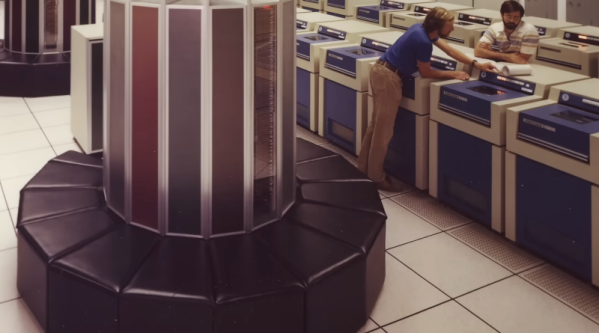
If you think of supercomputers, it is hard not to think of Seymour Cray. He built giant computers at Control Data Corporation and went on to build the famous Cray supercomputers. While those computers aren’t especially amazing today, for their time, they were modern marvels. [Asianometry] has a great history of Cray, starting with his work at ERA, which would, of course, eventually produce the computer known as the Univac 1103.

ERA was bought up by Remington Rand, which eventually became Sperry Rand. Due to conflict, some of the ERA staff left to form Control Data Corporation, and Cray went with them. The new company decided to focus on computers to do simulations for things like nuclear test simulations.

Continue reading “Remembering Seymour Cray”

DME With A Twist Of LimeSDR

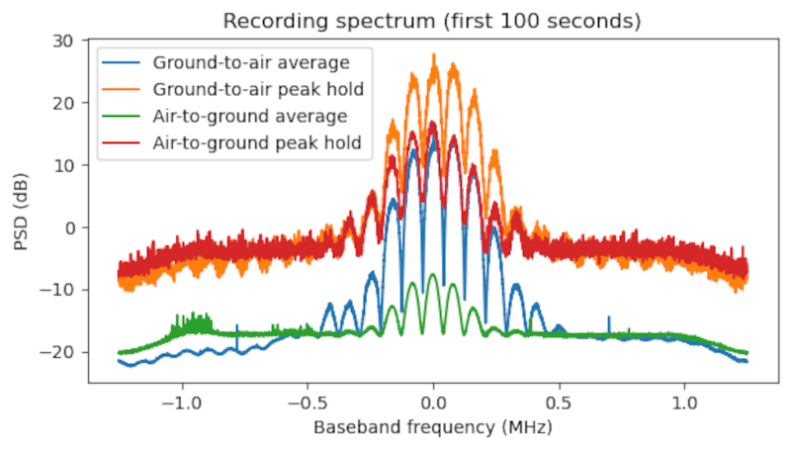
Navigating aircraft today isn’t like the old days. No more arrows painted on a barn roof or rotating airway beacons. Now, there are a host of radio navigation aids. GPS, of course, is available. But planes often use VOR to determine a bearing to a known point and DME — distance measuring equipment — to measure the distance to that point. DME operates around 1000 MHz and is little more than a repeater. An airplane sends a pair of pulses, and times how long it takes for the DME to repeat them. [Daniel Estévez] has been monitoring these transmissions with a LimeSDR.

Like most repeaters, the DME transponders listen on one frequency and transmit on another. Those frequencies are 63 MHz apart. This poses a challenge for some types of SDRs which have limits on bandwidth.

Continue reading “DME With A Twist Of LimeSDR”

Sharing 3D Printing With Kids

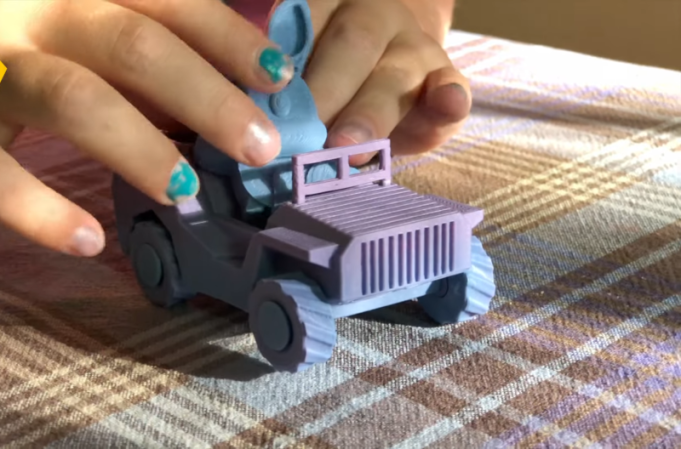
If you have a hobby, it is natural to want to share it with kids. If you are interested in 3D printing, you may even have kids who want to try their hand at printing without prompting. There are a number of “kid printers” aimed specifically at that market. Are they worthwhile? How old is old enough? [Everson Siqueirar] tries out a Kidoodle with this 6-year-old daughter, and the results are good, as you can see in the video below.

Impressively, his daughter [Sophie] was able to set up the printer with a little help. The build plate is very small and not heated. Apparently, a glue stick is necessary for bed adhesion. The printer has WiFi but also has a collection of models you can print without any internet connection.

Continue reading “Sharing 3D Printing With Kids”

How The Bell System Was Built

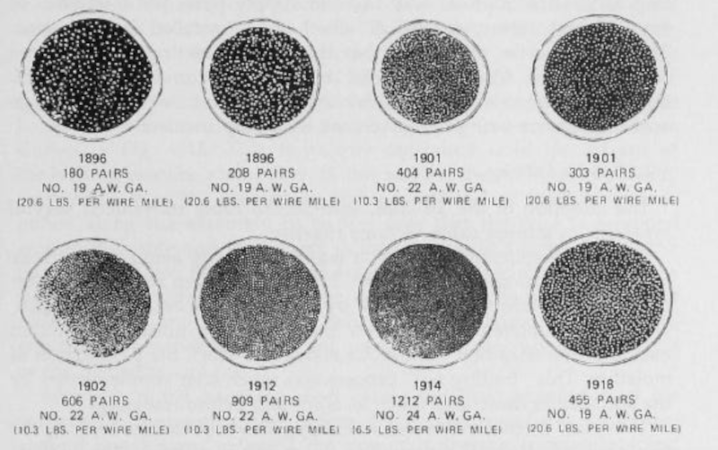
We’ve often thought that while going to the moon in the 1960s was audacious, it was just the flashiest of many audacious feats attempted and accomplished in the 20th century. Imagine, for a minute, that the phone system didn’t exist today, and you stood up in front of a corporate board and said, “Let’s run copper wire to every home and business in the world.” They’d probably send you for a psychiatric evaluation. Yet we did just that, and, in the United States, that copper wire was because of the Bell system, which [Brian Potter] describes in a recent post.

The Bell company, regardless of many name changes and divisions, was clearly a very important company. [Brian] points out that in 1917, it was the second-largest company in the United States and continued to grow, eventually employing a whopping 1% of the entire U.S. workforce. That’s what happens when you have a monopoly on a product that is subject to wild demand. In 1900, Bell handled 5 million calls a day. By 1925, that number was over 50 million. In 1975, it was just shy of 500 million. If Wester Electric — just one part of Bell — was its own company, it would have been the 12th largest company in the U.S. during the 1970s.

Continue reading “How The Bell System Was Built”

A 64-bit X86 Bootloader From Scratch

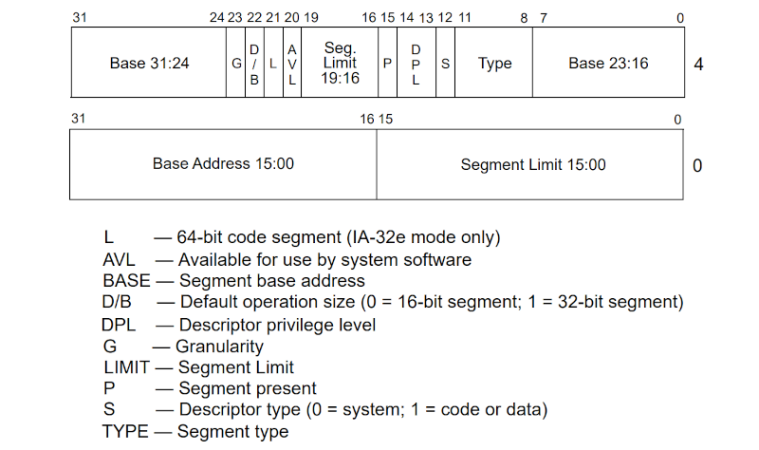
For most people, you turn on your computer, and it starts the operating system. However, the reality is much more complex as [Thasso] discovered. Even modern x86 chips start in 16-bit real mode and there is a bit of fancy footwork required to shift to modern protected mode with full 64-bit support. Want to see how? [Thasso] shows us the ropes.

Nowadays, it is handy to develop such things because you don’t have to use real hardware. An emulator like QEMU will suffice. If you know assembly language, the process is surprisingly simple, although there is a lot of nuance and subtlety. The biggest task is setting up appropriate paging tables to control the memory mapping. In real mode, segments have access to fixed 64 K blocks of memory unless you use some tricks. But in protected mode, segments define blocks of memory that can be very small or cover the entire address space. These segments define areas of memory even though it is possible to set segments to cover all memory and — sort of — ignore them. You still have to define them for the switch to protected mode.

In the bad old days, you had more reason to worry about this if you were writing a DOS Extender or using some tricks to get access to more memory. But still good to know if you are rolling your own operating system. Why do the processors still boot into real mode? Good question.