Beating The Heat With Geothermal Cooling

geo

A while back, [Erich]’s oil heating system was due for a few repairs. Given the increasing price of fuel oil, and a few incentives from his Swiss government, he decided to go with a more green heating solution – geothermal heating. The system works well in the winter, but it’s basically useless in the summer. [Erich] decided to put his 180 meter investment to work for the summer heat, and made his geothermal heating system into a cooling system with a fairly low investment and minimal cost.

The stock system works by pumping cold liquid from [Erich]’s under floor heating into the Earth. In winter, the surface is always colder than the ground, thus heating [Erich]’s home. In the summer, the situation is reversed, with the cool earth insulated by the baked surface. All that was required to reverse the heating system was a few slight modifications to the heating controller.

Stock, [Erich]’s heat pump controller doesn’t have the capability to run the system in reverse, so he turned to a Freescale board to turn the compressor off and the pump on. With the additions, [Erich] is using 50 Watts to pump 1.5 kW of heat directly into the Earth below, a fairly efficient cooling system that’s basically free if you already have a geothermal setup.

Building An Aquarium Into Your Walls

built-in-aquarium

We looked through the build log for this in-wall aquarium and were a bit horrified by the before pictures. You look at the original basement photo and there’s wood paneling, an incredibly rusty plumbing stack, and good god what is that wire jumble hanging from the ceiling? But the project’s not about building codes, it’s about the infrastructure that supports this fish tank.

This corner of the basement has a window and the electrical panel in it. It needs to be this big in order to enclose that window, but that offered the opportunity to add in the aquarium while still allowing easy access for feeding and cleaning. Hot and cold water pipes were run over to the location for easy filling. There’s even a drain line running to a utility sink in a different part of the basement for easy cleaning.

This seems like a bit of an upgrade when compared to the coffee pot fish bowl.

[via Reddit]

Angular Teardrop Camper Includes An Improvised Galley

01-vector-teardrop-camper


This teardrop camper is more about the angles than it is the curves. That makes construction quite a bit easier. But it’s not only the shape that catches our eye. This one’s built to last and has some nice amenities like a built-in sound system and a galley in the rear storage area. The project is quite old, but a good hack like this one is really timeless.

Head on over to the Desert Dawg website for a project overview. This proves to be quite a different build than the teardrop project from last week. The frame of the trailer started it’s life hauling around a boat. The long nose was cut and the cross pieces welded in place to form the final footprint for the camper which is large enough for a queen sized mattress. In addition to comfortable sleeping, the kitchenette revealed when you lift the back hatch will make cooking on the go a breeze.

[Thanks Doug]

Water Heater Controller Automates Garage Doors

water-heater-controller-automates-garage-doors

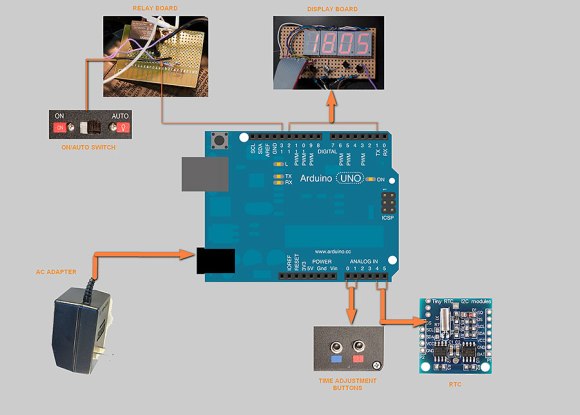
The black box mounted between two garage doors is actually a water heater controller. The entire assembly is a conglomeration of hacks which [Simon] added to his garage over the last four years. We’ll give you a quick rundown, but the entire story is told in his blog post.

Back when the house was built [Simon] was approached by the contractor who offered to throw in remote control for the garage door rollers for just 1500 Australian Dollars (about $1350 with today’s rates). That sounded quite steep to him. He managed to add his own remote control for about a third of the price. But there were a few missing features. Notably, a lack of a light that comes on when the doors open. He also didn’t like that the button inside the garage was on the motor, which is mounted quite high.

Years later his water heater controller needed a firmware upgrade from the manufacturer. Check this out: they replaced the entire controller rather than flashing the PIC 18F2321 inside. What a waste! But in this case [Simon] snagged the old unit, which included several mains rated relays. He connected one up to a light socket seen above, and outfitted several illuminated buttons on its original enclosure. Now he has the satisfaction of a light that comes on with when the door opens,  and shuts itself off after a preset delay.

Now his daughter wants smartphone control. But that’s as easy as hacking a Bluetooth headset.

Simple Bookends Wear Blemishes With Pride

curved-wooden-bookends


We have very few books hanging around the house which makes this small attractive assembly quite enticing. It was built by [Eric Whyne] who wanted to make sure the casual observer didn’t think it was store-bought. In choosing wood he tried to find a couple of show pieces with visually appealing flaws like the broken out knot seen on the bookend.

In addition to the blemish, he chose joinery techniques that would show off craftsmanship not generally found on mass-produced goods. And we’d say he succeeded. The rails attach to the end pieces using a mortise and tenon joint with a wedge to hold things tight. It’s similar to how an ax handle is mated with the blade. The mortise gets a bit of a flair, and a slot cut in the tenon is forced to grip that flair using a small wooden wedge. Here’s an in-depth description of this type of joint.

We just have to mention that we endorse his reading selection. Snow Crash and Burning Chrome are among our favorite novels.

Plastic Bottles Funnel Rain Into Rain Barrels

plastic-bottle-downspout

This is [Wombling’s] no-cost solution to getting rain from his gutters into a rain barrel. It is literally just a bunch of plastic water bottles chained together. At one end he uses the original cap with some holes punched in it as a sieve.

We like the concept, but find the execution a bit dubious. In heavy rain the holes in the cap will not be able to keep up and we figure your gutters are going to overflow. That may be okay depending on the grade of your landscaping, but those who value keeping their basement dry should avoid this route.

Just a bit of improvement could change all that though. We suggest making the rain barrel the sieve. Add a bowl shape to the lid with a large piece of screen in the bottom to filter out debris. Then form some type of spout on the front side of the lid to channel overflow away from the house.

The amount of waste generated by bottled water has always troubled us, which is part of the reason we featured this. We also liked seeing those plastic bottle skylights, and could swear we featured a floating plastic bottle island built in the ocean but couldn’t find the link. If you know what we’re talking about leave the goods in the comments section.

Gas, Water, And Electricity Monitoring

???????????????????????????????

From the look of this you can tell that [Jasper Sikken] has some pretty interesting stuff going on to monitor the utilities in his home. But it’s important to note that this is a rental home. So adding sensors to the gas, water, and electric meters had to be done without making any type of permanent changes.

The module above is his own base PCB which accepts an mbed board to harvest and report on usage. His electric meter has an LED that will flash for every Watt hour that is used. He monitors that with a light dependent resistor, crafting a clever way to fasten it to the meter using four magnets. The water meter has a disc that makes one revolution for each liter of water that passes through it. Half of the disc is reflective so he uses a photoreflective sensor to keep track of that. And finally the gas meter has a reflective digit on one of the wheels. The sensor tracks each time this digit passes by, signifying 10 liters of gas used. He also monitors temperature which we’re sure comes in handy when trying to make sense of the data.

[Thanks Stephen]