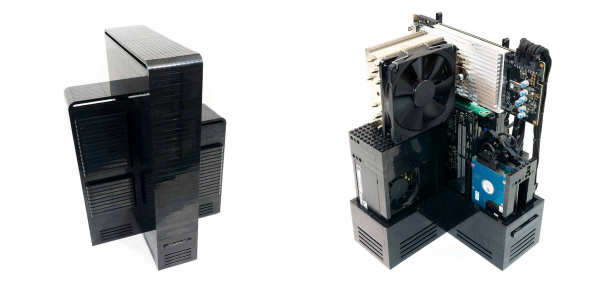
Lego isn’t the first material that springs to mind when you think about building a new gaming computer case, but it does make sense when you think about it. It is easy to work with, can be easily reconfigured, and it’s pretty cheap. That’s the idea behind this very cool (no pun intended) gaming computer case build by [Mike Schropp]. Built around a Skylake i7 CPU and an NVidia 980 Ti graphics card, his build has an unusual X-shaped design that allows for plenty of airflow. The sides of the X hold the CPU cooler, the power supply, the hard drives and the graphics card cooler, so each of them has its own separate flow of cool air from the outside. That avoids the common problem of hot air from one component being passed over another, so it doesn’t get cooled properly. Critically for a gaming system, this design keeps all of the components much cooler than a more traditional case, which makes for more overclocking potential.
At the moment, [Mike] says he is struggling to keep up with the demand for people who want to buy custom versions of his build, but he is planning to release the details soon. “Initially that will probably be in the form of a DIY kit, where you can buy the plans with all the Lego bricks needed for the build, in a kit form” he told us. “Then you can add your own computer components to complete your build. At some point I’ll probably also just offer the plans themselves and allow the end-user to acquire the Lego bricks needed.”