Building An X86 Gaming PC Without Intel, NVIDIA Or AMD Parts

This is an interesting challenge from the “why not?” files — [GPUSpecs] over on YouTube built a gaming PC without using a single component from NVIDIA, Intel, or AMD. That immediately makes us think of the high-power ARM workstations or perhaps even perhaps the new “AI workstations” coming available with RISC V architecture, but the challenge here was specifically “gaming PC,” not workstation. A gaming PC, without a GPU by one of those three? To make it even more interesting, the x86 CPU isn’t Intel or AMD either.

If you’re of a certain vintage, you may remember Cyrix. Cyrix reverse-engineered the x86 ISA and made their own compatible chips in the 90s, before being bought out by National Semiconductor, and then VIA Technologies. VIA partnered with the Government of Shanghai to found Zhaoxin, and it is from Zhaoxin that the KaiXian KX 7000 CPU hails — an x86-64 device, that isn’t Intel or AMD. We’ve actually covered the company before. This particular chip benchmarks like an old i5, so not spectacular, but usable. 

Continue reading “Building An X86 Gaming PC Without Intel, NVIDIA Or AMD Parts”

The finished product

Crouching Typewriter, Hidden PC

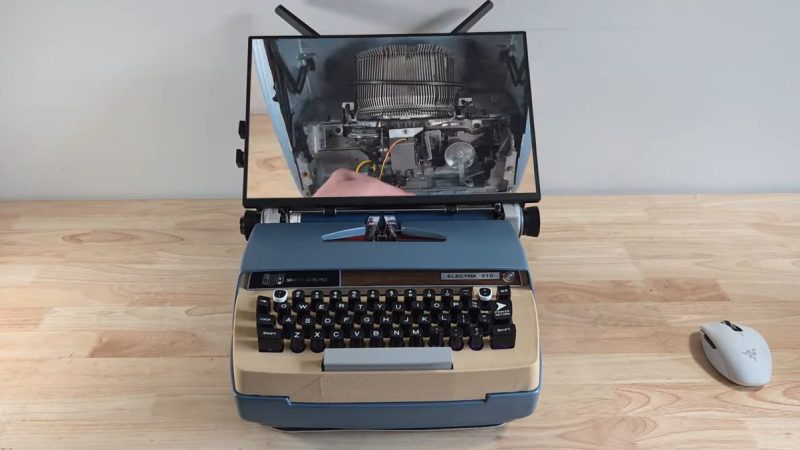
Go back a couple of generations, and rather than a laptop or a luggable, the office accessory of choice was a portable typewriter. As the 20th century wore on, the typewriter became electric before eventually being eclipsed by luggable and laptop computers. On YouTube, [Prototype] is turning back the clock, by turning an old Smith-Corona electric typewriter into a luggable computer– with a stretch goal of still being able to type.

Yeah, just gutting the typewriter and shoving an SBC inside wasn’t ambitious enough for [Prototype]: his goal is a working typewriter and an x86 gaming PC. To facilitate this, he guts the Smith-Corona keyboard, and 3D-prints a new top plate to add a little more vertical space in the old typewriter. The new top does recreate the original layout and the Corona switches get printed adapters to fit them to mechanical switches [Prototype] is using with a vibe-coded Arduino. Why one would bother with ChatGPT when QMK is right there, we could not say, but feel free to skip 6:20 to 15:00 if you’re watching the video but want to avoid that side quest.

Unfortunately, the “get the keyboard working” side-quest is either faked or deferred to video part II, which has not been posted yet. In this video he demonstrates that he can actuate a single hammer with a servo, but that’s a far cry from a working typewriter so, we’re really hoping he comes through on that promise in Part Two. Even if the build stops with just one hammer, that would give the tactile sound-and-feel that other builds turn to solenoids for. Squeezing a small-form-factor motherboard and graphics card into the old Smith-Corona is also going to be an interesting challenge. It’s certainly going to be a step up from using the keyboard as a terminal.

If you like this project but balk at the idea of destroying a working piece of vintage office equipment, it is possible to turn a typewriter into a USB keyboard non-invasively. 

If you like this project at all, join us in thanking [Katie] for the tip. Not your cup of tea? Tell us what is, with a tip of your own. Continue reading “Crouching Typewriter, Hidden PC”

RAM Prices Got You Down? Try DDR3. Seriously!

DDR3 seemed plenty fast when it first showed up 19 years ago. Who could say no to 6400 Mb/s transfer speeds? Of course compared to the modern DDR5 that’s glacially slow, but given that RAM is worth its weight in gold these days– with even DDR4 spiking in price– some people, like [Gheeotine], are asking “can you game on DDR3“? The answer is a shocking yes.

[Gheeotine] builds two budget-friendly PCs for this video, using some of the newest DD3-supporting motherboards available. That’s not exactly new: we’re talking 12 to 15 years old, but hey, not old enough to drive. We certainly didn’t expect to hear about an x79 motherboard hosting an Ivy Bridge processor in 2026, but needs must when the devil dances. The only concession to modernity is the graphics cards: the x79 mobo got an RX6600XT 8GB, and the other build, using a z97 motherboard got an NVIDIA RTX 4060. The z97 motherboard allowed a slightly newer processor, as well, an i7 4790, with the new and exciting Haswell architecture you may have heard of. Both boards are maxed out on RAM, because at less than one USD/GB, why not?

[Gheeotine] puts a few new titles through their paces on these boxen, and while the results aren’t amazing, everything he tries comes out playable, which is amazing in and of itself. Well, playable unless you’re one of those people who can’t stand playing at resolutions under 4K or FPS under 100. Those of who spent their formative years with 29.7 FPS or 25 FPS in NTSC or PAL regions aren’t going to complain too loudly if frame rates dip down into the 30s playing at 1080p for some of the more demanding titles. Ironically, one of those was the five-year-old Crysis Remastered. Given the age of some of this hardware “Can it Run Crysis” is a perfectly reasonable question, and the answer is still yes.

If you want modern games, you’re much better off with a z97 chipset motherboard if you chose to go the DDR3 route, since you won’t run into issues related to the AVX2 instruction, which first appeared with the Haswell microarchitecture. Here at Hackaday our preferred solution to the rampocalypse is software optimization, Since holding your breath for that would probably be fatal, cost-optimizing PC builds is probably a good plan, even if some might balk at going all the way back to DDR3.

Of course if you’re going to use nearly-retro hardware like DDR3, you might as well go all-out on retro vibes with a nostalgic 80s-style, or even 50s-style case. 

Continue reading “RAM Prices Got You Down? Try DDR3. Seriously!”

Teardown: Cooler Max Liquid Cooling System

Every week, the Hackaday tip line is bombarded with offers from manufacturers who want to send us their latest and greatest device to review. The vast majority of these are ignored, simply because they don’t make sense for the sort of content we run here. For example, there’s a company out there that seems Hell-bent on sending us a folding electronic guitar for some reason.

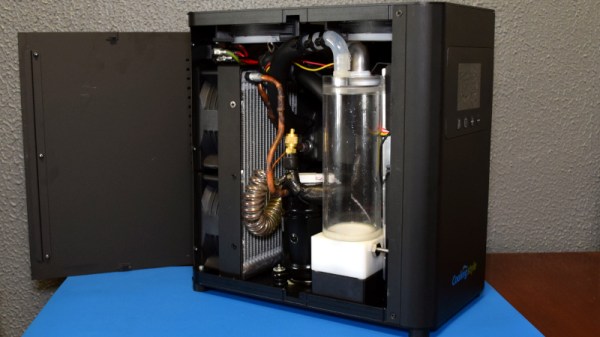
At first, that’s what happened when CoolingStyle recently reached out to us about their Cooler Max. The email claimed it was the “World’s First AC Cooler System For Gaming Desktop”, which featured a “powerful compressor which can bring great cooling performance”, and was capable of automatically bringing your computer’s temperature down to as low as 10℃ (50°F). The single promotional shot in the email showed a rather chunky box hooked up to a gaming rig with a pair of flexible hoses, but no technical information was provided. We passed the email around the (virtual) water cooler a bit, and the consensus was that the fancy box probably contained little more than a pair of Peltier cooling modules and some RGB LEDs.

The story very nearly ended there, but there was something about the email that I couldn’t shake. If it was just using Peltier modules, then why was the box so large? What about that “powerful compressor” they mentioned? Could they be playing some cute word games, and were actually talking about a centrifugal fan? Maybe…

It bothered me enough that after a few days I got back to CoolingStyle and said we’d accept a unit to look at. I figured no matter what ended up being inside the box, it would make for an interesting story. Plus it would give me an excuse to put together another entry for my Teardowns column, a once regular feature which sadly has been neglected since I took on the title of Managing Editor.

There was only one problem…I’m no PC gamer. Once in a while I’ll boot up Kerbal Space Program, but even then, my rockets are getting rendered on integrated video. I don’t even know anyone with a gaming computer powerful enough to bolt an air conditioner to the side of the thing. But I’ve got plenty of experience pulling weird stuff apart to figure out how it works, so let’s start with that.

Continue reading “Teardown: Cooler Max Liquid Cooling System”

Custom Electronic Load Makes Use Of Gaming PC Tech

At first glance, you might think the piece of hardware pictured here is a modern gaming computer. It’s got water cooling, RGB LED lighting, and an ATX power supply, all of which happen to be mounted inside a flashy computer case complete with a clear window. In truth, it’s hard to see it as anything but a gaming PC.

In actuality, it’s an incredible custom electronic load that [EE for Everyone] has been developing over the last four months that’s been specifically designed to take advantage of all the cheap hardware out there intended for high-performance computers. After all, why scratch build a water cooling system or enclosure when there’s such a wide array of ready-made ones available online?

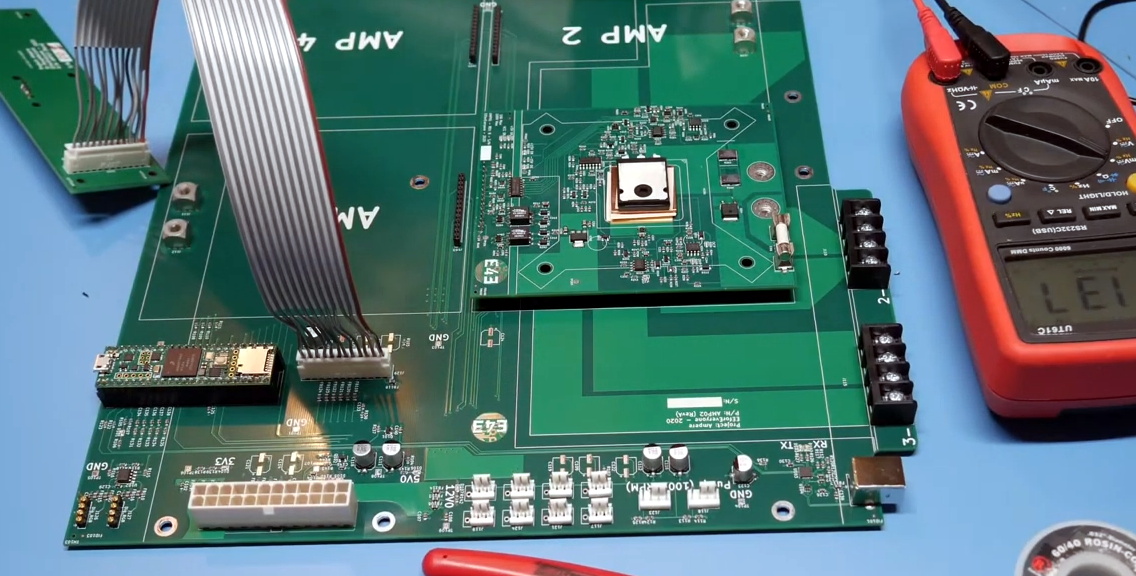
The “motherboard” with single load module installed.

Inside that fancy case is a large PCB taking the place of the original motherboard, to which four electronic load modules slot into. Each of these loads is designed to accept a standard Intel CPU cooler, be it the traditional heatsink and fan, or a water block for liquid cooling. With the current system installed [EE for Everyone] can push the individual modules up to 275 watts before the temperatures rise to unacceptable levels, though he’s hoping to push that a little higher with some future tweaks.

So what’s the end game here? Are we all expected to have a massive RGB-lit electronic load hidden under the bench? Not exactly. All of this has been part of an effort to design a highly accurate electronic load for the hobbyist which [EE for Everyone] refers to as the “Community Edition” of the project. Those smaller loads will be derived from the individual modules being used in this larger testing rig.

We’ve actually seen DIY liquid cooled electronic loads in the past, though this one certainly sets the bar quite a bit higher. For those with more meager requirements, you might consider flashing a cheap imported electronic load with an open source firmware to wring out some extra functionality.

Continue reading “Custom Electronic Load Makes Use Of Gaming PC Tech”

Original Xbox Gets The Steam Overhaul

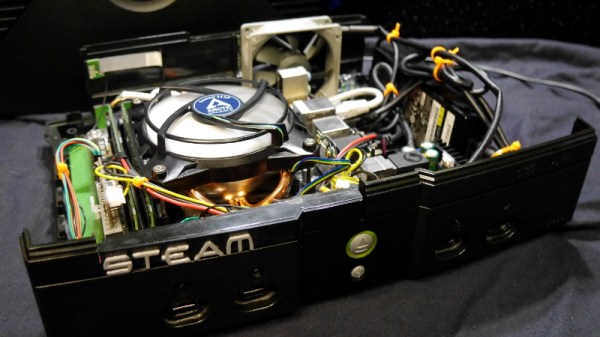
When Microsoft released the original Xbox, it deviated from the design of traditional game consoles in that it used several off-the-shelf computer components. The fact that Microsoft would want their game console to resemble a PC isn’t particularly surprising in hindsight, but we doubt anyone at Redmond ever imagined folks like [Ryan Walmsley] would be cramming in full-fledged computers nearly 20 years later.

[Ryan] tells us he was looking for a way to play some older games from the early 2000s, and thought it was a good opportunity to put together a quiet set-top computer. The final hardware is more than capable of running older titles, and can even be used with Steam Link to stream newer content from his primary gaming computer.

Even with a diminutive Gigabyte GA-H81N Mini ITX motherboard, things are pretty tight inside the Xbox. Fairly tight wire management was required to prevent any airflow obstructions, especially since [Ryan] decided to put the system’s 80 watt laptop-style power supply inside the case. While this made the build a bit more complicated, it does make the final product a lot cleaner and makes it feel just that much more like a proper game console.

Benchmarks show the machine has decent performance, all things considered. [Ryan] says there are some potential upgrades down the line, but as with most gaming PC builds, cost is the limiting factor. Until he’s ready to spend the cash on revamping the internals, he says that streaming newer games over the the network has been working great.

For those looking for a slightly more modern alternative to this project, we’ve also seen a gaming PC shoehorned into an Xbox 360 with similarly impressive results.

A Water Cooled Gaming PC You Can Take With You

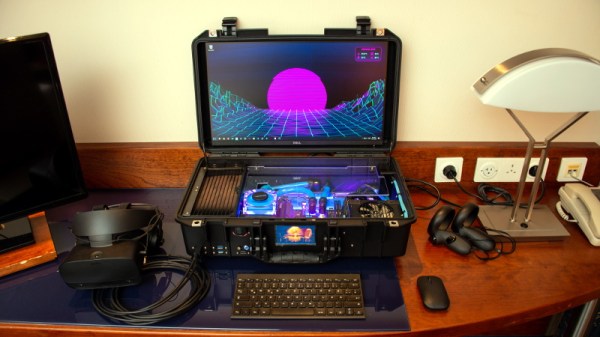
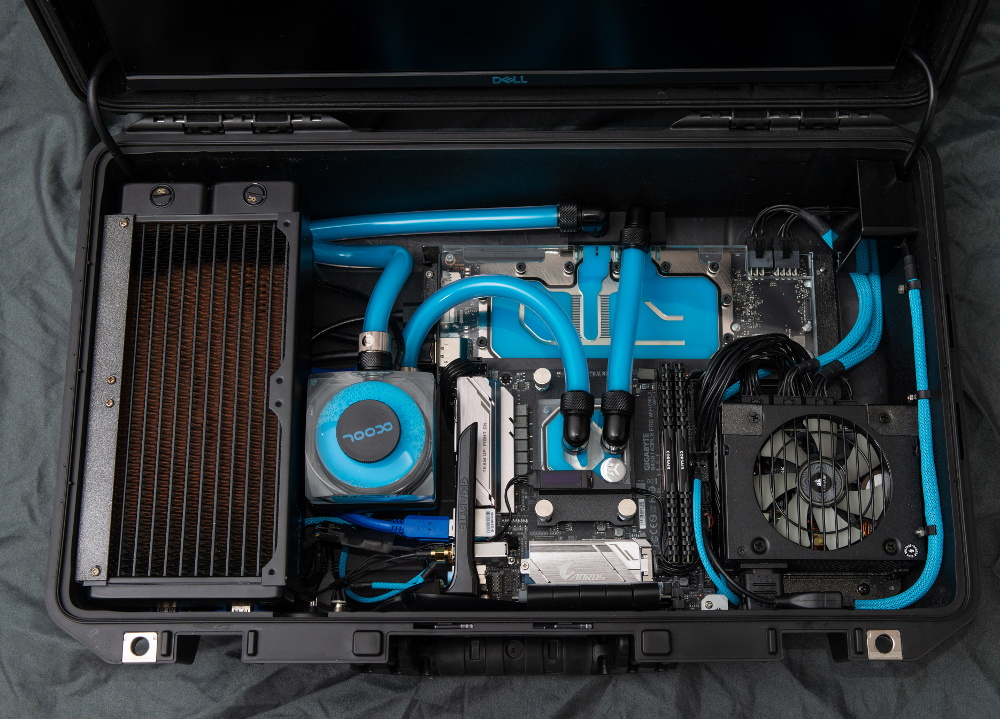
Have you ever been stuck in a hotel room wishing you brought your VR-capable gaming PC along with you? Well [thegarbz] certainly has, which was the inspiration for this absolutely gorgeous mobile rig affectionately known as “The Nuclear Football” that brings console-level portability to those who count themselves among the PC Master Race.

OK, fine. We’ll admit that the existence of gaming laptops means you don’t actually need to carry around such an elaborate contraption just to play Steam games on the go. But if you’re going to do it, shouldn’t you do it in style? More practically speaking, [thegarbz] says the cost of this project was less than what a gaming laptop of similar specs would have cost.

The Nuclear Football features a Ryzen 5 2600 processor, a NVIDIA 2070 Super graphics card, and 16 GB of DDR4 RAM. The water cooling gear is from Alphacool, and includes a custom controller that links to the computer and allows [thegarbz] to monitor temperatures and fan speeds via a widget on the desktop.

While not nearly as mobile, this machine does remind us of the water cooled “Big O” that packed all the current-gen consoles and a gaming PC into one glorious machine.