How To Install Haiku On A UEFI-Only Modern System

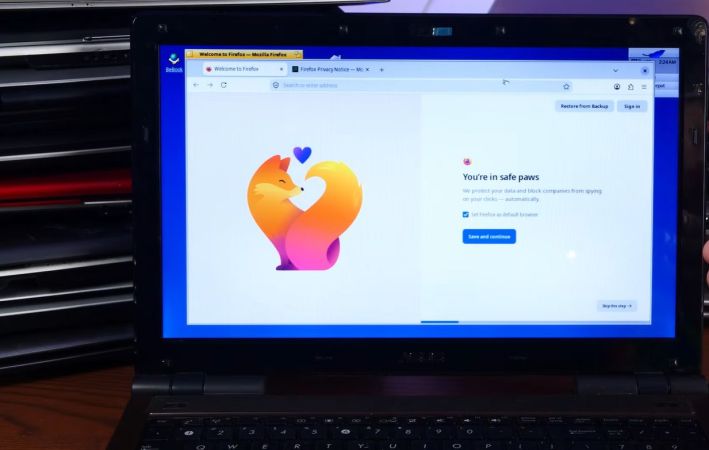
Recently Haiku has become a bit of a popular subject of articles and videos, owing perhaps to how close it currently is to be a daily-driver OS and fulfilling the dream that BeOS set out with. That said, there are still quite a few hurdles before that glorious era can fully commence, with a video by [Ex-IT guy] on YouTube demonstrating some of the major hurdles by installing Haiku on Ryzen 3-based MiniPC that only supports UEFI boot.

Installing the UEFI bootloader is still a very much manual process with the user required to create UEFI boot and OS partitions before copying the bootloader into UEFI boot partition. After this Haiku can be installed as normal. The other variation of multi-boot is demonstrated in the video, with Haiku installed alongside Windows and Linux. This requires a more complex directory layout in the UEFI boot partition.

The other major hurdle with Haiku comes after the system boots into the OS following installation, with no driver available for the Vega-based iGPU as AMD GPU support peters out around the GCN 2 era for now. Without accelerated graphics the utility of an OS is quite diminished, but fortunately this seems to be a fixable issue considering that Linux has the appropriate GPU support.

Meanwhile features like sound worked out of the box, which makes it arguably a more pleasant experience than installing Haiku on a 2009 Mac Mini. It’s also very easy to port software from Linux to Haiku, often with very few changes since it has all the typical POSIX things.

Continue reading “How To Install Haiku On A UEFI-Only Modern System”

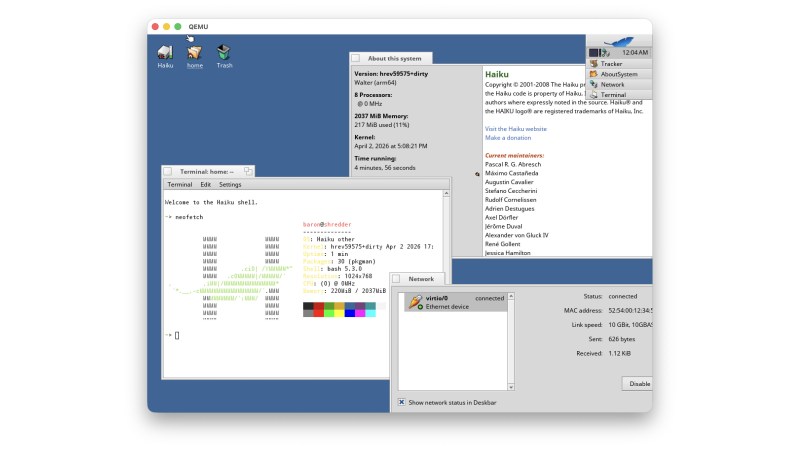
Haiku Isn’t Just For X86 Anymore, Boots On ARM In QEMU

Ever since it was called OpenBeOS, Haiku has targeted the x86 platform. That makes good sense: it’s hard enough maintaining a niche system on ubiquitous hardware. But x86 isn’t the only game in town anymore. Apple’s doing very well on ARM, Linux runs on oodles of ARM SBCs, and even Windows uh, exists, on that architecture, so why not Haiku? That’s what [smrobtzz] figured, and thanks to his work you can now run Haiku on ARM, in QEMU.

There’s no image available as yet — you still need to bootstrap your own from a working system, and ironically that system cannot be Haiku. [smrobtzz] apparently used MacOS, which makes sense as his ultimate goal is apparently to go where only Aishi Linux has gone before and boot Haiku on his M1 MacBook. There had been previous efforts to get Haiku going on Raspberry Pi hardware, which seems logical considering how lightweight the operating system is, but they’re apparently nowhere near booting either. QEMU is a good start.

Interestingly, according to the ports page, Haiku is “functional” on both RISC V QEMU and the now-discontinued HiFive Unmatched SBC. We don’t seem to have covered it, but that milestone happened five year ago. Given how most RISC V boards currently available are a bit slow for modern desktop Linux, Haiku would likely be a breath of fresh air. The BeOS-descended system might be single user, but it’s snappy.

We reported a couple of years back that Haiku was daily-drivable on x86 ,it’s only gotten better since then, assuming you choose the right hardware. Hardware support is always the hard part about alternative OSes, but Haiku users are absolutely spoiled compared to fans of MorphOS, which still only runs on G4 or G5 PowerPC, and even then not only some hardware.

Trying To Install Haiku On A 2009 Mac Mini

Although the number of uses for a 2009-era Mac Mini aren’t very long, using them to run new-and-upcoming operating systems like Haiku on would seem to be an interesting use case. This is what [The Phintage Collector] recently took a swing at, using both the 2024 Beta 5 release and a current nightly build. The focus was mostly on the 32-bit build, as this has binary compatibility with BeOS applications, but the 64-bit version of Haiku was of course also installed.

One of the main issues with these Mac systems is that they use EFI for the BIOS, so you’re condemned to either take your chances with the always glitchy CSM ‘classical BIOS’ mode, or to make Haiku and EFI get along. While for the 64-bit version of Haiku this wasn’t too much of a struggle, the 32-bit version ran into the problem that the 64-bit EFI BIOS really doesn’t like 32-bit software. After a while the 32-bit version of Haiku was thus abandoned for a later revisit.

With the 64-bit version a lot of things just work, though audio couldn’t be made to work even with a USB dongle, and there’s no hardware acceleration for graphics, so gaming isn’t really going to happen either. The positive thing here is probably that as a test system for 64-bit Haiku such a Mac Mini isn’t too crazy, it being just an Intel system with an Apple-flavor EFI BIOS.

If you’re into giving it a shot yourself, the video description page contains a lot of resources to consult.

Continue reading “Trying To Install Haiku On A 2009 Mac Mini”

Jenny’s Daily Drivers: Haiku R1/beta5

Back in the mid 1990s, the release of Microsoft’s Windows 95 operating system cemented the Redmond software company’s dominance over most of the desktop operating system space. Apple were still in their period in the doldrums waiting for Steve Jobs to return with his NeXT, while other would-be challengers such as IBM’s OS/2 or Commodore’s Amiga were sinking into obscurity.

Into this unpromising marketplace came Be inc, with their BeBox computer and its very nice BeOS operating system. To try it out as we did at a trade show some time in the late ’90s was to step into a very polished multitasking multimedia OS, but sadly one which failed to gather sufficient traction to survive. The story ended in the early 2000s as Be were swallowed by Palm, and a dedicated band of BeOS enthusiasts set about implementing a free successor OS. This has become Haiku, and while it’s not BeOS it retains API compatibility with and certainly feels a lot like its inspiration. It’s been on my list for a Daily Drivers article for a while now, so it’s time to download the ISO and give it a go. I’m using the AMD64 version.

Continue reading “Jenny’s Daily Drivers: Haiku R1/beta5”

Creating User-Friendly Installers Across Operating Systems

After you have written the code for some awesome application, you of course want other people to be able to use it. Although simply directing them to the source code on GitHub or similar is an option, not every project lends itself to the traditional configure && make && make install, with often dependencies being the sticking point.

Asking the user to install dependencies and set up any filesystem links is an option, but having an installer of some type tackle all this is of course significantly easier. Typically this would contain the precompiled binaries, along with any other required files which the installer can then copy to their final location before tackling any remaining tasks, like updating configuration files, tweaking a registry, setting up filesystem links and so on.

As simple as this sounds, it comes with a lot of gotchas, with Linux distributions in particular being a tough nut. Whereas on MacOS, Windows, Haiku and many other OSes you can provide a single installer file for the respective platform, for Linux things get interesting.

Continue reading “Creating User-Friendly Installers Across Operating Systems”

Haiku OS’s Beta 5 Release Brings Us Into A New BeOS Era

The name BeOS is one which tends to evoke either sighs of nostalgia or blank stares, mostly determined by one’s knowledge of the 1990s operating system scene. Originally released in 1995 by Be Inc., it was featured primarily on the company’s PowerPC-based BeBox computers, as well as being pitched to potential customers including Apple, who was looking for a replacement for MacOS. By then running on both PowerPC and x86-based systems, BeOS remained one of those niche operating systems which even the free Personal Edition (PE) of BeOS Release 5 from 1998 could not change.

As one of the many who downloaded BeOS R5 PE and installed it on a Windows system to have a poke at it, I found it to be a visually charming and quite functional OS, but saw no urgent need to use it instead of Windows 98 SE or 2000. This would appear to have been the general response from the public, as no BeOS revival ensued. Yet even as BeOS floundered and Be Inc. got bought up, sold off and dissected for its parts, a group of fans who wanted to see BeOS live on decided to make their own version. First called OpenBeOS and now Haiku, it’s a fascinating look at a multimedia-centric desktop OS that feels both very 1990s, but also very modern.

With the recent release of the R1 Beta 5 much has been improved, which raises the interesting question of how close Haiku is to becoming a serious desktop OS contender.

Continue reading “Haiku OS’s Beta 5 Release Brings Us Into A New BeOS Era”

Haiku OS: The Open Source BeOS You Can Daily Drive In 2024

Haiku is one of those open source operating systems that seem to be both exceedingly well-known while flying completely under the radar. Part of this is probably due to it being an open source version and continuation of the Be Operating System (BeOS). Despite its strong feature set in the 1990s, BeOS never got much love in the wider computer market. Nevertheless, it has a strong community that after twenty-two years of development has now reached a point where you can daily drive it, according to the [Action Retro] channel on YouTube.

One point where Haiku definitely scores points is with the super-fast installation and boot. [Action Retro] demonstrates this on real hardware, and we can confirm that it boots very fast in VirtualBox on a low-end Intel N100-based host system as well. With the recently introduced QtWebEngine-based Falkon browser (formerly known as QupZilla) even JavaScript-heavy sites like YouTube and retro Mac emulators work well. You can even get a Minecraft client for Haiku.

Although [Action Retro] notes that 3D acceleration is still a work-in-progress for Haiku, his 2014-era AMD system smoothly played back 1080p YouTube videos. Although not addressed in the video, Haiku is relatively easy to port existing software to, as it is POSIX-compatible. There is a relatively modern GCC 11.2 compiler in the Beta 4 release from 2022, backed up by solid API documentation. Who doesn’t want to take a poke at a modern take on the OS that nearly became MacOS?

Continue reading “Haiku OS: The Open Source BeOS You Can Daily Drive In 2024”