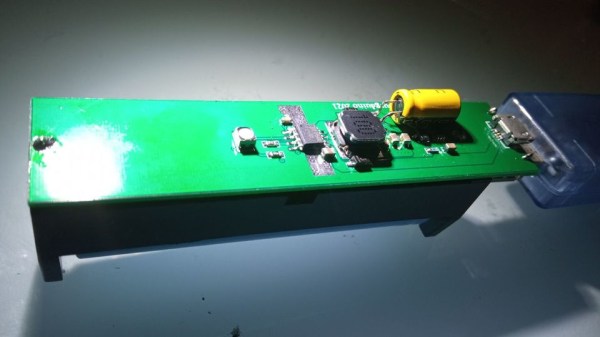
The powerbank PCB, with all the components on one side, 18650 holder on the other, a MicroUSB cable plugged into the PCB's MicroUSB socket

Open Hardware 5V UPS Improves On Cheap Powerbank Design

Often, we need to power a 5V-craving project of ours on the go. So did [Burgduino], and, unhappy with solutions available, designed their own 5V UPS! It takes a cheap powerbank design and augments it with a few parts vital for its UPS purposes.

You might be tempted to reach for a powerbank when facing such a problem, but most of them have a fatal flaw, and you can’t easily tell a flawed one apart from a functioning one before you buy it. This flaw is lack of load sharing – ability to continue powering the output when a charger is inserted. Most store-bought powerbanks just shut the output off, which precludes a project running 24/7 without powering it down, and can cause adverse consequences when something like a Raspberry Pi is involved.

Understandably, [Burgduino] wasn’t okay with that. Their UPS is based on the TP5400, a combined LiIon charging and boost chip, used a lot in simple powerbanks, but not capable of load sharing. For that, an extra LM66100 chip – an “ideal diode” controller is used. You might scoff at it being a Texas Instruments part, but it does seem to be widely available and only a tad more expensive than the TP5400 itself! The design is open hardware, with PCB files available on EasyEDA and the BOM clearly laid out for easy LCSC ordering.

We the hackers might struggle to keep our portable Pi projects powered, employing supercapacitors and modifying badly designed Chinese boards. However, once we find a proper toolkit for our purposes, battery-powered projects tend to open new frontiers – you might even go beyond your Pi and upgrade your router with an UPS addon! Of course, it’s not always smooth sailing, and sometimes seemingly portability-friendly devices can surprise you with their design quirks.
A Super UPS For The Pi

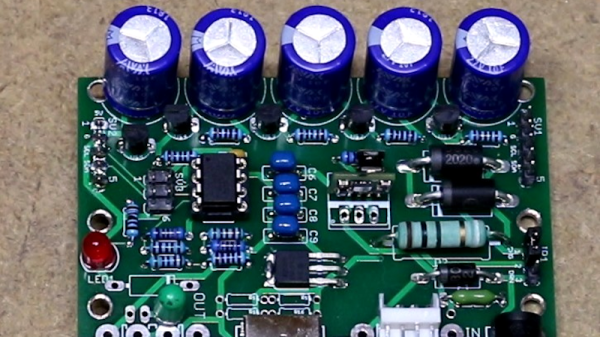
One of the problems with using a Raspberry Pi or most other systems in a production environment is dealing with sudden shutdowns due to power loss. Modern operating systems often keep data in memory that should be on disk, and a sudden power cycle can create problems. One answer is an uninterruptible power supply, but maintaining batteries is no fun. [Scott] wanted to do better, so he built a UPS using supercapacitors.

A supercapacitor UPS is nearly ideal. The caps charge quickly and don’t wear out as a battery does. The capacitors also don’t care if they stay in storage for a long time. The only real downside is they don’t have the capacity that batteries can have, but for a small computer like a Pi Zero it is pretty easy to gang up enough capacitors to do the job.

Continue reading “A Super UPS For The Pi”

A SuperCap UPS

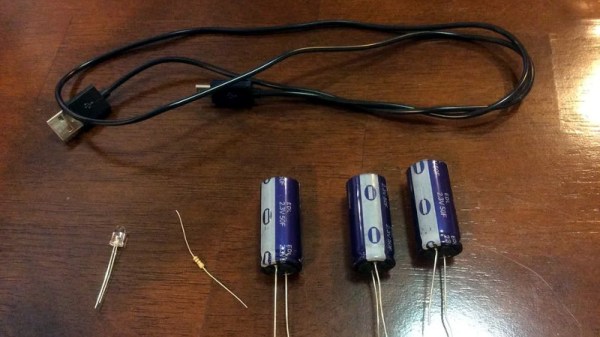
If you treat your Pi as a wearable or a tablet, you will already have a battery. If you treat your Pi as a desktop you will already have a plug-in power supply, but how about if you live where mains power is unreliable? Like [jwhart1], you may consider building an uninterruptible power supply into a USB cable. UPSs became a staple of office workers when one-too-many IT headaches were traced back to power outages. The idea is that a battery will keep your computer running while the power gets its legs back. In the case of a commercial UPS, most generate an AC waveform which your computer’s power supply converts it back to DC, but if you can create the right DC voltage right to the board, you skip the inverting and converting steps.

Cheap batteries develop a memory if they’re drained often, but if you have enough space consider supercapacitors which can take that abuse. They have a lower energy density rating than lithium batteries, but that should not be an issue for short power losses. According to [jwhart1], this quick-and-dirty approach will power a full-sized Pi, keyboard, and mouse for over a minute. If power is restored, you get to keep on trucking. If your power doesn’t come back, you have time to save your work and shut down. Spending an afternoon on a power cable could save a weekend’s worth of work, not a bad time-gamble.

We see what a supercap UPS looks like, but what about one built into a lightbulb or a feature-rich programmable UPS?

This Quick Hack Will Keep You Online During Your Next Power Outage

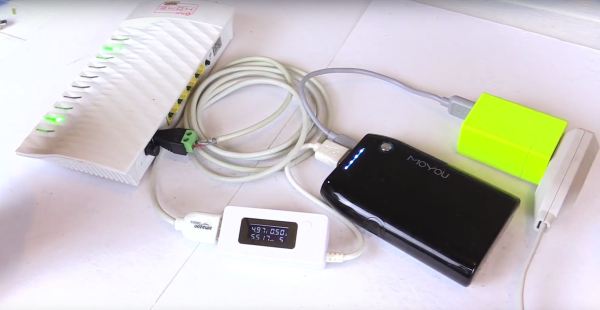
The modern human’s worst nightmare: a power outage. Left without cat memes, Netflix, and — of course — Hackaday, there’s little to do except participate in the temporary anarchy that occurs when left without internet access. Lamenting over expensive and bulky uninterruptible power supplies, Youtube user [Gadget Addict] hacked together a UPS power bank that might just stave off the collapse of order in your household.

This simple and functional hack really amounts to snipping the end off of a USBĀ  power cable. The cable is then attached to a screw terminal to barrel connector adapter and plugged it into a pass-through power USB power bank. No, really — that’s all there is to it. [Gadget Addict] notes that while most modems and routers are designed to run off a 12V power supply, they still operate at 5V. He goes on to connect several router and router/modem combination units to the power bank. In each case the system appears to boot up and perform normally.

Continue reading “This Quick Hack Will Keep You Online During Your Next Power Outage”