Regular Hackaday readers will no doubt be familiar with the work of Matthew Alt, AKA [wrongbaud]. His deep-dive blog posts break down hardware hacking and reverse engineering concepts in an engaging way, with practical examples that make even the most complex of topics approachable.
But one of the problems with having a back catalog of written articles is making sure they remain accessible as time goes on. (Ask us how we know.) Without some “algorithm” at play that’s going to kick out the appropriate article when it sees you’re interested in sniffing SPI, there needs to be a way to filter through the posts and find what’s relevant. Which is why the new “Roadmap” feature that [wrongbaud] has implemented on his site is so handy.
At the top of the page you’ll find [wrongbaud]’s recommended path for new players: it starts with getting your hardware and software together, and moves through working with protocols of varying complexity until it ends up at proper techno wizardry like fault injection.
Clicking any one of these milestones calls up the relevant articles — beginners can step through the whole process, while those with more experience can jump on wherever they feel comfortable. There’s also buttons that let you filter articles by topic, so for example you can pull up anything related to I2C or SPI.
Further down the page, there’s a helpful “Common Questions” section that gives you a brief overview of how to accomplish various goals, such as identify an unknown UART baud rate, or extract the contents of an SPI flash chip.
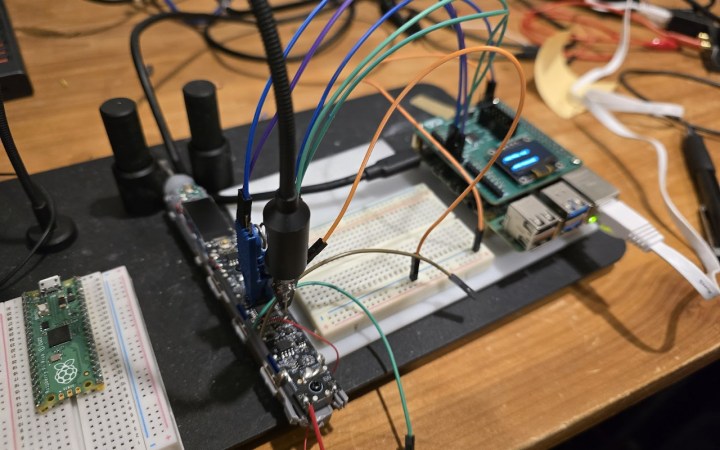
As you might have guessed, this isn’t exactly a hack out of necessity. With a flair for explaining hardware hacking, [wrongbaud] has put this together as a practical “brush-up” (get it?) on the tools and concepts involved in reverse engineering. In this case, the Raspberry Pi is used as a sort of hardware hacking multi-tool, which should make it relatively easy to follow along.
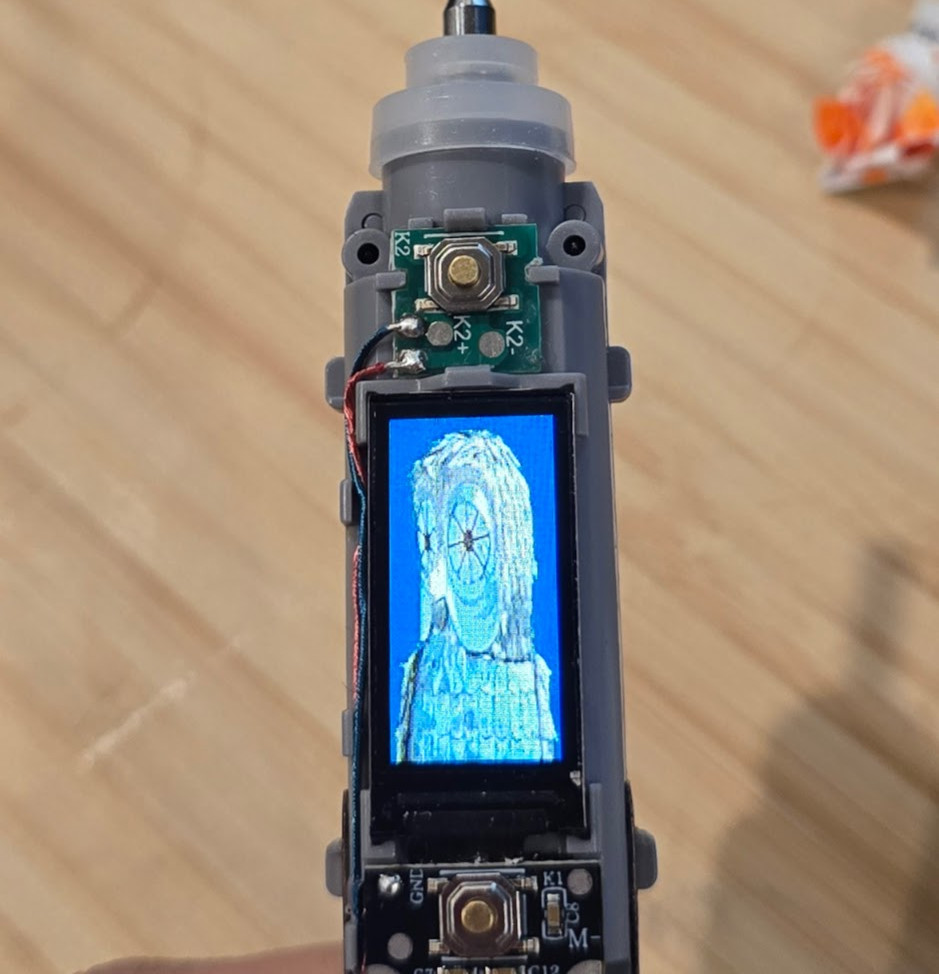
Modified image data on the SPI flash chip.
The first post in the series goes over getting the Pi up and running, which includes setting up OpenOCD. From there, [wrongbaud] actually cracks the toothbrush open and starts identifying interesting components, which pretty quickly leads to the discovery of a debug serial port. The next step is harassing the SPI flash chip on the board to extract its contents. As the toothbrush has a high-res color display (of course it does), it turns out this chip holds the images which indicate the various modes of operation. He’s eventually able to determine how the images are stored, inject new graphics data, and write it back to the chip.
Being able to display the Wrencher logo on our toothbrush would already be a win in our book, but [wrongbaud] isn’t done yet. For the last series in the post, he shows how to extract the actual firmware from the microcontroller using OpenOCD. This includes how to analyze the image, modify it, and eventually flash the new version back to the hardware — using that debug port discovered earlier to confirm the patched code is running as expected.
In a perfect world, all of our electronic devices would come with complete documentation, and there’d be open source libraries available for interfacing them with whatever we wanted. There’d never be arbitrary lockouts preventing us from using a piece of hardware in a way the manufacturer didn’t approve of, and the “cloud” wouldn’t be a black-box server in some data center on the other side of the planet, but a transparent and flexible infrastructure for securely storing and sharing information.
Unfortunately, that’s not the world we live in. What’s worse, rather than moving towards that electronic utopia, the industry appears to be heading in the opposite direction. It seems like every month we hear about another service shutting down and leaving viable hardware to twist in the wind. Just yesterday Google announced they’d be retiring their Stadia game streaming service early next year — leaving users with unique Internet-connected controllers that will no longer have a back-end to communicate with.
Matthew Alt
Luckily for us, there’s folks like Matthew [wrongbaud] Alt out there. This prolific hacker specializes in reverse engineering, and has a knack not just for figuring out how things work, but in communicating those findings with others. His conquests have graced these pages many times, and we were fortunate enough to have him helm the Introduction to Reverse Engineering with Ghidra class for HackadayU back in 2020. This week, he stopped by the Hack Chat to talk about the past, present, and future of reverse engineering.
Matthew got his start in reverse engineering during college, when he was working in a shop that specialized in tuning engine control units (ECUs). He was responsible for figuring out how the ECUs functioned, which ultimately would allow them to be modified to improve engine performance beyond the vehicle’s stock configuration. Sometimes that involved uploading modified calibration data, or disabling functions that were detrimental to engine performance. These software changes could potentially increase engine output by as much as 50 HP, though he says that sometimes the goal was to simply increase throttle response so the vehicle would feel more aggressive on the road.
Moving on to the tools of the trade, Matthew explained why he prefers using Ghidra for embedded targets over classic reverse engineering tools like IDA Pro. As an example he points to a recent project where he used Ghidra’s API and intermediary language PCode to crack passwords in Game Boy Advance games. Though he does mention that IDA still has its place if you’re looking to peek into some Windows C++ software.
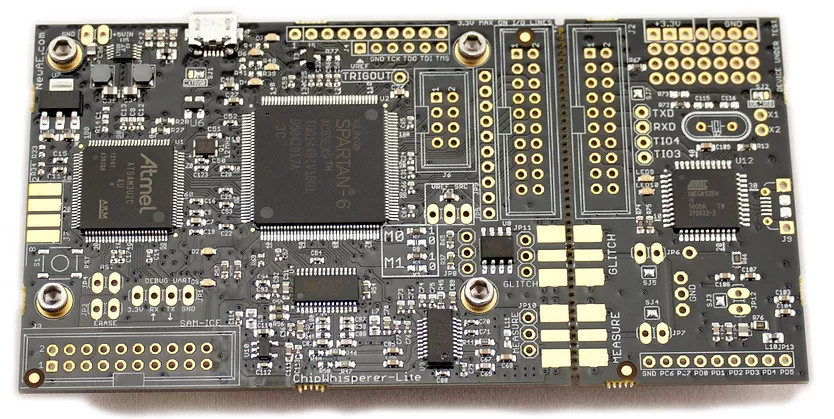
Matthew also pointed to new techniques and tools for working with fault injection which have opened up a lot of exciting possibilities over the last few years. In fact, he says tools like ChipWhisperer will become invaluable as newer devices adopt advanced security features. When gadgets are using secure boot and encrypted firmware, gaining access is going to take a bit more than just finding an unleaded serial port on the board. Glitching attacks will become more commonplace, so you might as well get up to speed now.
Colin O’Flynn’s ChipWhisperer makes side-channel power analysis and glitching attacks far more accessible.
We’d like to thank Matthew Alt for not just stopping by the Hack Chat, but for being such a good friend to the Hackaday community. His work has been inspirational for all of us here, and it’s always exciting when he’s penned a new blog post detailing another challenge bested. The next time your favorite MegaCorp releases some anti-consumer gadget, you can take some comfort in knowing he’s still out there bending hardware to his will.
The Hack Chat is a weekly online chat session hosted by leading experts from all corners of the hardware hacking universe. It’s a great way for hackers connect in a fun and informal way, but if you can’t make it live, these overview posts as well as the transcripts posted to Hackaday.io make sure you don’t miss out.
Ghidra is a tool for reverse engineering software binaries — you may remember that it was released as Open Source by the NSA last year. It does an amazing job of turning compiled binaries that tell the computer how to operate into human-readable C code. The catch is that there’s a learning curve to making the most out of what Ghidra gives you. Enter the Introduction to Reverse Engineering with Ghidra class led by Matthew Alt as part of the HackadayU series. This set of four one-hour virtual classroom videos were just made available so that you can take the course at your own pace.
While this was the first HackadayU course, there are more on the way. Anool Mahidharia just finished teaching KiCAD & FreeCAD 101 and videos will be published a soon as the editing process is complete. The fall lineup of classes is shaping up nicely and will be announced soon. As a sneak peak, we have instructors working on classes covering tiny machine learning, a second set of classes on Ghidra reverse engineering, a protocol deep dive (I2C, SPI, one-wire, JTAG etc.), Linux on Raspberry Pi, building interactive art, and all about LEDs, and an intro to design with Rhino. Keep your eye on Hackaday for more info as classes are added to the schedule.


 But one of the problems with having a back catalog of written articles is making sure they remain accessible as time goes on. (Ask us how we know.) Without some “algorithm” at play that’s going to kick out the appropriate article when it sees you’re interested in sniffing SPI, there needs to be a way to filter through the posts and find what’s relevant. Which is why the new “Roadmap” feature that [wrongbaud] has implemented on his site is so handy.