
Open source logic analyzer

posted Feb 28th 2010 4:28pm by
filed under: tool hacks

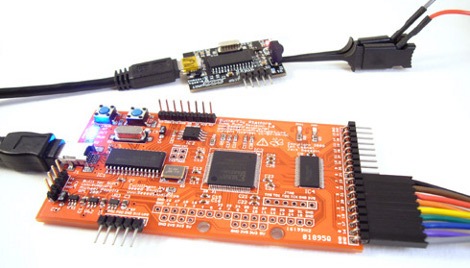
Hackaday alum [Ian Lesnet] has been working in cahoots with a dedicated team of developers to produce the OpenBench Logic Sniffer. This caseless logic analyzer can operate at 100MHz and sample 32 channels at once. Better yet, a digital oscilloscope add-on is in the works. The pre-order comes in at $45, that’s a lot of functionality for just a few greenbacks. We’ve embedded a demo video after the break that details installing and using this device under Ubuntu.

[Thanks Drone via Dangerous Prototypes]


86 Responses to Open source logic analyzer

  • Alpha says:

    this looks badass

  • ehrichweiss says:

    I definitely want to see an update when the oscilloscope option is made available!!

  • ReKlipz says:

    Excellent hardware!
    I was about to preorder this, however, I noticed the software requires a JRE. Why!!?!?!?!?

  • Rizla++ says:

    Seems like the software GUI is made in Java. Nice idea, makes the GUI portable easily :)

  • rob says:

    Very nice. A case would be good. What are ‘greenbacks’ and can you drink them?

  • econut says:

    Why is it required that all *nix user interfaces look like raw sewage?

  • Austin says:

    @rob well greenbacks are another name for the American dollar, because well there green and I forget the history of where it came from

  • Adam says:

    If anyone has experience with SUMP, I’d love to hear feedback — the hardware looks good, but the software is important.

  • Leviathan says:

    Looks cool. Can’t tell from their site if the probes are included or where they can be procured economically.

  • MusashiAharon says:

    I. Want. I wonder if my skills are up to soldering the whole thing by hand.

    Can’t wait for the oscilloscope!

  • andrew says:

    Now I feel stupid for buying a Saleae Logic…

  • metRo_ says:

    The order is a fully assembled board, right?

  • richard says:

    I too feel extra dumb buying the saleae logic….although its a great company

  • Alex says:

    Go back to instructables, Richard Nibbler.

    I’ll probably be preordering one of these soon. :)

  • Chris says:

    Looks great for the price. Unfortunate that this device and the Bus Pirate seem to not have proper mounting holes in the PCB, though. Would be nice to make an enclosure for a more permanent benchtop environment, but it doesn’t seem plausible. I hope the open source nature of this project encourages a better user interface. There’s really no excuse for a UI to not fit an 800×600 pixel display. The window isn’t even resizable?

  • charliex says:

    It’s open source for a reason. don’t like it, fix it. I’ve been using the sump for a while, it works really well.

  • richard says:

    i doubt i would need an analyzer for anything on instructables but thanks

  • Phazmatis says:

    The hardware appears to be very good, but I’ll wait for a better UI. Also, whenever I see a project being demoed in linux, I assume that the windows version isn’t well supported (if at all).

  • Drone says:

    RedKlipz, If you take the time to read the article, there’s a pre-compiled binary version of the java application for Windows (only). Java was used to easily allow cross-platform compatibility.

  • Jack Gassett says:

    Just wanted to answer a couple of the questions.

    The Sump Java client is actually very usable, it is possible to download it from the project page and check it out. It’s also open source so anything you don’t like can be changed.

    The command line is only required in Linux.:) The windows download has an included JRE and all that needs to be done is double click on an executable.

    The video is just a demo to show that the client works under linux. I personally run it in Windows when I’m debugging something. The UI is not buggy, rather I made a silly mistake by recording a screencast at such a low, 800×600, resolution to make it easier to view in embedded webpages. The main window is resizable but the window that I had opened to set the capture options was a child window that was not resizable. On displays 1024×768 and larger the child window easily fits but in 800×600 it was too big. I don’t think many people run 800×600 any more so it has probably never been considered a bug. Anyway, it is open source so it is easily fixed.

    Probes are not included, Ian is working with Seeed Studio to make the probes available for purchase.

    No soldering skills are required, $45 is for an assembled board.

    Jack Gassett
    Gadget Factory

  • shbazjinkens says:

    You can get cheap clips at dealextreme.
    http://www.dealextreme.com/details.dx/sku.7218

    The lead time sucks, but they’re very inexpensive.

  • sigtermer says:

    I was one of those people still waiting for Saleae to support linux. looks like something far more superior has finally come along.
    supporting linux from the start is always a smart choice.

    Despite relying on a jre. if id does what is advertised, I’m in.

    now for the good stuff:
    econut: psst! it’s java buddy. not linux.
    Richard Nibbler: sour grapes, ay richy?

  • Morten Larsen says:

    This looks nice. I would love to see some videos with some captures.

    Also about the window size issue: You can drag any part of any window with the mouse by holding down “Alt” in X11 (works on all Unix-like systems).

  • Richard Nibbler says:

    @sigtermer – no sour grapes here. But it shouldn’t take 5 mins to install software. I get paid to make things -not mess around on *nix all day.

    And the name is Dick Nibbler to you.

    Richard Nibbler.

  • slincolne says:

    The other thing worth noting is the gadget it’s connected to – Ian’s ‘USB Infrared Toy’. It’s also up on Seedstudio as a preorder and looks like a great kit for investigating IR controls with little effort.

    I don’t know which to buy first !

  • xorpunk says:

    This is a nice project, but too bad it doesn’t support 99% of reversing scenarios without custom made circuits.

  • vonskippy says:

    You guys need to work ALOT more on your “demo” skills. The video was 4:51 and showed (or should I say “demo’d”) your product working for about 6 seconds.

    No one cares about the CLI install. I’m assuming the files come with a readme or install file?

    How about a video of your board actually doing something?

  • slincolne says:

    Caved in – bought the IR toy. The analyser would be great if the board was a bit more case friendly (double-sided sticky tape is a bit naff), but its a better buy than the Salae logic device.

    Now if Salae’s version could be used from within Linux, perhaps with it’s own Sump interface, that would be great. I do all my hardware work in Linux so I’ve no interest in Windows and Ian’s work is a great fit for me.

    Ian – if you ever do a version that has mounting holes andpin headers so that buttons could be mounted on a case that would be great !!!!!

  • ReKlipz says:

    Drone:
    The need for cross-platform compatibility as an excuse for writing the client in Java is a poor one, in my opinion.

    I’m considering writing a cross-platform client in C++ for this device; it’s awesome hardware and definitely worth it! Is the communications protocol documented anywhere besides the Java src?

  • Ian says:

    @ReKlipz – The protocol is documented here: http://www.sump.org/projects/analyzer/protocol/

    A compiled client would be great, I’m not a huge fan of frameworks. Jack and I are hardware guys so that part was fun, but a x-platform client is beyond my skill set.

  • anon says:

    And to think i was going to dish $150 for salae.

    Really starting to like DangerousPrototypes stuff.

  • darkore says:

    @Richard Nimbler: congrats, you won the n00b of the day award (in case you’re wondering: yes, you should feel offended by this). Then again, extremely cool projects like this are better left alone by “hardcore users” like you.
    Very, very nice project. Can’t wait for the oscilloscope part. Keep up the good work.

  • xorpunk says:

    Fore low bandwidth debugging and reversing you can’t beat 50 bucks. I like the orange PCB mask.

  • renehug says:

    I think it is just awesome!

  • Richard (not Nibbler!) says:

    I can see this has a lot of potential for reversing stuff, and hardware peeps like me will find Java a lot easier to fiddle with than C++

    Once the oscilloscope bit arrives I can see me casing the two together and using the combination quite a bit.

    Thanks for the hard work guys. :-)

  • r says:

    Why does it seem like 80% of commenters are whiners? of course now I am one of them

  • janin says:

    Wow very nice product. To get the same specs in a commercial product you’d probably need to pay 5x more. And if there is the same kind of support than with the bus pirate, that’s a winner. I vote for mounting holes too. It doesn’t increase board size that much.

    I don’t get something however, you say that there are 32 channels, but the header has only 16 pins (+2 GND) ?

    I agree that the demo video is extremely bad. I believe it actually deters people from using the product. You need to demo the actual capture software, the installation procedure can be described in a 1 page text file. And choose a resolution which does not make the software appear defective …

    @ReKlipz: what’s wrong with a Java client ? I mean, really who hasn’t a JRE installed these days. If you’ve got motivation you should use it to improve the software, not to make a fork for ideological reasons.

  • Stew says:

    Just pre-ordered mine. As a bonus it can also be used as a FPGA dev board.

  • neil says:

    just ordered mine. had a 10% off coupon laying around, so i got mine for $40.78. can’t wait to try this bad boy out!

  • Phil Fitzgerald says:

    Poor video, certainly doesnt leave me begging for one, but its a nice product at a nice price. The sales video should have shown some usage, not how to install it, if anyone has trouble installing it, they probably shouldnt be buying one.

    I like the idea of the JRE frontend but would certainly need to see it in action before throwing down the readies.

  • xorpunk says:

    My only complaint is if they were going to do it open anyway and just charge for assemblies why not at least spend extra time to make it handle modern bus RF? You can actually do most of this stuff with a cheap proto board.

    I gave a positive comment above because it is good for debugging and reversing low power circuits. I just don’t get why they water it down, hell you can still manufacture a higher RF capable ones for tens more.

  • ReKlipz says:

    @janin
    The thing that is wrong with a Java client is that it requires a JRE. The compiled Java for Windows is a nice touch though.

    The answer to your next question ought be obvious.

    And finally, I think diverging from Java would be a vast improvement for the client, but these are just my opinions.

  • Spazed says:

    @ReKlipz
    If you want some help on a C++ client I will at least be able to help test it out under all three platforms and help debug.

  • George says:

    Bought an Saleae Logic a few months back. It’s nice and everything but the client for Linux is in beta and is unfinished.

    This is cheap and more importantly for me it’s 5v tolerant.

  • Rizla++ says:

    Does anyone know what kind of LookAndFeel the windows client uses?

    @econut
    I also hate the nix java gui, but I guess it will be pretty easy to switch it to GTK+ look, or the even cooler Nimbus look! ;)

    I’m already praying on the arrival of the oscilloscope! :D

  • osgeld says:

    I dunno, its cheap but how much are the probes going to cost? that is going to be at least half the cost of the board

    no mounting holes, ok yea it looks slick but I have a small cluttered desk, want me to buy 45$ worth of stuff to accidentally blob some solder or short it out, cant add some holes in the corners so we can mount it in a box to protect it

    and then there is this on the website

    “This open source hardware and software is distributed in the hope that it will be useful, but WITHOUT ANY WARRANTY; without even the implied warranty of MERCHANTABILITY or FITNESS FOR A PARTICULAR PURPOSE. If you can’t accept this risk, please do not buy this hardware.”

    for a particular purpose? its a darn LA how many purposes does it have

    I think I will pass on this one for now until we can get some real …

    a) cost with probes
    b) way to protect it
    c) know its going to do what is advertised

  • chango says:

    @osgeld

    The input is a .1″ single row header. If you don’t already have something in your junk box to hook that to your target then this isn’t for you.

  • osgeld says:

    what about the clips smartass, they cost 16 bucks for a pack of 10 at reputable shops

  • jackgassett says:

    A new demo of the OLS capturing and analyzing serial UART data has been posted on the project homepage. This demo was made under Windows to give a better idea of how easy it is to use.

    The demo is also on screencast at:
    http://www.screencast.com/t/MWM5MDUyNGIt

    Jack Gassett
    Gadget Factory

  • George says:

    @jackgassett Just watched the screencast, very impressive. I have just ordered a card, looking forward to trying it out.

  • Mikey says:

    Not sure what was impressive about that screencast, infact it made me cringe.

    Linux: overcomplicating shit since… well, forever.

    Also for some of the zealots above, writing something in java doesn’t guarantee it’s portable, it does, however, guarantee that it’s slow.

    I will have to check if there is a windows version or not (with a PROPER installer), as $45 may be cheap, and the product may be sweet, MY time isn’t cheap. And honestly I’d rather pay $200 for proper tools which I can get working in 1 hour instead of $45 to spend the rest of my life trouble shooting my equipment instead of working on what I WANT to work on.

  • asdf says:

    These analyzers that use only the FPGA’s internal memory are just too limited in their sample depth to be really useful (eg. Rocky Logic and Bugblat have ones that are very similar featurewise). Would it make the design too complex or too expensive to add even a few megabytes of external RAM?

  • jackgassett says:

    I just wanted to try and clear up any misunderstandings about the Linux screencast that is embedded above. It is a little bit out of context, the above video was one of several screencasts that were made with earlier hardware. The above video was not recorded to demonstrate the software, it was only meant to show that the software can run under Linux. So it is a little bit out of context here if it is taken as an overview of the software.

    If you want a better feel for the software then watch these Windows screencasts:

    Capturing UART Data:
    http://www.screencast.com/t/MWM5MDUyNGIt

    Overview and using RLE (this is an older video on older hardware but the software is the same):
    http://www.screencast.com/t/yWBdfwCYh6

  • davr says:

    I have a comparison chart of various PC-based logic analyzers under $500. This is obviously the cheapest one, and the specs are pretty decent too. Only time will tell if there are any bugs that crop up due to the DIY nature of the project.

    http://spreadsheets.google.com/pub?key=rmNr4Eeren8jBG7MXfHYxsQ&output=html

  • charliex says:

    While java is usually the write once, debug forever language.

    The client is pretty good. I was surpised how stable and fast it is.

  • Andrew says:

    @davr

    Nice speadsheet. I’ve been contemplating buying a zeroplus for a while.

  • ginge says:

    Well I don’t know what the problem was with the screencast. I just skipped to the interesting stuff, seeing the GUI. It is actualyl kind of refreshing to see an install of a problem with a video cast. I didn’t think the install process was convoluted at all. I have done worse. I also don’t think it is a reflection of linux in any way. It is a tool for a job.

    As for the “open source logic analyzer”. Ordered. I’ll take a gamble on $40. As someone mentioned, at that price you got to be able to do something with it.

    Re: Mounting…. buy a case, buy some self adhesive PCB mounting pillars, glue then on. Sorted.

    Once again, another quality device for an unfeasibly small price.

  • osgeld says:

    “Re: Mounting…. buy a case, buy some self adhesive PCB mounting pillars, glue then on. Sorted.”

    heh maybe Ill just hot glue it in a tin, still seems like 4 holes isnt that much to be asking for, considering Im going to have to make my own box and probes as it is

    anyway I am about to send a polite email to them asking about what I brought up earlier, see what they say

  • Rizla++ says:

    @Mikey

    Java, doesn’t guarantee portability, but with Java you ARE able to make portable software, which is this case. And, I also don’t see the reason why Java should be slower… I used CMU Sphinx to write some voice recognition software a couple of years ago and it was surprisingly fast! :)

  • ReKlipz says:

    @Rizla++
    “And, I also don’t see the reason why Java should be slower…”

    It’s a virtual machine. A single “Java bytecode instruction” (if you can even call them that) equates to numerous machine code instructions. Don’t bring up the fact that there are hardware accelerated JREs, because no one has one (as they’re virtually pointless).

  • janin says:

    Heh modern Java is as fast if not faster that native code thanks to the JIT compiler. But of course C programmer that rely on benchmarks from 1996 don’t know that.

  • Spazed says:

    I’d love to see your stats on Java being faster than C/C++. Care to provide some examples? There are plenty of modern comparisons showing C/C++ being faster, not to mention all large data crunching apps being written in C. Surely people willing to spend hundreds of millions of dollars on computers wouldn’t hamper their efforts by using C over Java because of ‘old benchmarks’.

  • janin says:

    Program performance is essentially a factor of the developer’s experience and usage of appropriate programming techniques (talking only about compiled languages here). So, the choice of a language is the choice of where you have the more experience and resources available. And C/C++ programmers vastly outnumber Java programmer. Hence the usual choice. In my opinion choosing one over the other purely for performance reasons is a mistake.

    If you really want a benchmark showing Java come on top of C++, here’s one :
    http://scribblethink.org/Computer/javaCbenchmark.html

  • ReKlipz says:

    That link mentions bounds checking in C as a performance hit. Bounds checking. In C. …

  • Tony says:

    There really needs to be an alternate release of this board that has at least a 1Mbyte SRAM chip to make good sample depth possible. There just isn’t much RAM available on the FPGA. I’d be happy to pay the premium for this.

  • janin says:

    No, you read that passage wrong. read it again.
    Anyway, this is not the place for a lengthy debate on the relative performance of programming language. One certain thing is that performance is not an issue for a software like SUMP that is essentially a GUI.

  • Richard Nibbler says:

    What’s a noob?

  • ReKlipz says:

    @janin
    Indeed you are correct. I just refuse to install a JRE on any of my machines; I’ll save Java for enterprise work.

    @Tony
    The project pages and discussions notion toward a future revision that will include DRAM, lots of it. Plus, with proper software and firmware, it ought to be possible to dump the SRAM on the fly, using it as a FIFO buffer of sorts, enabling unlimited sampling.

  • sigtermer says:

    you people complain a lot.

    I hate java. Having said that, it doesn’t matter what language the client is written in AS LONG AS IT WORKS.

    I’ve already pre-ordered mine, partly because it works with linux, and because the specs are pretty sweet for 50 bucks.

    I wouldn’t have even considered it if that little video wasn’t included in the post.

  • GrizzlyAdams says:

    Its a shame that most of you don’t realize that this is also viable Xilinx Spartan 3 dev board with several pins routed to headers… From what I can tell that gives you atleast 48 GPIOs with usb/jtag interface to the host pc. I’m currently working with 8051F34x usb micros, propeller chip, and pic micros. This looks like a great addition to my toolkit and a good starting point for fpga dev.

  • ReKlipz says:

    @GrizzlyAdams
    Do you have a beard?

  • Rizla++ says:

    @ReKlipz, @janin, @Spazed
    Ok, this is the benchmark that supports my experience with voice recognition. :P
    http://www.sunlabs.com/techrep/2002/abstract-114.html
    I also agree that this is not the place to start a conversation about Java performance, we’re only talking about a GUI here! Which, for God’s sake, is impossible to actually be slow on modern hardware!

    I still want that oscilloscope addon, though… :(

  • jeff-o says:

    Looks great! Any word on whether this would work on a mac?

  • jackgassett says:

    It should work on OS X but as of yet we have not attempted it. Will put it on the To Do list.

  • therian says:

    I feel so stupid for buying digitalscope/logic analyzer but it was long time ago, I will look close on this project and definately buy scope version

  • charliex says:

    @rizla++, read the whole document. They said they could put the improvements from the java client into the C version, and it’d likely match the speed. They also changed the algorithms used.

    What they’re saying is choosen very carefully, in that the work/cost/performance ratio of java to C is the benchmark, not the speed of C, but rather the lesser peforming algorithms and code of flite.

    @GrizzlyAdam’s i think jacks butterfly is probably a better bet for a fpga dev board.

  • taintedkernel says:

    @GrizzlyAdams: Yes I’m slightly bothered I didn’t realize this earlier as I already ordered a Spartan-3 board earlier this week for double the price. The feature set is quite different however so…

    Personally I think this is a great project and happy to see it supports Linux without a major fuss. It will make a good addition to my bus pirate.

  • asdf says:

    Nice tool, but the Java front end is a no-no for me.
    Anyway as this isn’t a place for programming languages flame wars, here’s the short answer for those willing to write graphical interfaces for hardware but still afraid of C++: please consider Lazarus.

    Lazarus is the open source multi platform clone of the glorious Delphi, the best interface builder ever created coupled with one of the most powerful object libraries and a blazingly fast compiler.
    Now the Lazarus clone produces 100% native code
    (no VM’s, JIT and other bull) on a plethora of systems/OS’s going from your Windows desktop to the Nokia N900 phone, OSX included.

    http://lazarus.freepascal.org/

    The right way of going multiplartform is to have multiplatform (cross) compilers, not using a virtual machine that eats cpu cycles for no reason.
    Lazarus (as other well thought develpment systems) does just that.

  • Derrek says:

    The oscilloscope add-on has a 5V limitation – ouch

  • Rizla++ says:

    Thanx asdf !

  • Mark says:

    I love that digital oscilloscope add-on even if it limited to 5V. I can use this thing for my electronic project. Need to get this one soon.

  • scheissfelder says:

    Maybe I’m just too impatient or too much of a mere mortal who can’t figure out the intricacies of the install process, but I can’t get this thing running..

    Where the heck is the transcript that goes along with the Youtube video? I just want to get this set up in a reasonable amount of time so I can get to analyzing my logic. I got a thesis to write and not a whole lot of time to futz with Lunix…..

  • onaclov2000 says:

    Does anyone have a “how to” for the latest and greatest stuff? I am having issues getting this setup on my ubuntu box, and my netbook doesn’t have a big enough screen to be able to see the capture button in windows…arghhh

  • Freida Lulic says:

    Man, sucks to be under 18. What if you’re parents aren’t home to give you assistance with the wooden stake attachement and a dracula shows up during gameplay? That’s tough.

  • Leave a Reply

    XHTML: You can use these tags: <a href="" title="" rel=""> <abbr title=""> <acronym title=""> <b> <blockquote cite=""> <cite> <code> <pre> <del datetime=""> <em> <i> <q cite=""> <strike> <strong>

    Hack a Day serves up fresh hacks each day, every day from around the web as well as hacking related news.

    Send us your hacks


    Hacks

    Resources







