

After scathing accusations of skimping on due diligence, as well as other feedback to my article on trying to use an ‘AI coding assistant’ for the first time, the only rational, academic response is to lick one’s wounds following a particularly bruising peer review and try to address the raised issues. Reality after all does not care about one’s feelings, and there may be more to this AI assistant technology that can be coaxed out with a more in-depth look.
To this end I’ll do my best to try and work through each raised point, criticism and accusation, to see what I – and perhaps others – can learn of this endeavor. Said points include the use of the wrong frontend – i.e. Copilot – and the wrong model – being Claude Haiku 4.5 – as well as the egregious flaw on my end of ‘prompting wrong’.
For the sake of due diligence the best frontend and models will be investigated for particular tasks, with finally the verbal minefield of ‘prompt engineering’ examined for industry-standard approaches.
Junior Developer
The exact way to refer to an LLM coding assistant is still in flux, with some comparing it to pair programming, while others see the assistant more as a glorified search engine that also has code-complete features as a kind of merger of a web search engine and IntelliSense in Visual Studio. This relationship and how to look at it is the cause of a lot of contention as a result.
Another perspective is that of these assistants being more like junior developers. After all, they can apparently do all the basic boilerplate stuff, write unit tests and perform a range of other basic tasks that are beneath more senior developers. The corollary here is then of course why companies would even want to hire another junior developer if the LLM can fill these jobs. Unsurprisingly, it is already being reported that this happening.
The million dollar question that remains is that if all of this is true whether a junior developer still has value. The answer appears to be ‘yes’, even if you ask Microsoft. The argument would appear to boil down to that these assistants supposedly automate away a lot of the tedium that used to get pushed onto junior developers, leaving them free to develop more advanced skills, naturally supported by the same coding assistants.
Fancier Automation
This gets us to the question of whether these assistants are really much better than the automation tools that have existed in IDEs for many decades now with arguable improvements over time. They certainly do seem to be more capable, but they’ll still never exceed their programming, and require a lot of finagling to make them do the right thing.
Returning to junior developers for a moment: bad apples aside, they will let you know if they didn’t understand something correctly, ask for clarification, admit that they don’t know something and offer to look something up in the documentation if they do not know. None of these are things that these glorified chatbots are capable of, which makes a comparison with IDE automation tools rather fair, especially since junior developers tend to get fired if they screw up as badly as the LLM tools seem to regularly do.
While it’s true that these newfangled coding assistants do have a context window in which they “remember” previous details, you’re still dealing with the limitations of the underlying model no matter how good your prompt engineering skills are. They will also regularly confabulate and you have to accept that they generate code and documentation that is just as likely to be correct as completely wrong, even if many users of these tools seem to believe that they are actually more performant.
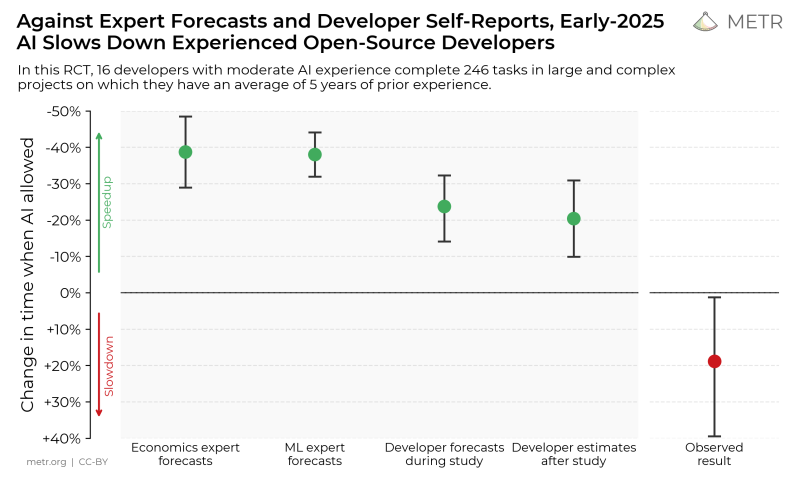
Ergo you’ll be writing test cases for the test cases and generated code, while also pulling code review duty, as there is no possibility of ever establishing a level of trust. Especially not after it deletes your entire hard drive or the production database for the second time that week.
If that sounds like the kind of junior developer or automation tool you’d love to be paired up with, then you’re quite the adventurous spirit. Meanwhile I have had enough fun with even code completion tools like the aforementioned IntelliSense or its equivalents in the various other IDEs that I have used over the years to never use them again. It’s bad enough when a code completion tool gets it wrong, it’s worse when the human in the loop fails to catch the glaring mistake.
Model Frontends
Although we generally refer to ChatGPT, Claude or Copilot as an LLM, this is technically incorrect, as these are merely the chatbot frontends that are written to provide a natural language interface experience. The choice here is naturally quite dizzying, as you have a range of major players including the aforementioned, each of which offers a web interface as well as integration with various IDEs and use on the CLI for easy automation.
Hence the claim that one should never use the web frontend for coding, as it needs access to your code and local environment, which makes sense if you want more of the pair programming experience. Since my ‘IDE’ of choice are Notepad++ and Vim, my options here are of course rather limited. There is a third-party OpenAI integration plug for NP++ called NPPOpenAI, but that would seem to be it.
The cool kids are of course all using Visual Studio Code with direct integration of all the frontends, but that option seems about as appealing as ripping half the RAM out of my PC and smashing my fingers with a hammer. Even as a former avid Visual Studio Pro user I feel insulted on a fundamental level at the mere thought.
Maybe that one of the CLI tools like Copilot CLI are a better match for me here as suggested, but this would appear to be more of a way to automate various GitHub tasks. Despite searching around I could not find an objective comparison of the different frontends, just many strong opinions and various pricing plans for model access, so for all intents and purposes they’re being treated as the same.
The Model Catwalk
It was further suggested that I take a look at LiveBench.ai for a comparison of how models perform on various tasks. This does indeed appear to be a valuable resource, if only for providing what appears to be a fairly objective way to compare these individual models against each other.
When sorting by the heading Coding Average, it puts OpenAI’s GPT-5.2 Codex at the top, with Claude 4.7 Opus Thinking High Effort close behind at both a hair over 83%. The Haiku 4.5 model that I was using comes in at a mere 72.17%, which is still much better than the sub-60 percent models near the bottom. Of the free models Haiku 4.5 at least would seem to be not too terrible, with Anthropic marketing it in October of 2025 as equivalent to Sonnet 4 when it comes to coding performance:
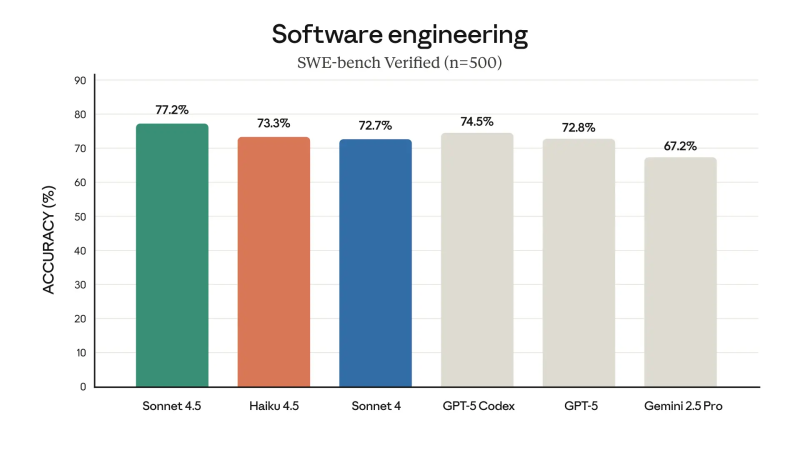
Consequently, it would be expected to perform at least decently at given tasks, but we can take a look at what other models are available via GitHub Copilot, for instance.
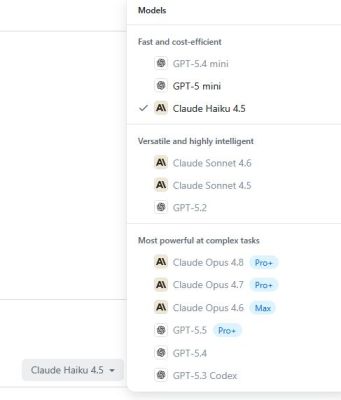
If you’re not into shelling out any clams for a purported improved experience with at least the Pro+ – not Pro – subscription, you get access to quite a few models to pick from that are apparently not ‘premium’. Of note here is that new sign-ups are currently ‘paused’ as usage-based billing is being introduced.
Of these available free models the following would have theoretically performed better according to the aforementioned benchmarks:
- GPT-5.4 Mini, at 74.70%.
- GPT-5 Mini, at 76.07%.
Following the ‘fast and cost-efficient’ category things get a bit dicey to compare, due to Anthropic’s awesome naming scheme and apparently an additional mode you can use these models in, which may or may not apply here:
- Claude Sonnet 4.6 (Thinking High Effort), 79.9%.
- Claude Sonnet 4.5 (Thinking), 80.36%.
These are apparently ‘more versatile and highly intelligent’, which doesn’t seem to bump up their total score too much compared to the mini models. Following this we get the ‘most powerful at complex tasks’ models:
- GPT-5.4 (Thinking High Effort), 78.18%.
- GPT 5.3 Codex (High), 78.18%.
Taken at face value, the 72.17% for the Haiku 4.5 model is indeed somewhat worse than the other two mini models, yet as this points system relies on a specific methodology it’s important to consider what this means. From the underlying coding tests we can see that they are all Python-based programming examples, which is great if you’re testing Python coding assistants, but rather useless for my purposes as I program in just about any language except Python.
Perhaps more worrying here is the statistic that even in this scenario the best model (GPT-5.2 Codex) only managed to score a rather pitiful 83.62%, so your choice would seem to be roughly between ‘atrocious’ and ‘very bad’. Within the free model selection you’re choosing between roughly 28% and 22% of the answers being incorrect, or roughly a 3/4 chance of getting what you were asking for.
Statistically, this wouldn’t seem to make much of a difference when picking either model.
Prompt Engineering
On my last foray, I was also accused of “prompting the wrong way”, which brings us to the topic of prompt engineering, where you must learn to follow specific rules in order to “correctly” use one of these coding assistants. A crucial aspect that was not obvious to me is that you absolutely must use so-called ‘environmental prompting’, where you set the equivalent of global variables.
To this you then add instructions, such as in the absolute gem that is used by the Livebench code test for an array test:
### Instructions: You are an expert Python programmer. You will be given a question (problem specification) and will generate a correct Python program that matches the specification and passes all tests. You will NOT return anything except for the program.
### Question:
You are given an integer array nums and an integer k.
The frequency of an element x is the number of times it occurs in an array.
An array is called good if the frequency of each element in this array is less than or equal to k.
Return the length of the longest good subarray of nums.
A subarray is a contiguous non-empty sequence of elements within an array.

Example 1:

Input: nums = [1,2,3,1,2,3,1,2], k = 2
Output: 6
Explanation: The longest possible good subarray is [1,2,3,1,2,3] since the values 1, 2, and 3 occur at most twice in this subarray. Note that the subarrays [2,3,1,2,3,1] and [3,1,2,3,1,2] are also good.
It can be shown that there are no good subarrays with length more than 6.

Example 2:

Input: nums = [1,2,1,2,1,2,1,2], k = 1
Output: 2
Explanation: The longest possible good subarray is [1,2] since the values 1 and 2 occur at most once in this subarray. Note that the subarray [2,1] is also good.
It can be shown that there are no good subarrays with length more than 2.

Example 3:

Input: nums = [5,5,5,5,5,5,5], k = 4
Output: 4
Explanation: The longest possible good subarray is [5,5,5,5] since the value 5 occurs 4 times in this subarray.
It can be shown that there are no good subarrays with length more than 4.


Constraints:

1 <= nums.length <= 10^5
1 <= nums[i] <= 10^9
1 <= k <= nums.length

### Format: You will use the following starter code to write the solution to the problem and enclose your code within delimiters.
```python
class Solution:
def maxSubarrayLength(self, nums: List[int], k: int) -> int:

```

### Answer: (use the provided format with backticks)
With this kind of preamble and explicit instructions to the ‘coding assistants’, you may as well just write the code yourself. Even if further brevity is usually ‘good enough’, the need to spend all that time and effort just to get the answer that you know you were looking for. Even a junior developer wouldn’t need this much hand holding.
In this regard, the other uses that people have mentioned, such as bouncing ideas off the chatbot — “rubber ducking” — has merit, but often even talking to potted plants or going on that walk around the block can do just about as much with getting one’s thoughts in order, along with random web searches.
Whether to use “micro prompts” or larger tasks, whether to use the chatbot as a search engine or not, and whether to correct answers to previous prompts are all details that seem to be highly divisive among users of these tools, as is the topic of vibe coding, which some seem to embrace, while others dismiss it as an insult for their artisanal craftwork.
Local Models
There are many more things to cover here, such the use of local models vs these hosted ones, with all the gotchas of subscriptions, private data harvesting and the like that this entails, but that will have to wait for another article. It’s also interesting how much the subscription and usage fees (and limitations) are currently going up across the various services, making the idea of local models seem more attractive, if they are even worth it with such limited inference capacity available.
Suffice it to say that I have learned some things along the way of writing this article, while not changing my overall premise and conclusion of the previous article. Although I could have certainly picked a theoretically better model, this is hard to to substantiate without pitting the models against each other in STM32 CMSIS and Ada coding challenges. Based on the results in Python it’s hard to make the claim that it would have made an amazing distinction, but maybe not using a ‘mini’ model makes all the difference here?
Hopefully the better models won’t be removed from free access before I can even give this idea a shot.











Truth be told, most of the work in programming was already boiling over to simply writing lines and lines of slop. The only change that LLM makes, is that it’s now all automated. Anyway, the ship has long sailed and it’s probably joever for teens entering IT courses now. (Universities won’t mention that thou, it would be bad for their business.)
I’m glad I got the so called “assistance package” during the pandemic (essentially a gov’t handout) and became an retro motocycle influencer. Work in IT is probably even more inhumane than working at Auchan. No I support myself just from making the videos instead of doing C#.
It was already automated in most sensible environments. Or you could copy-paste from tutorials or stack exchange.
The AI is legitimately much better than the median programmer now. The rage over AI is mostly based in labor dispute, but disguised as concern over quality. It’s very obvious to see.
And much of the labor isn’t properly paid anyway, and is imported. We are seeing another slaves-to-machines transition, and the people who become very upset during such a transition.
While that is a good reason to dislike it, my personal reason is that it is neither repeatable nor deterministic. As an alternative, I have long been of the opinion that humans should not be writing code. I think we should be writing specifications and having a compiler generate tests and a solution based off of that specification. There are some issues with this to put it mildly but I believe the biggest is that no one is attempting to form a common knowledgebase upon which this hypothetical tool could be used.
Systems Architects. That’s where the real work should be because a bad system handed down to programmers is still a bad system when done.
Pretty much. The issue I worry about more is changes to the program accidentally making it not match the system design if it ever did.
Funny to see people still trying to label AI output as slop, just to make a point. Anthropic states that 80% of its code is now produced by AI. Someone shared a real Monet painting on X and claimed it was produced by AI. The X folks tumbled over each other to tell it was soulless, etc. ( https://petapixel.com/2026/05/14/someone-shared-a-real-monet-painting-as-ai-and-asked-for-critiques/ ). Current top models, which you can use for $20/month, are extremely good, and we’re still not at the end of this curve.
Getting it wrong 1 out of 5 times is not “extremely good”.
I have paid “senior programmers” $125 an hour and found glaring mistakes more than 25% of the time. Now I enter my spec into AI and the results are 90% accurate. Sometimes the AI comes up with clever implementations I didn’t expect. Either way I have to inspect and test the result but I save thousands of dollars and endless ego massaging by using SkyNet.
And I’m guessing the guy who sold you your car has one just like it himself and loves it, right?
I spent 6 months writing Java boilerplate in the early 2000’s and I threw in the towel.
Having generative AI churn though some statistical model of what my project’s code should look like is solving the wrong problem. But I’m not going to get anyone to make Java or Rust easier. Python any less of a package dependency and search engine exercise.
The things I actually need are clear requirements. And time to design, test, and implement them properly. Anything else involves making compromises with the software quality. Which is fine, we can all make consumer grade trash if that is the requirement.
What seems to be missing is clear requirements, a design paradigm, and design standards.
I became hooked on clear requirements back in the ’80s. IBM championed Tom Gelb, and he became one of my heroes, but Gerald Weinberg and Edward Yourdon were also big influences.
At this point my design paradigm within AI coding is for imperative languages only, and I use Warnier-Orr diagrams. I am not finished experimenting, but Codex has created some really elegant Small BASIC programs and bash scripts for me. Right now I’m trying to figure out how to make the best use of C and FORTH. (Give me few more weeks.)
And the standards are evolving: For BASIC I insisted on strict “hungarian” for naming, but there are always exceptions and tweaks and minor rules for formatting. {For instance, I insist on LISP-like assignment for consistency.)
This means that my profile for programming is growing massive, but I expect that the result will be worth the effort if OpenAI doesn’t blow up my account again. I also expect that things will require different profiles for OOP and Functional programming.
yeah 2025 was bad. Opus 4.5 was the turning point for me – the point at which it was faster to use assistants. So don’t use old studies!
The new hotness is: spawn 20 worktrees with 20 agents in parallel, working on 20 different things. But beware burnout. And I don’t care what the marketing says, I can leave Opus 4.6 or 4.8 alone for an hour and it will make good progress, esp with the 1M context window. So “work” these days is really wild, and burnout is a huge problem, since it becomes addictive to solve problems so fast. But you’re context-switching 100% of the time which is crazy tiring.
if you want a real evaluation of what software development is going to look like, you’re gonna need the paid models. Full stop. I’m sure there’s somewhere on IRC you could get some API keys for…not much.
Pardon me for being a cheapskate, but I feel like the answer is always “use this thing that burns tokens faster”. That’s what all my programmer friends and colleagues say anyway. And they are probably right — but that just doesn’t mesh well with my personal hacker ethos, which is driven by frugality and DIY-ness. I don’t want to be dependent on some external (possibly fragile, esp if the claims are true that these companies are wildly overvalued economically) resource that costs an arm and a leg just to work properly.
TBH depending on the task, Opus will actually use fewer tokens often, cause it has to iterate less. But I can sympathize, I just got 2 V100s off ebay running for pretty much the same reason. Doing some weird stuff now, but wanna check out Kimi on it seen.
Claude Max is plenty of tokens for hobby projects and the vast majority of individual contributors on a professional project. It’s $200 and saves me time in writing test plans, unit tests, etc. I still have to check that it’s doing something sane and that it didn’t miss anything major. But having code that runs and passes a test is like 80% of the work and the current gen AI models can do that much.
Example of a silly hobby project, I had Claude make a primitive multiplayer game for DOS. Took an afternoon while I was watching some TV with my wife to guide it along and get it to make an article about what it wrote. Much of the work was getting it to test its own builds and the networking (serverless design). https://orangetide.github.io/the-mechanical-researcher/netchan-ipx
Nothing beats reusing proven code.
This is it right here. I think these tools are super cool, but not a replacement for an engineer. We expect an engineer to revisit buggy code and build 75% correctness upwards as they test and refine, with an asymptote somewhere above 99.9% hopefully. This can be accelerated by leveraging functional blocks where that asymptote has already been reached, either by yourself or another engineer earlier.
The coding agent workflow seems to accept the possibility of rewriting even the known-good portions of the project. Even if you get 95% correctness on each cycle, that effect is multiplicative…keep multiplying something by 0.95 and see what happens.
It’s not exactly that simple, as this isn’t a constant ratio but a probability. There’s always a chance that it returns something actually correct. The problem is that your codebase is a lone survivor standing in a battlefield littered with bodies. The only way to navigate 5000 lines worth of functionality in a 100,000 line codebase is using AI again. Now we have an asymptotic curve going in the right direction again, but this time it’s revenue for whoever owns your model.
Words of truth. It feels a bit weird to have a bunch of agents swarm your problem, let their solutions get killed off by another agent, leaving one decent solution standing. Knowing that these aren’t abstract bits and bytes but actual electrons getting moved around by a coal plant (or a hydro dam if we’re lucky), and that the silicon atoms to get calmed down by the local water supply after the electrons have moved through, the ‘littered with bodies’ picture feels about right. Not human bodies, but there are casualties, multiplying the waste in an already wasteful approach.
Meanwhile, all I needed to produce fewer mistakes and come to a better solution was a couple slices of toast and a glass of water. (Yes I know there’s a lifecycle cost — I feel like my PB&J toast would win by miles in an analysis.)
And I thoroughly agree that the solution necessitates more of the solution. For chuckles I tried vibe-coding a codebase (Inkscape extension that generates OpenSCAD files for a ceramic mug mould of your design), but it’s such an alien style, with weird organisation, and I made the mistake of not reviewing every diff. Now I’m beholden to Claude to make changes in a codebase it understands way better than I do.
I really feel like I’m holding it wrong; beginning to suspect the thing doesn’t have a handle-shaped bit in the first place.
(tempted to use a diffusion model to generate a picture of a tool that’s got a bunch of almost-handle-shaped bits sticking out of it. But I know diffusion models are definitely using that last-organism-standing approach)
This is when we find out that Gary Larson was a time traveler and “Cow Tools” is the proof.
Well, as deep as I’ve gotten into the LLM universe lately, it is not my actual AI specialty: Mine is “emergent” or “genetic” (genetic algorithm, anyone?) and the type of testing and mutation you are talking about excites me. I try to write programs that write programs…and make them better. This is a long way from being as well-developed as the LLM AI tools have become in the last couple of years, but it is my chosen path.
The right proven code.
Using the proven code you already know can be a problem.
As always, languages are easy, libraries are hard.
One of the ‘best’ features of using LLM code monkeys?
When they suggest methods (from similar libraries) that don’t exist in the installed binaries.
They apparently forgot how to use reflection, went straight to bad web search.
Take time during planning to investigate the state of libraries.
It sucks to be a year in, then find the right tool…doh.
Not gonna comment on how the future will look like, because simply I don’t know. Anybody telling what things will be like in 5 years is either deceived or wants your money (or both).
What I willl say though, if you want decent results with the tech writing proper specifications (aka prompts) is key. Understand the problem you are trying to solve, identify how you wanna solve it, be aware of constraints and formulate requirements. First plan then (let) work! To me as a product manager this comes natural but to many software engineers its a new (and great) skill to learn.
Aww, I was hoping you would retry the programming tasks that you tried earlier on. Whn I read your previous article I was surprised how bad your results were compared to me experience, so I had a go at it myself using the free version of Claude (and GPT 5.4); they did it on the first try, but Claude was significantly better than GPT (and that was using the web frontend).
For giggles, try taking the original and bad Copilot code, copy and paste it into Claude and tell it what the program is supposed to do and instruct it to look for and explain errors in the code. It is surprising, and the checklist it creates is decent too.
This will be interesting to revisit in a year, two years, three years and five years. I expect that a year makes a world of difference here. Another issue is, a large, and I mean large, amount of humanities issues are already solved by code that is already available. The problems are the awareness, marketing and implementation. As thing boil down and we get instant full code program on request then we can just stitch this stuff together, refine down and then move even closer to AGI that can use what is already out there. Get it to rewrite itself down into assembly and continue to optimize and in a decade we are in a new world and then some.
Oh wow, someone who actually thinks this BS is anywhere near AGI, or is even anywhere close to being able to “re-write itself” into AGI. Slow the hell down, Ray Kurzweil.
Speaking as a third party, that read unnecessarily harsh and against the comment policy.
Nah, calling out this BS stock bubble is fair.
It is unkind to let an idiot go on babbling.
By treating the idiot as someone who can learn you are showing him/her respect.
I don’t generally do either.
I just laugh at them.
Like calling out a rando very bad liar, you are just making them better at it.
You’re right, now shut up. (I just couldn’t let myself be unkind anymore.)
Time will tell.
There were people just like you last time.
And the time before that.
And before that.
AI coders is the wet dream of the PHB class.
But they are too stupid to know that the coding is the easy part.
Even if ‘DoWhatIWant.exe’ was possible, it wouldn’t help them.
They don’t know what they want.
I will say that AI is now good enough to fabricate ‘I’m using AI and it’s great posts’ to tech forums…
They can fool 90% of non-coders.
That’s true only if you believe that “opinion on whether technology X will create god” is a protected class. They need to learn somehow.
You seem to be on the other end of the spectrum. If he’s delusional for thinking it’s further along than it is, you’re delusional for denying it’s as far along as it is.
Okay that is a good criticism of me and the person you replied to but it also assumes that it’s on that path at all. If we haven’t already hit a plateau I’m expecting it to be hit within 1-5 years, whether because of economic collapse or inherent limits of the concept.
Those are certainly two possible outcomes, but they’re not the only possible outcomes. I think we all agree we’ll see the bubble pop, and then I think it’ll scale down to something local only and more sustainable.
it’s soooooooooo far from where it needs to be, though, and I personally have not been encouraged by the progress so far this year, while token costs are exploding and it’s introducing major problems in the world. it blows me away Google is actively advertising products like NotebookLM, which is a great way to get misinformation stuck in your head believed to be fact because you gave the LLM factual information — but it’s a hallucination engine, so you never know what’ll come out. if you actually check the sources on things like google’s search AI, you’ll find it’s about as often citing something completely irrelevant or which even flatly disagrees with what it’s saying, than it does cite things supporting its arguments.
LLMs primarily fuse ideas together, and often does it very effectively in ways humans haven’t done before; I often get very frustrated using it to write novel software functions or systems, but it is able to fuse ideas together which I wouldn’t have thought of without background-stewing on the problem for months (and maybe not even then) — it DOES help. -but it also has too much conflicting information and doesn’t run experiments itself. it doesn’t know the ideal temperature to grow alfalfa because nobody does; it’s somewhere around room temperature, probably, with no indications of what environment that holds true in, and then what about my environment, my soil, my irrigation regimen? what if I cut the plant this way as it grows but not that way? we can certainly improve it, but we haven’t proven out all the ways we can. there are too many things we need to actually do to know; there are information gaps everywhere, and we aren’t even sure where to put our data if we’re not doing peer-reviewed studies.
I spent my weekend a couple weeks ago literally watching ice melt, because we didn’t have the data on some particular PCMs. the data’s only mildly useful, and it’s very boring work I understand why most people wouldn’t do (many would just ask an LLM and accept the first hallucination), but it’s probably the most guaranteed-helpful way I could’ve spent it; I identified a data gap and filled it.
Truth does not exist.
Therefore there is no such thing as “misinformation”
Unlike most LLM, NotebookLLM is not politically biased and simply presents the information given.
Remember when it was OK to have your own ideas? Now when other people have beliefs different from yours you call it “misinformation”
RE: …scathing accusations of skimping on due diligence…
I honestly apologize if my comments sounded like accusations.
My larger point was coming from the decades in IT, and it goes like this, almost ALL things that could have been automagicated by the average human programmer have been automagicated already in the ~ late 1990s.
What remained un-tamed were truly advanced stuffs that were never easy.
Apology accepted :)
We essentially agree on that point, indeed. I have seen my share of automation being added to IDEs over the years, especially in the JVM world but also in MSVS, with much of it ending up being rarely used or quietly dropped again.
Personally I mostly ‘got good’ with tools like GDB, Valgrind and related tools while learning to design my own code to be as idiot-proof as possible, since the biggest idiot is usually you sitting in front of the screen.
The desire to make all the hard bits of software engineering go away is ever-present, but there’s only so much that we can do there. Hence the difference between ‘software development’ and ‘software engineering’, a distinction you learn by the time you become a grizzled and bitter senior developer :)
I mainly use LLM to write scripts, and the context window problem is a huge snag. Instructions for multiple characters breaks down after a few thousand tokens, with the model asserting training data over prompt instructions.
I can only surmise that for uber complex software such as browsers or OS are not possible given this limitation. The model cannot keep track of its instructions. And for code that is 10k+ tokens the instruction drift, it doesnt look good.
How many tokens in 3GB of code? That’s how big the main product is where I work.
Approx .75 words per token, which is sort of vague. Tokens can be nice and clean recognizable words, but also can contain grammatical context (like punctuation, or end of lines). 3gb of codebase far exceeds context window limitations even in cutting edge very large models (trillion plus params).
WTF?
Do you work for SAP?
That’s just unmanageable. (3GB of actual current version code?)
The implications of that big a project X peter principle X Germans are frightening.
A bureaucracy like the Borgia catholic church, dedicated to protecting important people’s relatives at their level of incompetence, while always maintaining a ‘professional image’.
I’d run away and find a new job.
Say something nice about SAP…
It’s better than Oracle apps.
I hope your big project is broken into components with well-defined APIs. And using gen AI to test and document interfaces is a pretty common use case.
As a human, I do not have even 1% of the 7GB code base in my head. Luckily, I only work on a little slice of it, and if I had more than 100 KB in my head at any one time, I would be shocked.
If you have to darn nearly write the program yourself in the setup phase for the ‘AI agent’ to get it right then the only reason to use one at all would be because you need it written in the language you are not good at/don’t know at all…
And translating a program from one language to another is something they’re actually not too bad at.
Which is not a huge surprise as we’ve had AI translation for human languages for ages.
As a non programmer:
Does it really translate to another language using that language leverages? For example you have code in C and than it’s translated to C++ (by utilizing all it’s features like objects etc)?
You can write Fortran in any language.
Except for ‘Goto IntVar’.
Language translators don’t refactor.
Which brings up a key point.
Coding is the easy part, AI can’t do that right.
Getting what the code has to do out of a room full of PHBs is the hard part.
See how a LLM does when half the people providing input are also hallucinating.
I no longer consider any article on AI hosted by Hackaday to be ethical. This article triples down on the bias, with a pretence of something else.
I’ll be replacing Hackaday with my own personal curated feed of projects, no subject to this level of garbage.
+1 ….. The only exception is the HAD author Jenny List, who is capable of unbiased writing regarding Ai IMO. The current author would be well advised to go to her and get some tips. The main problem is that the current author evidently very much wants Ai to appear to be crappy, so nothing’s going to break through that heavy commitment to make it be so ……. long sigh …..
Another +1 from me. Several sections stuck out to me as being obvious examples of bias after a promise to pursue this with as little bias as possible.
“For the sake of due diligence the best frontend and models will be investigated for particular tasks, with finally the verbal minefield of ‘prompt engineering’ examined for industry-standard approaches.”
Promises, promises!
“Especially not after it deletes your entire hard drive or the production database for the second time that week.”
This doesn’t really happen to anyone using AI for coding. It happens to people who give AI agents free reign over a computer with administrator privileges. Let’s not confuse the two even if these people happened to be coding (or actually debugging) at the time.
“Returning to junior developers for a moment: bad apples aside, they will let you know if they didn’t understand something correctly, ask for clarification, admit that they don’t know something and offer to look something up in the documentation if they do not know. None of these are things that these glorified chatbots are capable of, which makes a comparison with IDE automation tools rather fair, especially since junior developers tend to get fired if they screw up as badly as the LLM tools seem to regularly do.”
This is a clear example of ignorance combined with bias. ALL of these things are something an LLM is capable of. If you simply tell the LLM to do those things, it will do them. I cannot lie and say it will do them perfectly 100% of the time, but neither can I lie and say they cannot do them at all. I guess if I were ignorant of what an LLM can and can’t do, I might say this without it being a complete lie. Now.. what % of junior devs are bad apples, and why do bad apples suddenly get a pass? Aren’t we calling 83.62% “very bad” accuracy? The standards are all over the place here.
“Hopefully the better models won’t be removed from free access before I can even give this idea a shot.”
So the “best frontend and models” were never really on the table, huh? Not very surprising.
Let’s hear more from Jenny or let’s just stop pretending to be objective while regurgitating mindless anti-AI slop.
You highlighted several issues that I immediately noticed before I stopped reading it today.
I previously emailed their editor(s) and expressed my opinion they should back away from AI articles.
It’s ok to hate AI and want nothing to do with it.
It’s not ok to pretend to present it in an independent fashion while being completely biased. It’s absolutely unethical, and substantially reflects not only on the author but the editorial team.
Unfortunately they’ve decided that it’s ok to publish things like this.
Their sponsors should take head that ethics has no place here, honestly has no place here, truth has no place here.
When honesty and truth have no place, nothing of value is possible.
Not a single opinion expressed on Hackaday going forward should ever be trusted.
This is what it looks like when you nuke your reputation.
Dateline and 60 minutes became irrelevant in a similar fashion.
Supplyframe owns Hackaday. Write an email to them: https://supplyframe.com/contact . This, now obvious, negative AI bias needs to stop.
I’m not looking for an article that paints AI in a good light using lies, nor an article that paints it in a bad light using mischaracterizations. I’m not looking for any article on AI at all. I like to read Hackaday, and I find it educational. Double win.
This article just fails at maintaining objectivity to the point that it feels intellectually dishonest. I just prefer truth instead of feel good, and I do realize that isn’t such a popular stance in the wider world these days.
AI is a tool but people treat it like it’s a brand or social identity. It’s ok for AI to work as well as it does. If you’re worried about your job, relax. The only ones who will feel the pinch are the people who refuse to learn and adapt.
Ironically, the next article talking about an LLM project has people crashing out because it’s too positive and people think it’s kool-aid. Seems like HaD must be balanced coverage in some way, but that’s evidently not what people want.
I… THIS is the article you say this on? I think maya is one of the few that call it how they see it instead of reciting marketing lines. What would you consider to be ethical in this case? Bias here is not a bad thing! If every other platform is biased in favor, why would one biased against be an issue?
Bias when compared to objectivity is always a bad thing. Please provide an example of when objectivity is worse than bias, and I will accept it if it is true.
That’s stupid. You can worship at the altar of objectivity all you want but this is isn’t a problem that can be measured with objectivity. You’re just upset because this article has the slightest bit of negativity.
It’s really not that hard to churn out code. i think a lot of the enthusiasm for using ‘AI’ when coding is from people who don’t like to / don’t know how to do it themselves. And a lot of it of course is just from people who are enthusiastic about the LLM technology itself. Nothing wrong with that!
But i haven’t seen anything in it for me.
I recently had an idea for a program I wanted to use, but not to write. I really wanted “ssh -L” sort of fuctionality, but for UDP (so i could forward all DNS requests over a tunnel, because my ISP-provided router interferes with DNS). I was surprised I didn’t find a convenient solution in a quick google search but by the time I had envisioned the problem, I had also envisioned the solution, and I sat down to write it. I wrote it in a burst, 2 or 3 hours of work — just less than 500 lines of code. And then the next day I spent another couple hours debugging it. And i’ve been using it trouble-free for 2 months now.
After I was done debugging it, it occurred to me to wonder if — since i wasn’t interested in writing it — i might have been able to get around that chore by using an LLM. So i went to ChatGPT and asked it to write it, and i made exactly zero progress. I suspect ChatGPT is simply the wrong tool for it. And also, by the time i’ve specified the problem well enough to get a palatable solution, i really have just about written it already.
So i looked at Claude that everyone is talking about, and it wanted me to do a ton of work to set up the session, and i wasn’t convinced the free tier would have been enough to make my software. That was a non-starter for me because i wanted to avoid that work, and because that work itself was super odious to me — it meant giving Claude some sort of access to my system as though Claude was another programmer i was collaborating with. I did not want to do that. I wanted it to give me an output that is complete, not for me to take on a facilities-maintenance responsibility in relationship to a clanker.
And i’m still curious, could AI have done a good job at that? Could i have gotten a working program in less than 5 hours of labor? Would it be as small, efficient, well-defined, and reliable as my hack? I’m not willing to do the work to find out, but i still wonder, how could an LLM enthusiast have fared at this?
But my point is, the task of using the AI didn’t appeal to me but the task of spilling 500 lines of C code from my soul did. Just my own enjoyment at stake here.
In all seriousness; shell out the $20 for a month of Claude, install Claude code on a vm/raspi/etc, switch the model to Opus 4.8, provide it a basic description of what you want (a paragraph or two, no prompt engineering needed), answer whatever questions it has, and I would be surprised if it doesn’t give you something usable.
By the time I’ve done all that, I could solve my problems myself. You describe hours of work, signing up with Claude (another damn account and another company wanting to send me bills) then setting up a bunch of bullshit on a virtual machine. By the time I’ve done all that crap, I’ve lost all interest in the actual programming project.
I’d rather just skip the crap and do it myself.
If you don’t like to program, why are you a programmer?
Some of us are more ‘general’ engineers where programming is just a small part of our work. Personally, I am heavily involved with hydraulics, CAD, electrics, electronics, PCB design, etc etc and programming is just another element. I’d rather create boiler plate code with an LLM than spend lots of time in front of a computer doing it long hand. I then look through the code, making sure i understand what it’s doing. Later on, I’ll get the LLM to check the whole code for bugs, over and over again until I’ve seen them, understood them and fixed them.
Remind me to not ever buy any of the things your company produces.
Respectfully, Mr. Nemo sir, I hope to never stand near to a hydraulic system that you have designed.
What is your take on the difference between hardware/software safety interlocks, as in the Therac-25 disaster? When you design a PCB are you considering what it will look like after a few years of use or when a lightning strike gives it some interference or are you just following a design rules check?
I am genuinely interested in you personal career and portfolio, not to mock you but to understand your design philosophy and use it as a learning experience to figure out if it is flawed or not and in which ways if so.
P.S. I hope the name is a reference to the movie. If not, you may as well watch it. I can’t say that you’ll get anything out of it but it is funny.
Yikes! These guys huh? Rude much? Mr. Nobody, I’m like you in more ways than a dozen it seems. I completely agree that as a generalist, I don’t always have time to treat every problem like a specialist. I do everything from schematic to shipped product. When do I have an extra 40 hour week to code everything by hand?
How is it you’d be laughed at for deciding to cut a 100,000 boards with a hand saw, but using AI to do the equivalent while programming is a crime against humanity?
People who don’t understand the benefits of AI seem to think it is something far more sinister than it is. I guess I blame Hollywood and a shakey hold on reality. …. This just made me think of what kind of overlap anti-AI sentiment may have with religious belief. Anyone want to do that study?
@douyarou (#comment-8307676)
“…. This just made me think of what kind of overlap anti-AI sentiment may have with religious belief. Anyone want to do that study?”
Dumb, you didn’t think this through. The underlying phenomenon is people are stupid, by default. Don’t bother serious scientists with your bright ideas ;)
@douyarou:
“…. This just made me think of what kind of overlap anti-AI sentiment may have with religious belief.”
Let me guess, you learned what “religious belief” is from high-visibility fools.
Douyarou, I’m genuinely starting to think that you’re posting here with an ulterior motive. Comparing skepticism of a a technology to religiosity? Really?
Mm, (in my defense) I think he’s (willfully?) ignorant… and arrogant. That shortcut to self-satisfaction was just too tempting for him ;)
I don’t want to do that. That sounds like work to me. haha i’d like to know, but i don’t want to do that work.
Nice. Even if you maybe didn’t want to put a lot of work in your project it sounds like something fun and refreshing to write. There’s also ssh -D port and then configure socks5h:// SOCKS proxy config with the programs you want to use DNS over SOCKS (that’s the “h” in sock5h). Potentially solves your program in a different way, but with a different set of caveats.
oh! i’m not sure about socks5 but i bet i could haev done it easier by just making a UDP<=>SOCKS5 gateway. Didn’t even cross my mind that (of course) SOCKS has the ability to tunnel UDP
I’ve used chatgpt free to write several programs in python including ones with GUI’s, network applications (device scanning), bit of cyber security bug PoC, because I frankly suck at programming. I’ve been trying to learn it for decades and I simply find it’s not my thing, like foreign languages.
Doesn’t mean I dont try. But I can spend weeks on something simple and I’ve had chatgpt free give me the results in a few hours.
You have to guide it like crazy tho.
Funny this article came along. I’m just literally asking chatgpt how to get away from using notepad++ and using a proper IDE.
Be very careful about Anthropic, they talk a lot about AI safety and ethics etc. but they are very shifty operators and “game players”.
Don’t use “### Instructions: You are an expert Python programmer….”
Tell the AI they are a team of experts, then list the names (if well known) github account URLs of people who you consider to be relevant.
Simple truth – Claude is incredibly powerful, if you… know what you’re doing, have real experience, and understand the technology well enough to leverage it.
So many want to step up to the podium and speak without really understanding, knowing, or trying. Bury your head in the sand, if you write software for money, you’ll need a new career before you know it.
I’ve got a project I’ve been working on, and it is irrefutable proof of what is possible, in many ways. I understand, and I am properly convinced, through my own experience: Claude can be, depending on the person in the chair, absolutely freakin’ amazing. If you aren’t getting “good” results, “amazing” results, odds are, it isn’t Claude’s fault, it .. is .. yours.
I’m not writing a book about this, but I could: part of the power in Claude is the ability to use Claude to optimize itself – to mitigate the opportunity to wreck an app, to optimize token usage, to alter how Claude responds to you and how Claude works with you, specifically. If you don’t know, you haven’t really tried – Claude can actually help you get better results from.. Claude. You must guide it, but you must not over-prescribe, or you end up better off writing code manually. The more specific you are, the less the productivity gain. Sometimes you need a fine point, but this is not where you will find the greatest benefit in using Claude. Claude can and will make mistakes, but your expertise leads the way, if you’re doing it right.
The simple truth is, average people get average results from Claude – or any LLM-based tech. Better than average, better results. It’s not rocket science, but it also means most people will not realize the greatest benefit – and will go online and rant about their rightfully-deserved average results. I say again, what you get out of Claude is a reflection of who is in the chair.
I’m still wondering where my experience will have had come from, had I not started decennia ago – programming knowledge & experience that is.
I think the answer to that question is still pending. I think there is a qualified and experienced group that will be very valuable in the short term, but that long term, the equation has a wee bit of a problem. Reality is, today isn’t 10, 20, 30 or 40 years ago – those specific learning path no longer exists as we experienced and lived and worked through them. I don’t know what the solution to that conundrum will be.
I am a programmer, not a slave driver for a robot.
By the time I’ve described a problem to a chatbot in enough detail for it to do something for me, I might just as well do the programming myself.
Wanna see a clanker choke? Feed it the 3.5GB of source code for the main product the company that I work for produces, then ask it to fix a problem or add a feature.
Wanna see a wanna be programmer choke? Ask ’em to fix a bug in their vibe coded nightmare.
If you think feeding 3.5 GB of code is anywhere close to a suitable use of the tool, no AI is ever going to be useful to you, because you don’t really WANT it to work, with a stunt like that. Absolutism is not actually how the world works – to push a non-viable challenge and declare the tool useless doesn’t actually mean … anything.
Slave driver – excessively dramatic. It’s a tool. A hammer is a tool. You don’t call yourself a slave driver for hammer use, so what is your motivation in how you comment about such a dev tool? Pretty clear.
For me, writing software is about solving problems. It is why any app is written – to solve a problem. I’ve written so much code throughout my life, when all the while, what I was after was solving problems. I don’t have to write all of the code anymore. I don’t get “slop” as a result, either. The tools are so incredibly good, when you know how to use them, that NOT using them isn’t really a viable option.
Disagree if you’re shortsighted and stubborn, your days of programming by hand are numbered. As someone who has hired devs, and writes software, I can tell you very directly, I wouldn’t pay a developer to write code by hand knowing what I do today, and I’m not about to hire a dev that refuses to use tools that negate the need to code by hand. I WOULD hire a dev that can articulate how he/she drives an AI dev tool to the proper solution, code-wise and solution-wise, with an appropriate response to both.
On your 3.5GB behemoth, I work with such systems, and their days are numbered as well – systems so large that meaningful change is nearly impossible. In virtually all of such systems, substantial rewrites are needed, rewrites no bean counter can justify. Tools like Claude will deliver solutions that leave such ridiculously large systems, expensive, laden with backwards compatibility constraints, reams of legacy code, and the huge arrays of staff to manage them, entirely to rot on the vine. Nobody is going to pay for what is charged for those behemoths in the not-so-distant future, as better, leaner, and less costly solutions will render them entirely redundant. The world is unprepared for the shake up that is inevitable at this point, and those naive enough to believe their jobs are safe and that they have zero reason to change will find themselves in unfortunate circumstances.
The rest of the world isn’t going to wait for you to get on board, and won’t skip a beat if you don’t.
For the problems in our code base, you’re not going to find the solution by looking at some little spot.
Writing correct code (functions and classes) is no sweat.
Dealing with how thousands of things interact (our code and the external systems) is non-trivial.
I don’t need an LLM to write code for me.
An LLM can’t do the things it takes to make the system work well.
An LLM cannot track down the sort of system bugs that I have to deal with.
I’ve never fed out code into an LLM. There’s no point in it. Giving an LLM just part of our code wouldn’t solve any difficulty we have.
We’ve had a maximum of 10 people working on our main product at any one time, usually around 5. The product has developed over more than 20 years.
Your LLM couldn’t analyse it sufficiently to simplify any part of it, and I wouldn’t waste my time trying it.
People will stop paying for the system we produce. There’s already plans in the works to replace it with a bunch of garbage in the cloud. Web-based, everything in the browser, work from anywhere. All the data of all the customers in one system.
They haven’t done any of the hard parts yet, and think it is all so easy. AI is helping them write code that they can’t understand.
I will be retired before the replacement system is in daily and implodes.
Enjoy giving orders to a chatbot, then debugging the resulting hot mess. I don’t and won’t.
First thing I’d point to, why ARE there problems in the code base, to begin with? I know the answers, that there are several. It’s code that has languished for a couple of decades, it is what happens with such systems, with issues often caused by shortsightedness in architecture early on, or worse, tight deadlines that push bad coding practices along the way.
While I don’t “need” a LLM to write code for me, it definitely multiplies my output, like having a large team, without the human problems. It’s a waste of time NOT to use it.
Analyzing 3.5M? I wouldn’t bother – I’d start from scratch to replace it entirely.
Sounds like that’s what your company is effectively doing. I’m not a fan of cloud apps, but I understand the reasoning.
It can be done, if those at the reigns are good enough. Domain knowledge and extensive software dev experience are crucial, but mgmt doesn’t always make the right decisions there.
You speak of debugging Claude’s output as if that’s some huge problem and task. Close Claude’s loop, and you’d be amazed at how little you actually have to debug, and how little it takes to do so.
I’ll tell you what I enjoy – solving problems. Claude has opened my eyes, and I see endless possibilities, new domains to explore, new solutions I never could have built otherwise, because I simply could never find enough time to code by hand. Claude has managed to make the impossible and non-viable, possible and very real. Can’t say I hate… that.
HackaDay nuked my other comment.
3.5 GB of code.
10 coders
20 years
365 days/year
47.9K of new code per coder-day.
That’s some GOOD code!
12 hr days, that’s 4k of code per hour.
German work ethic!
“Ich tippe mir die Finger wund”
You aren’t paying them by the line are you?
Shenanigans!
@HaHa – Math, you say? How wild that is… LOL!! .. and that isn’t even counting revisions to those bytes!! LOL!!
You are assuming that giant codebase in some confusing monolith, you could easily have a huge code base of custom functions that are all rather self contained and self explanatory with only a few scripts/main loop that is actually stitching it all together, and are commented enough to be easy to navigate.
In which case its pretty easy to make most changes, the only thing you need to know is that this function took in x and outputs y in this format so your new version has to be able to do the same, even if its now able to take in x’ data or you have to check every time this function is called in the whole is tweaked to take the change. Both are fairly easy and you are not disturbing that presumeably relatively reliable whole.
Where the AI vibe coding is going to be a huge mess on these complex/expansive programs that generates large codebase that simply can’t be debugged or understood as the structure it stole from somewhere else wasn’t really the right one for the task in hand as it has no judgement or real understanding! So throw the whole lot out and start again, introducing who knows how many bugs in areas that in the previous version of your code were bulletproof.
So what have you “programmed” with Claude that someone else could look at and use and try to modify?
Not playing your game with you, sorry. The whole paradigm is entirely different – and you’re still thinking in a box where a tool like Claude doesn’t exist, where hand-coding cowboys save the day. This isn’t how things will be.
To be clear, it’s not even how things are RIGHT NOW, for AI enabled dev.
Yknow, the “if you piss people off you must be right” adage doesn’t really apply here the way you want it to
So, nothing.
For so wonderful a tool, you’d think it would be easy to make a program worth using and sharing – but nobody does.
Strange.
Haha, not dragging it out of me, no – but to your point, I am giving it away when I’m done, just to show people what is actually possible. I’d guess HaD will run an article or two on it – they’d be silly not to.
@SomeUser what is this level of hubris? “I have an astonishing program that I have used the latest buzzwords to create waiting in the wings! The news will flock to me when I release it! They would be fools not to!”
Nihil sub solum novum.
There is nothing new under the sun.
In other words, extraordinary claims require extraordinary evidence. I will believe it when I see it.
I think it’s due to your obvious predetermined position. You’re like Charlie Kirk sitting at his booth. No one who values their time will entertain you. Only ones with free time to burn are going to be willing.
@O – Let me be clear, I’m not going to engage in a nitpicking sort of exchange by providing the very subject for said nitpicking. I fully expect that the slightest hair out of place would be met here with “OhMyGosh, THE SKY IS FALLING!!” levels of drama. Hard pass.
You won’t have to wait terribly long. Keep your eyes peeled, getting close to done. Not your average Joe here, but I get the skepticism.
@douyarou who is charlie kirk?
Different AI, but I’m trying to reverse-engineer my Tartarus Pro. Threw a little code out there, but still quite a bit of work left to do.
I came across this article today, it seems to fit this discussion very well.
https://petapixel.com/2026/05/14/someone-shared-a-real-monet-painting-as-ai-and-asked-for-critiques/
Using gpt5.5 is unreal, code is a byproduct now. Go back and (re)learn cmm, Young. Codd, Jacobson, Booch etc and start doing what the job was and is: solving problems.
The next phase is that the llm will be build into the pc or app and the ui will be build on the spot to help the user, but the core of the problem still needs to be defined and written down for the llm to understand.
Right. What have you created with an LLM that is worth the time to look at it?
Not the same person, but I left Claude and GPT to bicker back and forth and write the code for a pool chemistry controller on an arduino with a lora. It takes values from multiple sensors along the intake lines and doses chemicals out to keep everything in balance. The general concept is to take the previous doses and follow-on readings to more accurately dose in the future. It saves temperature averages, pump run speeds, pump run time and solar exposure to see the impact on redox potential in the water.
The LLMs wrote all the arduino code, the web interface, the android application and all the code needed to use the lora to transmit instructions.
I didnt write a single thing. As for bugfixes, that was mostly hands off as well. It was easy enough to boot a fresh rasberry pi image and let codex take the wheel. The worst thing that could have happened is that I needed to redo the image if it went crazy. Sure there was a few times where the human had to be in the loop, the web interface and android gui needed human eyes, not all bugfixes can be done via codex.
Mind you, all of my “experience” in cpp was from 6 years of school, so I wont catch as much as a seasoned professional.
That does sound nice and it truly IS a good use-case for AI (if you don’t care if it messes up) BUT that one should be a solved problem, no?
Bear in mind, I would believe that it saved you a lot of time and money, it just should have already existed
I suppose you realize that your word choice indicates you’ve already decided all projects created with AI help are not worth looking at, right? You seem to be looking for things to poop on.
I suggest reading the article I linked to from PetaPixel. It’s a good look at bias against AI.
As someone with dyslexia, it really is easier for me to write a very explicit piece of text describing the details in English compared to just writing the code myself.
There is some evidence that some dyslexics have a particularity bad time learning and performing the act of programming as is. Yet, they are capable of succeeding or even excelling once they have the right support structure in place. (see: arXiv:2511.00706v1)
In this context I believe LLMs for coding are a great accessibility tools for people with short term memory issues, symbolic processing problems or issues with attention and self motivation. For me, LLMs are comparable in spirit to autocomplete, linters, spellcheckers, screen readers, etc. And as shown in the article itself, some people who are better at remembering the details hate them, some people (like me) can’t live without them.
The real question is thus not whether hand writing code is an artisanal craft and if it should be valued as such… But rather if we want to gatekeep software development around the manual production of syntax, OR evaluate people by the quality, maintainability, and judgments imbued on the systems they produced. Because using a machine to find a
=instead of a==or use it to fill in the blanks after a sensible architecture has been produced by a person with judgment is not the same as telling Claude to “make my app, don’t make mistakes”.“The argument would appear to boil down to that these assistants supposedly automate away a lot of the tedium that used to get pushed onto junior developers, leaving them free to develop more advanced skills, naturally supported by the same coding assistants.”
“Are We Teaching Programming Wrong? | Shop Talk #83”
https://youtu.be/y72rKtx08vo
I’m an engineer who only programs about half the time, but I still find these LLMs to be of limited usefulness. If you ask it write some code that can more or less be found on stack overflow then it’s true, the result is usually excellent. It can even customize the code to a limited extent. But for original code and difficult problems, I find that it gets bogged down almost immediately. It fails, but it responds so confidently that I find myself going back and forth a few times and before I know it I’ve blown 2 hours helping chatgpt chase its tail.
Obviously the first part is quite useful, but I think the problem with LLMs currently (which may be solvable), is that they are incapable of telling you when they cannot do something. Not only will they never say “I can’t figure it out”. They will INSIST that they CAN solve it and even write lengthy explanations as to why. When you actually parse through this deluge of text it is not uncommon to find such glaring errors that if a junior developer were to have written it I would accuse them of professional misconduct.
LLMs are like a semi-knowlagable “free” servant, to whom you can ask questions and give tasks. The limitation being that if he does not know an answer he will simply make up something that sounds plausible. It is useful, and dangerous.
I was a little surprised to see the article stop where it did. It did some theoretical research, without putting things into practice. While I can understand you first want to research, I’d almost argue, you first gain practical skills, and then apply the theory to the skills to see how things rhyme.
So while we wait for the next iteration of this series (good!!), some things did irk me a bit, so take these as positive feedback.
First, on github copilot cli. This is a clear tell-tale you did not actually try/use anything (not even with the free access you get with your github account). Yes, github copilot cli can help with reading/creating/managing issues/merge requests, but that’s maybe 1% of it’s functionality.
While I’m no longer a fan of github-copilot-cli (like antigravity-cli (of google, as gemini with a small pool of free credits), or claude-cli or gemini-cli (which also can be used with a gmail account and a (limited set) of free credits) or , they all are fine, but not as powerful as OpenCode (with oh-my-opencode-slim) for me. Granted it burns through tokens maybe faster, but I care more about the actual functionality. And yes, you do not get the better models on the free tiers, and a very limited set of credits, it does allow you to experiment with the tools.
As you are not against proprietary software (since you are mainly a windows user, which is fine), none of the above options should be an issue, but you will quickly run into the wall-garden syndrome. The vendor specific tools will keep you in their garden by design. However, give them a shot, try them out in a repo and try to do (really small, due to limited tokens) requests.
Secondly, the whole ‘give money too’. Since I assume you are not paying for your github, (potentially if you have it gmail) or anything else, getting everything for free from commercial parties is of course unrealistic. These services cost serious money to run. And while i won’t go into the details of financial doom and lossleading products, it’s unfair to expect things to be free. Paying for one month of gemini, is 20 euro’s for their pro tier (not sure what you can do with gemini-cli/antigravity-cli with that), but the claude code 20 per month thing is quite reasonable what it will let you do (but be careful with opus-4.8, it’ll still churn easily through credits :). I don’t know how re-imbursement for HAD goes, but this should be deductible/tax write-off, as it is something you need to do your job (write a HAD article). So lets assume you are a freelancer depending on the HAD articles as income, so 20E cost is too high to justify and HAD will not reimburse you, and it’s not something you (want to) afford, but you are the only one (maybe rightly so due to high criticism) to write this article. Then ‘lets all chip in together’, i’m sure some HAD scribes are willing to help out, and i’m sure we can gather a few in this thread alone that would be happy to sponsor 1 or 2 a person to help you to a month. I’d consider it ‘HAD fees I haven’t payed to read the site’.
While it is certainly not my mission to convince you or anybody, and I’m certainly also highly skeptical, I also see a huge benefit that REALLY helps me in a lot of workflows. Just the other day, I was busy writing a spec/api document, but using an LLM. Would I have been faster writing it from scratch? Doubtful, but maybe. I do not write API documents often, and the LLM helps and corrects me, just like I have to steer it into what I want. Doe sit still require tight reviewing of what it produces? Absolutly, but again, it also can work on it while I do other things. More importantly, we want our specs writing in typspec with openapi conversion and mkdocs + swagger rendering. A lot of technologies I do not use often. So getting the css right for the theme? easy, LLM, writing it in typespec? easy, i don’t know typspec, nor do I really want to, but it produces readable yaml and even more importantly the generated output reads naturally and nice in a beautifully generated page. But I have also a few coding examples, so no, not just pure text :) and typespec is code in the end…
I actually also started to play with deep-seek; and it works remarkably well, and is ‘pay-as-you-go’ and relativily cheap (feels much much cheaper then the others). So if needed, sharing a (pre-paid) API key with just 2 or 3 euro’s on it would be even an option if the fear of ‘igning up to a chinese service’, and ‘it costs money’ are the only things holding you back. Note, that I only used deep seek for reverse engineering and writing python code so far.
Spec and Plan based coding using “Superpowers” is the future. We turned the corner at the end of 2025 and it has just been getting better. I love it and hate it.
I think the likes of Microsoft feel they have to say that LLMs do not replace Junior Developers because they’re aware that without Junior Developers, we eventually begin to lose Senior Developers (in only about eighteen months!). But the reality is that we are indeed losing Junior Developers and, since there are ever-fewer of them, demand for Senior Developers will only continue to climb. Judging from the uptick in my inbox from recruiters, this is indeed the case.
Although I love a healthy dose of scepticism, I don’t like the negative bias as I read it. A few days ago I saw how Claude switched a complex front-end from one platform to a new one, including all the self-written extensions. In just a few hours. It would take a team with a few developers several months to do that!
And yes it took a sprint or so to define the correct context first, but still. This is so bizarly powerful, if you’re a developer and ignoring this, you are missing out big time.
I have definitely been helped by LLMs with software development in ways that have saved me months of work. Just using LLMs to search what is possible with various technologies is game changing. In the past, I’d ask on StackOverflow how to, say, draw a rectangle as a graphics layer over text in Javascript, and all I’d get would be a chorus of people asking why anyone would ever want to do that. ChatGPT, on the other hand, cheerfully tells me how to do it and gives me some sample code. Recently it also helped me migrate someone’s AmeriGas Home Assistant plugin from Python to PHP ao I could include it in my ESP8266 Remote Control framework (yep, I do not use Home Assistant!). It did it instantly and the code worked. Not only that, but I could understand exactly what the code was doing. It’s only when I get stuck in loops with an LLM trying to do something complicated, where it keeps tweaking the code, promising this time it will definitely work, only to lose three days of my life trying something that would’ve only taken three hours if i’d pretended LLMs did not exist.
I coded a Pac-Man for serial terminals in 9 lines. To be precise, it was a 9-sentence directive to Claude. It took Claude about 15 minutes to come up with something. And when Claude finished, the code didn’t even need any tweaking.
I’d say that if we were all coding Pac-Man-like games for TTY, then we would all be out of a job.
Luckily we are (or at least I am) coding much more complex stuff, which still needs to be maintainable in 20 years time. Of course people can bet on that AI will be so advanced in 20 years time that it can do the maintenance of all the spaghetti code it wrote all by itself. But “betting” might be an exciting business model, but is not a particularly good one if you’re going to build a respectable company.
Let’s say that I think that there is a chance that AI’s can’t make heads nor tails from their own spaghetti code after 20 years, just like any programmer. :)
I put my Pac-Man game on Github here: https://github.com/RetepV/aight-man/. I’m not proud of it, but it’s too much fun to keep it to myself. I changed not 1 byte of the program, it’s all how Claude generated it. I would personally opt to slow it down a bit. Either the original Pac-Man was slower, or I myself have become slower.
That’s an interesting point about no-code automation. From my experience, the most important thing is to start small and iterate. Automating one process well is better than trying to automate everything at once.