
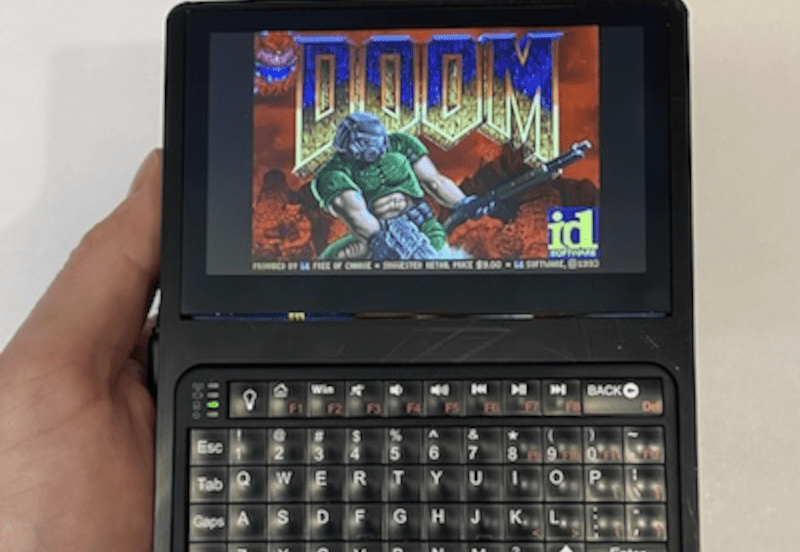
[Samcervantes] wanted a cyberdeck. Specifically, he wanted a Clockwork Pi uConsole, but didn’t want to wait three months for it. There are plenty of DIY options, but many of them are difficult to build. So [Sam] did the logical thing: he designed his own. The Bumble Berry Pi is the result.
The design criteria? A tactile keyboard was a big item. Small enough to fit in a pants pocket, but big enough to be useful. What’s more is he wanted to recycle some old Pi 3Bs instead of buying new hardware.
The result looks good. There’s a 4.3″ touch screen, a nice keyboard, and enough battery to run all day. If you already have the Pi, you are looking at about $60 and two 3D-printed parts. There is some soldering, but nothing that should put off the average Hackaday reader.
Does it run Doom? From the photo on the GitHub repo, yes, yes, it does. This would be a fun build, although we have to admit, the beauty of doing a build like this is making it your own. Maybe your pants have differently shaped pockets, we don’t know.
Either way, though, you can get some ideas from [Sam] or just clone his already good-looking deck. If we’re being honest, we are addicted to multiple screens. Plus, we want a built-in radio.












…but I can’t fold it and put it in my pocket….that’s a problem no matter how well it works.
I wear size 36 Levi’s and this fits in my back pocket
I wish the keyboard wasn’t ble but otherwise I love it
The only way that I can think of getting a better keyboard is by increasing the overall size of the device until you can fit a keyboard that works for you.
the issue that I have with most of these custom self made handheld mini PCs, especially when they design their own keyboard for it, is that they seem obsessed with having a keyboard that is just letters and a few custom keys, no arrow keys, no number keys or F1 to F12 function keys…
I mean if it works for them awesome, but I kinda like having those mentioned keys for the sake of using it as a actual Linux PC.
This persons handheld mini Raspberry Pi PC seems to use one of those wireless mini keyboards you see places like Amazon push whenever you look up Raspberry Pi kits, which I’m perfectly comfortable using, so they get a thumbs up from me with this build.
I like the build too sorry I wasn’t clear.
I just wish there was a nice little keyboard out there for cyber decks that was USB. You are right though, the current alternatives are rough.
Touchscreen keyboards are probably the only way out right now and I don’t love those either
One hack I’ve seen is to get a bluetooth mini keyboard but completely bypass the electronics–basically bodge-wiring the key matrix to a separate USB-capable microcontroller board (e.g. RPi Pico). I forget if he started with a keyboard with a burnt-out controller
I agree – I was initially skeptical at using a bluetooth keyboard. I originally wanted to use a mini USB keyboard for this project, but I had difficulty finding one in-stock on amazon in the right size, so I found this one and discovered it works surprisingly well. The keyboard goes to sleep after a few minutes of inactivity, but a key press on any key will quickly wake it up. I’ve been using this unit every day for the past few months have been very happy with how the keyboard works. As an added bonus, a bluetooth keyboard minimizes the cabling required, which reduces the overall size of the unit.
Does it run doom? FFS I hope it does a SNES did 39 years ago
Better than the wheezy cyrix 486dlc we had at home back when doom was fresh did for sure.
Yes – it will most certainly run doom!