Surviving The RAM Apocalypse With Software Optimizations

To the surprise of almost nobody, the unprecedented build-out of datacenters and the equipping of them with servers for so-called ‘AI’ has led to a massive shortage of certain components. With random access memory (RAM) being so far the most heavily affected and with storage in the form of HDDs and SSDs not far behind, this has led many to ask the question of how we will survive the coming months, years, decades, or however-long the current AI bubble will last.

One thing is already certain, and that is that we will have to make our current computer systems last longer, and forego simply tossing in more sticks of RAM in favor of doing more with less. This is easy to imagine for those of us who remember running a full-blown Windows desktop system on a sub-GHz x86 system with less than a GB of RAM, but might require some adjustment for everyone else.

In short, what can us software developers do differently to make a hundred MB of RAM stretch further, and make a GB of storage space look positively spacious again?

Continue reading “Surviving The RAM Apocalypse With Software Optimizations”
Libxml2 Narrowly Avoids Becoming Unmaintained

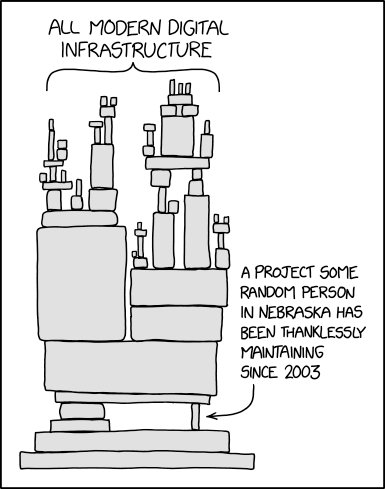
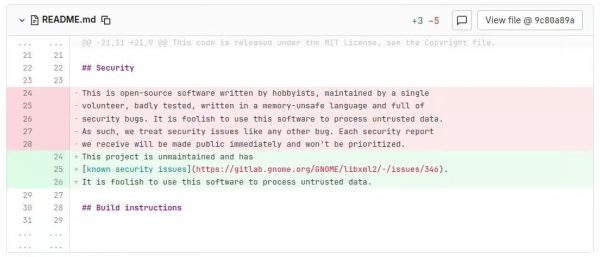
In an excellent example of one of the most overused XKCD images, the libxml2 library has for a little while lost its only maintainer, with [Nick Wellnhofer] making good on his plan to step down by the end of the year.

XKCD's dependency model
Modern-day infrastructure, as visualized by XKCD. (Credit: Randall Munroe)

While this might not sound like a big deal, the real scope of this problem is rather profound. Not only is libxml2 part of GNOME, it’s also used as dependency by a huge number of projects, including web browsers and just about anything that processes XML or XSLT. Not having a maintainer in the event that a fresh, high-risk CVE pops up would obviously be less than desirable.

As for why [Nick] stepped down, it’s a long story. It starts in the early 2000s when the original author [Daniel Veillard] decided he no longer had time for the project and left [Nick] in charge. It should be said here that both of them worked as volunteers on the project, for no financial compensation. This when large companies began to use projects like libxml2 in their software, and were happy to send bug reports. Beyond a single Google donation it was effectively unpaid work that required a lot of time spent on researching and processing potential security flaws sent in.

Of note is that when such a security report comes in, the expectation is that you as a volunteer software developer drop everything you’re working on and figure out the cause, fix and patched-by-date alongside filing a CVE. This rather than you getting sent a merge request or similar with an accompanying test case. Obviously these kind of cases seems to have played a major role in making [Nick] burn out on maintaining both libxml2 and libxslt.

Fortunately for the project two new developers have stepped up to take over as maintainers, but it should be obvious that such churn is not a good sign. It also highlights the central problem with the conflicting expectations of open source software being both totally free in a monetary fashion and unburdened with critical bugs. This is unfortunately an issue that doesn’t seem to have an easy solution, with e.g. software bounties resulting in mostly a headache.

Using An E-Book Reader As A Secondary Display

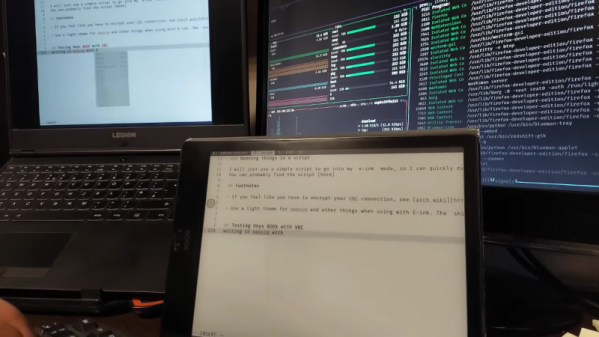
[Alireza Alavi] wanted to use an e-ink tablet as a Linux monitor. Why? We don’t need to ask. You can see the result of connecting an Onyx BOOX Air 2 to an Arch Linux box in the video below.

Like all good projects, this one had a false start. Deskreen sounds good, as it is an easy way to stream your desktop to a browser. The problem is, it isn’t very crisp, and it can be laggy, according to the post. Of course, VNC is a tried-and-true solution. The Onyx uses Android, so there were plenty of VNC clients, and Linux, of course, has many VNC servers.

Putting everything together as a script lets [Alireza] use the ebook as a second monitor. Using it as a main monitor would be difficult, and [Alireza] reports using the two monitors to mirror each other, so you can glance over at the regular screen for a color image, for example.

Another benefit of the mirrored screens is that VNC lets you use the tablet’s screen as an input device, which is handy if you are drawing in GIMP or performing similar tasks.

We sometimes use VNC on Android just to get to a fake Linux install running on the device.

Continue reading “Using An E-Book Reader As A Secondary Display”