
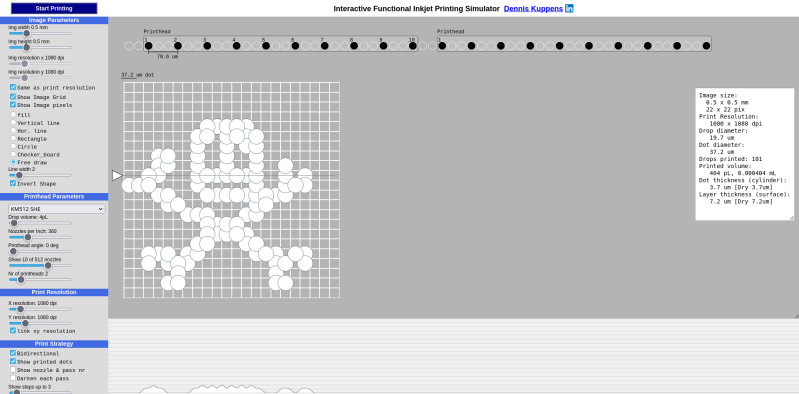
Love them or hate them, inkjets are still a very popular technology for putting text and images on paper, and with good reason. They work and are inexpensive, or would be, if not for the cartridge racket. There’s a bit of mystery about exactly what’s going on inside the humble inkjet that can be difficult to describe in words, though, which is why [Dennis Kuppens] recently released his Interactive Printing Simulator.
[Dennis] would likely object to that introduction, however, as the simulator targets functional inkjet printing, not graphical. Think traces of conductive ink, or light masks where even a single droplet out-of-place can lead to a non-functional result. If you’re just playing with this simulator to get an idea of what the different parameters are, and the effects of changing them, you might not care. There are some things you can get away with in graphics printing you really cannot with functional printing, however, so this simulator may seem a bit limited in its options to those coming from the artistic side of things.
You can edit parameters of the nozzle head manually, or select a number of industrial printers that come pre-configured. Likewise there are pre-prepared patterns, or you can try and draw the Jolly Wrencher as the author clearly failed to do. Then hit ‘start printing’ and watch the dots get laid down.
[Dennis] has released it under an AGPL-3.0 license, but notes that he doesn’t plan on developing the project further. If anyone else wants to run with this, they are apparently more than welcome to, and the license enables that.
Did you know that there’s an inkjet in space? Hopefully NASA got a deal on cartridges. If not, maybe they could try hacking the printer for continuous ink flow. Of course that’s all graphics stuff; functional printing is more like this inkjet 3D printer.












In the early 90s a senior sales exec at HP told me that inkjet technology was given to HP in exchange for getting a son from an executive at Canon into Stanford.
” functional printing is more like this inkjet 3D printer”
Calling inkjet bound plaster 3d printers “functional printing” is a bit generous.
Photopolymer jetting like you see in 3d Systems Projet printers would fit the bill quite a bit better.
Until you actually need to print something. Then it will be a neverending misery of “head cleaning” or some other “calibration” bullshit that keeps failing, but at least it wastes ink.
To buy? Maybe. To actually operate, lol nope.
My b/w Samsung laser printer had its toner last changed in 2015. After graduating from university I don’t print much anymore so it spends most of its time stored in a plastic box to keep the dust away.
Just yesterday I needed to print a 2-page document and guess what? After taking it out of storage, connecting power with IEC C13 connector and data with USB-B cable it Just Worked™, the same as it did in 2009 (Win XP, when I was in highschool), 2014 (Win 7, when I was printing reports for university classes) or 2022 (Win 10, when I was enjoying wheatpasting provocative political stickers).
It will probably remain operational for another decade or two.
Try that with inkjet lol.
My last printer was a LaserJet 5 I bought off Craigslist in 2010 for $20. At that point the printer had been thru several owners, and likely spent 10 years in an office in the 90s prior to that. It still worked perfectly when I took ownership of it. I replaced the toner cartridge exactly once in the 12 years I owned it. It printed all of my taxes, all of my papers thru college, and numerous toner transfer pcbs, without breaking a sweat.
I miss that printer. In the end, I had to let it go, I couldn’t source a replacement for the fuser, which had finally given out after 30-odd years of faithful service.
I have a LaserJet 1022n (with wired network) that was literally recovered from a dumpster 12 years ago. Works like a charm, provided you keep feeding it toner every leap year.
Although you are completely right, inkjet printers suck. They are: unreliable when not used frequently, expensive when used frequently, wasteful, but cheap to buy. Although if everything does go right they can produce great looking printouts.
Yet I could not resist the video of this 40 year old inkjet connected to a modern PC.
“Commodore Ink jet MPS 1270 Windows 10 High Resolution Print”
https://www.youtube.com/watch?v=yqG-qxhI3Tc
Yeah, inject printers are inexpensive if you never print. As soon as you actually use your printer, I never found inkjet printers worth it.
Dried out heads is a major problem if you do not use it enough.
Expensive ink is a problem if you use it too much.
Laser printers just always work, and pretty much never require refills.
Only minor thing it has going over laser printers is better color quality, BUT, any print shop where you can order photos will have a much higher quality. So for photos that you want to frame, it’s also no good.
Inks not so expensive if you buy it by the liter and use a Continuous Ink Supply System tank mod.
Toner costs are usually 12–15 cents per page, rising with high-color usage
An epson printer converted to CISS gets 15000 100% color coverage pages from a $80 4 liter ink set. Thats half a cent per page.
That and a high quality paperstock will get you the same quality photo prints as your local printshop.