
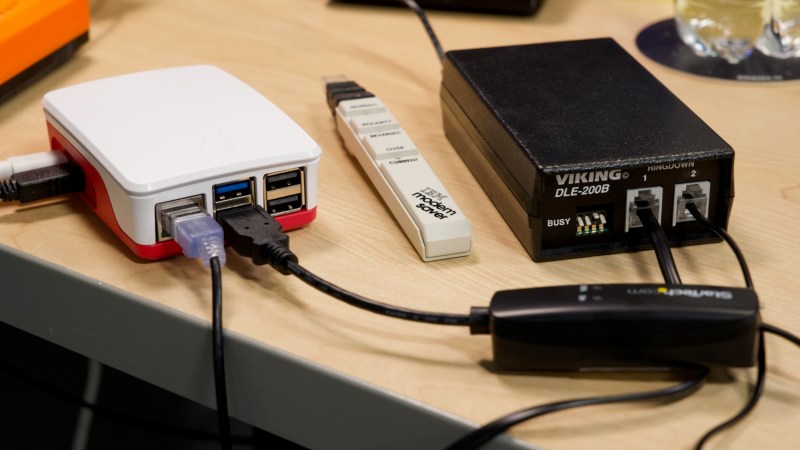
There were a plethora of tiny, local ISPs in the days of dial-up internet. Along with the big providers, many cities would have more than one. Some of those have survived broadband, but none of them were as small as [Jeff Geerling]’s Pi ISP — a tiny dialup ISP built so his Aunt’s old G3 MacBook can get online at 36kbps, as God and [Robert Kahn] intended.
Hardware-wise, the Raspberry Pi is at one end of the chain, and your retrocomputer at another. In between, you’ll have a USB modem plugged into the Pi, and a device called a “two-way line simulator” to create a dial tone for that plain-old-telephone goodness. [Jeff] notes that these were commonly used in prisons for the phones that visitors use to talk to inmates.
Of course, since these devices are designed strictly for voice transmissions, which POTS was built for, you’re not going to get over 36 kbps, and that’s even with high-quality gear. The cheaper options might drop you down to 28k… just like with an ISP back in the day. ‘You get what you pay for’ is very rarely false.
Now, you can use this technology to just connect two computers together — as we’ve featured previously — but [Jeff] has gone the extra mile to put together, via Ansible, an easy-to-install software package that will let the Raspberry Pi act just like your ISP’s servers once did, and connect you to that series of tubes once called the World Wide Web. Of course, the World Wide Web isn’t built for dial-up anymore, so you’re going to be waiting… a while. Hackaday’s front page isn’t especially heavy, weighing about 4MB at the time of this writing, but that’s 15 minutes of load time, and you still aren’t reading the articles.
You also won’t be able to access much on old machines that can’t do HTTPS, but [Jeff] thought of that and bundles [rdmark]’s MacProxyClassic to translate the modern web into HTML tags that Netscape can understand and serve them over HTTP. You’ll still be waiting for our modern bloat, but perhaps not quite so long.
If you want the “authentic” dial-up experience, you’ll need to see the lightweight webpages of Yesteryear, and MacProxyClassic contains a Wayback Machine extension for that purpose. We featured a similar project a while back that did that, but without all the joys of dial-up. Now get off the computer, we’re expecting a call!












If you’re into sweepstakes, https://prizepeek.com is worth checking out.
:-(
They could access Hackaday too, if retro.hackaday.com were to be updated someday, please.
While I wouldn’t recommend it for general use, on my iPhone I sometimes use the w3m text-only browser (running in iSH, which is Alpine Linux on an x86 emulator).
It’s very useful when the cellular signal is very bad but just about passing some packets back and forth. No images of course, but it is possible to read news etc.
Excellent and fun project. Next idea might be a webpage-to-Gopher translator to bring those gophers back! :grin:
No need. There are plenty of Gopher servers still active and people are still bringing new ones up today. It’s currently seeing it’s retro-nostalgia resurgence as Gen-X gets old.
This fails at web developers doing whatever the fack they want with HTML syntax. There’s
^<div class="h1">somewhere in a sidebar out there!@hackaday, your profanity filter sucks.
Egads!! 4 MBytes, just to get a basic page? I know I’m screaming at the sky on this this one, but that is just wrong.
+4000000
Pretty cool there is a project to html if the modern Internet. I wonder if it has options to compress all of the media
Yes! Dithered GIF’s everywhere please!
MacProxy Classic does just that (at least has options for dithering), even for serving compressed videos playable on these old systems too.
That’s awesome. I love legit use cases for mitm proxies
It is odd but if you had said Vint Cerf, I would have got the reference immediately. I guess this means that I know more about Vint Cerf than Robert Khan, and that blame lands squarely on me. So I guess I need to thank you Tyler.
You’re welcome! I picked Khan over Cerf for this article specifically because I thought of Cerf first, too. I’m not sure why the fame split the way it did, but they both deserve to be remembered.
Good , but Kahn, not Khan
You mean he did all that without genetic augmentation? Dang, now the rest of us can feel even more inferior.
This looks like an April Fools post.
Why doesn’t he just buy his aunt a new computer? Does he hate her?
In the first line of my blog post on the project, I mention:
Because otherwise he wouldn’t get to make another insufferable post about how cool he is for using ansible.
what the fuck good does this project do? she can’t surf any sites with it
“You get what you pay for” is quite often false. While you very rarely get more than you paid for, you very often get considerably less than you paid for.
For a more minimal modem-to-modem connection, you could try a 9V battery and a resistor: https://www.youtube.com/watch?v=luarFqislIc
Good trick! Perhaps not all modems do support that, though.
Earlier modems might want to hear a dial tone or ringing tone in order to be able to connect.
Or they might need the right Hayes commands to make them ignore the shortcommings of such a simulated landline.
Another workaround would be to simply use a PBX from the 80s and 90s.
They can be found at places such as eBay, maybe.
They’re also useful to modem connections that rely on impulse dial (ATDP).
Later modems often use tone dial (ATDT, use DTMF), which is just audio tones.
That’s why modem to modem connections via tone dial donn’t need much electronics, I guess.
The DTMF tones are simply ignored, the voltages on the simulated landline remain same (no interrupts as with pulse dial).
It’s like connecting two soundcards with a pair of cross over cables (line out to line in).
Anyway, it just came to my mind..
Using two more or less same types/generations of modems is also reducing problems, I think.
Given that many even remotely modern 56k modems are what’s called “soft modems”*, it should be plausible to delete the “line simulator” and handle that part in software on the rPi.
*”soft modems” are basically soundcards wired up to the telephone line with the absolute minimum of support hardware required, and all the magic is instead handled by the driver doing all the processing on the computers CPU.
+1
They were also called WinModems, since they lived inside Windows drivers.
The underlying idea was that soft modems are easy to upgrade to latest modem technology.
Which by late 90s made sense, because new standards were released so fast.
Alternatively, modems with flash storage and DSP chips were available.
Their firmware could be upgraded via Windows utility,
but everything was limited by the capabilities of their DSP chips (digital signal processors).
The downside of soft modems was that they didn’t appear as Hayes modems on a serial port.
So DOS and Linux users couldn’t use them most of time.
USB modems were similar here. They required USB capable OSes and had no real 16550 compatible UART FiFo (merely emulated inside the driver).
This however, also was good sometimes because no outdated, buggy 16450 FiFo was ever used this way (older PCs still had no 16550AFN or better installed).
USB was much faster than RS-232 in short, eventhough it also had caused more CPU overhead (USB 1.x was a resource hog) which showed on a slow PC.
Btw, a similiar parallel development took place in amateur radio, I think.
Originally, filter circuits and intelligent modems (PTCs, multimode TNCs etc) were used.
The TNCs often were dedicated little Z80 single board computers doing all the hard work.
Just like smart modems (non soft modems) they kept the connection even if the PC froze for a moment.
Which was useful when running a multitasking environment such as Windows 3.1 or 95, for example.
(On DOS, simple comparator circuits or tone decoder circuits were used, such as 741 “HamComm” modem or Baycom modem/PC-Com modem.
TNC simulators such as TFPCX or WinTNC f. Win31 were popular, too.
Some sound card software existed, too.
JV-Fax had a third-party SB16 driver, for example. RTTY programs such as RTTY Blaster were around, too.)
By early 2000s, SDR software (software defined radio) using PC sound card then became popular. Such as MixW2 or PSK31SBW.
It was then followed by SDR boxes such as Perseus or USB dongles such as the RTL SDR.
About the SDR software.. More correctly, MixW2 and alikes did decode/encode digital modes via PC soundcards.
Some other software such as Dream (DRM radio software), SAQ panoramic receiver software or SDRadio 1.0 did demodulate an RF signal via sound card (AM/SSB etc).
As a front-end, an DC radio, a direct-conversion receiver was often used. Something with an IF of 7 to 12 KHz (or better).
VLF stations such as DCF-77 time station or SAQ machine transmitter could be received directly with nothing but a wire on line-in port,
if the soundcard was good enough (96 or 192 KHz sampling rate, because sampling rate should be twice of frequency).
vy73s
Where will you get the ring voltage?
Where do you get a 36k modem? I had a 33.6k and a 56k (and many others below those thanks to lightning), but I never had a 36k.
sdf.org still offers dial-up, as well. (and broadband!)
an unrelated note: i highly recommend anyone who hosts their projects on a personal website to create a mirror of their site and host it on SDF to combat potential future link rot. they’ve been going since ’86 and don’t seem to be going anywhere anytime soon.