
These days our appetite for more data storage is larger than ever, with video files larger, photo resolutions higher, and project files easily zipping past a few hundred MB. At the same time our options for data storage are becoming more and more limited. For the longest time we could count on there always being a newer, roomier, faster, and cheaper form of storage to come along, but those days would seem to be over.
We can look back and laugh at low capacity USB Flash drives of the early 2000s, yet the first storage drive to hit 1 TB capacity did so in 2007, with a Hitachi Deskstar 7k100, only for that level of capacity in PCs to not really be exceeded nineteen years later.
We also had Blu-ray discs (BD) promise to cram the equivalent of dozens of DVDs onto a single BD, with two- and even four-layer BDs storing up to a one-hundred-and-twenty-eight GB. Yet today optical media is dying a slow death as the sole remaining cheap storage option. NAND Flash storage has only increased in price, and the options for those of us who have large cold storage requirements would seem to be decreasing every day.
So what is the economical solution here? Invest in LTO tapes using commercial left-overs, or give up and sign up for Cloud Storage™ for the low-low price of a monthly recurring fee?
It’s Not Hoarding, I Swear
 Although there are many people today who use just a lightweight laptop with something like 256 GB of storage in it without any complaints, the problem would seem to lie mostly with those who are really into having local and offline data. This can include things like multimedia content, but also project files and resources, which especially in the case of video editing and game development can quickly balloon into pretty serious size requirements.
Over the decades of memory storage, there’s been a near-constant flurry of new innovations and technologies, always with the knowledge that in a decade there would be massively larger forms of storage or at least big price drops to look forward to. This is how my first late 90s PC didn’t have just a zippy Celeron 400 CPU, but also a massive 4 GB HDD.
Compared to the 30 MB HDD in the 386-based system that I had before this was massive, but with multimedia content flooding in courtesy of the filesharing revolution, I quickly had to pop in a 10 GB HDD. By the time that I upgraded to a new PC that was considered small, and I found myself well above 20 GB, before soon joining the 1 TB and later the 5+ TB club. By 2012 HDDs were using 2 TB platters, so this was basically becoming unavoidable.
Meanwhile a lot of files were offloaded or backed up onto optical media, both CDs and DVDs. Although ZIP disks also briefly made an appearance in my PCs, optical discs were simply far cheaper and more universally usable.
The Problem
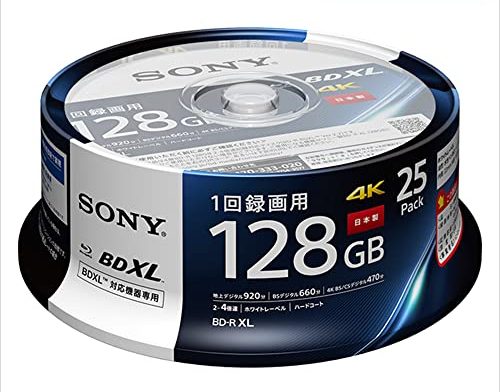
Even before the current ‘AI’ datacenter-induced tripling of Flash storage costs that’s also affecting USB Flash drives and HDDs, optical media had been slowly phased out for a while. Even without checking sales numbers, you don’t have to be a genius to consider it a bad sign that manufacturers like Pioneer are exiting the optical storage market and big names like Sony ceased the production of recordable Blu-ray discs along with MiniDisc and MiniDV formats.
If you have recently shopped around for internal 5.25″ optical disc drives (ODDs) in particular, you may have noticed that these are becoming increasingly more rare and expensive. Even stand-alone BD player options are becoming more limited, with that distinct ‘final gasp’ vibe that comes with a dying format, as with VHS and kin in the past.
Part of the problem can probably be attributed to the move away by content distributors – including multimedia, games and software – from physical media to online distribution methods. This takes the form of streaming services, Software-as-a-Service (SaaS), and online game stores. At this point you do not even need a BD player in your home game console, never mind PC, to install games. Neither do you need a BD player connected to your smart TV as you can just join the new brave world of terminal-based subscriptions.
So with demand for optical media massively reduced by this shift, what’s left for those of us who just want to back up our data in peace and without shelling out too much hard-earned cash?
The Future
 With the prospect of cheap DVD and BD blanks becoming a thing of the past, or unusable due to a lack of new optical drives to use them with, what options remain? We can look at metrics like cost per GB to see what might conceivably make sense.
The most recent 50-disc spindle of DVD+Rs that I purchased came in at just under €15 for 235 GB, so that’s about 6 cents/GB, and I could have gotten it much cheaper by going for larger spindles and shopping around some. For comparison, SSD storage was more than triple that even before the recent price surge, and HDDs are coming in around that same price tag as well.
A quick look at LTO tapes and drives for sale shows that while tapes for the older LTO-8 standard from 2017 are pretty reasonable, the drives cost an absolute fortune, so you’d have to be pretty lucky to score one without having to pawn off a kidney.
Add to this that LTO tapes are only really guaranteed for a lifespan of 15-30 years and are incomparably slower due to being a linear format. This makes tape storage only really suitable for the coldest of cold storage, and not for keeping some videos around, or for game development resources that you would like to pop in and quickly query without dying from old age while a tape seeks to the appropriate position.
The Solution?
Even assuming that the current insane surge in pricing for RAM, NAND Flash, and even HDD storage is just a temporary blip, and that by the time 2027 rolls around the RAMpocalypse will just be a bad dream to meme about, the basic economics of cost per storage would still not have changed in any measurable way.
The advantage of optical media, especially DVDs, is that they’re a very simple technology, relatively speaking. While there is some impressive technology in the optical pick-up component of an ODD, over the decades they have become highly affordable commodity devices. Meanwhile the discs are very cheap to produce, being at their core just some plastic with a coating on which the bits are written, while being very durable if kept away from physical harm.
It’s also essentially guaranteed that a DVD+R or BD-R will not have its data altered, something which cannot be guaranteed with a USB Flash drive. Filesystem corruption and electrical issues may damage or even destroy the Flash drive.
Although it’s easy to say that one should just ‘stop hoarding data’ or subscribe to some cloud storage solution for potentially infinite money per GB, high latency and the possibility of data loss due to a datacenter issue, there are many arguments to be made in favor of keeping local, offline copies, and that this should be done on highly durable media. We just cannot be sure that optical media will remain an option in the future.
What is your take on this conundrum? How do you manage your storage needs in this modern era, and what are your plans for the future? Please feel free to sound off in the comments.











This is a problem I’ve long thought about. Technical changes make EVERY (but one) form of storage obsolete eventually.
The one exception? Paper. Anything you put on paper will absolutely be machine-readable in 100 years. Of course, putting 50 TBytes of data on paper would be a LOT of paper .
BTW, I’ve still got an extensive collection of IBM PC software on 5.25″ 360K Floppies. Being a retro nerd, I’ve got the equipment to read them, but I recognize that it’s a fool’s errand to try to keep all that data.
Similar, with Apple ][e. I was sad that the SD-card disk emulator projects for Apple ][ seems dead.
I’m planning on using Flash Floppy for my ][e once i get a some sort of power supply sorted out. My original seems to have given up. I don’t have the required real floppies to use with it.
https://github.com/keirf/flashfloppy/wiki/Apple-II
Note that original Apple II power supplies don’t operate without a load. Many folks have assumed their supplies were bad when bench testing without any load. Use some incandescent 12V bulbs to provide a load to the 5V and 12V lines.
Yes, i tried it with 12V and 6V bulbs and obviously the motherboard led doesn’t light up either.
I even made a 19-pin (DE, DB whatever you call it) connector out of a 25-pin. If you cut it smart, the outer metal can be folded so, that it looks a lot better than just cutting it straight up and it fits. I also soldered it, so it doesn’t open up.
Long-term survival of paper is an interesting topic. I’ve read that as “historical” paperwork goes, there are more newspapers from the late 1800’s in existence than from the early 1900s. Why? A switch from rag to wood-pulp for paper-making, around the turn of the century, resulted in widespread use a material prone to self-destruction through acidification.
My (tongue-in-cheek) solution is binary-encoded clay tablets.
Sumerian tablets cuneiform are still readable after 6,500 years. A library even burned down around them, and instead of erasing the text…. it fired the clay into pottery and rendered it nearly immortal.
Agreed. Museum quality photographs of tourist destinations needs preservation, not the tedious tourists gnord pix. Bit rot can eat that Langolier style.
Old aerospace, tech and sci-fi forums need preservation.
some of the dead sea scrolls were written on copper sheet. they did corrode but i imagine if they were packed with grease it would be the best shot.
Had a short peek and a 12TB HDD is EUR 350 at the moment. So that/s 350/12k = 3ct per GB, half the cost of the DVD stack mentioned in the article, and I don’t even want to calculate how much time it takes to jiggle enough of those in and out of your PC to fill such a HDD.
Biggest disadvantage of HDD’s is their mechanical vulnerability, but putting it in one of those thick silicone sleeves helps a lot. And you need multiple HDD’s as a decent backup strategy, but that’s true for any decent backup strategy.
It’s also not so difficult to configure a PC as a NAS and then have some of the drives spin down manually, so you only spin them up when you need access to your backup, and you never have to move the drive phisically or even plug in connectors. Plenty of options in that direction.
Just don’t waste time on WD. I had 3 drives from them all die within 3 months of purchase. I haven’t bought another WD drive since. I tried a Green, a Red, and a Green again. The second Green lasted the longest, ironically the Red NAS drive died quickest. Their replacement plan requires international shipping, so… that never happened. I’m still bitter about it 15+ years later.
Although totally understandable re what you say, I have used WD drives (not exclusively but in large majority) for well over a decade (maybe one and a half or even two now?) with no such problems except after years of use and even then rarely. I have upgraded and added external drives for space needs (in the last 7 years doing a lot of video), I am still running 2 9 TB drives that are rather old now among the 6 total external drives (always a duplicate for each drive, so it is really 3 drives worth of storage).
^ this is the way. HDD’s are cheap and robust, easy & fast. Yes you need some redundancy but that’s true of any storage medium.
Also, the amount of data we have that’s actually critical to back up is usually relatively small – yes a lot of us have libraries of downloaded movies or shows that we’d like to preserve but in the majority of cases if you lost that HDD you could reinstate it with a few trips on the high seas, there’s not much that’s not findable online one way or another these days.
Maybe for your needs, but plenty of folks out there will have lots of data that isn’t so available, or at least they hope isn’t available as they never shared it – home movies, photos, music from the local/small artists that were the warmup act at a show 40 years ago but never made big enough, that 3000 hours of game saves etc.
Trusting the high seas will always have what you want, or even that you can find a live one in the sea is really not a great solution, and even if there is still a live source of everything you want how many hours are you going to spend looking for it all! That backup however you do it is almost certainly worth it!
Interesting. Came here to say that optical isn’t great for long-term storage either (10-30 years), based on my last look (Library of Congress link as example). However, a quick look at at least newer web sources seems to indicate DVD-R may hit 100 years nominally. Or 10 years. Or 200. WinxDVD link as an example of a typical from the quick search.
Anyone have more authoritive source on DVD-R lifetime information?
https://www.loc.gov/preservation/scientists/projects/cd-r_dvd-r_rw_longevity.html
https://www.winxdvd.com/dvd-ripper/how-long-does-a-dvd-last.htm
The lifetime of a DVD-R would obviously be completely dependent on what medium you use and who manufactured it in what year/month, as well as how it was stored.
I suppose with enough samples you could get an absolute max period, but that’s about it I expect.
“It’s also essentially guaranteed that a DVD+R or BD-R will not have its data altered”
Unfortunately not at all. Even 15 years ago when I was in the optical disc industry, we were very aware that whilst “silvers” (stamped discs) last almost forever, “golds” – the many forms of writable discs – have life expectancies of a few years up to 20 years for “medical grade” CD-Rs. And that drops very quickly if they’re kept too warm, or exposed to light. The quality of writer also has an impact, with slower write speeds typically giving a better result.
This is potentially acceptable for video as a few bits lost here and there don’t make much of an impact, but is obviously disastrous for other files – or if the loss occurs in file systems etc.
Case in point, my wedding video was burnt to DVD-R about 20!years ago, and whilst the first VOB file is intact, the rest are a complete loss.
It’s been a while, but if I remember correctly, the thin film layer on a CD-R/DVD-R is an organic chemical which tends to break down over time. The silver on a stamped CD/DVD I believe is metallic aluminum. In the -R discs, the organic layer is heated by the laser and that makes the depression which is later read. On a stamped disc, it’s a physical depression in the plastic. Stamped discs should last until the plastic degrades. “Burnt” discs only last until the organic layer degrades.
During the late 90s/early 2000s forums were filled with people discussing the pros and cons of certain DVD-R/+R coatings, with Azo being the premium version, with long-term stability. This is what is used on the Verbatim blanks that I buy.
The CDs and DVDs that I burned around that time are (so far) still readable with no detectable errors. Even newly burned discs should be good for a number of decades.
The solution is antimonopoly laws
Law is already a monopoly, and the worst one at that because it’s enforced by thousand of clueless men armed with machine guns, tanks, IFV, fighter jets, drones etc. They are paid by the kingmakers to kill those who don’t want to follow them in their murderous legiree.
Until every normal human has the capability to stand against them and create their own set of rules to live by there can be no freedom, just slavery.
Are you a professional comedian?
No, he’s based.
Artificial price fixing organized behind the scenes by a dozen tech manufacturers plainly fits within existing anti monopoly laws. Your nebulous line of thought while impassioned says very little.
Huang, Cook and Nadella have shown through decision making foreknowledge of the RAM and now CPU/Storage price increases. This constitutes a monopoly.
Or astute business sense, which makes more sense given the ability to run a successful large company depends on the ability to read the market, and companies which fail to see what’s coming quickly die as many articles here narrate. But you do you.
Go ahead and buy an RTX5080 or a stick of DDR5 at MSRP, you do you.
AI will free us from the tyranny of Lawyers!
(Try it, it’s surprisingly eloquent, and almost as correct.)
My current strategy for data I care about and access somewhat frequently is to use sync software and tie multiple devices. I use Resilio Sync right now but Syncthing can also be a substitute. An issue with the latter is lack of mobile app support.
I am trying to change it using this here: https://github.com/yeus/syncpeer.. which is hopefully the missing piece for syncthing to be fully usable in the phone… It’s only experimental right now though…
my needs never exceeded 4tb. which i have on 2 nvme ssds and backed up to spinning rust. on one had i dont like running storage devices to the point of failure, on the other hand i have storage devices going back 10 years that still seem to function. got enough sata ssds to do a raid5 (though something newer that better handles mismatched drives is probibly desired).
though now that i think about it raid is a misnomer. its now raoed. redundant array of overpriced expensive disks.
I bought a used HPE LTO drive off Amazon not long after covid struck; HPE refused to send me the software for it. Just something to keep in mind even if you do get one (Amazon quickly refunded me both for the drive and the tapes I bought for it).
99% kidding here, but you could save your data as a descriptive prompt (perhaps with screenshots) to feed AI later for reconstruction. You could even automate the describing and documentation of the media. What comes out won’t be quite right, but think of it as the digital equivalent of atomic gardening; maybe you’ll look more attractive in the reconstructed video. Fight fire with fire, though in this case it ultimately makes the problem much worse, sort of like an air conditioner.
I experimented with DAT / DSS Tapes for data storage, some 15-ish years ago. The drivers were freely available. And as for the software,
Windows had a tape writing tool integrated inthe XP era. Was quite an “out-of-the-box” experience for me.
The general workflow sucked though. You couldn’t write or read single files from the tape. You always had to read the tape and write to drive for the whole session, just so you can go back and open one file. Considering I was working with lots of Video files back then, I was hoping I can access them directly from tape.
Later I had a short stint using Blu-ray’s for storage. But the discs were expensive and a burn error meant lots of lost money (comparatively).
Today I only use internal or external mechanical harddrives for mass storage. Biggest advantage for me, direct random access at reasonable speed, even for single files.
I never bought blue-ray because both the drives and media were expensive, and because my experiences with CD and DVD as a backup medium was mediocre.
Just had a short look and with EUR 50 for a player and less then EUR 1 a piece for a cakebox of disks it’s quite affordable now. But who wants a media with only 25GB (or 50GB) of space? Juggling with a whole stack of those to make a backup is just yuck. And labeling them, and finding the right disk in a stack to read some data back. All yuck.
I can see some limited benefit in giving such disks to friends, or mailing them around, but I have never used optical media after the DVD era.
These days backing up a few TB on a HDD is easy. Doesn’t matter much whether it takes 2 hours or 8 hours, as long as the backup is done when I get out of bed the next morning it’s just fine with me.
Or just let it hum along on your multi core PC in the background. It’s quite rare that my CPU usage gets above 10% for normal work. (Except for short bursts). 30 years ago this was very different indeed.
Something I always really liked about UNIX is that tape was relatively easy to work with: tar made it fairly painless to pull files off a tape, and you could be pretty much guaranteed tar was available on every UNIX and UNIX-like platform, alongside native tape device format.
It wasn’t great at dealing with open files (like, eg, databases) but there were ways around that.
“99% kidding here, but you could save your data as a descriptive prompt (perhaps with screenshots) to feed AI later for reconstruction.”
Sounds similar to what I’ve heard about how human memory supposedly works.
Never buy used HPE because you’ll never get support.
In my opinion this is a strategy that industries are acting to fight against PERSONAL computing. They prefere, in future, we will rent their AI supercomputer. They don’t need anymore people aid to gain economy scale about microelectronics selling billions of ssd or ram as in the past. So only solution, in my opinion of course, is to boycott them, not using AI, not buying new phones, PC, etc.
Back to the past, at Commodore64 age!
If your data isnt in their cloud then they cannot read it, teach their AI, or monetise you.
xor it with an OTP which you store in another cloud.
The loss of optical storage options is a tragedy for many reasons. Unless a good alternative is found, many of us are going to be very badly left in the lurch in the near future.
I had our new overlords crank this out over the weekend: https://github.com/aleksclark/blockyard please don’t use it for data you care about yet, but basically this is my solution to “I gradually acquire differently sized harddrives and want to store stuff”
I was about to go all-in on SSD backup storage, when I read that SSDs don’t retain data when left unpowered for long enough. That left me with buying a 2.5″ portable HDD as my backup solution.
NAND Flash has a guaranteed data retention period, but this shortens dramatically the warmer you store them. At over 50 degrees C your data will be toast in a matter of weeks to months. Which is basically the equivalent of leaving said drive exposed to direct sunshine.
I consider NAND Flash to be okay for short- to medium-term storage, but sketchy as actual ‘backup’.
I have two backups on platter HDD’s: One in my house that I regularly (but not enough) bavk up to, and one (two disks that I swap arounf) that I do a full backup to each year and store in a friends house so a fire in my house loses only a year worth of data.
About 3 years ago, I changed my case (an Antec P182), struggling to find a good case with 2 x 5.25 bays for my 2 BR writers. Eventually, I took the plunge with a case with no 5.25 bays, copied all my DVD+R and BR onto a 5TB WD black hard drive which I bought from the money I sold my 2 BR writers, wondering if I was making a mistake.
I’m now convinced it was the right thing to do. Actually, I figured it out then: out of the 200 discs I copied (yes, it was tedious!) onto my 5TB drives, few files had become unreadable. Considering that I was always buying good quality blanks AND always writing them at half their advertised speed AND doing a full test post writing, that tells me that optical discs are not reliable even if stored for just few years.
So if I had several TB of data to backup on an external drive, I’d defo go: 4TB or less, a SSD, and 4TB+, a platter drive. And regardless of the amount, I’d totally ditch optical discs and old USB style pen drives.
That’s just me anyway.
Actually, I kept a couple of spindles of CDR and DVD+R, as well as a USB DVD writer, just in case, and have never ever used those since migration! So another hint I probably did the right thing.
I’ve found write-once optical storage from the late 90s thru the early 00s is still readable. After that, they are all total crap. I just use spinning rust drives. Best bang for the buck. Monthly backups I keep off site. Weekly backups are usually kept offline but on site. Replace drives occasionally when ZFS complains.
There is a method of storing QR code compressed files on printed paper out there that has a storage density of around 200KB per page call Twibright OPTAR (OPTical ARchiver). It’s designed for long term archiving, and has a built in method of error correction using Golay code. It’s a Linux program that is free to use, and can be found at this site – https://ronja.twibright.com/optar/
There is a similar Windows program called Paperback which can be found here – https://ollydbg.de/Paperbak/index.html
First, I keep everything I want to keep spinning on my two servers (a primary and backup). That way I don’t have to worry about bit-rot, media obsolescence. Currently this data is around 3TB. I then do periodic backups and quarterly backups. At least once a year, a backup is stored off site as a yearly backup. Or if we go on vacation, a complete backup is made and stored off site for the duration. I keep three years off-site. They are rotated back in as needed. So ‘none’ of my ‘storage’ is obsolete. As technology changes, so does the backup media as it rotates around. Right now it is simply external HDDs (some book size, other portable) as it is the ‘cheapest/reliable’ media at this time for my use. When our ‘need’ is over (we die), no one is going to care, so only for our lifetime. All pictures by that time, for example, will be in the hands of the kids and they can do what they want with it. We won’t care :) . FWIW, the cloud will ‘never’ be used for any of my backups.
Obviously businesses have different needs to drive long-term storage. But not my problem.
In my experience, CDs do degrade way faster than DVDs: just within a few years. I’ve been told that this is due to CDs holding the data layer unprotected on the top surface, whereas in the case of DVDs, the data layer is sandwiched inbetween plastic.
Should add, if I ‘had’ to buy a replacement for spinning servers, I’d go back to HDDs at this time rather than a (now expensive) 2TB+ SSD drive. May not be fast, but they work. My max price point for an SSD is around $100.
Galvo type Fiber Laser Engraver 15 cm width, continuous feed stainless steel ribbon, QR like encoding at max resolution of laser. You can figure out the rest… ;-) Store in silicon based oil. Should last +500 years easily.
D-VHS tapes or MiniDV sitting around doing nothing. Could come in handy!
Check out M-DISC
LTO-8 is expensive, but LTO-6 is affordable. I’ve seen used but working drives on eBay for $250. LTO-6 tapes store 2.5TB per tape, and you can write data at sustained 160MB/s if your system can keep up, which is pretty fast for a backup format. T
In comparison the fastest you’ll get out of Bluray is 72MB/s with 128GB max storage per disk.
I’ve never regretted using tape, it’s proven very convenient, robust and easy. I have about 40TB formatted in RAID10 online, so that’s my data workspace across 3 machines. Everything that I don’t need online 24/7 goes to tape.
Thanks for that comparison. I had reckoned that going back to 2017 would be long ago enough to make it cheap, but LTO-6 looks a lot more reasonably priced.
Pretty sure I have some even older LTO drives (with SCSI interface) stashed away somewhere, but I imagine that they’re probably LTO-2 or -3, at which point you have to question whether it’s worth the effort.
LTO-5 is the lowest I’d go, and that’s most of what I have. Fortunately LTO-6 drives work just fine with LTO-5 tapes.
Keeping files as small as possible is my solution. I restrict images to HD and as .avif 55%, and movies 720p libx265 q=25 (some movies at 1080p).
And I do not store much. I now use 650GB, stored on 3 SSD/HD 1TB disks at 3 different places in Europe (data being added monthly and completely overwritten yearly). Enough free room for about 10 to 20 years, maybe.
And while we are all hoarding all those files and photos, storing them on card/disk/tape/whatever, there will come a day when the person who collected it all comes to die. Nobody knows what’s on that mysterious device or medium and the one who’s left behind needs to deal with it and throws it away… end of story.
Or in case of data storage in “the cloud”, when left unattended for long enough (and bills are no longer paid) it will be erased automatically… end of story.
Regarding serious preservation of data… keep on moving the data onto newer media of different kinds to spread the risk and don’t throw away the old media, because you never know…
Me in 1990: “A 40MB hard drive! I’ll never need to buy more storage ever again!”
Me in 1994: “A 420MB hard drive! I’ll never need to buy more storage ever again!”
Me in 2000: “A 20GB hard drive! I’ll never need to buy more storage ever again!”
I was wrong a lot in my youth.
There’s kind of an inverse Moore’s Law at work here: Software will always expand to fill all available space.
I haven’t considered CDRs to be viable as backup storage for a very long time. Even when they were what “everyone” was using I didn’t like them for that. I had way too many go bad on me! I lost stuff by counting on CDRs to keep them. The worst was if you put a label on the CDR. Any sort of adhesive and you would start to see data errors in a matter of months. But even without.. and even perfectly stored.. they go bad.
Tape backup might be ok. But.. I feel there is a much simpler solution.
Just back your stuff up to a hard drive!
I have a hot-swap removable drive slot. It doesn’t even require a tray, just pop the drive in and close the door. I have two backup drives, one for local backup and one for remote. When it’s time for backup I just pull the local backup drive out of it’s box, pop it in the slot, close the door and run a script. Come back in an hour or so, put the drive back in it’s box. Next time I am going where the off-site backup is I take it along and swap them.
If I ever have to restore from backup.. Just pull the dead drive from the server. Install the former backup drive in it’s place. Order a new blank drive to add to the backup rotation. The whole process can be done in just a few minutes.
I heard that some spinning rust is helium-filled, and the He diffuses out through the breather. Then the heads crash. But, maybe add a Shraeder valve for a top-up? As this is HaD.
My home computing needs are constantly in flux, but the rough trajectory is to slowly consolidate all of my storage to a NAS, where I can sort everything to a local backup and then an offsite backup.
While I do seem to have an annoying amount of media to store, I actually care very little about the majority of it, and am really only concerned with having an actual backup of about 1-2tb at this time, so I am considering doing split backups between my house and my parents, or a cloud solution like backblaze.
I have been quite sad about the downfall of bluray media though, and really wish that there would have been a bit more care or interest from the general public about keeping it, but it seems that the streaming and content distribution was just barely good enough for long enough that nobody cared enough to save the optical format.
I am worried that the loss of consumer optical will make it hard for the current tech environment to see a demand to create a replacement, and some generic MBA-types somewhere will just argue that nobody buying a thing that doesn’t exist is a justification to keep pushing subscriptions and streaming.
Seems like I already posted. Posts seem to disappear on a whim….
My solution is to keep everything spinning that I ‘want’ to keep. Then rotate backups onsite and offsite. Simple. That way as technology changes, I change with it. And there is nothing I have that needs to last 500 years or even 50 (wait, that puts me at 110, so 30). My data is still less than 4TB which I doubt I’ll ever exceed as half of that is just media files anyway… Nothing stored in the cloud…. and never will be.