
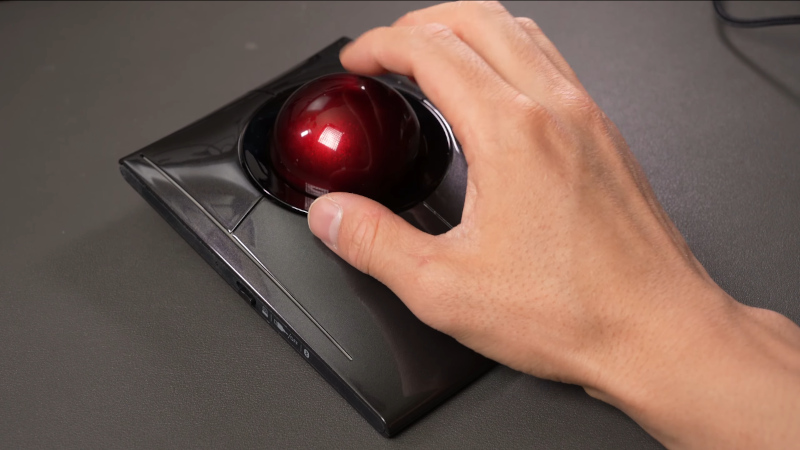
We use CAD packages in our 3D work, and it’s likely that many of us have become annoyed by the limitations of controlling the view of a 3D object using a 2D interface, our mouse. Joystick-like 3D controllers exist for this purpose, but [David Liu] found them inconvenient. He tried a trackball, but that didn’t improve matters. His response was to take the trackball and change the way it controlled the software, turning it from the equivalent of a ball rolling over a surface to a ball representing the object on the screen itself. He can turn and rotate the object intuitively just by moving the ball.
He started with a Kensington off-the-shelf trackball and adapted its electronics and handy twin optical sensors such that it worked in the required fashion. There was a lot of iterating and tuning to get the control feeling right, but he’s ended up with a peripheral that replaces both mouse and 3D joystick, and leaves the other hand free for those keyboard shortcuts.
He’s making a go of it as a product called the Rotatrix, which is definitely worth a look. But we know the Hackaday community, and we’re sure this will have given some of you ideas as to other new ways to control your CAD models. Here’s to a new era of useful peripherals!











Bah. Still waiting for my USB Robo Bitstik.
It’s like an erect Trackpoint…
Please place that on a mouse.
Should be easy. Harvest a sensor from a second mouse and make custom pcb with a nRF52840. I shot the trackball on ebay to do my own version and might try the mouse aproach as well, as the software should be nearly identical.
I don’t want to take any business away from David, but i don’t want to wait and this feels like great weekend project.
In a legal grey area the new controller could just create a virtual space mouse. alternatively the software integration has to be done for every software like David did.
This isn’t a grey area of anything unless you start selling it as a “space mouse” (it’s not even a very good name to describe the functionality). The mechanism is different, the hardware is different. There is no copyright, trademark or patent issue.
As much as it might be tempting to believe otherwise, they don’t own the concept and were not the first or only company to make these things.
another win for zeroth order controls.
Bind shift and middle mouse to mouse3 and mouse4 and you’ll never consider cluttering your desk with unnecessary peripherals like this again.
As someone whose been using SpaceMouse devices since 2009… This.
The spacemouse has it’s place and uses, but in my opinion, it’s best application isn’t actually in CAD software – it’s in space sim gaming, cinematic camera motion recording and as far as controllers in this specific application go -SecondLife.
The trackball idea here is cool though. I like that it’s basically a shifted mode like you’re describing.
As far as my own personal solution to this now (Standing by for the hate; I can take it!);
I’m using the Apple Magic Mouse. Blender defaults to using the entire top touch surface as orbit, Cmd and Shift are modifiers for dolly/zoom and pan.
I like having two hand control. The ability to roll round a model and click as you go without ever stopping motion is invaluable. Spacemouse ftw.
Fairly certain the developer deleted my YouTube comment, but there is a similar open-source project from Monroe Williams with dual mouse sensors and a 3rd axis: https://github.com/monroewilliams/trackball
Nice! As a big fan of the Logitech Cordless TrackMan FX (T-RA17), I approve of that project.
FYI youtube deletes your comment if it has an link of any kind in it.
That one doesn’t seem to have any 3D functionality, it’s just a trackball that can be twisted for scrolling.
This is a long overdue function integration for the CAD/3D design community; time will tell if it leads to the intuitive integration of movement, viewpoints, and precision we all like so much. If it doesn’t, it certainly points the way to the next iteration. For those of us who “two hand” it (space mouse plus trackball), unification is both obviously needed and, until now, poorly addressed in the marketplace.
I sincerely hope most of all that IP issues/patent trolls don’t sink the whole project when it gets established.
$250 for off-the-shelf hardware and a custom driver!?
It’s a custom PCB that gets replaced to the $120 off-the-shelf mouse.
Of course it’d be cool to have this open source, but well, that’s his decision.
After seeing this I thought about getting a secondhand Kendington Slimblade on eBay and seeing if it would be possible to rewrite the firmware on stock hardware. However we’re all full of great ideas that get stuck in the mental project queue. David Lui got off his butt and did it, so good luck to him. I hope he gets some sales from people that are happy to pay $250 for one.
I will be checking out Monroe Williams open-source work too though. I’m not a potential Rotatrix customer as I’d rather hack something together myself.
monroe william’s atmega device does get mentioned a lot but it’s very old. ginko’s trackball is superior as it has a lower profile due to a non cartesian sensor mounting system. it also has more memory due to the rp2040 setup.
https://github.com/ginkgo/trackball/
Hi, ginkgo here. I just pushed basic support for spaceball rotation with my trackball. It works but probably needs a bit more tuning and improvements.
If we can 3D spacemouse, then 3D printing this would be a walk in the park.
*3D print
I’d suggest its harder to print a decent trackball than a space mouse – the low and very consistent friction between ball and housing really really matters to how it feels in use and the artifacts of 3d printing would not play well with that.
I have no doubt it could be done in 3d printing, as the real trick most trackballs use to make it work is having usually 3 very small smooth hard spheroid bearing surfaces defining the space for the trackball itself, and adding something like that to your 3d print and using a snooker/pool ball so the 3d printed parts are not in contact with anything during the motion wouldn’t be that hard. But to get just the right feel with the ball sitting really where you want it would be somewhat tricky.
I’ll keep my spacemouse and my slimblade pro intact, thank you very much.
That was always allowed.
For simple 3D use in specific SW, this could work well. And there’s always the effort to make this work, which was likely significant, so bravo!
For the avoidance of doubt, the spacemouse does more than just rotate the object in space. It also pans and zooms, and while I LOVE my Kensington Marble Mouse, my SpaceMouse could not be replaced with a marble mouse unless said device underwent extensive physical mods. And as always, the drivers for it–and which SW can use them–are critical to use.
You can pan and zoom with zero modifications by using keys or button presses. Numerous gaming peripherals have been adapted for 3D work doing just this, and with a hand on your keyboard already it’s hard to call unintuitive. Note that the physical mods you suggest are probably simpler than you think to get basic functionality as well.
This cool, and I want one, but video is pretty vauge. There is no description of what hrdware changes he made, or how the soft ware works, it reads like a kickstarted video.
I am fairly sure that you could get the same experience by clever remaping of keyboard and mouse inputs.
I looked into it because it seems to be a fun project. The problem is, that you need two sensors to determine a 3D rotation from the trackball and the mouse controller provides only 2D movements plus scrolling, not the raw data. So a new controller is necessary to have the same capability as Davids trackball.
Meh… Spacemouse is fine
Especially when the HP branded ones are $20 and work fine when you copy the config files from the old driver package into the folder of a currently supported driver. You might have to remove some ‘soft touch’ rubber that is trying to turn back into crude oil, but Goo Gone works pretty well to get that off with a little elbow grease.
what what what
I had to find the one driver version that works with a current solidworks version while also still supporting the old space pilot and spacenavigator space mouses and all it takes is to copy paste config files from an old driver version to a new one?
can you tell me more about it?
Seriously last week started pulling part a cheap Kensington trackball mouse I had, wishing that I could get clockwise and counter-clock-wise out of it not even seeing this article. Long story short the trackball has the PCB traces as if it were to add a ring around the ball or even just a photo transistor etc. Prob just gonna yank the PCB, use use sensors and glorious shell space with an esp32 and another sensor to get another read on the ball since it has a pro type speckled translucent ball all going to waste with insufficient capabilities
It might not surprise you now that you’ve seen the PCB, but in industrial uses these do have configurations with advanced functionality. I’ve never understood why Logitech and Kensington both decided to avoid the consumer market on this.