
Once the microcomputer era got going in earnest, the floppy disk quickly supplanted the tape as the portable storage method of choice. They were never particularly large, but they were fine for the average user to get by.
At the same time, it wasn’t long before heavier-duty removable storage solutions hit the market for power users who needed to move many megabytes at a time. In the 1980s, these were primarily the preserve of big print shops, corporate users, and governments. By the 1990s, even the mildly savvy computerist was starting to chafe against the tyrannical 1.44 MB limit of the regular 3.5″ diskette. Against this backdrop launched the SuperDisk—the product which hoped to take the floppy format to the next level, yet faltered all the same.
More Is Better
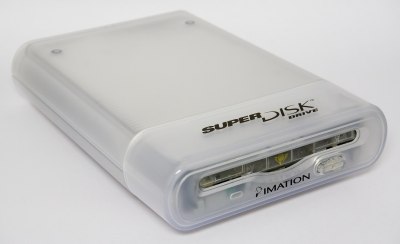
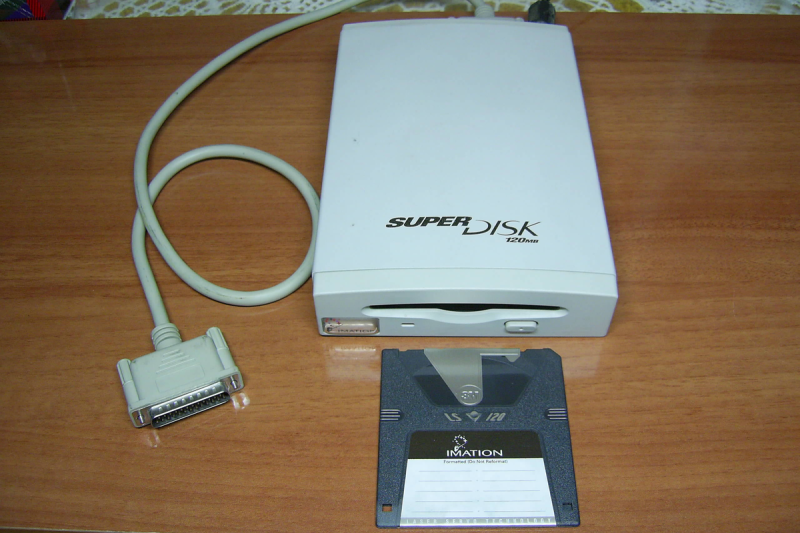
The SuperDisk was yet another innovation spawned by 3M, or more specifically, by the company’s storage group, Imation. Landing on the market in 1996, it was intended to be a higher-capacity successor to the regular floppy disk. In this era, the default removable storage was was the 3.5″ floppy, capable of storing 1.44 MB on a high-density double-sided disk in the dominant IBM format. The SuperDisk would easily eclipse that with its 120 MB capacity, almost 100 times what users were used to getting from a compact floppy disk. Back in the mid-1990s, when hard drives were just starting to flirt with gigabyte capacities in the single digits, this was a huge chunk of storage to be carrying around in your pocket.
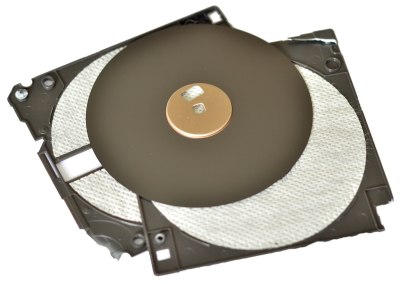
The format relied on so-called “floptical” technology. The idea was to use optical guidance to more precisely position the magnetic heads that read and write the floppy magnetic platter. This would allow a disk to pack more tracks in per given area of disk, massively increasing the storage density. Where a regular 3.5″ floppy disk had 135 tracks per inch, an LS-120 disk would expand that to 2,490 tracks per inch. The LS-120 disks were physically unique, due to the need to have optical alignment tracks on the magnetic surface that could be read via a laser and sensor. Hence the LS designation, for “laser servo.”
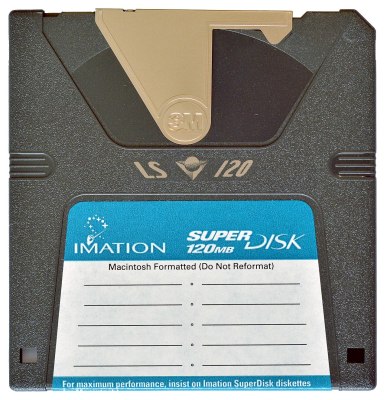

A variety of drives were made available in the marketplace, both in internal and external versions. The latter typically used parallel, USB, or SCSI interfaces, while internal drives were accessed via SCSI or ATAPI. Despite the special technology inside SuperDisks, they were otherwise very close in size to regular floppies, albeit with a rather unique shutter design. This allowed the SuperDisk drive to also read regular 1.44 MB and 720 KB diskettes. Notably, though, this was really only a thing in the PC world—the drives could not read 800 KB or 400 KB Macintosh format disks.
Unfortunately for Imation, the SuperDisk had a major hurdle to overcome from the outset. Iomega had already launched the Zip drive in 1995 to rapturous applause, racking up huge orders from the drop. The drives were not compatible with regular floppies in any way, and initial versions stored just 100 MB per disk. However, the first mover advantage had launched Iomega’s market share and stock into the stratosphere. There was little market interest in the upstart competitor when purple drives were already sitting on desks in business and universities around the world. Nevertheless, the SuperDisk drive still found some traction with big OEMs, showing up as an option in Dell, Compaq, and Gateway computers way back when. Panasonic even launched a line of digital cameras that used the supersized disks, not unlike Sony’s floppy disk cameras but with far more storage that made them more practical. Sadly, though, uptake was never high enough to make the SuperDisk a normalized replacement for a regular floppy drive, nor even a viable or well-known competitor to the all-domineering Zip.
Nevertheless, Matsushita persevered with the SuperDisk concept for some time. In 2001, the company launched LS-240 drives, which doubled capacity to 240 MB per disk. They also came with a fun party trick that allowed regular 3.5″ floppies to be formatted to hold 32MB. This feat was achieved in part due to the use of shingled magnetic recording (SMR), a technique wherein magnetic tracks on the platter are allowed to overlap to increase storage density. “FD32MB” formatted disks could only be read in LS-240 drives.
By this point, however, the CD burner had already taken over the world. With a CD-R or CD-RW retailing for less than a dollar in quantity, and capable of storing 700MB-plus, the value proposition of the SuperDisk faltered, along with most other magnetic storage solutions of the era. The drives would eventually go out of production in 2003, by which point the venerable USB drive was rising to prominence as the go-to standard for removable media.
Other than being a little late to market, there wasn’t a lot the SuperDisk got wrong. There were no major scandals with the reliability of the drives or media, and they had the nice feature that they were backwards compatible with existing floppy disks to boot. Sometimes, though, it’s impossible to overcome showing up late to the party. Between Iomega’s dominance in the 90s, and the widespread abandonment of magnetic removable media in the early 2000s, there was never really a good time for the SuperDisk to shine. Like so many other technologies out there, it was perfectly capable at what it was supposed to do, it just didn’t find the right audience. A solution without a problem, perhaps, given that others had already solved the issue before the SuperDisk saw the light of day.
Featured image: “SuperDisk” by [Miguel Durán]












1.44->120 is >>10x.
Got stuck on that one myself.
” In this era, the default removable storage was was the 3.5″ floppy, capable of storing 1.44 MB on a high-density double-sided disk in the dominant IBM format. The SuperDisk would easily eclipse that with its 120 MB capacity, nearly ten times what users were used to getting from a compact floppy disk.”
120MB / 1.44MB = 83.33x
Never forget the tape room!
Just reminds me how downright insufficient everything was in the 1990s. Every moment was chafing against limitations and every upgrade was overdue. Feels like i replaced most of the components in my main PC every other year for a decade. Crazy how satisfactory, by comparison, a ten year old piece of hardware is today.
Restrictions craft innovation. While nowadays, your typical electron App uses easily 1 GB of RAM and 500 MB of storage for what could do the same in 1/100.
And those innovations became obsolete the next year, when the technology marched by the need to have them.
Point in case: Amiga’s graphic chips pushing an obsolete and resource-limited planar architecture to produce high color graphics using a hack that made it temporarily superior at the cost of being difficult to program. Then VGA and SuperVGA came along, and wiped the floor with it.
The Amiga was an arcade machine with a keyboard, though, so its original architecture was justified.
It had very good scrolling capabilities that weren’t so easily possible on VGA.
It’s apparent in games like Lion King or Pinball Dreams,
were the Amiga ports are a tad bit more smooth than the PC/DOS version.
The Sharp X68000 from Japan was a similiar arcade PC (or graphics workstation if we will) and offered many weird video timings.
In the UK, the Acorn Archimedes and later Risc PC was maybe comparable to Amiga, too.
But anyway, pretty graphics weren’t everything.
The Atari ST line was popular in Germany because it was so Mac-like, but affordable.
The high-res monochrome mode of 640×400 was used most (on GEM desktop).
The SM124 mono monitor was sort of standard over here (video game fans could still use a regular TV or a SCART TV for low-res color resolutions).
Those that needed more could use a special mono CAD monitor and an expansion card (Mega ST had VME slot).
Using an ET-4000 AX VGA card was possible, too. There were GEM drivers available.
GEM applications that were written according to official programming guidelines could run at 800×600 16c and up.
The Amiga 2000 could use graphics cards, too.
It even had a CPU upgrade slot and a video slot intended for graphics upgrades such as flicker-fixer/scan doubler.
Well behaved “AmigaOS” software could run on an dedicated graphics card, too.
There too was a Commodore CAD monitor (A2024?) that worked with internal Amiga video circuit.
It had a framebuffer or something along these lines and worked at slow refresh,
which allowed it to have a high virtual resolution (built using 4 separate screens).
Reminds me of using 13 floppy disks to install Windows 95!
The worst part was when one of the disks wouldn’t read for some unfathomable reason (even though it worked in every other machine). I, for one, was thrilled when CD-ROM drives became cheap enough that I could finally convince my boss to let me start adding them to our computers.
I had a 3.5″ IDE drive with all the installation files for WIN95 that I would temporarily plug in during installations. It was some much faster.
How about the 50 floppies for some of the Borland languages?
I used 50 floppies for the MMC and later SLS distributions of Linux. I’d go to work on the weekend and use several machines at once. Format format format FTP FTP FTP. Then replace disks and start again.
There was at least one CD-ROM drive that always had been affordable, the Mitsumi LU005S.
It’s a single-speed drive with an ISA Mitsumi controller card.
It had good driver support, too. Even OS/2 had out-of-box support.
The drive was available from 1992 onwards and no luxury item.
It was very slow and used a manual top-loader design.
Using SmartDrive or a similiar CD-ROM cache was almost a must because of it.
Otherwise there was a very audible squeak-squeak sound all time,
because the laser had to switch position constantly to read requested data (no linear read path as if a buffer cache was available).
With a big enough CD-ROM cache it ran rather smooth and quiet.
That was years before these fancy caddy based CD-ROM drives came out in 1994/1995 or so.
https://www.youtube.com/watch?v=6DWPHQGJ1wQ
Oh, about Windows 95.. It wasn’t very smart, sadly. 😅
Windows 95 Setup loved to remove DOS-based CD-ROM drivers when it was half through.
It not only removed MSCDEX, which was bad enough, but also the DOS CD-ROM driver itself.
That often resulted in the situation that Windows 95 Setup lost access to its drivers and set-up files stored on Windows 95 CD-ROM.
Which meant the installation was essentially broken,
unless the advanced user manually added the DOS-based CD-ROM driver back to config.sys (such as the Mitsumi driver).
MSCDEX was ootional, because Windows 95 had an equivalent built-in (cdfs.vxd).
The equivalent didn’t work on plain DOS, of course, but at least with DOS based drivers.
An alternative was to start installation entirely on HDD and have most important files copied over to HDD (WIN95, WIN98, WIN9X folder, DRIVERS folder).
This workaround was common during whole Windows 9x era, I think.
I think it really depends what one is doing. I was doing desktop publishing at the time and I went from a Quadra 700 in 1992, to a 100 MHz PPC upgrade in in it 1995, then a Powermac 9600 604 250 MHz in 1997 to a G4 500 MHz upgrade card in it 2000. Other than Ram upgrades and replacing a bad video card, I don’t think what I did was too far out of line as what I have done in the past 10 years with my other computers.
The flip side is this, I shelled out for each computer what could have purchased a decent used car at the time, but I could write it all of in my taxes. A so a budget home user didn’t have that option.
Back in the day with the 400-500 MHz machines you could really feel it in everyday use just on how fast the system would respond on the desktop running simple applications like word processing or web browsing, especially when multitasking. You didn’t have 50 tabs open in a browser, you had one (there were no tabs), and you could see the screen stutter and lag while scrolling.
Falling back to the older 100 MHz machine would not have be possible because it simply could not run the new applications and the rapidly increasing amounts of data you wanted to process. Even when you weren’t running out of RAM and swapping to disk, simple things like decoding an MP3 could consume all the CPU resources and make it practically infeasible to do anything else at the same time. You needed that upgrade to make it tolerable.
Today the new machine might be technically 5 times more powerful than the 10 year old machine, but both will play Youtube and edit a Word document without any lag, and even slower systems will do it without much pain.
Hackady from April 2050: “Here’s an SSD from the late 2020’s, holding mere gigabytes of storage. Can we run Doom XIV on it?”
Heh. I spent 12 hours on a 1200 baud modem downloading the ~5 MB source tarball of GCC to my ATT 3b1 computer (because the compiler that came with it choked on Nethack). Now there are freaking web pages bigger than that.
We used to think in terms of an annual hardware refresh, or maybe every 2 years if you were on a budget. Now if you buy high end hardware you can basically use it until it dies. I consider myself a power user but I have no plan to upgrade my cpu (4 years old), GPU (6 years old), or mobo (8 years old). (Ryzen 5800x3d / Geforce 3090 / x570 mobo).
But it did take me a few years to disconnect from PC-upgrade media coverage. I’m so happy that I don’t need to “stay on top” of benchmark news stories and have hardware fomo anymore.
Times have sure changed. Those upgrades (system/graphics card/etc.) felt really ‘good’ in the 80s, 90s, 2000s. Each one was a ‘leap’ forward and you could see/feel the progress every time. It was a magical time… I recall when I put foot in mouth, when I told my wife the 100Mhz 486DX would last us a looooong time it was so fast…. A year or two later, was upgrading!
As you say, today, you really can’t see any change for everyday work. My AM4 platforms all just ‘scream’. Do a compile (except when using Rust), and done before you remove your finger off the the return key. Everything runs smooth from browser to videos, editors, 3D cad, etc… . Network 1Gb and 2.5Gb speeds, SSDs for fast storage… Therefore, other than ‘WANT’ (or system(s) lets out the magic smoke), I have no reason to jump to AM5 platform for home use. For business, only reason for PC turn-over is now due to lend/lease expiring contracts…. Of course now with memory prices even the ‘want’ has gone by the wayside.
I don’t recall the super disk at all, but I must have run into it….
What gets me the most in today’s world is the uncanny valley lag from input to screen. After typing for a few hours in a web-based document editor, try to go to a real text console – like a proper dos prompt on real hardware, or text-based linux login.
It will seem like the characters on the screen are coming from the future, before you’ve finished hitting the key.
All this computing power but some things are definitely not better.
That’s a common issue.
Modern PCs have so many software layers that each do introduce a small delay.
Thus, an Motorola 68000 powered Atari ST from the 80s has lower input lag/latency than a recent Windows/Linux PC.
Typing in 1st-Word-plus, MS Write, Signum or GEM Write is basically instant,
while MS Word and LibreOffice on their highly complex OSes are delayed.
So yeah, slower PCs were faster. :)
In early-mid 90s, a PC was considered to be obsolete after every 6 months or so.
From a purely technological point, I mean. Technology was developing so fast (thinking esp. of 486 clones and upgrade sockets).
There had also been users who ran Windows 3.0 or GeoWorks Ensemble on a Turbo XT, too, of course (ideally with EMS memory).
Or who had Windows 3.1 running fine on a 16 MHz 286 PC when Pentium was out by a few years.
The 90s had a lot of diversity, PCs often were assembled from what was available.
i was doing upgrades yearly seemed like. more ram, more storage, cd burners, voodoo cards, seemed i was always at the electronics store looking for my next upgrade. now i usually just do a mini itx build because im gonna spec it for the next 5 years, by which time there will be a new socket a new pcie standard, a new usb standard, and a new ram standard anyway. only thing i still upgrade is the gpu, and those are starting to last 5+ years as well.
thank you for giving the wonderful LS120 drive and disk its own post; i had mentioned it in comments on the one for the zip drive(within the last couple weeks). :)
Great timing! I picked up a Blueberry iBook on Saturday and one of these drives with a matching color scheme. The iBook is a PowerPC 750 (G3, Powerbook 2,1). Now, is there a PPC Linux that will run in 64MBytes…..
My ancient Gateway Solo 9150 laptop has an LS120 drive, pretty sure I still have disks..
One problem I recall from back in the day is that, as far as the BIOS was concerned, the drive was not a floppy drive. So people who wanted to use the boot from floppy setting couldn’t do so and had to have a second drive they could boot from. It doesn’t seem like much, but it was a real point of friction at the time.
Sad fact…. Using a cleaning disk in one of these usually destroys it.
I still have some operational ones and every LS120 disk I have still works. Kinda wild
I have a working usb Super Disc drive I snagged a thrift store for $10, I don’t have any of the special media, but it has been handy occasionally for pulling files of ancient floppies hiding in random boxes…
i had one of these. the only problem is nobody else did. so it got little use. i seem to recall the disks constantly having errors though. the best thing is you could stick a normal floppy in the drive and it would work fine. most computers around the time had separate floppy and zip drives. then cd burners killed the need for both.
These drives were great. I still have a disk or two sitting in a box somewhere. If only I wasn’t the only person I knew who had one.
Super drives and especially the discs themselves were freakishly expensive compared the “good old” 1.44Mb floppies. Therefore, nobody (or very few people) actually bought them and so they were basically an “orphaned” technology right of the gate.
The “good old” 1,44 floppies weren’t that inexpensive, either.
Here in Germany, the 1,2 MB 5,25″ diskette was still popular in the 90s during the Pentium 1 era.
One reason was good reliability, but also lower price.
Many magazine cover disks in early to mid 90s sometimes had 5,25″ disks, too.
At least PC centric ones. Such as shareware magazines..
Amiga, Mac and Atari users never really got to enjoy professional 5,25″ media, unfortunately. Poor fellows!
While there were 5,25″ disk drives available on these platforms, they were rather niche by comparison.
So they were stuck with their cutesy micro floppies with hard protective shell.
Which was the equivalent to an audio cassette (cassette recorders for children used them).
In terms of professionallity, the 3,5″ floppy compared to an audio cassette while the 5,25″ mini floppy was an audio tape reel. :)
Floppies were cheap in the US. My mom would by them in boxes of 100 for teaching. We had mountains of them. Getting her out of those and into putting data elsewhere was a real chore.
Interesting! I see, that probably has historical reasons, too.
In the US, the home computer market of the 80s didn’t last and so the PC+floppy disk became the norm.
Unfortunately, the Tandy 1000 was a gaming PC that we never got.
Closest we got was Amstrad PC-1512/1640 or Olivetti Prodest-1. Or Poisk (in eastern Europe).
In places like Europe, the C64/ZX Spectrum and the datasette were a thing and floppy disk drives and their media remained a “luxury”.
Well, in terms of home users I mean. The audio cassette as a physical medium was overly popular in Europe.
In the west, the computer fr*aks among them did have 1541 disk drives or clones, of course.
They also shared “backup copies” on schoolyard.
In the 80s I think our users basically got a pack of MCs (music cassettes aka compact cassettes) to a similar price to what your users got for a pack of floppies.
Businesses here did of course use floppy disks, just like everywhere else.
Then there’s a special case, I think.. Amiga/Atari used 720 KB DD diskettes which became obsolete and cheap rather quickly (we didn’t have that much 68k Mac users btw).
So yeah, our Amiga/Atari ST users had stacks of 3,5″ floppies, too.
The DD floppy was noticeably cheaper than the HD floppy, I think.
Well, until production was discontinued and the HD floppy became the norm.
Then it was cheaper to just get a pack of ordinary MS-DOS formatted 1,44 MB floppies and re-format them in an Atari/Amiga.
And by the time AOL floppies were around, it was common to use the 1,44 MB floppies as blanks.:
By mid-90s, a lot of free floppies were available through advertisements.
Companies had offered advertising software on diskette (utilities, games, info material etc) and so almost exchanged the floppies as casually as business cards.
The 2,88 MB ED format didn’t catch on, either, sadly.
By using custom floppy formatting, it could hold up to 3,5 MB of data.
VGA Copy allowed such non-standard formatting, for example.
Imagine how much fewer floppies and disk changes would have had been required! 😃
Windows 3.1 came on about 7 diskettes (1,44 MB).
With a 2,88 MB ED floppy, it would fit on 3 floppies, maybe two, if the 3,5 MB formatting was used.
MS-DOS 6.22 would require 3x 1,44 MB diskettes (+1 legacy disk) normally but just one disk on a 2,88 MB floppy with 3,5 MB formatting or two with out it.
Installation of MS-DOS and Windows 3.1 would have required much less disk changes with ED floppies!