
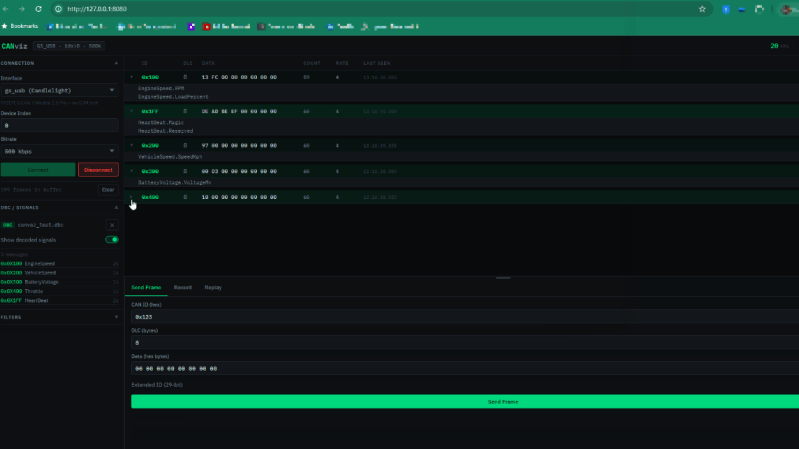
If you’ve got a modern car, truck, or tractor, it’s probably got a CAN bus or three that is bouncing data all around the vehicle. Listening in on these transmissions can enlighten you to what’s going on with sensors and modules which can aid in troubleshooting. You might find [Chanchal]’s latest work to be helpful in this regard — a CAN bus visualizer that runs right in your browser.
CANviz, as the project is known, is designed to work with any one of a number of cheap USB CAN reader modules. To use it, you simply run the Python “pip” tool to install it, and then you have a live CAN bus frame analyzer running on your local machine. Point your browser to localhost:8080 and you can see the data pouring in from whatever you happen to be hooked up to. The tool supports decoding CAN DBC files to make better sense of the raw data coming off the bus, and you can also record sessions for later analysis and even send CAN frames yourself if you need to. You can also run the tool on a remote single-board PC if so desired and access it over a network connection from another machine.
We’ve explored CAN hacking tools before and tools for visualization as well. Often, the latter is important when trying to debug and investigate dynamic issues. Meanwhile, if you’re working on your own automotive interface hacks, don’t hesitate to notify the tipsline!












Now mechanics and automotive hackers can sip coffee at their desk and scan :P
Nice to see a tool that supports arbitrary hardware. Another option that I’ve used since 2017 is Comma Cabana with a Panda device. I believe both the software and hardware are open source. (The web interface appears to be deprecated though. And the founder is a bit of a prima donna.)
I just get a ERROR: Could not find a version that satisfies the requirement canviz (from versions: none)
ERROR: No matching distribution found for canviz
when trying to pip install on ubuntu
Thanks for reporting this! A few things to try:
Use pip3 install canviz or python3 -m pip install canviz instead of pip
Check your Python version with python3 –version, CANviz requires 3.10 or newer. Ubuntu 20.04 ships with 3.8 which won’t work.
If you’re on Ubuntu 20.04, you’ll need to upgrade Python or install 3.10+ separately.
Let me know which Ubuntu version you’re on and what python3 –version shows, happy to help debug further.
I’ve recently started developing a C library that offers a unified API for accessing CAN hardware from multiple vendors on both Windows and Linux. Alongside it, I maintain a reference project called CANopenTerm.
Chanchaldhiman: CANviz looks awesome: if you see this, we should definitely talk! 😄
The access that Chrome has to things, like USB, is really nightmarish.
I’m really surprised we don’t hear tons of stories how that was exploited and what drama resulted.
I mean it’s also dead easy to trick at least half the world’s people into giving permission if that is needed (not that that is needed though).
Good observation, CANviz doesn’t use WebUSB, the browser only talks to a local Python backend over HTTP/WebSocket, so Chrome’s USB permissions aren’t in play here. The USB access is entirely on the Python side via python-can.
Your broader security instinct is valid though, when you run any locally installed tool that touches hardware, you’re trusting that code. Same as running any Python script locally. Worth being aware of what you install.
You’re too kind.
I long ago used sockets to talk to a game engine, over time the players got more nifty and nasty and the game makers had to close down that functionality, along with many other nice functions. So my innocent stuff was killed with it.
Makes me wonder if all those that code to use browser interfacing will in the end also find their functionality will be killed by updates necessitated by people being unpleasant.
It already happened with Firefox’s extensions in the past, they felt they had to lock a lot of that down too. But I think you really should make a browser that defaults for non-tech people and a setting to enable the more complex and tricky functionality. Like now with Google’s turn-around on side-loading.
They initially did stuff like that in some browsers, but then over time even the ‘developer’ modes got more and more neutered.
But I say that if you are clueless and still bypass all the warnings and get in trouble the companies should just say ‘deal with it people’ and use their lawyers to make that point loud and clear.
Ha, your game engine story is a perfect example of how this always plays out, one bad actor ruins it for everyone.
Fortunately, CANviz is boring in the best possible way, the browser is just loading a local webpage and talking to localhost. No exotic APIs, no external connections. It’s as basic as a browser gets, nothing to lock down.
Your point about power users vs non-technical users is a genuinely unsolved problem though and the industry keeps defaulting to restriction instead of informed consent.
Websites can’t just access random USB or serial devices. They can’t even tell if any devices are connected. They have to request permission, then the browser pops up a dialog where you have to give it access to a specific device.
They should make the default permission block instead of ask though. Most people don’t need it and the ones that do won’t have any trouble changing a setting.
Exactly right and agree on the default block idea.