
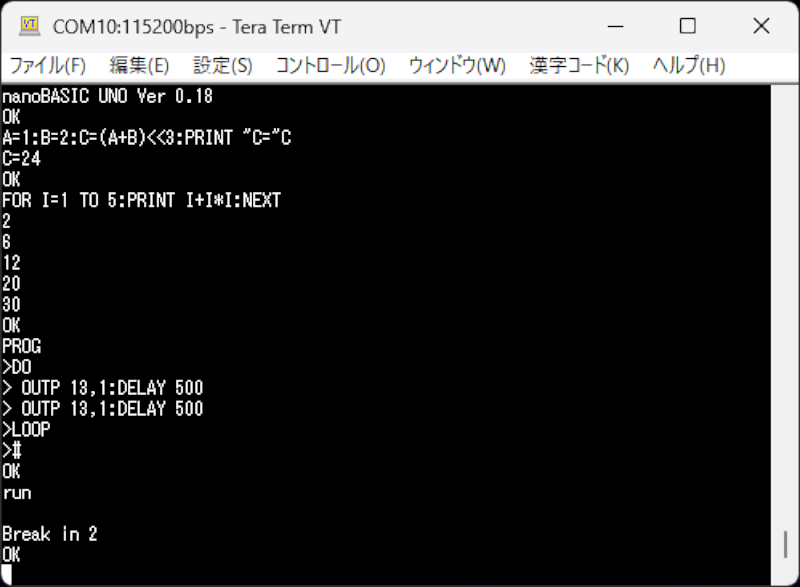
If you miss the days when you used Basic on your classic computer or wrote embedded software with a Basic Stamp, then maybe dust off your Arduino UNO or any similar AVR board and try nanoBASIC_UNO from [shachi-lab].
Apparently, the original code was meant for the STM8S, but this port targets the ATmega328P. It is Basic more or less as you remember it. There are enough extensions to deal with GPIO, the analog systems, and so forth. At build time, you can decide if you want 16-bit or 32-bit integers.
One thing that is a little odd is how it handles direct mode. In classic Basic, anything without a line number executes immediately. Line numbers simply store your program line until you type RUN. nanoBASIC_UNO doesn’t force you to use line numbers. To indicate you are programming, you have to start with the PROG keyword. Then you can enter lines into the RAM buffer until you enter a # character. The program is stored in RAM, but there is a way to save programs to flash.
You can also build the code for Windows or Linux if you just want to experiment. Looks like fun.
If you missed the heyday of the Basic Stamp, you missed a lot of fun. If you just want a quick Basic hit, try your browser.












Go to 10
goto 10
goto 10
10 goto 10
10?”Mayhem was here”
20 goto 10
Amateuer!
10 for x = 65 to 65535
20 sound x, 1
30 next x
40 goto 10
+1
Though I grew up using N as s placeholder.
Not sure why that letter was the choice, though.
N from number perhaps?
FlashForth is better than this. Extend the dictionary in flash memory, use interrupts, multitask and so much more. flashforth.com
They’ve implied Forth, but indirectly, you have to look closely: “…and so forth…” : -]
Cool! Reminds me of 8052AH-BASIC!
That was an 8052 microcontroller pre-programmed by intel with its own AH BASIC interpreter.
But “interpreter” doesn’t really do justice here.
It had serial i/o for a terminal, could do use interrupts in Basic applications and had built-in EPROM read/write support.
So it could add “files” one after another, which was useful for data logging or saving settings.
The AH BASIC (MCS BASIC-52) source is now free and had been updated, too.
It now can be run on various MCS-52 series of microcontrollers.
Info:
https://www.wolfgangrobel.de/sbc/8052ah.htm
https://hackaday.io/project/189145-8052ah-basic-single-board-computer/details
https://www.dos4ever.com/8031board/8031board.html
That being said, an Arduino alternative is very fascinating, too.
Especially since the Arduino Uno R3 is so common and can be built from scratch using an ATmega168 or ATmega328 (or compatible).
The Arduino ecosystem still has usable remnants of numerous shells/interpreters/multi-flavored BASIC implementations.
Sleeping for the past 13 years is an interesting one:
http://github.com/billroy/bitlash
you’ll have more fun with this if you install it on an 8 bit AVR with lots of RAM – one of my favorites these days is the little-known Atmega1284p– which has an amazing 16k of RAM and can be obtained in a 40 pin DIP.
Arduino bare-chip ATmega1284P (PDF)
http://cdn.hackaday.io/files/1734797422125536/ATMEGA1284_UserGuide.pdf
The Arduino Forum has numerous posts about the 1284, but sadly much of the old stuff is pre-COVID and some links are simply bad.
http://forum.arduino.cc/search?q=ATMEGA1284
I personally have a couple of “Bobuino” and I think a “Goldilocks” in the bin that has not seen the light in years. For most uC projects, the 1284 was simply overkill and the price point was higher than the clone-UNO boards. The Arduino traction for 1284 was pretty much shotdown when the Maple Mini clones became available; afterwards the ESP8266 and then the ESP32 fragmented ATMEGA’s hold over Arduino.
i still have a use for 8-bit AVRs because of how reliable they work as I2C slaves. i’ve had no luck getting a Raspberry Pi Pico to work as an I2C slave, for example, though that would be a prime contender (i haven’t tried using an ESP as an I2C slave, though they work great as I2C masters). i also like that 8-bi AVRs don’t use very much power. and, because I keep adding capabilities to my I2C slave firmware, i’ve had a need for ever-greater amounts of memory. for example, i added serial packet parsing to my slave firmware to completely offload that work when i need to grab proprietary data from some device like a solar inverter or a boiler, and the more memory the better.
of course maybe i’m just a bonehead and if i could just get an RP2040 working as an I2C slave I’d laugh at the days I was using 8 bit AVRs as slaves.
Interesting! Thank you! 🙂👍
there has been a run of such shell-providing Arduino sketches on HAD of late. by being restricted to doing their business over serial, though, they lack some of the fun that can be had controlling such devices across the internet. in my ESP8266 Remote Control system I’ve got a “shell” that is agnostic to the communication technology, and so the same commands that work over serial also work across the internet (since the ESP8266 is like an Atmega328, only 32 bits, has internet capability, and is cheaper!). it’s a polling-based system, though, so there is a little latency when sending a command across the internet, and you have to used a web-based command shell to do so. see:
https://github.com/judasgutenberg/Esp8266_RemoteControl
Your project is very impressive!
now, for readers who are nostalgic for BASIC, there is also a BASIC interpreter for the esp8266 (esp8266basic.com) which has been around for ages, and interestingly, provides a simple interface for editing and running your code from a web page hosted on the esp8266.
If you step up to the esp32, the BASIC32 project (basic32.com) has truly impressive peripheral support, albeit with a more conventional serial/text interface for programming. It also seems to be closed source (but free).
Back in the early days of ESP8266.COM, this version of BASIC was developed by the moderator:
http://github.com/mmiscool/esp8266Basic/blob/master/ESP8266Basic/ESP8266Basic.ino
By that time, I had moved over to the ESP32 and really never played around with it but I did see it on my home-server just now, so I must at least have tried it out.
Doesn’t the ESP32 have a BASIC interpreter built-in? Seems I read that somewhere. (Probably here)
IMO: some of the limitations mentioned could be eliminated in a rather straightforward manner by moving from the ESP8266 to the ESP32 uC.
I have a PDF out on my hackaday.io site from some experiments that I did years ago called “ESP32: In Love With Both Cores” and the PDF can be downloaded from this page:
http://hackaday.io/project/203859/files
the needs i have for a remote microcontroller has been remote control and remote data logging, and for those tasks an ESP8266 is plenty good enough. if i start adding features like remote photography or remote sound capture/playback (such as in my Disturbatron project, where I used a Raspberry Pi Zero: https://github.com/judasgutenberg/Disturbatron ) then I’d be forced to use an ESP32. I have a bunch of them in the parts bin, but so far i’ve only used them for hello world web cam experiments.
Didn’t see PEEK and POKE from my old day’s.
Good for register manipulation.
The thought made me feel BLOADed!
Tiny basic has existed for eons and an avr port for half of that time… I have a “sbc” made on radio shack perf board (if that helps date it) running on a mega 644 with the old TV out library and ps2 keyboard input