
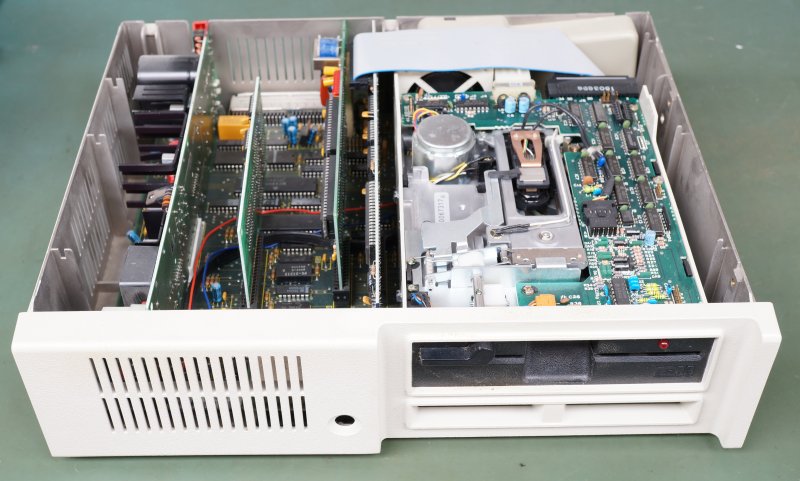
As unloved as IBM’s PCjr was, with only a one-year production run, it’s hard to complain about the documentation available for it. This includes the x86 assembly listing for the BIOS, which [dbalsom] recently used this print version to create an ASM project that can be built into a byte-identical copy of the PCjr BIOS.
In order to build the BIOS image, a ZIP file has been made available that contains the requisite assembler and linker tools, all of which can be run in DOS (or DOSBox) using the provided build.bat file. This creates an executable file, which can then be converted into a BIN file using the provided exe2bin.py Python script, or of course, manually.
This image cannot be used as-is, as the PCjr has its BIOS split across two 32 kB ROMs, so splitting them is required if you intend to burn fresh ROMs. Of note is that the BIOS code is still copyrighted by IBM, so do not take this as some kind of open sourcing, unless you wish to test IBM’s legal take on 1980s BIOS code for a generally unloved system.
With an estimated 240,000 – 275,000 PCjrs sold by January 1985 and reports of hundreds of thousands of unsold PCjrs languishing in warehouses by the end. It’s hard to say how many PCjrs have survived to today, but it’s good to see that keeping this glimpse of a budget, not-quite-IBM-PC-compatible legacy alive has become a little easier again.
Heading image: IBM PCjr internals. (Credit: Binarysequence, Wikimedia)












Tip: On Windows, the shareware version of the WinHex hex editor can do that.
It can split, merge and interleave binary files. Among other things.
Useful if soneone has to work with odd/even binary images, for examples.
The provided script will do it for you if you pass –split.
When “making” a bios, be careful not to halt and catch fire..
MS-DOS Player is another option, it can run DOS executables straight off Windows NT command line.
Which is useful to run DOS-based compilers, linkers or ZIP programs (ARC, PKZip etc).
MS-DOS Playwr an built-in x86 emulator and works on Windows x64, too.
Then there’s also XT.. a young DOS command-line runner.
https://www.zophar.net/pc/ms-dos-player.html
https://github.com/electricbolt/XT
“XT” is pretty cool:
“Because there is no Video RAM, ROM BIOS, Option ROMs or DOS kernel in memory, programs get almost the entire 1MB address space to run.”
That would have been very useful back in the day when Windows was new and programs were ported from DOS to Windows! :-D
It could have been used to extend the size of DOS programs a little more before hitting the memory barrier and needing XMS or EMS.
Hi, thank you – hat reminds me of something! 🙂
Back in the 80s and early 90s, when serial terminals still existed in society,
it was possible to run DOS via terminal using CTTY command.
So provided the PC would boot normally without a graphics card,
CTTY AUX command in autoexec.bat would transfer the console to first serial port (CTTY COMx also worked).
That way, up to about 900 KB of conventional memory were available to DOS applications.
That was a workaround to have large software projects succesfully
being compiled with existing compilers/linkers that otherwise would have run out of memory.
Something like Clipper, maybe.
IMHO if you want to dabble in x86 firmware today, you should do it on Linux, or at least WSL. The page from Zophar’s site first states “last update 2009-12-18” but then offers a download called “MS-DOS Player v 01/02/2020” along with a second date “02/02/2021”. On the original Japanese author’s page, which has enough English to navigate, it’s download is dated 11/26/2025. Why go to Zophar’s at all? Granted DOSBox 0.74-3 hasn’t been updated since 2019, interested hackers should probably be looking at DOSBox-X. https://github.com/joncampbell123/dosbox-x
On a lighter note, IBM always settled with companies that “infringed” on the BIOS. It wasn’t until 1983 Apple Computer, Inc. v. Franklin Computer Corp, where it was ruled that US copyright actually applied to firmware (or any software for that matter). I don’t know if IBM’s lawyers were concerned that a judgement wouldn’t go their way, but they never tried their luck with a judge.
PS Halt and Catch Fire follows more closely the history of Corona Data Systems(later Cordata), rather than Compaq, with the exception that they didn’t reverse engineer IBM PC BIOS, they just copied it. Compaq was never confronted with IBM lawyers, they were aware of their legal standing.
To be honest, I thought that a link to Zophar was a good idea because it’s a classic site and it would users introduce to other interesting emulators in that category, too.
The homepage link of MS-DOS Player was mentioned, too,
so I assumed users would be smart enough to figure out about new versions all alone. 😅
Quite possible, yes. But I think some DOS users might be more like myself and would like keep Linux on a distance when possible.
That’s because the philosophies are kinda opposite, I guess. 🤷♂️
DOS users enjoy tinkering with assembler/machine language (plus Turbo Pascal, C and QB) and embrace unrestricted access, the low-level approach (direct port and register writes etc),
while Linux users are all about high-level approach, C++, permissions and things being case-sensitive.
It’s a different world, basically. The multi-user/multi-tasking DOSes being excepted here.
They’re more Unix like than MS-DOS/PC-DOS and have virtual consoles, just like *nix.
for once on this website, I think the “hack” is because one would be violating IBM copyright, rather than any “clever programming”. It may not impress you, but there is an aspect of preserving computer history to it. Although I’m not sure “unloved” is accurate. “The PCjr was a successful product. The problem was that it only sold a few hundred thousand a year. Anybody else would love to have a product that sells a few hundred thousand a year. But that’s a disaster when you plan to sell a million, million and a half a year” - John V. Roach, Tandy Corporation CEO, 1988
I agree that the history needs to be preserved. If nothing else to preserve readable source code!
I think the “hack” is being inventive enough to OCR the manual, write some scripts to clean up the listing to make it into a .ASM file, and come up with an image that matches the original. Due to some specialized hardware (sound chip, for example), the image wouldn’t really do the cool stuff on a “real” PC that the PCjr would do.
BTW… I learned MASM by reading the IBM TRM listings! :-)
Unloved for all the sidecars needed.
Could you put this BIOS into a Tandy for giggles?
If you dropped ROM BASIC, maybe. The Tandy 1000 only has 32K of ROM. There are enough differences in the paging and such that it might not work without a bit of modification.
I’m wondering why it needs exe2bin.py when he’s compiling and link in dos. Dos originally had exe2bin. What am I missing?
Hi, yes, the very old versions had it, along with EDLINE. Say PC-DOS 3.30 or MS-DOS 3.30..
But beginning with MS-DOS 6.20, these utilities were removed from the main disk set.
Users who wanted to keep using EXE2BIN, DOSSHELL or EDLINE
had to either use the files from MS-DOS 6.0 or use the 4th MS-DOS 6.2x disk,
the so-called “Supplemental Disk” that was bundled by some OEMs.
That disk was a very cheap solution to Microsoft and did contain the English files of the aforementioned utilities.
Because it origionally was a self-extracting disk uploaded to BBSes and FTPs, rather than a real official physical disk #4.
International users were better off just using localized MS-DOS 6.0 files.
Either by installing MS-DOS 6 first and the 6.2x or by merging two DOS utilities (MS-DOS 6.2x DOS directory content overwritting MS-DOS 6.0 directory content).
That way, all the utilities are being available.
PS: IBM PC-DOS was a bit different in the 90s.
It nolonger was in synch with MS-DOS and had different utilities, but also kept more classics.
*merging two DOS directories
Sorry for the typo.
I forgot, there also was an MS-DOS Step-Up disk for users of MS-DOS 6.
Not sure if it had kept the old utilities when performing the “update”..
The EXE is too large for EXE2BIN – it has to fit in a single segment. Maybe they fixed this in a later version, but it was either mess around with it for another hour or spend ten minutes making a python script to chop off the MZ header. I needed a script anyway to calculate the checksum byte and optionally split the binary for you, so we can just skip that tool entirely.
PCjr was unloved? Huh.
Back in those days I had a Tandy 1000HX. I didn’t know it at the time but electrically that was basically the same as a PCJr in a different chassis although ours did have the addon board that gave it 640k and an RTC.
Anyway, my mother and I would pick up PC magazines at the local library and type in the .bas programs published in them. That was our main source of software.
I remember those magazines always having listings for PCjr versions, more-so than Tandy ones!
Hi, I think I vaguely remember that the PCjr and Tandy 1000 were about 90% same, but not fully.
Some software written for either didn’t necessarily run correctly on other.
But the similiarity was the reason that most games were written to support both without issue..
But again, I do only vaguely remember reading this and since I have no Tandy 1000.
Here in Europe, except UK, the Tandy 1000 was very obscure.
Most of us merely knew it from the packaging of US games (minimum requirements label).
The only way we could enjoy Tandy 1000 was via emulation, I think.
Yes, even as early as way back in the 80s..
Because some PC emulator boards for Atari ST/Amiga had software support for Olivetti M24/AT&T 6300 graphics and Tandy 1000.
But then same time, who wants that if Amiga/Atari ST had superior graphics and sound?
Later in the 90s, dedicated Tandy 1000 emulators appeared.
They could be run on a 386/486 PC with VGA graphics and emulated Tandy graphics and sound, such as Tand-Em.
A pure Tandy 3-Voice sound emulator was TEMU, by comparison.
It worked for Sierra AGI games when using the -t override switch (Larry, Quest series etc).
Games that won’t check for Tandy machine type and allowed manual selection of Tandy sound, in short.
(Later Tandy 1000 had been upgraded with VGA graphics, so the override option made sense.)
Output was via PC-Speaker and Covox SpeechThing (parallel port DAC).
Another thing we lacked was CGA Composite support, by the way.
Being PAL countries, NTSC artifact colors didn’t work here out-of-box.
Also because on-board CGA graphics in international XT clones didn’t have color-burst circuit.
The RCA/Cinch connectors provided a plain VBS signal, thus.
To get Composite CGA we would have had to use an real IBM CGA card and a foreign American TV/monitor (plus step-down converter)
or an ordinary PAL composite video monitor with an additional transcoder attached to it.:
Then, by adjusting to 60 Hz refresh via control knobs and using the NTSC-PAL transcoder circuit it would have been possible.
But in reality, at the time, we rather used CGA in monochrome or on an RGB capable video monitor or a domestic SCART TV.
And to this very day, international users are confused by the NTSC artifact patterns when they play old CGA games.
Since NTSC is alien to them (to us), users wonder what this strange dithering was all about.
I’ve seen forum posts discussing this just a few years ago.