
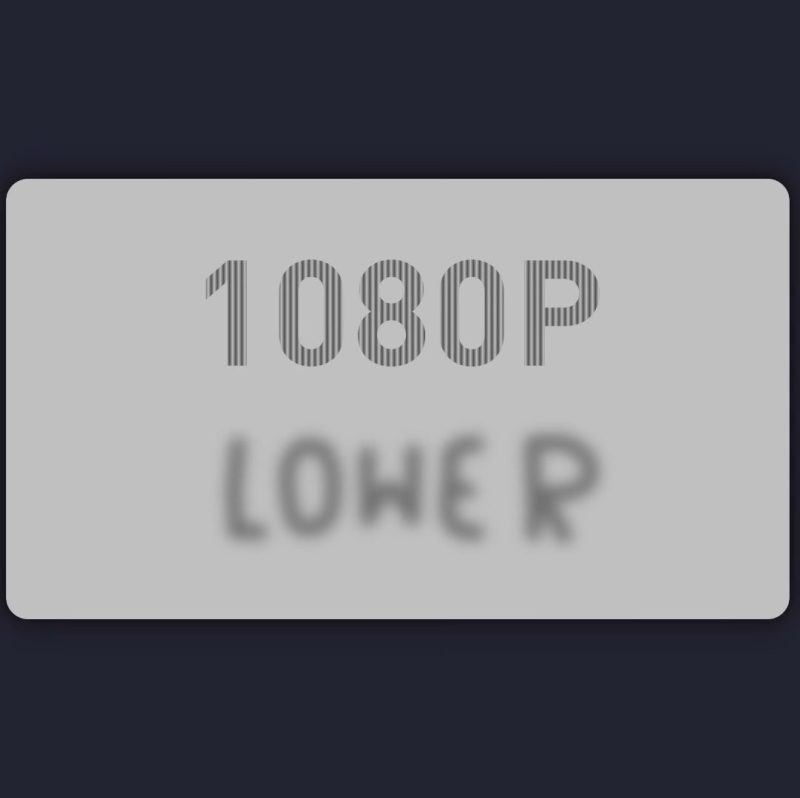
We notice there are a lot of hacks on YouTube lately, but we don’t share enough hacks about YouTube. That’s why [PortalRunner]’s latest oeuvre is interesting: it’s a video that gives you a different picture depending on the selected bitrate.
Watch it at 1080p, you get one thing; at 360p, the image is completely different. The hack relies on understanding precisely how YouTube cuts down videos — because if you haven’t uploaded a video there before, you might not know the creator doesn’t have to encode all of those options; they’re invited to upload in the highest possible definition, and YouTube reencodes the rest.
1080p and 720p films are shown at 60FPS, while 360p and below are 30FPS– so that’s one way to hide the difference. Since YouTube drops every second frame when encoding the lower-quality video, images you want in the HD version can be kept only in even-numbered frames that YouTube will remove. That seems easy enough, but how does [PortalRunner] avoid the low-quality image flickering in at 30 FPS when watching in higher definition?
Well, that relies on understanding exactly how downsampling works: going from 1080p to 360p means tossing out every third pixel in both the horizontal and vertical directions. If you’re careful, it turns out you can craft an image that vanishes when the 3×3 grid of pixels it’s made of at 1080p is averaged to a single background-colored pixel at 360p. [Portal Runner] is using vertical stripes here, but that’s not the only way to do it. Just to be sure the message came through loud and clear at 1080p, though, the original image, not the stripy one, is used on the odd-numbered, discarded frames.
Hiding the 1080p video is only half the battle: he needs to get those frames not to average specifically to the background color, but to make his new images. That’s a bit tricky, which is why the demonstration uses “1080p” and “lower” as its easter eggs: they fit well inside one another, with the characters lining up one-to-one. That’s without even getting into the hack he’s using with extra i-frames to create thumbnails on the timeline to tell you to ‘subscribe’. Look, it is YouTube, what else can you expect? We’re just glad to see a totally benign hack of the platform that’s holding so many hacks these days.
Of course, real hackers live on the command line, and you can play YouTube there, too.












An interesting call for people to take up computer programming and learn about the digital world we engineers live in, about stuff like codecs and decodecs, and how to compress video. I learned a lot in just 5 minutes myself. Goes very deep, but also guides you and inspires. Great work, let’s hope more people stop and think.
Codec is a portmanteau of coder/decoder. Is a decodec a portmanteau of decoder/dedecoder?
Normies don’t even use a bidet after taking a dump and you expect them to learn DSP? C’mon XD
There is no such thing as a “decodec”. The word “codec” means CODer/DECoder, decoding is already implied by the word “codec” because a way to encode something is not worth anything without an accompanying means of decoding its output. Codecs are the entire coding+decoding strategy. As someone who purports to be an engineer you ought to know this already!
Bruh, he’s a redditor, not an engineer.
This is amusing, but given that the threshold is 1080p/720p versus 480p and lower, isn’t this just a semi-amusing end effect of Shannon-Nyquist? I say “semi-amusing” because it would be really impressive if the visibe “LOWER” text were instead a bit more specific to the bitrate, as well as if the video didn’t say “1080p” when being played back at 720p.
This is just an admittedly clever way of abusing the combination of bitrate and downscaling that YouTube applies for a given quality factor, something that is codec-specific and not even slightly specific to YouTube.
I’d be way more impressed if [PortalRunner] had actually made use of signal theory to create videos crafted to every specific viewing option, implying that they’d taken the time to learn these concepts that have existed for literally the past 60+ years. As it is this is just a cheap parlor trick, and it sure as hell isn’t a hack.
thank you, armchair.
The video could have been a lot more obvious if that text said 60fps vs 30fps.. The resolution is completely unrelated. It is just tied to YouTube’s quality settings, offering only 60fps for 720p and up, which complicates things but is a bit of a random choice tbh (and reason why he says the effect may break in the future).
Basically this video demonstrates what happens when you identify which frames are only used for 30fps (odd or even), and then “interlace” 2 videos that way. The 60fps video is flickering a lot more though, and on some of my devices it doesn’t work properly at all.
Thank you for being the only person of 3 to pick up what I was laying down. It’s an amusing trick, but it’s not exactly terribly useful.
To throw it back to a more HaD-relevant retro tip, it’s similar to how original-model Apple II computers would tend to power up with their color carrier in one phase or another, resulting in high-res graphics ending up in either blue/orange or purple/green at the roll of the proverbial dice.
It’s a neat trick, and definitely a worthy hack, but ultimately it can’t really be used for much other than perhaps making 30fps viewers argue over what actually happened, à la Clue, but at the cost of everything being a flickery mess for anyone viewing the full-res content.
I understood what you were getting, and it’s a fair point (if fairly minor). But you are also engaging in gatekeeping…
You seem angry. Are you OK?
Nice gatekeeping there!
This assumes everyone is based in the US (as usual) or uses US/NTSC land frame rates. Being based in Europe and working in the broadcast sector as well as a YT channel, I never shoot/edit video at 30/60p (or 29.98 or whatever it is) frame rates. It doesn’t even occur to us. Our mains frequency is firmly 50Hz. I make a point of switching all displays to 50Hz. It’s also equally infuriating that archive SD video of 625 (576i) uploaded is reduced to 480 lines. In the early days of television, futile attempts were made to establish a world TV standard. It appears YouTube has achieved that by enforcing an NTSC based standard. I would rather more lines than frames. High frame rates are only a benefit on fast moving action, in which case put some shutter on.
While I can agree with your gripes re: downscaled 576i video content (really, Youtube’s handling of all SD video is pretty terrible), your arguments re: framerate-vs-resolution are rendered somewhat moot by the fact that HD video the world over is generally broadcast at the same set of resolutions regardless of frame rate.
Unrelated, but I recently dow loaded some videos from youtube using VideoDownloadHelper and was surprised most come out as mp4, but a few are avi and mkv!
SPOILER: the software likely used embedded ffmpeg library to convert them.
It does, but different videos were downloaded with exactly the same settings, which leads me to think that Youtube serves its videos in entirely different encodings.
Mp4, avi and mkv are containers, not codecs. Apart from some codecs being incompatible with older containers, there’s little correlation and no reason for a YouTube downloading tool to vary the container; Mp4 or mkv could almost certainly hold any codecs YouTube uses.
The settings used in the app are why you have different containers being output.
I downloaded 3 videos back to back and the middle one came out as an MKV!
Well, basically, video and audio has codecs (the algorithm to save space) and containers (like .zip but specialized and with metadata files and stuff defined, video and audio codec in there). Youtube supports m4a (mp4), avif and webm.
Try
yt-dlp -F <youtube-video-URL>;-)And the .mkv is from your downloader software: most containers support a limited set of codecs, and if the only available (in the chosen resolution) video and audio codecs from youtube don’t mix, mkv is pretty much universal.
Edit: yes, the description is not exactly accurate:
1. the container should be compared to tar, because it’s also two steps here: archive and compression, which zip does both and tar is only a archive (which is why .tar.gz.), while trying to compress a already encoded file is futile. But who outside tech (who wonders about mkv) knows about tar vs zip?
2. codecs are only secondary about compression and primary provide a base structure, how the audio/video data is organized. But here too: too techy.
Hope that helps!
Note that higher quality downsampling, rather than discarding the intermediate pixels, performs anti-aliasing/resampling to avoid artifacts of this sort.