
After my recent misadventures setting up an OpenWrt installation on a scruffy e-waste-level x86 PC, quite a few people chimed in with feedback, criticism and friendly hostility regarding things like a presumed ‘x86 bias’. There were also some system-related things that simply didn’t seem to want to work, such as booting from an SD card with a USB adapter, which cut short a lot of the actual OpenWrt testing that I had intended. This made it mostly an enlightening look at what issues you can run into when ‘quickly’ throwing an OpenWrt router together with some junk parts these days.
In this second article I’ll try to address as many of these points as possible, as well as attempt to show off an actual working OpenWrt installation in action. In addition, since just using random junk x86 PC parts was the way to go back in the late 90s/early 2000s doesn’t mean that this is still the way in 2026, so I’ll be taking a look at alternatives that exist today. This includes everything from mini PCs, to ancient business PCs being sold for peanuts, as well as more dedicated (ARM-based) hardware solutions.
The Hardware Landscape
One of the aspects that I somewhat overlooked whilst scrounging through my junk bin was just how much faster internet connections have become compared to the early 2000s. My cable internet connection of the time was hooked up to a DOCSIS 1.x-based modem, with 40 Mbit/s as the theoretical maximum downstream capacity.
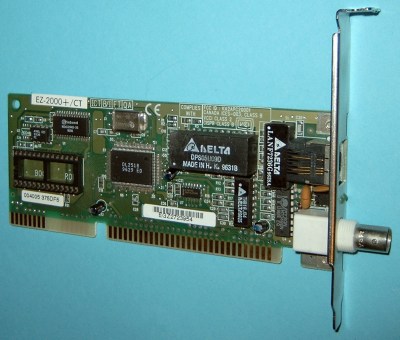
For this a 100 Mbps PCI or ISA NIC was plenty. Back then I was using NE2000-compatible 10 Mbit ISA cards and enjoying the ISA ‘Plug-and-Pray’ life to my utter dismay while configuring IRQs and other relevant settings. At least this taught me about legacy connectors like those for coax-based thick- and thinnet as well as AUI, I guess.
But fast-forward to today, and my current fiber internet connection could do at least 1 Gbps if I wasn’t a cheapskate with only a 300 Mbps downstream plan.
Thus 1 Gbit NICs are pretty much the absolute minimum you’d want to have on your DIY router, unless you’re somehow stuck in a digital wasteland where the very concept of such internet bandwidth numbers just makes you shake a powerless fist at the uncaring skies and lack of even high-ish bandwidth 5G LTE options or similar.
Of course, coupled with this you also want hardware that is capable of dealing with the requirements of such NICs and associated bandwidth. It’s one thing to provide basic routing, but consider the hardware requirements should you end up maxing out both up- and download limits for extended periods of time due to torrenting all those Linux ISOs.
When it comes to the rest of the hardware, you can still grab whatever junk PC, cheap Celeron-based mini PC, or e-waste/refurbished thin client you come across, as long as it can support at least two 1 Gbit network links. When we then finally drop our x86 bias and look on the ARM side of the fence things get a lot less easy, though.
RISCing ARM
Although some ARM-based SBCs do have 1 Gbit Ethernet NICs, like the AllWinner A20 based LeMaker Banana Pro that I have serving various networking tasks – including NAS duty via its SATA connector and the bandwidth-heavy task of a ZNC IRC bouncer – adding a second Gbit-level networking interface is impossible with just USB 2.0 ports. This is a pattern that repeats with other single-board computers (SBCs), including the gaggle of Raspberry Pis and clones of which I have plenty kicking around.
Until you hit the Raspberry Pi 4 with its USB 3.0 ports and PCIe-connected Ethernet controller, the best you could get out of these boards was ~300 Mbps over the USB 2.0 ports. The good news here is that OpenWrt’s support for all RPi SBCs is pretty substantial. As long as you can squirrel away that grafted-on second Ethernet port from a USB dongle or similar somewhere, it just might be a decent enough router for a Gbit-level internet connection.
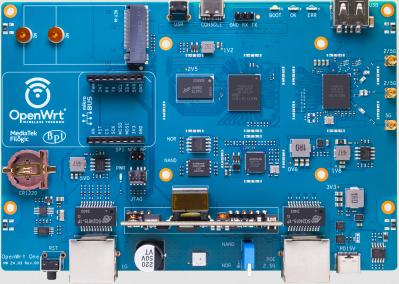
Beyond these options you also have various dedicated router boards, with the OpenWrt One and Banana Pi BPI-R4 being two viable options here. Expect to shell out at least $100 just for the bare board, sometimes even before adding an enclosure and other essentials. Here you’re basically buying a typical off-the-shelf router and doing the final assembly yourself.
The final result would be fairly similar to the OpenWrt-based Xiaomi router that I’m currently using. This fancily named Mi AIoT Router AX3600 is like many Xiaomi routers and other networking devices officially supported by OpenWrt. These thus make for another viable target to reflash with a clean OpenWrt image and no OEM customizations if that’s the one thing that irks you about these commercial offerings.
Clearly there are a lot of options here, hardware-wise, even if on the ARM side of things you’re probably just better off buying that existing OpenWrt-supported router as the most economical option, unless you happen to have a Raspberry Pi 4 SBC or equivalent gathering dust.
Booting Troubles
One issue that I ran into was the inability to boot from a properly prepared SD card, even after trying it in a variety of USB-SD card adapters. Here the assumption made by me was that to the BIOS this made zero difference compared to a USB stick with built-in Flash, but clearly this was wrong, especially when a USB stick did show up in the list of bootable devices. Of course, this doesn’t make any sense since either is just a USB Mass Storage Device and some sanity-related search engine consultation later I managed to confirm that I was correct.
Since I needed a different mainboard anyway for at least Gbit link speeds I opted to drag another system from the surely-that’s-e-waste pile, featuring a rather nice Intel D2500CC mainboard with onboard dual Gbit Ethernet and miniPCIe expansion option that I could slot quad 1 Gbit Ethernet Intel I350 modules into which I have also hoarded salvaged.
After taking the same SD card that failed to work before and slotting it into this 2012-era system, it booted into OpenWrt, terrible graphics courtesy of the VGA-to-HDMI adapter and stray reflections included:
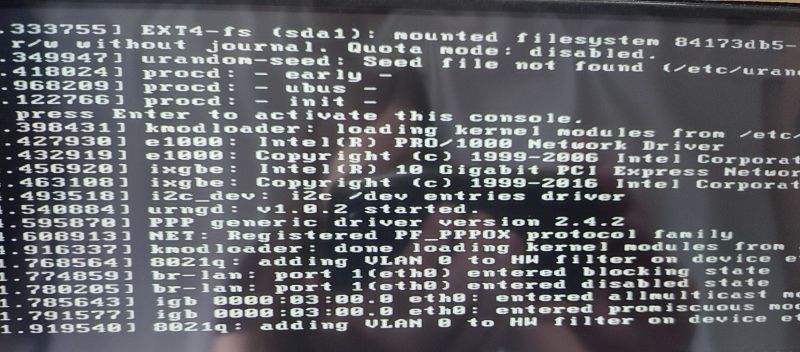
After this momentous step I proceeded to triumphantly check for a network connection on the connected laptop, but saw that it didn’t even see an active network connection. That’s when I noticed the inactive link and activity LEDs on both of the D2500CC mainboard’s Ethernet jacks, which was rather worrisome.
I did have a poke at ifconfig to confirm that it had detected both onboard NICs and created connections for them, with indeed both an eth0 and eth1 interface created in addition to the loopback. Slightly baffled I did try to prod DHCP just in case, but at this point the console began to corrupt itself:
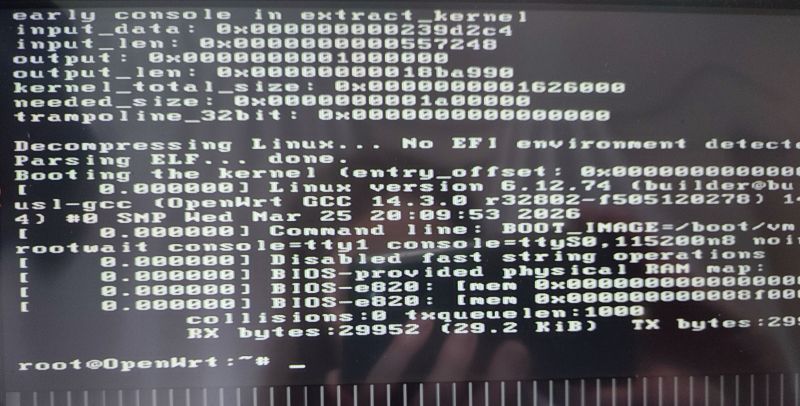
Although I’m pretty sure that I didn’t miss any steps, something is still clearly amiss. Whether it’s a hardware issue with the mainboard, some BIOS configuration glitch, an issue with the OpenWrt image, USB being USB or a quaint planetary alignment, I obviously wouldn’t be able to log into the graphical administration interface any time soon at this rate.
This mostly leaves me with more debugging to do, as well as the increasingly dismayed feeling that some things really were easier in the past.
Next Steps
Although I haven’t given up yet on reviving an old PC as a router, it’s clear that dealing with ISA PnP configuration nonsense from yesteryear doesn’t hold a candle to the fascinating troubleshooting you get to do these days. That said, assuming that this or the other D2500CC board that I have is functional, they should be pretty nice for router purposes as they both have 8 GB of DDR3 installed and the aforementioned plethora of expansion options.
This should allow for OPNSense to be quite happy as well, which is a more regular PC-focused router distribution anyway, should OpenWrt not work out somehow. The first priority here is of course to ensure that the hardware that you’re using is fully functional before you get too far into the weeds. In the case of the previous Intel mainboard, for example, I later found that Memtest86+ would immediately crash on start — probably a bad sign.
As usual I’m looking forward to all the feedback and comments as I’m gradually digging through my pile of junk parts. Hopefully the next article will feature some actual benchmarking and working systems, as fun as writing about things-that-don’t-work is.












due to torrenting all those Linux ISOs
xD xD xD xD xD
The conversation should also not exclude things that are already sold as network products; Mikrotik makes quite a lot of really low cost, high quality networking hardware and there is a community to keep porting OpenWRT to them if you prefer that network software over their own. They are truly hard to beat for something efficient and cost-effective.
I have also done many DIY routers over the past ~20 years and while the formfactor may not be ideal, there are an absurd number of perfectly fine low power PCs and Thin clients around the world that are no longer suitable to run a desktop OS.
Several of my ‘routers’ were these thin clients with a single ethernet port connected to a cheap web-managed ethernet switch, and would happily saturate 500mb each way for a few watts.
(Dell Optiplex FX160 with the Atom 330)
The Wyse 5070 is an amazing piece of hardware often available used in an immediately bootable state with storage and ram, and a case and power supply for far cheaper than other SBCs, and can support a second ethernet or SFP interface, or an expansion module for a full PCIe slot.
https://blog.kroy.io/2019/12/08/the-wyse-5070-a-perfect-little-vyos-device/
https://www.parkytowers.me.uk/thin/hware/hardware.shtml
If you are also one of the folks that has network storage connected to your router, there are also many QNAP single and dual-bay devices with x86 processors and 1-2 ethernet ports that you can install any x86 software on for a pretty small solution.
+1 to the Dell Wyse 5070
On using existing network products: I use a decommissioned fortigate firewall, because it’s cheap and still supports the functions I care about without a license. It’s a purpose-built device with a custom asic, so it has very good latency and stability, with good-enough performance though not as much as an entire multicore x86 machine. The web interface is convenient and useful, the price is right, and the power consumption is not much.
If you really want the basics to be done dependably, these kinds of product make it easy to set everything up the way you want it. And they’re not really that basic – in addition to fine-grained rules for access, they can also handle all your dhcp, dns, ntp, etc including dns filtering from public lists and custom local domains, all in the same pane of glass. You can also define prioritization for bandwidth and latency taking into account devices and services, so you should be able to get everything tuned better to maintain stable, low-latency connections even under load.
I’m sure a software firewall like opnsense has similar features, don’t get me wrong. But this is all from a device not that much different from a consumer ‘router’, rather than requiring you to put together a tiny server. So in that category, they’re a great option.
One of the main things I wouldn’t advise is using them for a VPN server; make your own for that and you’ll get better standards that don’t get hacked as often. Another is that I don’t think the value proposition is there if you were looking at brand new or subscribing to the licensed features. There’s enough functionality with all that disabled, anyway. They often have limited bandwidth, though they should have several ports. An x86 software firewall has a similar problem but at least it can be fitted with a faster nic. Either way if you want more you’ll want managed switch(es) to split the traffic off, e.g. between your regular vlan, your guest vlan, your iot vlan, and optionally a separate wireless vlan if you need. With the two less-trustworthy groups split off, you don’t necessarily need to filter intra-vlan traffic, so it’s fine if that’s where your server(s) and your computers both live. (That way the firewall can’t limit the speed for a nas or whatever).
Third to the WYSE 5070. Fun little workhorse :)
I could see a DIY because a lot have, or will get Gig+ internet and they need something to keep up. Other is they’re demanding more than the standard routers can deliver due to speed, or capacity.
That’s how I ended up on a banana pi R4. Originally I had 1.6gbps FTTP and thought why not upgrade to 10gbps capable hardware. That turned out to be a good idea when 8gbps symmetric FTTP became available. At first I was a little disappointed as it seemed to bottleneck at 2gbps but it turns out there are some tick boxes in Openwrt to enable hardware acceleration and none of them were ticked, oopsie.
The new bottleneck is Steam’s compression. An AMD 5800X3D tops out at about 2gbps as decompression is so intensive. Apparently they’re switching to a different algorithm to fix this and allow downloads while semi-sleeping on their upcoming hardware but we’ll see.
Zero chance a Bpi anything is doing REAL routing above 1 or maybe 2gbps.
Anything more complicated than “connect hydrant to fire hose and let it rip” will overwhelm those little SoCs.
That is the problem with 10gbps. The routing needs fast cores AND full hardware offload, OR ASICs.
And that kind of hardware alone costs hundreds of dollars.
Throw a VLAN at a cheap SBC and you might as well be using USB 2.0.
“if I wasn’t a cheapskate with only a 300 Mbps downstream plan.”
I feel personally attacked
Right? I work from home full time, often while there are two or more YouTube streams going, while hosting web, email, and Minecraft servers with a small number of users (less than 5), all over a 300/300 Mbps connection, and I’ve yet to have a complaint or see a bottleneck.
My location would max out at 100M/20M (yes, twenty) with a wired connection. Fine living with 40M/10M. My servers live at professional hosting services, though, because they have been up and running for more than 25 years now – back then I was still on a dial-up 56k modem.
The copper DSL lines at my parent’s rural house top off at 7 mbps down
Yep.
I previously was on 100 Mbit VDSL before they put in fiber, so the 300/150 Mbit plan is already a big bump up from where I was before. Didn’t have any complaints with the VDSL speeds before, though it’s nice to see a bump in raw download speeds when I’m torrenting Linux ISOs and installing Steam/GoG games.
My current ISP has one lower priced tier, but it’s a big bandwidth cut for a slight decrease in the monthly fee, so I didn’t bother. Not sure why you’d opt for the Gbit tier, unless you like burning money or run a small datacentre.
Also envious. My son was in Korea abt 15 years ago. 1G fiber for some insignificant amount of money (maybe even included in his rent). Meanwhile, we suffered with a puny cable modem and 100M.
We can put men on the moon, but our home Internet is stuck in the back of the bus.
I now have 300/300 fiber, but it’s costing me $60/mo from Verizon.
It really depends on where you live.
Around here a 1gbps fiber connection is ~$50/mo.
Go down to 300mbit and save… $5/mo.
Go up to 5gbit and pay $65/mo. But then have to spend $300 to build a router…
I’m just happy to see custom router development still has a community around it, now it’s up to me to not be lazy and find an alternative to Unifi for wifi management.
Also if you’re considering the cheap mini pc + opnsense/pfsense route, you may want to repaste and add some active cooling. I had to retrofit a fan to my 4 port n150 case as it was trying to cook itself alive under heavy load.
Maybe its just me but I don’t find Gigabit interfaces very useful for home use. We tend to focus on raw speed but the two parameters I find more important are latency and power consumption. Latency is critical for snappy system response, especially for games, and power consumption is important for anything you’re leaving on 24/7/365.
I haven’t been keeping up with 802.11 (wireless) but this protocol has always been relatively high latency and relatively low symbol rate. This doesn’t mean its not useful but one of the problems that plagued it from the earliest days is that its marketing has always outstripped its engineering.
Gigabit Ethernet is low latency.
Who’s talking about wireless?
The only viable alternative to gigabit Ethernet for home use is…. 2.5g Ethernet or perhaps 5 or 10g
Toking ring forever!
Token Ring is fine until you leave a cable unplugged long enough, the token falls out, and gets lost in the shag carpet.
100G stuff is cheap now.
Cheaper than the actual single mode fiber at this point.
Not much reason to leave any point to point links with 10G if you are interested in networking or speed.
I had built my own router back in 2001 using the Linux floppy disk distribution as well as Clark Connect. Looking at Chinese router bans I figured I might need to revisit that geeky adventure.
OpenWRT was a bit of a hassle. To make it natively installed and not have to boot from USB/SD card I had to pull the SATA drive out of the thin client and attach it temporarily to my main Linux box and write the image using Etcher, then pop it back in the thin client. Hassle.The base image did not include support for WiFi cards or USB to Ethernet dongles. A custom image had to be built. Why? A complete router image isn’t that bloated to have to drop network drivers to save space.
I switched gears and opted for IPfire. Easy install and out of the box support for my USB to Ethernet dongles and WiFi card. The big difference is that IPfire is ported only for X86 and not ARM. Lots of old used nucs and thin clients out there for $20. Cheaper than a pi and most have usb3.0. My Comcast connection is 1GB and the hardware delivers it. For better wifi coverage I added a $15 AP/wifi extender and I do get 300mbs on the cell phones and tablets in the home
I am running an i3-14100F, passively cooled on OPNSense. Absolutely nothing you can buy even compares to this. Period.
DIY is the only way IMO. I would NEVER use a commercial firewall. For any reason. PFSense and OPNSense are the best.
Using your CPU to do routing is incredibly inefficient above 1G.
Basically impossible above 5G.
The Intel CPUs with quick assist are shockingly capable. Atom C3000 are very impressive if you start to look at cost and efficiency for hardware that is outside vendor support.
Sophos xg125/135 rev3 are very cheap nowadays for a gigabit capable firewall with enough resources to do some extra tasks.
300 Mbps. Ha. 25 Mbps at home, and I’m fine. Seriously: simultaneous multiple streaming video, Zoom and audio streams, not an issue. Big downloads, OK, I wait a bit. No biggie. But just as often it’s the other end throttling me to 1 MB/s or less.
Internally we have wired gigabit to the dozen or so machines and three APs, with paralleled gigabit lines into the NASes and big server, but the outside pipe is just 25 Mbps, and it’s plenty.
I have honest gigabit speeds in my workplaces, and it’s a bit snappier, but honestly not a significant difference in actual work impact.
I guess I’m just not a serious-enough internet user to remotely need that bandwidth, even if I can get 10x the speed for just 2x the cost.
A comment on being unable to boot from an SD card in a USB adapter, even though a flash drive works fine:
The reasons that this happens all basically boil down to the BIOS not being flexible enough in talking to USB mass storage devices. It expects only one LUN and gets several, or it expects it to identify as a “fixed” disk and not “removable” (meaning the media; obviously the usb cable is removable either way), etc.
I’ve wrestled with this a lot in the past, and while the best solution is often to just suck it up and find a flash drive, I also find that the tiny, cheapest little adapters (that are sometimes bundled with a new SD card and can be had for a pittance on Amazon) will actually work. I assume they are just lazily identifying as a generic, non-removable flash drive in a way those bioses can understand.
I figured it would be something along those lines. Thanks for confirming those suspicions :)
It’s why I used both those cheapo adapters and some higher-end ones in the hope that it’d work with the 2010 Intel board’s BIOS. Unfortunately it seems that I wasn’t lucky enough to hit such a lazy adapter.
Clearly the BIOS on the 2012 Intel board is a bit more flexible there, which is another big bonus.
This.
I’ve also banged my head against the wall trying to boot from removable flash drives where the BIOS would recognize the drive during boot sometimes but not always.
It turned out that the difference was 2 fold:
1. Which OS was booted last, and
2. Was I trying to boot from the flash drive via a hot or cold boot.
Basically, if the BIOS had gotten the appropriate drivers from the previous boot AND didn’t loose them during the reboot, it would see the flash drive. Otherwise, no dice.
So, the lesson here was: when trying to see if your BIOS can see your drive at boot, be sure you’re trading with a cold boot. Otherwise, you’ll get your new OS all set up only to find that it suddenly can’t see the drive on which the OS is installed.
I feel lucky getting a modern Fritz!Box from my ISP-provider for free. 4-port 1Gbit Ethernet on my end, Wifi (meshable), a well maintained firmware with security upgrades for years to come and more. If the box ever reaches EOL it will be replaced free of charge, too.
Theres a bunch of very cheap Cudy travel routers that are compatible with openWRT and they are really good, replaced it both GL-Inet’s that i had with a couple of them.
I used a Cudy router for quite a while without any networking problems.
I did make the mistake of flashing it with a nightly release of OpenWRT, and then several years later I attempted to update it. Of course, the nightly branch was now several versions ahead and one of the first things it did was download a version of wget that it couldn’t run and now it’s stuck that way. It’s since been replaced with an OpenWRT One. Some day I’ll pop the cover off the Cudy and reflash it, but it’s just a spare router at this point.
Other than my screw-up, the Cudy worked great for years.
First things first: balls of steel for flashing a nightly build onto a router.
That said, hopefully you get yours back to fully operational. Those are really good routers, way better than I expected when I got my first one.
i witched from 300Mbit plan to 1Gbit plan because at&t gave me a discount, my bill went from $75.70 to $70.22 when i ‘upgraded’. i don’t notice the speed difference. everything transfers about as fast as i could imagine. for the most part.
Life is too short to do it this way.
Save yourself a whole lot of trouble.
Old PC
Good Multi-NIC
OPNSense
Right? I don’t know what the fixation with OpenWRT is. It’s designed to work on tiny single board computers, but it’s not particularly reliable or robust, it doesn’t get security patches fast, and it’s missing many serious enterprise features, also upgrading is often a recipe for complete failure / full-reconfiguration. OPNSense is rock solid, gets fast patching, and just works on any reasonable PC motherboard, and can handle high throughput. People like to criticize the lack of Wi-Fi support. This is mostly not really true anymore, and to the extent that it is true, you’re better off with a dedicated, “dumb” Access Points anyway. I feed my various network VLANs to a couple access points that then serve those as various Wifi SSID’s (one for me, one for guests, one for IOT). All the DNS, DHCP, and routing happens in OPNSense. The AP simply needs to know which VLAN goes to which SSID, and handle the auth/wireless stuff. Since any network of size is going to need a Switch Anyway, get a small computer with a couple 10G ports or multiple SFP+ ports (one for upstream modem/ONT, and one for your downstream switch), and you’re good to go.
I should also mention that I did the OpenWRT life for several years before switching fully to OPNSense. I’ve never regretted the change (other than maybe the original learning curve). That said, it’s possible OpenWRT has improved, but it is fundamentally designed to service small singleboard computers instead of a real, and standard piece of hardware. As long as it has to deal with that baggage it cannot move quickly or be as reliable.
What are you even talking about. OpenWRT is just a linux distro. How is it different trom alpine or Debian?
What makes openwrt special is the dedicated tram of people trying tot bring weird dedicated switch/routing chip support to the kernel (goal is always to mainline). Instead of gnome they ship luci. Is it opinionated and focused on the routing/constrained space boards? Sure, but how is arch, Ubuntu fedora etc not opinionated.
You may complain about yet a mother Linux distro or that BSD is much much beter at routing (noticeable performance wise better?? I highly wonder if its more than 2℅). Better security? Better support? …
End rant :)
Can do the same thing with Debian, often with much higher performance.
Although, given how rapidly Debian is turning into “Thin? Embedded? No! Desktop All The Way!”, I may have to spend more time familiarizing myself with Alpine in a non-container context.
I’m not suggesting debian is the best for everybody. We each have different skillsets and experience. Mine is that I’ve been professionally rousting Debian servers since Potato, so it takes less effort than learning the ins and outs of a bsd-based system. I have hobby-level interest in bsd, and no hate for it, but on my particular hardware, the performance advantage for linux was extremely nontrivial.
My current free-time project is a tiny initramfs that does automagic dual-homed load-balancing between two (masqueraded) upstreams, each on a non-cooperative provider. It requires some interesting combinations of iptables and
ip ruleto keep each connection sticky to the provider it initiated over, but it does properly balance the load, and if one provider fails (both are flaky, fortunately with different triggers due to different media), any reconnects simply “load balance” across the one remaining valid upstream; once the link recovers, subsequent connections go back to being spread across both upstreams.It’s not quite done, more as a matter of lack of free time: this is a use case that suffers from “low documentation”, and chasing more documentation is too much like my day job. But, barring a couple of hiccups with busybox versions of
ip, everything actuall works as the documentation says it does (once you find the documentation).If there weren’t two separate ip masquerades involved, it would have taken about 15 minutes. Currently about 8 MB for the no-modules kernel for this hardware, and about 2.5 MB for the initramfs (which is also the only filesystem)…
Pretty much fits on anything, and the same approach would work on any hardware supported by a mainline kernel.
Sure. I have done that too… many many years ago. Actually.. way back I ran a proprietary router program called Wingate on top of Windows 95! Then I switched to Linux, used manual shell commands to get ip masquerade going then put those commands in a startup script.
But that was when I lived with a bunch of roomates. Once I was paying the whole electric bill by myself.. then came years of many consumer router devices. I used to go through those things so fast! I was always trying to get open source router distros on there, yes, including OpenWrt because I wanted my router to do things they didn’t do out of the box. Such as be a VPN server. Which.. I finally got working on a Linksys WRT… once. And it died after a couple days.
I think all those consumer routers used crap NAND that wasn’t meant to be flashed as much as I was doing.
I finally went back to using a PC as a router when I was so frustrated with trying to make something of consumer oriented garbage. Even then I thought it would be a temporary thing until I could get a good SBC that was meant to be an industrial router.
But… when I plugged in a wattmeter to see just how much electricity the desktop uses… it’s come a long way since my old PC as a router days! I started that with a Pentium 1, might have upgraded it as far as a K6-II. Those things were space heaters! When I came back to PC based routing I had an old Core-2. Now I have an old Dell with an i7. It’s a whole new world. I know they CAN use a lot of power.. maybe if I was gaming on it or mining bitcoin or something. But as a router.. nope! Barely sips the current.
So why bother with SBCs that don’t have the same far reaching communities as an ATX/x86 PC? Why bother with soldered on NAND that fails?
When I did come back to using a PC as a router I had it in mind that I might want build it on Linux. Then I stumbled upon Monowall. (OPNSense is a fork of PFSense is a fork of Monowall which is now retired).
Back then I read that FreeBSD which those are all based on had better performance as a router than Linux. I’m not a tcp/ip stack or network driver author so I can’t really speak to if that was true or not let alone if it still is now. I can tell you it is quite performant. And so is Linux. But I would be very surprised if I actually noticed a difference one way or the other if I tried switching. I might be able to measure a difference. But experience it? Nah!
It is very typical for three people in our house to be streaming video to three separate TVs at the same time all while I am connecting somewhere via ssh and surfing the net at the same time. And there is never any slowdown.
I do like having the web based appliance-like GUI to configure my router, encompassing all the “router things” such as DHCP, local DNS, NAT, DynDNS client, even VPN server. And it’s a pretty powerful UI, not some nerfed Fisher Price UI that expects you to just be a typical consumer trying to get to their social media.
I’m sure something like that is probably available to install on top of Debian. But it is nice that this is a distro and web UI that are made together so everything can be expected to just work.
Personally I run Openwrt on several E8450 routers from ebay. They’re inexpensive and make great routers or, as I personally use them, access points. I’ve also setup vanilla openwrt on an HP 400 G5 mini desktop with an added usb ethernet adaptor. It runs fine but I needed to manually add drivers for the usb nic and wifi. With two of those I could create a point to point wifi connection. It worked well with 7265 wifi nics at 5ghz.
My personal opinion, openwrt is great, but I prefer to use it for my E8450 APs and leave routing to pfsense or opnsense where I really need performance. If I just need a single router to replace what the ISP gave someone, E8450 is great (my mother has been using ine for a few years now).
Perhaps some knowledge in what the Linux kernel is actually told, to make a router, could help.
Do you really need a specific distro, like WRT, on a PC? Per Canuckfire, probably not.
Absolutely not. I described a project in a reply to someone else above.
All you need is a kernel with the necessary modules compiled in (dramatically simplifies things), and a cpio archive with a few directories, device nodes, and an init. Busybox easily covers everything you need for basic ethernet routing, although if you want a more full-function dns cache, etc, it’s nice to have a few other tiny packages.
Or, you could just go ahead and install almost any linux distribution. The systemd-based ones and ones intended mostly for desktop usage tend to do too much for you (it’s the wrong thing for a router, no matter how helpful it is for a desktop), so you have to jump through hoops chasing down what to disable, and correct it any time systemd rethinks a feature. Personally, as a matter of taste and familiarity, I save myself the hassle and stick to more traditional inits since it’s easier to convince them that they have a different job to do. Someone more familiar with systemd could do equally well; it’s a matter of familiarity with the tools, not the tools themselves…
if you just have busybox and a shellscript called /init or /sbin/init (depending on how you booted), you can manually make it a router; busybox init, sysvinit, openrc, systemd, etc just automate the steps (in a more or less opinionated fashion):
ip link (see your nics)
then set them to up status
then ip addr to set the ips (if static; busybox has a dhcp client, but it needs a small amount of configuration)
ip route to set the default route
iptables to set up a basic masquerade
use sysctl to set net.ipv4.ip_forward=1
and you’re done.
still missing a lot of convenient and useful stuff (caching dns, etc)
but this is the minimum to get the job done.
Given a whiteboard and a dozen youngsters, it’s easy to have them all succeed in a couple of hours. The three or four who really want to understand will suck up another 3-4 hours, but afterward they understand what they did and can do other things rather than just the rote stuff I initially taught them.
Even properly automating it, using busybox init, a dhcp client for upstream ip, etc, only uses a few dozen megs of ram when running (openwrt is just a very highly modurarized and structured version of the same thing, with a nice optional web ui).
Being tiny and initramfs, it boots basically instantly. Depending on how slow the machine and the media is, it can take a bit of time for the bootloader to shove the kernel and initrd into memory, but it will be up and routing literally as fast as the isp’s dhcp server provides an ip. In my case, from the point the kernel starts running to first successful lan client pinging an internet ip takes about a second. And with no hard drive and no large/hot/fragile flash, even a 10 year old secretary thin client can often do a good job, surviving for years in an uncooled desert attic. And, accidentally, uses so little power that it’s easy to solar power the router, the lan switch, and the media hardware (cable modem, whatever) even with broken junk panels.
No magic, just a very cut-down minimalistic version of what openwrt itself does (and a lot closer to what openwrt originally looked like).
Back in my college days when consumer store-bought routers weren’t really a thing yet and space in my apartment with roomates was a premium I used a desktop computer in the livingroom as a router.
This was a full GUI desktop.
That was my justification for taking up common space with it. Any of us could sit at it and surf the web or chat on instant messenger while watching TV or just hanging out. I made sure every roomate had a login (non-root) This was also before we had internet on our cellphones, I realize my story wouldn’t even make sense today.
It can be done.
So can just doing a basic Linux install without all that GUI stuff and turning it into a router just by typing some shell commands. Then add those commands to a startup script so it comes back up after reboots automatically.
But should you?
What you get by using a distro is a nice, easy configuration UI and things that ‘just work’. Yes, I know.. we don’t always go for that here. That usually means low-tech consumer oriented stuff with all the more advanced features not available.
But no.
Low-tech consumers are not installing router OSs on old desktop pcs, they are buying the ready-to-go devices off of store shelves. (or Amazon) Any router distro I have tried in the last 15 years has been pretty full featured and made for the demanding power user. Whatever you want it to do it should do it…
– port forwarding?
– custom local DNS entries?
– DynDNS client?
– Time Server?
– VPN Server?
– Double as a NAS?
– Ad blocking?
– Image caching?
– A million things I haven’t thought of?
A good router distro will do all that right from it’s web based LAN-only config page.
Is there an advantage to rolling it yourself starting with a basic Linux console?
– bragging rights
– save resources? (maybe if your hardware is from 1995!)
Save yourself some hassle.
OPNSense – the King of router distros. You can’t go wrong choosing that.
OpenWRT – Well.. it has seen a lot of commercial development on it recently which somehow resulted in multiple UIs to do the same thing… it can be a little weird and confusing that way. Or at least that is how the OpenWRT that comes installed on Microcenter’s routers is. But.. if you are too loyal to Linux to use FreeBSD (which OPNSense is based on) OpenWRT will certainly get you what you need. Personally that is the only reason I see to chose it but that’s only an opinion.
PFSense – OPNSense was originally forked off of PFSense. Their UIs have diverged a lot but capabilities are still pretty closely matched Either option has community support but expect to get paid commercial support for PFSense shoved in your face a lot. (Commercialization is in some way what lead to the fork)
The day I chose between them the deciding factor was that I found an easier to follow tutorial for setting up a VPN server on OPNSense than what I found for PFSense. That was years ago. Your mileage may vary.
Good Luck!
I built my own out of a no longer windows compliant motherboard/memory and CPU that otherwise would have become e-waste, dual port 2.5 Gigabit NIC. And a couple of 2.5 Gigabit switches. Used debian13 to manage everything to do with the network. Containers for pi-hole, the horrendous ubiquiti software to manage my U7pro ap. And currently rolling my own front end to make it feel more like a domestic router. It’s still a work in progress but I’m extremely happy with it. It yawns at anything I throw at it. So, sometimes… Doing something with just old kit that’s been kicking around can reward you massively… Even if it does cost a little more to run ;)
Long time DIY router user here.
Running a Pi 5 with custom configured regular Pi-flavored Debian and a spiderweb of Realtek 2.5Gbit USB NICs. It serves as a both regular router, UniFi AP controller and also manages inter-subnet communication for that segmented network of mine. Plus a few small VMs thrown-in for low-power services. Upstream is 2 Gbit XGPON and 5G as backup and hardware KVMs.
My first DIY router was an old Pentium 3 box which I modernized with ammenities like a Gigabit NIC and USB 2.0. It ran regular Debian.
OpenWrt is fine for dedicated router and network appliance use, but it’s too far from being a general purpose distro. Good for inexperienced folks though, who don’t want to bother with command line. I personally never tried OpenWrt on PC hardware, but tinkered with it a lot on routers.
I´m curious if the memtest86 was also booting from that SD card + adapter. Please try with a real usb drive. The reasons for the machines working or not with these adapters can be researched in another series of articles. :)
Memtest86+ was booted from a proper USB stick, not an SD card adapter. It’s one of the USB sticks I keep around loaded with diagnostic tools.
The Raspberry Pi 5 has a PCIe port. You can use that to connect an ethernet card. There is enough bandwidth for a dual port 2.5G card.
Now I’m curious. I haven’t built a “router” since the early ’90s. Back then I just configured whatever UNIX system I was using to do routing. Modems were an interesting problem. Direct line from the telecom required a CSU/DSU card. But I taught the 3Com Wizard courses, and our definition of a router was “a computer with two ports”. I wonder what has happened since?
FWIW, one way around needing a second network card is to have a managed router and use the VLAN functionality it provides. External internet on one VLAN, internal network on another VLAN, optionally shenanigans like guest or IOT networks on more VLANs, physical ports connected to the various VLANs to taste, and a trunk port containing all the VLANs to the single port on the router. OpenWRT has native support for this (a lot of multiport routers actually have the guts of a managed switch inside of them to provide the multiple ports) and they just show up as separate Ethernet ports after configuration.
You can also use any of the cheap (slightly) managed switches that support vlan tagging. I have a cheap 5-port switch that fails to be unmanaged only because it supports vlan tagging. One port tagged on vlans 2 and 3, one port untagged on vlan 2, and the other three ports untagged on vlan 3.
Vlan 2 is the “upstream” vlan, and vlan 3 is the “lan” vlan.
You lose half the bandwidth, but this is a gigabit switch and I’m paying for 300 mbit inbound (and actually only getting 100mbit/20mbit; i need to go yell at someone).
The “one legged” router I use in a pinch is just a decade old hp thin client, and it has never been the bottleneck in my setup.
Used to do all the custom router OS’s now i just setup ubuntu on my 1u PC, install all the packages, setup my routes, get firewall and vlan setup, then forget about it.
What am I missing? Why do people make this so hard?
I switched to using an old ewaste-destined 2014 Mac mini with a second Thunderbolt Ethernet port as a home router recently – it’s working great, and uses surprisingly little power, especially for a 2014-era device (Apple did a great job on power even back then!)
It’s running OpenBSD in a VM on Debian because it’s also running other services and VMs. I suspect OpenBSD on the metal would work just as well. I was pleasantly surprised at how easy OpenBSD was to set up, I’d really recommend it now.
https://www.blog.montgomerie.net/posts/2025-10-11-setting-up-a-very-simple-but-ipv6-capable-home-router-with-openbsd-7.7-or-7.8/
Hey Maya,
It sounds like you may simply need to reseat your ram assuming they’re DIMMs and not soldered directly to the motherboard! Also I’ve never had any kinda luck using sd cards are boot media though USB thumb drives are nearly bullet proof if not too old and corrupted.
Good luck!
-Sean
Fwiw, the openwrt one makes a nice router. The multiple ways to unbrick it are extremely helpful.
Incorrect Raspberry Pi conclusions… the Pi you should look at is the Compute Module.
With a CM you can simply buy a multi-NIC Carrier Board, like Geerling has demonstrated for like 5+ years.
Very important to use a high quality sd card when it’s running an operating system, otherwise they corrupt very easily. You should also check out Tomato64 running on x86_64. It’s much more intuitive and user friendly while still retaining powerful features.
Given the warnings regarding EOL on routers of course interest in opensource and OpenWRT, I came accross Turris Omnia NG. It is based on OpenWrt and claims lifetime updates. Does anyone have experience with this firewall/router combo?
“including NAS duty via its SATA connector ”
I don’t know if this is still an issue now that some SBCs even have PCIe ports.
Some years ago when I was still messing with Arm boards for router and NAS use you had to be careful with the ones with SATA. Some had their SATA abilities built right into the chip. Those ones were good, they provided Desktop-like drive access in an SBC. But there were a lot of them out there that were nothing more than a USB to SATA adapter soldered right on the mainboard instead of as a separate pluggable module. They would even share the same USB bus as all your socketed peripherals.
What about BananPi R4 or R3? You even get GPIO pins for endless possibilities 👌