
When you think about it, time is all we’ve really got. Where to go from there is ultimately up to you. Maybe you use an app to track every task, or just go with the onboard timer. But that can be a lot of steps to begin with, and then the phone screen goes dark again. For some people, the whole out of sight, out of mind thing will kick in. At worst, you get distracted, start doing something else, and then feel guilty and frustrated when the timer starts going off.
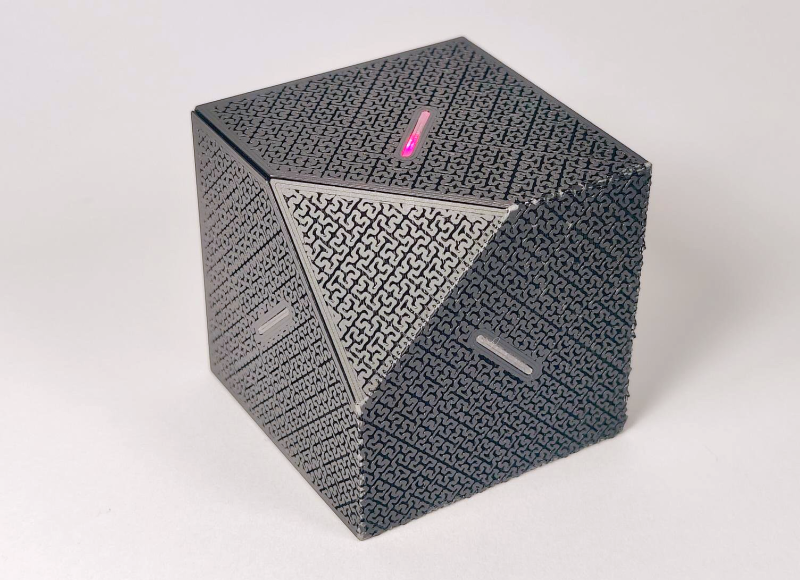
 But there’s hope for us visual simpletons, and the purveyor of that hope is [Edris] of Ponderly Robotics. You see, [Edris] created an extremely easy-to-use timer that looks like something you’d find on Captain Picard’s desk as a token of defeating the Borg. But the affably-named FlipBuddy is far more useful than that description implies.
[Edris] uses the open-source FlipBuddy every day, and swears by its simplicity. The point is accessibility, and respect for privacy. That said, there’s a companion app to provide insight.
Basically, you assign a task to each cube face. Choose one, and place the cube with that side facing up. FlipBuddy wakes up, connects to WiFi, and then pushes your session to the cloud, bypassing the need for your phone.
Time to switch tasks? Just put the new side face up. When you’re done for the day, use the stop face, which we’re hoping means to set it on the knocked-off corner.
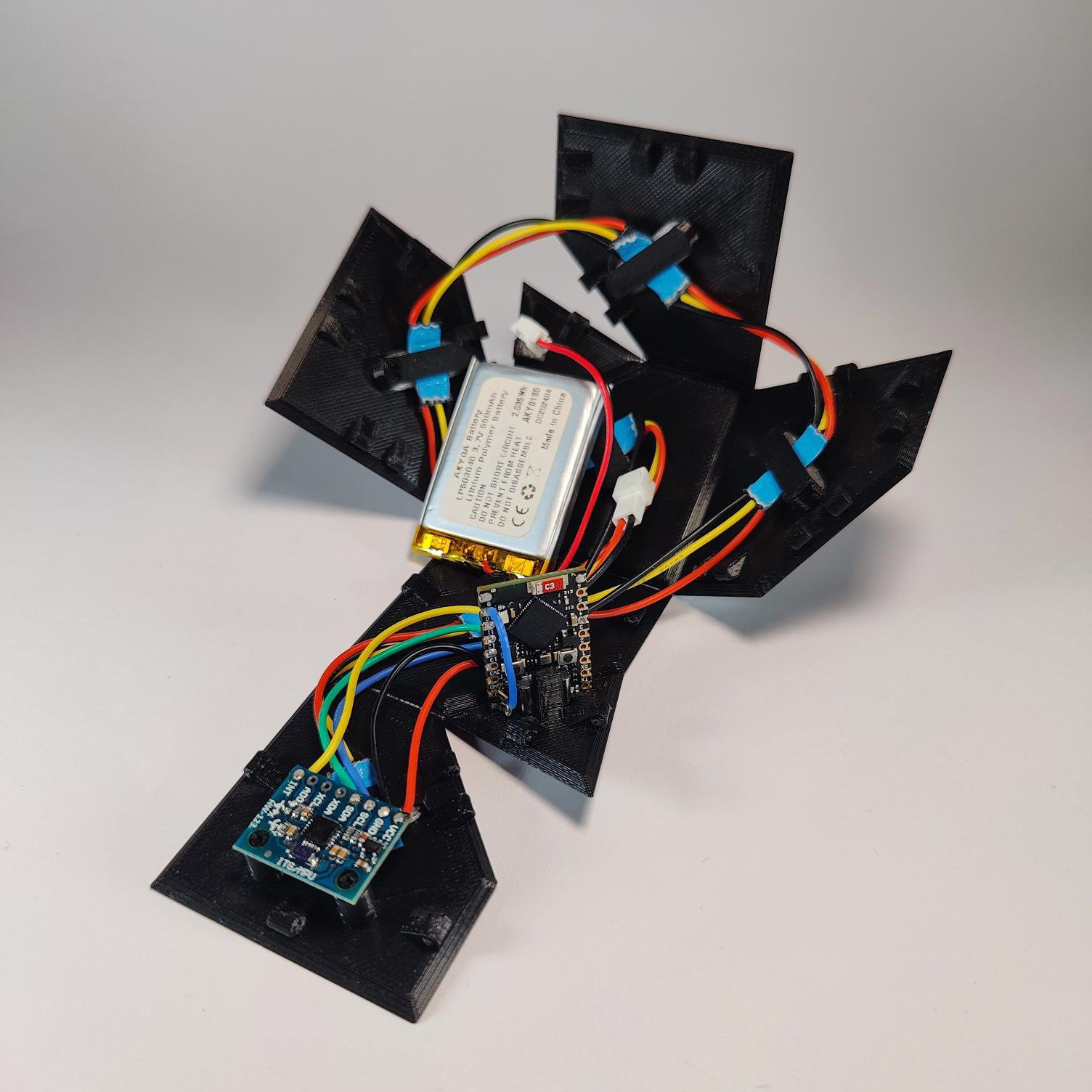
You don’t need much to make FlipBuddy come to life. [Edris] used an ESP32 (an S3 SuperMini or similar will work), an MPU6050, six WS2812B LEDs, and a 3.7 V Li-Po cell. The beautiful, 3D printed origami mesh enclosure prints as a single, flat piece, and you get to fold it up around the internals and make your new buddy come to life.
Part of the point of FlipBuddy is that it can become as intuitive as punching a chess clock. So if it’s buttons you’re after, check out this simple Pomodoro timer.










this is the second story in two days that has a step where i just cannot fathom the verb at the core of it. “pushes your session to the cloud.” ??? i clicked around a little bit and it seems like it simply means “tells the app’s website which face is up” ?
i really struggle to understand the point of this thing. and not because i doubt the value of timers, but because the thing is very poorly explained from my perspective. it’s called a “timer”, and the HaD write up refers to “timer starts going off”, which matches my expectations from the word “timer” — an alarm that sounds after some pre-determined interval. but the project’s page seems to describe a device that is (just?) an event logger. it logs the time when the cube is flipped. for producing a timesheet for billables?
one thing i am starting to understand is that people who use LLMs a lot have a significantly different culture than i do. forget the generation gap, there’s a whole new kind of gap. they have different needs and different ways of communicating about those needs? it’s kind of surprising to me because i thought the product that the human is supposed to create these days is a brief description of the goal — “prompts” — and these words seem to spray the vicinity around the goal without ever hitting it. nudge nudge, time mumble mumble, wink wink.
So, like, Claude feels similarly about it. Here’s what it says:
You’re not wrong that “pushes your session to the cloud” is doing a lot of hand-waving for what’s presumably just an HTTP POST with a timestamp and a face ID. That phrase tells you that something happens, not what — which is exactly backwards for a hardware writeup.
And the “timer” naming bugs me too now that you point it out. It’s really a task/event logger — it timestamps state changes (which face is up) rather than counting down to an alert. Calling it a timer and saying its “timer starts going off” implies an alarm that, as far as I can tell from the project page, doesn’t exist. That’s a documentation problem more than an AI-culture problem, I think — the underlying device is simple and clever, it’s just described one abstraction layer above what a builder actually wants to know.
I’d be curious whether that vagueness comes from the project’s own page or crept in during the HaD writeup — worth a skim of Edris’s GitHub README to see if the precise version already exists somewhere.
:-)
(and that is the first and probably last time I’ll ever paste AI content in a comment here.)
You’re right that “timer” and “cloud” are easy to misread.
Not a countdown alarm. It is a flip-to-log desk cube: face up = current activity, flip to switch, stop face when done. Goal is seeing where your hours went over days and weeks, not billable timesheets. It always makes me smile when an open source project gets used for something I never planned.
“Cloud” here just means an optional free companion site/app that stores those face changes for history (+ free AI productivity agent for everyone). Open source firmware/STLs; app is optional if you want more offline / less SaaS.
Thanks for saying the explanation felt off. I’ll try to make the project page sharper on that.
That’s an extremely neat design, I love the aesthetics! The internals are pretty tidy too.
Thanks! The origami shell + light guides ate a lot of iterations. Glad the guts read as tidy too.
Aim was a 3D-printable shell with no glue and no screws, so the snap-fit joints had to carry that.
Looks like a Hilbert space-filling curve.
Correct! check printables page for other infill patterns, Archimedean chord turn out nice too, and maybe lower infill percentage for Hilbert curve could turn out more appealing.
Context. There is none.
“Don’t have to track your time on tasks? Get FlipBuddy, he racks your time so you don’t have to!”
I need Billy Mays hawking this at me at 2am.
Looks like lot of people have problems with concentration to make tasks and with organization of time. Seems to me that instead of some psychohygiene they are trying to solve it with gadgets which are maybe adding more distraction. Hard to say. The contemporary movies with lot of cuts and action can be one of sources of such states of mind. This all is only my wild today’s theory 🤪.
“psychohygiene” First time I’ve heard the term. I like it. More specific and active than the bland blanket “mental health”.
Today’s fast paced media certainly plays a part here. It’s frightening to see an increasing number of young people with symptoms that are very similar to early age-related dementia. I often wonder what happens when they reach the age of retirement with all it’s ailments. Whatever that will be, it will be a big and possibly unresolvable burden to our society.
Besides that, just two decades ago you would design such gadgets for the elderly…
You may consider it an issue, I consider it an opportunity.
You and I, we both know that those big tech companies thrive by driving engagement through addiction and negative emotions – therefore we know how to reduce harm to ourselves by simply ignoring their products.
When 99,5% of general population is hopelessly addicted to social media, tiktoks and other “brainrot” content, it’s much easier to get ahead and prosper. Energy saved can be used on hobbies or other pleasant activities instead.
Not to worry. I expect Medical Assistance in Dying to be fully normalized by that point. it should be easy enough to nudge the afflicted into the abyss.
I think that some of you are missing the point that many people (say, consultants or lawyers) do have to precisely track the time they spend on tasks. This is a nice, fun way to do that — far more fun than logging into some app and clicking around.
Imagine you’re a lawyer with up to six active clients (or maybe five active clients and “other”). The phone rings and you have to log your time. So, you flip your buddy over to the appropriate side. The only downside is that you have to remember to flip it back when the call is over.
Very nice. It’s essentially a way to do time tracking without a full mental context switch.
And for those with more tasks hanging around, see next year’s FlipBuddy: a dodecahedron. Kristina could have added all sorts of fancy stuff, like little TFT displays or something. Instead they kept it perfectly simple. Good work!
Thanks. That “no full mental context switch” bit is the point.
I wanted something non-intrusive in your field of view: the face color is the activity, so starting and stopping is muscle memory (flip), not “remember the app.” A slow blink now and then is a soft nudge: still on this, or is it time to flip to something else? Easy to sink hours into one task without noticing.
You can also run more than one cube (e.g. work vs home). Firmware and STLs are open; free app is optional for history (and a free AI daily allowance if you are curious).
“think that some of you are missing the point that many people (say, consultants or lawyers) do have to precisely track the time they spend on tasks. This is a nice, fun way to do that — far more fun than logging into some app and clicking around.”
No, we understand this, we didn’t know this was the context we should have initially read this in however.
A Nintendo 3DS tracks your activities for you and generates a log of dates with time for each activity. A Palm Pilot also does this and integrates with your desktop machine allowing this kind of activity tracking across several activities. Your cell phone not only tracks where you are but can easily help you keep a log of your time. This thing is not new, time clocks have been in use from before the advent of electronics. Most modern operating systems collect user data and can be “mined” for a report of what you were/are doing at any given time. The extra time spent assigning tasks to the faces of this device is wasted time. My day at work (retired) would easily consist of many more tasks than a simple cube metaphor can log. And, consider that your task load will include activities away from your gadget cluttered desk (tell me you don’t have one of these) trying to track your time with this device will make you push it aside. Just use your phone’s voice generated text utility, and send yourself text or email of what you are doing and paste it into your day-timer application. “Cloud” storage satisfied right there.
The ‘out of sight, out of mind’ struggle is so real when you’re deep in a project. While a physical timer is awesome, I use Taskai on my Android to capture tasks from my notifications so I don’t lose my train of thought when I’m multitasking.