

In the previous installment on UDP broadcasting and service discovery, the basics of both were explored, including an implementation in the form of NyanSD and its protocol. Contained in the comment section was a very good demonstration of why one of the most exciting aspects of software development is the opportunity to share your latest creations with other people. This being the ability to get solid feedback on all the points – including any potential boneheaded omissions – that you really should address, whether intentional or accidental.
The most pertinent point raised was definitely that of broadcast addresses and IPv4 subnets, with the latter topic especially being something that the sysadmins at the office would talk about all the time, but which us software developers were always happy to ignore as something that didn’t concern us. Turns out the joke was on me and everyone else – like our esteemed readers – who thought that they could escape the fascinating world of subnets, as today we’ll take an in-depth look at what subnets are and how they are relevant to the world of UDP network discovery.
I somewhat alluded in the first article to the topic of ‘which broadcast address to use’ as being somewhat of a rough topic to figure out, which is clearly why I just stuck to a blatantly ‘works for me’ /24 subnet that usually will work on networks, until it does not.
Subnet And Conquer
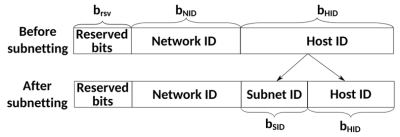
The short version of ‘what is a subnet’ is to point at the subnet mask that we have been mostly mindlessly mashing into networking configuration dialogs along with the IPv4 address for many decades now. Usually this takes the form of 255.255.255.0, which is just the human-readable version of the actual bitmask. Here the loopback interface already tends to use 255.0.0.0 as its netmask, which is a detail that tends to be easy to gloss over as this is just one of those local OS things.
Putting netmasks in the crudest and simplest terms, they are a bitmask that is used to identify how an IPv4 pool of addresses is split up by defining which bits of the 32-bit IPv4 address identify a subnet. Normally we call the trailing part of an IPv4 address (the .123) the host identifier, with the preceding section the network identifier.
By masking part of this host ID and using it to create a subnet identifier, we can then use this for additional routing, just at the cost of a reduced number of possible host IDs within that subnet.
As an example, the common 255.255.255.0 mask identifies the first 24 bits (3 bytes) of the 32-bit (4-byte) IPv4 address, hence the mask being referred to as /24. With this mask, the remaining host ID bits allow for 256 hosts, of which two are not used for hosts: the first (e.g. 192.168.0.0) and last (e.g. 192.168.0.255) in the range. The last host ID in the range forms the broadcast address for that subnet.
This is why, for a /24 subnet, you can generally get away with just slapping a .255 on the end of an interface’s address, but also why for other subnet configurations it’s likely to explode violently.
To get briefly back to the loopback’s /8 style netmask, this means a single subnet with a maximum of 16,777,214 hosts, which ought to be sufficient for local system networking shenanigans. Its opposite extreme would be the /31 style netmask, which with just two potential host IDs is practically useless.
IPv6 subnetting is similar, but due to the much larger address pool and differences in the protocol this is a whole other kettle of fish that is as likely to send a network administrator’s heart racing in excitement as it is to make the average software developer run away screaming. This can be a fun topic for another day, perhaps.
This overview of IPv4 subnetting also skips over details like the different classes of IPv4 subnets beyond the Class A type here, but those are happily left to sysadmins and kin for now.
Sub-casting
In order to thus obtain the broadcast address for a given network interface you need to know two things: the IPv4 address and its associated netmask. From this you can then tell three things: the subnet ID, the broadcast address in that subnet, and the current host ID. Of these we only really care about the the second item.
Although you can obtain the broadcast address yourself by applying the netmask to the address, the OS’s APIs tend to happily give you the precomputed broadcast address. If that’s not your style or not an option, a manual procedure is to:
- Determine the number of host ID bits using the netmask.
- Set all bits to
1in these bits to get the highest possible host ID. - Use this value along with the original masked (i.e. network ID) bits to obtain the broadcast address.
If we thus start with a 192.168.0.0/24 network, we end up with 192.168.0.255, while for a 192.168.0.0/26 network with just six bits available the maximum value is 64, ergo we get 192.168.0.63, since we start counting at 0.
With this we can now broadcast UDP packets on any interface without any (major) worries.
Local Broadcast Address
A small glitch in the whole above story is that there’s actually another broadcast address, one which is always the same for each interface and can be considered to make the whole preceding explanation completely irrelevant. This being the local, or limited, broadcast address, which is either the best thing since sliced bread or the worst sin ever committed in the history of IP networking, depending on whom you ask.
This cheat code takes the form of the address 255.255.255.255 and if you send a packet on a UDP socket to it, you’ll get happy UDP responses from any service that is listening on the specified port. This raises the point of why you’d not just use this broadcast address on all interface, rather than bother with all the earlier described nonsense.
The only major difference between this local broadcast address and the earlier described directed broadcast address is that the latter can also be used to target a foreign network, instead of just the local network. This makes it a very attractive option if you just want to query the local network with UDP broadcast packets.
As for why you’d not want to use a local broadcast address, I couldn’t really find any references or citations on why this would be the case. Both would appear to be perfectly valid approaches to broadcasting, each with its own pros and cons.
Bugs
One final topic was my mistaken hardcoding of a /24 style broadcast address in NyanSD. Here reader ziew helpfully pointed me towards the Poco::Net::NetworkInterface::broadcastAddress() function, which seemed perfect. Unfortunately Poco’s implementation at least on Windows 10 appears to be rather broken.
After getting only 0.0.0.0 as broadcast address from this function, I had a bit of a look at what was happening, including checking what I got as subnet mask both for the default index parameter and for the next index. Across two different Windows 10 installations and both GCC in MSYS2 as well as MSVC 2017/2022 with various versions of Poco the returned values were… interesting enough to file a bug report on the Poco issue tracker.
Clearly this isn’t going to be fixed just yet, but on the bright side the horrific atrocity that I committed by hardcoding a /24 broadcast address will still work on basically every home LAN out there that NymphCast is likely to be used on.
Maybe I could just switch to a local broadcast address and that’d be even better. Feel free to torch down this idea in the comments, just be sure to provide solid reasoning and cite your sources.
A Complex Topic
Writing out the above pretty much clarifies I think why past me got a bit overwhelmed when trying to ‘just do a UDP broadcast thing’. Even just scratching the surface of IPv4 subnets and not even venturing into IPv6 territory makes one already feel a bit antsy.
Certainly, one could totally argue that anything other than a /24 network is unlikely to be encountered outside of certain government and business networks with either very specific needs, very enthusiastic sysadmins, or both, but it’s always better to design software with such real-life scenarios in mind.












Here on muy local network, for my hobby projects, I just send and receive ethernet bloadcasts and frames. Simpler than TCP/IP and good enough for what I’m doing.
can you expand on that? like, what kind of hardware/software do you use where it’s simpler to send ethernet frames?
anecdotally, the first time i used tcp (or udp), it felt like a black art but now i know it’s actually very simple and i throw things together and they work on the first try and they don’t contain a lot of code or a lot of uncertainty. really the hardest part is trusting your understanding imo
++Me too
I often had to write on-off loggers for recording data and I usually used an ESP32 dev boards and wrote a program that uses UDP broadcasts to send data every second or so.
Doesn’t matter what IP it gets, I can always receive the packets. Its a pretty simple use case. If there are multiple ESP32 boards logging data, its all the same, doesn’t matter, just need to listen for a packet on the decided port, easy.
I’ll just leave this here.
i’m not sure i am understanding if there’s a “there there”? it seems to me like it’s being presented as being opposed to TCP/IP but actually it perfectly fits within TCP/IP. the whole point of modern network design (“the OSI model”) is encapsulation / layering. the content distribution protocol would naturally work as a layer above TCP. people really are interested in information more than they’re interested in specifc hosts, but in reality there is a specific host (the “cloud” is a concept built out of individual hosts) so having a host-oriented protocol like TCP/IP is inescapable. but a layer on top of that can provide the abstractions that users actually want.
From skimming real quick, it sounded like they’re primarily trying to do away with routing and, by extension, escape one of the weakest links in the current IP internet architecture: DNS.
If you request data by name, instead of contact a machine by host name, then you don’t need the directory of name:address mappings that DNS provides. The name IS the address. How packets find their way to a server that can provide the named data is an open question (to me; it may be answered in the parts of the entry I didn’t read, which was most of it), and even moreso how they find their way BACK, but the idea of a DNS-free Internet has to be at least a LITTLE enticing to anyone who understands how much it SUUUUCKS.
In that case I’ll leave this: Tanenbaum, the bible of computer networks, should still have my copy somewhere.
https://ia903105.us.archive.org/view_archive.php?archive=/3/items/calibre_ebook_libraries/calibre_libraries/202.203.132.245.zip&file=Computer%20Networks%20%285e%29%20-%20Andrew%20S.%20Tanenbaum%20%26%20DAVID%20J._29.pdf
I’m looking forward to a similar article but with IPv6 focus!
+1
I’ll wait on the IPv8 article ;)
Yes!! ASN+IP = no more conflicts and no need for IPv6… ;)
I wouldn’t mind one on multicast too!
It’s very common to have non- /24 subnets outside of residential networks, and maybe small businesses which use residential grade routers.
It would be naive to assume /24.
with IOT devices everywhere and every child having a phone and 17 other devices any more i know more and more residential and small businesses(no it is not always possible to get all small businesses to get the infrastructure to allow for vlans) going outside the /24 networks. 255 seems small but it is very limiting these days.
While many common routers default to 192.168.x.x/24, 172.16.x.x/12 isn’t unheard of and even 10.x.x.x/8 you rarley see in some networking equippedment. I certainly remember,maybe it was zyxel or fritxbox?
So leaning heavily on 192.168.x.x/24 ‘aww I’m sure everybody uses that!!’. I’d even argue, today’s home networks are getting g even uglier with double Nat’s and what not because users have no idea and just plugin stuff. Or routers setting up separate subnets for separate functions. Odd stuff does happen.
But yeah :works for me’,’and probably a lot of others’ :)
Or, just stick with the established zeroconf/bonjour and ideally have it working for everybody :P (which I’d also not true of course, as zeroconf f doesn’t magically cross networks,but that is a matter in itself
I moved my network to 172.16.x.x/22 this year. Partially to support more devices per subnet and partially to get away from the default manufacturers subnets.
Subnetting was a difficult concept for me to learn. And then, once I learned to count to 256 in binary, it all clicked.
Example: 192.168.1.16/28
32-28=4, or 4 binary bits. Four bits in binary can be expressed as 1111 which in binary is 16.
So, that leaves you 16 IP’s available starting at 192.168.1.16, so you get 192.168.1.16 through 31, which is 16 IP’s including 192.168.1.16, which is the network address IP, which is unusable, as is .31 generally, leaving you with 14 usable IP’s.
So /24 = 8 bits 11111111=256 IP’s. /30 = 2 bits = 4 IP’s. It’s easy after a while.
Binary 1111 is decimal 15, but because you also have 0, you have 16 values that can be represented with 4 bits.
Yeah, I simplified. 1111 = 15, 0000 = 0. 16 possible values.
Oh, if you want to be more confused, prior to CIDR (really prior to RFC 4632) the netmask didn’t have to be contiguous. Now the CIDR notation (/blah = 2^(32-blah) addresses) makes it pointless, but netmasks are really “if (dest & mask) != (src & mask), send to gateway” and so you could do goofy weird non-contiguous netmasks to do odd things.
This is an aptly-timed article as I just learned about UDP discovery only yesterday. I’m building a custom Home Assistant installation and device discovery is a requirement.
Not wanting to overly repeat,but service discovery is going to be tricky with dockerized versions of home assistant. You probably get more success and acceptance with mDNS-Sd. But if your device uses UDP broadcast you wish to support, make sure to test and try this in docker containers without network=host, and also try macvlans for isolated iot clans.
AI can probably help a lot here too to rubber duck with.
Running HA in an LXC on Proxmox. The tricky bit here actually will be the custom phone app, React Native on Expo. That doesn’t support mDNS without dropping out of Expo.
Today’s feedback: look up “Classless Inter-Domain Routing”.
Thanks for the feedback. I’m aware of CIDR, but didn’t want to quite crack open that can of sardines yet. There’s definitely a lot more material just in IPv4 to get into the weeds with.
The article uses CIDR prefix notation extensively so the can is cracked already ;-)
Fair point, I should probably at least have noted it :D
Non-CIDR seems more historical/niche, so I didn’t really want to blow innocent minds too much, same as with not diving into the weeds of class B & C subnets :)
CIDR is all you need for practical use. But it helps to explain the “simpler times” assumptions baked into classful, and how they imploded once the internet expanded beyond ARPANET and NSFNET, and started allowing commercial traffic. The details do make it a lot easier to intuitively understand, but probably only matter for people whose career involves shepherding routers or complex networks. Or… people who are doing crazy things with vms, containers, tiny embedded devices with little room for intelligence, or other challenging situations that a random “my browser just works” user would never trip over.
90% of the following is probably not useful to any given HaD reader, but it’ll be a different 90% for each of us. I’m not good at targeting an audience, so this is just an info dump that someone could hopefully salvage some useful details from.
The sharpest edge is actually /32 vs /31 vs everything else, and that sharp edge isn’t inherent in ipv4; it only emerged in the mid 1990s.
/32 goes through the routing table for everything (there is no “local same-network” shortcut). This allows some interesting things in containers or home networks, but is more common for anycast routing, load balancing, ddos protection in datacenters, etc.
/31 is point-to-point: it’s great when you need a bunch of VMs or containers that must be isolated from each other but must all be available to a common client (such as your laptop). Since every destination but the vm/container host is a route hop, it is easy to keep all firewalling decisions in one place without any risk of “routing around” the firewall.
Everything else is simple: if the netmasked part of the address is the same, it’s “local” and goes through ARP; if not, it’s “nonlocal” and goes through ip routing.
At the lowest level, routing is just a radix tree lookup that picks the longest match. For this, /32, /31, etc aren’t special. And, originally, with a plethora of point-to-point links (SLIP, etc; PPP came later), the radix tree view was “front of mind” for anyone implementing a network stack, so everything just worked and there were no sharp edges.
Later, with the massive rise of ethernet and subnetted networks, (especially by the late ’90s, with heavy GUI user-input validation based on subnet masks), it became common to assume that “all networks look like ethernet collision domains”; lack of testing and perceived relevance meant that Microsoft OSes and hypervisors are not fully RFC-compliant and fail to handle /32 and /31 correctly. DHCP itself had a strong assumption of ethernet collision domains; to make /32 work, kludges were needed (most notably, certain parts of RFC 3442).
The IP protocol has no issues with /31 and /32 networks, and Linux is one example of an OS that properly supports them; many commodity software stacks and oses make assumptions that are violated by /31 and /32 networks.
If you get into those “Classful” weeds, it’s also useful to explain to people that (a) Classful networking is well and truly dead these days, CIDR is all we use in networking, and (b) just because it’s a /8 does NOT necessarily make it “Class A”, and /24 isn’t “Class C”!
Class A stopped at 127.255.255.255, class B stops at 191.255.255.255…
It drives me nuts when people try to call 192.168.x.y/16 a “class B”, because by definition, it can’t be. Similarly, 10.20.30.0/24 isn’t a “Class C,” despite being the same length as a class C network (/24).
IPv4 joy…
BTW I go with UDP to use old phone as remote display for my esp32 project…
https://github.com/defdefred/UDisPlay
I’m not fond of the diagram that introduces the “Basic subnetting concept”, as it implies that there is an additional identifier. In reality, this is purely administrative. i.e. the network registrar has allocated this range of IP addresses for your use. RFC1918 specifies a number of “internal use” networks: 10.0.0.0/8, 172.16.0.0/12 and 192.168.0.0/16, which is what most people will be exposed to.
What you do with the allocated addresses, and how you subdivide them is up to you, and the devices on your network have no knowledge of this administrative detail. All they need to know is the network that they are connected to (address and size aka mask).
The allocated addresses are typically divided up using /24 network masks, but folks requiring larger networks can easily use a /23 or /22 or shorter mask. A /23 allows 510 hosts, while a /22 allows up to 1022 (2^(32-22)-2=1024-2 for the network and broadcast addresses).
You can obviously go larger if you want to, but eventually you end up with too much broadcast background traffic – hosts doing ARP lookups, mDNS announcements, etc. Previously (prior to switches), this was more of a problem, because all traffic on a subnet was sent to all hosts. Switches learn which MAC addresses are on which port, and direct traffic accordingly when they can, reducing the noise.
And then there are VLANs.
Thank you for this article, its helps with an area about which I’m woefully uninformed because, you know, effort.
I feel like this could have been cruder and simpler, TBH.
For real fun, consider the situation where you discover a system, and want to forward a broadcast through that to find if there’s anything on an attached subnet.
Lest that sounds like something a worm would do, this was for a shared cross-platform clipboard 25 years or so ago: auto-discovery worked for Solaris, Windows, and Linux (various architectures and endianness).
My memory is a bit vague by now, but the bottom line appears to be that even on a network which was heavily name- (rather than address- ) oriented, it’s worth ensuring that every node also returns its IP addresses and associated subnet masks. If you don’t do that, you’re likely to end up doing a whole lot of guessing based on the apparent IP4 address classes.