
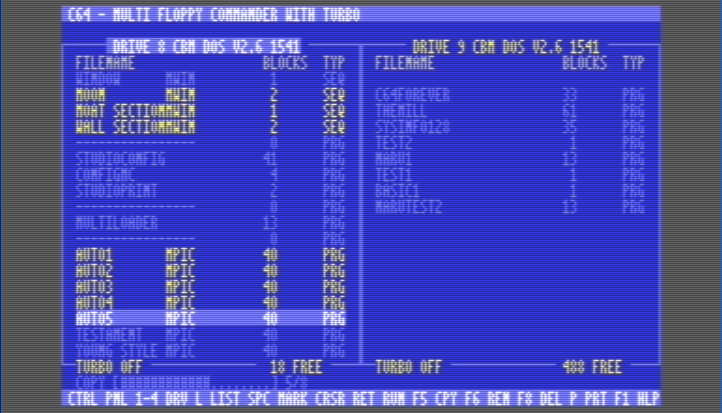
Norton was always a PC company — Norton Commander, the file manager that launched a thousand clones, was only ever available for DOS, like the rest of the company’s offerings in those days. If they’d decided to port it to the C64, though, it would likely look a lot like [retro3872809] aka [Chicken 64]’s Multi Floppy Commander with Turbo, available on GitLab.
 As you might be able to see on the screen shot above or in the demo video below, the application provides an 80-column interface with a split view to show a pair of floppies side-by-side. Not that you’re limited to two floppies, however. The software is happy to swap between all the drives on the bus, to the C64’s maximum of four. All four drives will be usable since the file manager lives on a cartridge.
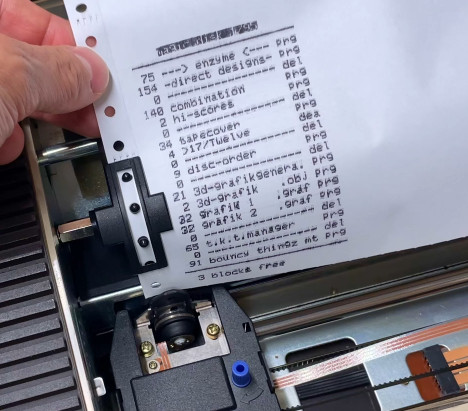
All drive models are supported, though not all have turbo. As a file manager, it looks like it has the normal functionality you’d expect: renaming, copying, moving and deleting files and directories. You can also launch programs or print disk listings, assuming you have a printer attached to your Commodore.
Said Commodore perhaps needn’t be vintage, as they’re selling new ones again, but if you want a disk drive you may have to fix it yourself.












I need to mention this: https://midnight-commander.org
It is an open source improved “Norton Commander” implementation (develoment started in 1994).
So if you like that two pane interface as much as i do, give it a try.
Or FAR Manager
Yes MC is very good, on Linux I have a fork of it with Grok (and local) AI fully integrated into it. Having it look at your shell history to inspire further extension to MC alone made it totally worth the effort of developing it and with Grok Build that was on the trivial end of things anyway. You effectively get a full IDE and AI harness because of the included MCEdit.
Sounds like a good hack – please submit a tip if you have some online example of this.
There’s also Krusader for KDE!
Thanks for the link! I’d heard of Midnight Commander but didn’t know it was open-source.
Hi! On DOS, there’s also Star Commander..
It’s basically an Norton Commander clone with 1541 support.
It was meant to be used to exchange files via PC and C64.
However, it can also run as generic file manager.
https://www.c64-wiki.com/wiki/Star_Commander
https://csdb.dk/release/?id=6234
The split-pane dual-floppy interface is a faithful adaptation of the Norton Commander paradigm. Supporting all four drives on the bus via cartridge is clever — avoids memory limitations. The 80-column display mode is impressive given the C64’s stock 40-column limitation. A nice piece of retro computing engineering.
Cool, especially that tiny font, does look pretty useful/workable.
However since I grew up using Amiga instead of a PC, I think I pass on this one and wait for a C64 version of Directory Opus.
I think that I remember using stereo shell back in the day… but was that on C64 or old pre-windows machines?
does it work with SD2IEC floppy emulator?
In theory C64 could have 247 disk drives but realistically the IEC cable length would be too long since none of the devices helps boost signal over long chain.
Disk drives can have ID beyond 11 with software trick.
OPEN 15,8,15,”U0>”+CHR$(x):CLOSE 15
where X is the desired device ID number. Many years ago when I was still finding cheap C64 and disk drives everywhere, I did have 8 disk drives. I turned the first 4 (hardware set to 8-11) and used the software ID change to make them 12-15. Then turned on other 4 which got me drives 8-15
Very little use in having so many disk drives besid making multiple copies from one disk, and most software and some multi-disk games only recognizes 8 and 9. I did consider hacking Ultima 5 to recognize 8 drives so I wouldn’t have to swap any disk at all but never got started
Looks cool.
Xtree was great, back in the day.
I srcomd that! 🙂
On DOS PC, in late 80s, there were basically two groups of PC users: Norton Commander and XTree Gold.
Though some GUIs such as MS Windows 1+2 (underdog) or GEM had some users, too.
Tandy users had used that Tandy Desktop, too.
In early 90s, PC-Tools and other software suites had their proprietary Desktop software, too.
This is one of the better C64 applications.
It simulates 80 columns via graphics modes, it seems.
Well done. An C128 enhanced version would be cool, too.
The VDP can be accessed from C64 mode, for ecample.
So a dual monitor set-up would be possible.
Extra information could be displayed on abother monitor etc.
Oh yes, Midnight Commander is very handy and comfy tool to control adjust your Debian system.
Many times I tried VI, it works but MC with Nano makes it a good day.
I used to use a free dual-pane file manager called Fast Filer (FIL.EXE) that came on a PC Magazine demo disc. It’s on archive.org.