
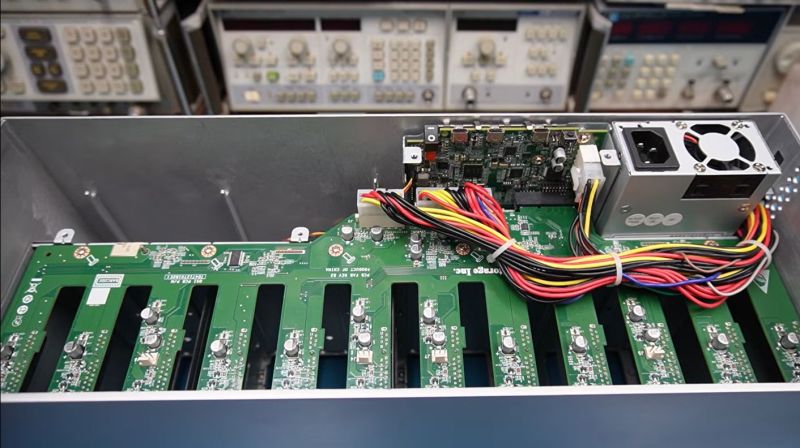
 After the [Slow Mo Guys] acquired a 168 TB Seagate LaCie Thunderbolt 3-based RAID storage system back in 2019 to store their video footage, they were obviously slightly miffed when suddenly it would just refuse to power up. Naturally the device was now out of warranty, the product itself no longer produced and Seagate support was less than supportive, ergo they sent the device to [Mend it Mark] for an attempted repair.
At first inspection the device appeared to be basically unresponsive, with none of the four fans running and no signs of life other than a few lit LEDs on the main PCB after supplying power to it. After full disassembly and with no repair guide or schematics to go by [Mark] had to start from basics, first diagnosing whether all the power rails were turning on, which they weren’t.
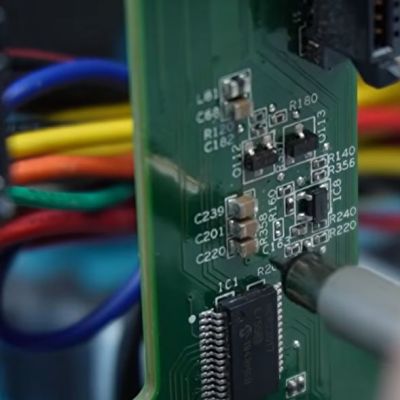
Eventually this led to the NXP LPC11U6x-series MCU which acts as the main power management and monitoring chip in the system. [Mark] deduced that this MCU wasn’t turning on all the power rails because it was waiting for a signal from the fan controllers on the SATA backplane. With the MCU sending the right signals here, and the fans all working when directly supplied with power, ultimately it turned out that a single SI2319 or similar P-channel MOSFET in SOT-23 package near one of the fan connectors had gone faulty.
Replacing this one MOSFET seems to have fixed the RAID array, with it now happily powering up, although the real test will be once the [Slow Mo Guys] start shoving the HDDs back into it. Assuming that this was the sole fault in the system, then it was a very cheap fix in terms of materials. It’s a real shame that repair guides or schematics aren’t made available for devices like this, even if just after they stop being produced.












Commendable repair for a serious unit with no backup information, and it appears to now work. Better yet he explained it well enough that an idiot like me actually followed his course of action to repair it. Well done.
I imagine that I’m being misled by the appearance of what is basically the biggest model from a consumer, desktop, line that just looks a lot like a drive shelf; but I would not have guessed at that cause of failure.
I’m overwhelmingly used to IT gear definitely being touchy about the status of its fans; but quite specifically being willing to wake up far enough to scream at you in one way or another(blinking out an error code, audible alarm, or the BMC crying about the situation on whatever interface you prefer to check it through) about the fans.
I hope that having a hard refusal to boot doesn’t imply anything ominous about how much monitoring it is doing after it starts; because that would be the main reason I’d think of for treating one fan out of spec that drastically.
If I had to guess, it’s just a boot sequence “turn on fans -> wait for fans on -> continue” that doesn’t ever get the “the fans are on” signal.
Still, it would be nice for it to fail more loudly, like flash the power indicator with an error code. Just sitting there like a brick isn’t the best.
That definitely seems to be the case; I’m just surprised because I don’t think I’ve ever run into a piece of IT gear(at least not anything in remotely the same ballpark in terms of price) that does it that way.
On the lower end it will usually come up far enough to do either a status light blink code or an audio beep code, or just naively come up and then start throttling when it overheats. On the higher end it will come up far enough for the BMC to be accessible so it can spew fan status alarms(often while running every fan it can at 100% as a failsafe measure, which really gets your attention).
Just silently refusing to do anything visible because one fan is in an odd state is a really weird and brittle behavior for a multi-fan chassis that would have cost actual money at the time of purchase.
That’s lacie for you.
It wasn’t one fan in an odd sate, it was a bad MOSFET in the fan control circuit.
it’s got a usb connection – a proper error message should have gone up it..
Very very sloppy design.
How to we avoid this? Rate the MOSFET for 2x or 3x the max voltage, oversize the FET for the load by 2x to 3x, soft start. Is that all? Anything else?
Urgh, LaCie drives. 15-20 years ago the place I worked had loads of them as they were the fastest largest drives for slinging DVD and Bluray images around at the time.
Performance was great.
Then they suddenly started dying like mayflies.
Think it was completely insufficient heat management. But they killed themselves and the data went with them because of how the raid was done.
I like how he snickers rather than using various expletives ! Then he gets to the absolute core after all the knowlege spun probing & the wee little parts try to blow off the board. Hahhh Nice stereo tri-noc & thermal camera. Tally ho my good man !
LaCie seems to be the company that cares a lot about looks and little about engineering. Their drives are hard to disassemble, use unexpected cheap hardware inside and tend to take all their data with them once they die.
I had a customer with a cupboard full of LaCie external drives in the 500GB disk era, when the first ones died he gave them all to me “do whatever” and had himself built a simple Debian based RAID6 box.
I chucked all the drives and the Samsung HD501LJ that were inside are still in use after more than 10 years.
And I have been told near identical stories from different colleagues over the decades. Great enclosures, cheap or questionable controller, quality disks from reputable vendors.
All isolated incidents, of course.
Decades ago there was an external disk enclosure that had a disk fail (no RAID, just disks partitioned as needed). I had the idea to swap the disk enclosure with another disk, and that disk failed, while the first disk thrived in the second disk enclosure. So the fault was in the enclosure printed circuit. After looking at it for a long time a colleague found a speck of dust/dirt between two traces (they were not covered by solder mask). After removing it everything went running like nothing wrong happened.
The moral is that shift happens, be prepared.
La industria es muy leonina, lamentablemente nadie te brinda nada para reparar, te obligan a gastar una y otra vez. Esto no sería obsolescencia programada, pero de verdad que da mucha bronca, ya que muchos equipos podrían seguir andando décadas, con una mínima reparación. Con eso sería más ecológico además. Pero claro, ellos tienen que vender. Saludos desde Argentina.