
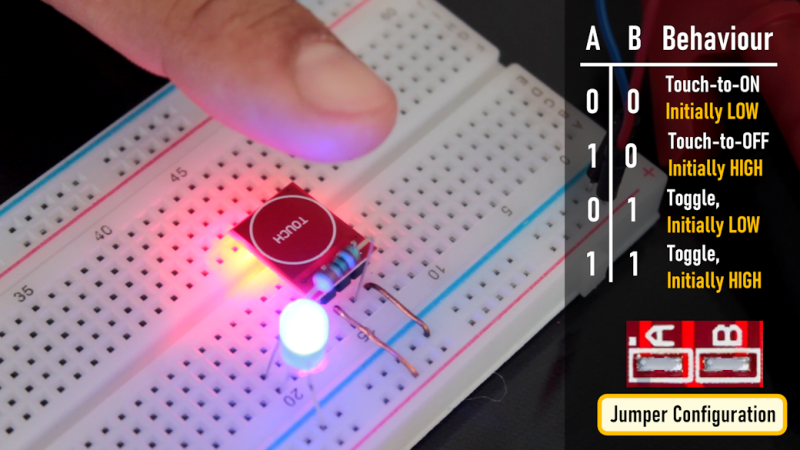
Mechanical and prone to failure, switches can seem quaint these days. Plus, everyone is used to having touch screens on their phones and other devices. So why not use touch sensors on your next project? [Tarantula3] has details on using the TP223 instead of ordinary switches.
These inexpensive modules work through plastic, glass, or wood, opening up many interesting possibilities for building a front panel. Of course, the thicker the surface above the module, the less sensitive the switch is, but that’s not always a bad thing. In particular, you may want to reduce sensitivity anyway. Thicker panels, reducing the size of the touch pad, or adding an external capacitor can reduce the sensor’s range.
You may be worried about eating up batteries with a bunch of electronic switches. But according to [Tarantula3], the modules consume less than 2 microamps at rest. You can configure the modules with our favorite scripting language: solder. There are two jumpers, initially unsoldered, and this results in four possible states. By default, the output goes high when someone is touching the sensor and stays high until they release.
However, you can solder jumper A to invert the output. Jumper B causes the switch output to toggle on each press. Of course, you can also do both jumpers, which toggles but has the opposite default state. If you get false triggers, consider adding a small capacitor to filter the power supply to the module.
These would be great “drop ins” for 3D printing to add switches to your designs. You might even be able to use these as power switches with a little work.












Because they’re horribly unreliable, provide no feedback, and are the most concise possible way to say “I hate everyone who will ever use this device and wish them an eternity of annoyance and frustration.”
The only non-user-hostile use for these things is for detecting mechanically repeatable movement, like behind a rubber dome switch where can detect the carbon-loaded rubber pad hitting the PCB without being sensitive to surface contamination and corrosion.
They’re good in places where you don’t want something mechanical and open to ingress – I’m glad to have them on my oven hob.
I’m with Bunsen. Capacitive buttons are the WORST. On my stovetop they get triggered by stray spoons and pots, and a splatter of water will shut off the entire stove and lock the buttons…
I’m just glad the growing backlash has started pushing car manufacturers back to real buttons!
A splatter of water on my induction hob stops them working – but only until I wipe it clean. A splash of water on a mechanical switch is a bit more permanent. And rubber buttons may be waterproof, but are horrible, and they wear out fast.
A rotary encoder on a hob would be lovely whilst it worked, but break far too fast.
And before you suggest optical, that’d get bunged up fast.
Potentially Hall effect? But we’re really increasing the complexity, and you’re still back to moving parts.
Personally, I have no problem with the capacitive buttons on my induction stove, and I think it’s one of the few situations where they’re a good thing. But I think you’re being unfair to classic mechanical switches.
A bit of water does nothing to a decently engineered mechanical switch. Gaskets, bushings, dielectric grease, and other forms of waterproofing are a thing. Even without those, unless you’re dunking it in the ocean or submerging it for hours, a wet mechanical switch still will generally work fine as soon as it’s dried out again.
I’ve been in plenty of houses with electric stoves from the 1950s and 60s with their original burner rheostats and oven setting selectors, and they still work just fine.
idk, some of those contactless encoders are pretty nifty and easy to implement (i2c, spi, or pwm options exist).
The touch controls on induction hobs are one of the things that keeps me from replacing my gas hob.
Every time I use those things they refuse to react to me unless I lean on them with force.
How hard can it be to give me a rotary encoder with a nice knob?
Or even just a potentiometer for what theese do
I think infrared reflective would be more reliable.
I was going to say you deserved a special place in hell, but I realised it would have been too unjust.
The special place is reserved for whomever invented touch controls on a hob.
Touch controls are… ok, so this module seems useful. But in general, touch switches are often less optimal to use in some applications. Is there anyone who actually likes using the touch button when their smartphone is in camera mode? For many uses, the shape and tactile feedback of a physical button or switch are pluses.
I recall one interesting use of touch combined with a physical feedback. It was a tablet-shaped digital audio editor, and when you pressed on virtual buttons (eg transport controls), a little solenoid behind the display would deliver a little thwack! that you could hear, and feel in your fingertip. It was … satisfying.
you can stick a piezo or solenoid behind the touch control (like the track pads on the steam deck) to give the illusion of a button press thats hard to tell from the real thing. so unless the module includes that tactile feedback capability its a horrible substitute for a button in most applications.
There’s a red LED on the touch sensor board that gives feedback. I used one in a sealed enclosure, behind the transparent front panel, and it worked well, and will continue to work well into the foreseeable future.
TTP223 can be a piece of junk. I used it for a tamper alarm on a doorknob and it drifted out to lunch.
The problem with these capacitive touch sensor IC’s is they capture their zero (no touch) reference osc value on IC power up.
But their oscillator drifts greatly with temperature and with tiny VCC changes. If the oscillator is now running below the zero cal frequency (got cold out) it screws up looking for the touch drop in freq.
So the TTP223 would get lost and fail to detect touch at all. You would have to reboot the TTP223, or hope that touch (big capacitance) would toggle the state, which is also where it re-learns the ref. osc no touch value.
In the end I changed over to Atmel AT42QT1010 which worked great.
Also, there are many patents over touch detection that make the playing field awkward.
i hate the capacitive touch sensors on my wireless headphoes, you cant take them out or put them back in without issuing an undesired command. the old ones i had used physical buttons and they were a lot easier to handle without hitting the button. i hate touch screens (especially on phones) for the same reason.
Is this going to become a column/series?
I used one of these for an NFC stereo project I built (based on Phoniebox). I kept the thing as minimal as possible, but on revision I decided to add a skip button so my kids could find the song they want on an album. I went through a lot of button options, but decided on one of these as the most graceful, durable option. It keeps the press to a light touch, which means my kids aren’t pushing the stereo all over the place.
One possible hack is that the TTP223 might actually be a PIC10Fxxx.
Speed? Are they fast enough to send Morse or trill notes on a EWI flute/sax?
the only place i used them to satisfaction was in exhibits in public spaces. not a single fault. after that, i made two with mechanical waterproof buttons and guess what, they don’t like muddy fingers and became stuck after only half a year. but in cars? hell no!
I’ve used a bunch of these sensors to detect a liquid starting to flow in silicone tubes. Works well, but after a while it “recalibrates” and sets the output to low again.
The TTP223 has a 100s timeout, see datasheet.
ATTiny 85 series chips had this as a built in feature. And it wasn’t well documented.
And I would’ve done well if I had paid attention to the word capacitive before touch sensor and realized it didn’t require contact. But the sensor function worked and I learned how the capacitance sensing worked quickly on my first project with an ’85! Just needed some mediating material.