
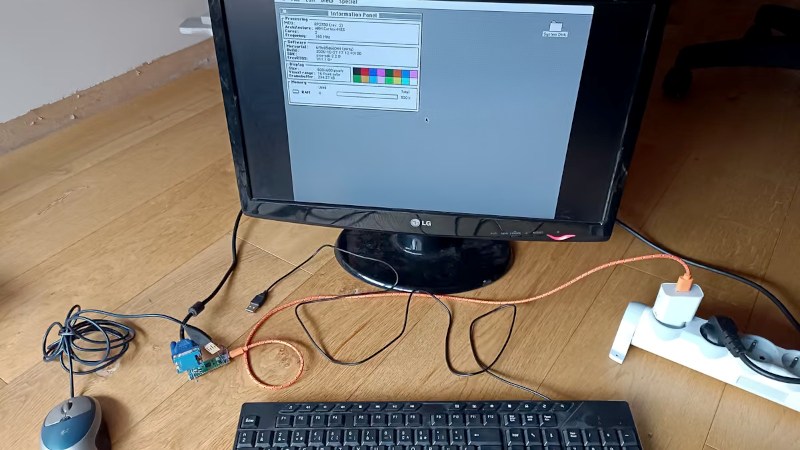
We’re living at an interesting time here in 2026, when microcontrollers are becoming powerful enough to surpass the capabilities of “real” computers from a time when those real computers were starting to become useful. We’ve seen plenty of microcontrollers emulating machines from the 1990s, but what if instead they were giving all their power to the OS? It’s a question [Thomas] is trying to answer with SylphideOS, a general purpose GUI operating system aimed at multiple microcontroller platforms.
On the surface it has a GUI that appears to owe a lot to the early Macintosh machines, but underneath it has the FreeRTOS kernel, something that has been around for quite a while. You can argue among yourselves as to whether this make it an OS in its own right or a FreeRTOS distro. Aside from driving a screen through a framebuffer it also has the hardware interfaces you’d expect, for keyboard and storage. There’s support for RP2350 and selected ESP32 platforms so far, as well as an emulator.
We have already seen a few operating systems for microcontrollers that provide a user interface for a binary bootloader rather than persisting under whatever programs are running, so this marks an interesting departure. Only time will tell if it becomes a success, but perhaps it’s one to watch.











Heretic !
Well, they run DOOM, so Heretic or Quake are in the ballpark.
Heretic, sure. Same/similar engine to Doom
Quake is a whole different kettle of fish, it’s a proper 3D engine, while Doom is fake 3D, more like 2.5D. It’s a 2D map with height. All the graphics are sprites, not 3D models.
There is a quake 2 port for the RP2350: https://github.com/rh1tech/frank-quake2
As interesting as this is (and it really is), the words “aimed at multiple microcontroller platforms” made me think one uC would be handling the display, keyboard, storage and network, and parceling out jobs to other uC’s in the same box.
That would be fascinating.
We could call it… Amiga
In front of you there are two paths to multi-co-processor hardware. The light path takes you to Amiga, the dark path to Sega Saturn…
That way lies madness. Now your mass storage MCU has to be a server responding to multiple MCUs requesting different things at the same time. And the same goes for your graphics CPU, for which different screen areas belong to different MCUs. And when you add networking to it, now your sockets are on multiple MCUs. Fascinating, but maybe not in the best of ways.
Perhaps it can go either way. Depending on how you divide things up.
The earliest disk drives had the host directly controlling the motors, and writing one bit at a time.
Then more electronics were added to the drive and it could take an entire 32-bit word at a time – the drive has its own chip that divided a word into bits, so the host didn’t need to clock out individual bits.
Then we got IDE, Integrated Drive Electronics. Which allowed the host to see it as an array of 512-byte blocks and it could just ask the IDE drive to write whatever block. Because the drive has its own microcontroller(s) handling that. Everything went that way – you don’t have your printer plugged into a 25-pin connector anymore because it’s better for the main CPU to just serial stream PS to the printer and let the printing chip handle the rest.
Your laptop has several microcontrollers. Because it’s better that way.
Linux and Unix are built on the idea of stacking simple independent layers. Like “everything is a file”. So that you can have simple utilities like “cat” and “sort”. You can
cata drive, a partition, or a mouse — cat doesn’t care, it just reads a file.sortsorts whatever — and doesn’t need to know whether it’s sorting data coming in over the network, being read from a file, or typed by the user. It’s a bunch of small simple things, each doing one simple job. It works pretty well.Of course, if someone makes bad decisions about how they divide things up, they’ll get bad results.
Before IDE, there already was “AT-Bus”* – and before this, there was ESDI.
Many SCSI Fixed-Disk Drives had used ESDI via a bridge.
https://en.wikipedia.org/wiki/Enhanced_Small_Disk_Interface
*The difference between AT-Bus and IDE (later: E-IDE, ATA/PATA) is mainly the naming, but there are real differences, too.
The first AT-Bus drives simply were HDDs that attached to the PC/AT bus
(later standardized as ISA-Bus through EISA specs) via simple glue logic.
That’s why ISA “IDE controllers” are really nothing more that IDE host adapters.
A difference between early 40pin AT-Bus Fixed-Disks and 40pin IDE/E-IDE HDDs might be
that early AT-Bus drives from the 80s do behave on software-side more like
ST506/ST412 Fixed-Disks with an WD1003 compatible controller card.
They may not use logical adressing internally (like E-CHS or LBA)
and may not be able to identify themselves (name, drive geometry etc).
So auto-detect in a 1993 era CMOS Setup won’t work on them.
And then that “simplicity” went out of control with symbolic and hard links criss-crossing every which way to the point of making your system a tangled mess.
How much free space do I have on my partition? How big is this software package? Weeell… it depends on how you count. Oh no, I’m running out of space on my drive, how do I move this stuff over to that drive and not break everything? Weelll…
Most of those would be better described as ASICs rather than MCUs. There might be a small CPU in there, but not a general purpose programmable one – more like a DSP chip with a fixed program.
Or if they try to extend the paradigm beyond its usefulness. Everything being a file was useful when everything you did with a computer was to handle text in some format or another, like sending streams of teletype data from A to B.
When things are no longer simple streams of data, when things have internal states and modes, conditions and contexts, events, messages, then assuming that everything behaves like a file breaks down. You might still organize things as if they were files, but this is no longer a useful conceptual abstraction because they are not files, and then you get into the weeds with special cases over what actually is and isn’t a file and how it should be handled.
A file is merely a collection of data which is stored in an environment where it can be found and retrieved. Nothing about a file says anything about the internal structure of that data although individual operating environments may use naming conventions to identify contents.
Microsoft is primarily responsible for calling directories ‘folders’, perverting the notion of directory trees in their attempt to make the notion familiar to people used to working with paper filing systems.
And a hardware device or a socket, etc. isn’t merely a collection of data. It often behaves quite differently, so when “everything is a file”, you have to know the difference between a file file and a file that isn’t a file – so the simplification becomes obfuscation.
“Linux and Unix are built on the idea of stacking simple independent layers. Like “everything is a file”.”
No they aren’t. Unix was a step in that direction. The OS you are looking for is called Plan 9. It was supposed to replace Unix. But… it didn’t catch on because.. of course it didn’t. Since when does the better OS ever catch on in this world? Linux came along as a Unix clone and Plan 9 faded away. Eventually some of Plan 9’s goodness was ported to Linux but it’s not all there. The amorphous clusters of computing power added and subtracted at will which we could have had isn’t really a thing our software supports.
It didn’t go anywhere because it was network centric distributed multi-user system, at a time when the internet wasn’t a big thing and it cost a lot of money to connect to other computers. It was made as a research project in an academic environment. The developers were all living and working or studying in institutes with fast always online networks, so they designed a system to leverage those networks. Meanwhile, the home user with a computer and a dinky modem that cost 50p per minute to connect to some faraway server had no realistic practical way of access. Linux suffered a bit of the same effect, but at least you could somehow move software and data around on floppy disks and treat your computer as your computer rather than an organic member of the Borg.
In 1992 all the universities were on the internet, regular computer users were not.
Practically speaking, how well do you think a fully distributed networked OS would work from the user’s perspective when your network bandwidth was measured in single kilobytes per second and your round-trip latency was in the high 200 ms range?
Such a system became technically feasible, though still pretty sucky, about a decade later when we started getting ADSL at home, and to be practically useful it would still underperform severely today against having your computational resources on the same machine with hundreds of gigabytes per second of bus bandwidth between your computational units.
Like, why do i need a driver for a external device? It has a microcontroller, so it should connect via a sandardized protocol / device class.
What you’re describing is real multi-tasking on a hardware basis.
Each component or sub system is processing a given task in real-time.
Reading your comment, the first thing I thought was “Imagine a beowulf cluster of these.”
One head sending out jobs to client uCs, collecting the results and displaying them. Interesting.
FreeRTOS has IP support, so it might not be too difficult (though IP and Ethernet is overkill for this kind of setup, some kind of direct link based on I2C or SPI that still used the socket() interface?). The kernel on the extra processors wouldn’t need the GUI, KBD, or network code so they could be slimmed down.
Useful, maybe not. Interesting, definitely.
I’ve seen it before so many times. It’s always 5 minutes of excitement because you can write files to FAT32 SD card, followed by 50 hours of struggle to independently discover problems described in Silberschatz’s book. Finally you realize microcontroller is good for doing HMI or motor control but it sucks ass when you try to make it into a personal computer. And the project becomes a forever TODO/FIXME zombie.
+1
Back in the day, it was other way round.
An Z80, 8080, 8085 or 8086 processor was used as single board computer (once refered to as EMUF in German).
Such a processor served on SCSI controllers as the heart of an on-board computer, for example.
The 6502 CPU and the 8051 MCU were similarily used.
Sound Blaster had used an 8051 as a “DSP” chip, for example.
Thr 68000 was used in some intelligent wavetable sound cards (Turtlebeach cards?).
There was less of a difference between a CPU and an MCU. Early MCUs didn’t integrate a program ROM or flash memory and some CPUs had small integrated scratchpad memory provisions or extra registers for RAM, making the distinction about the application rather than the technology.
MCUs became their own thing with integrated IO drivers/buffers, integrated RAM and integrated program memory so they could exist as one-chip solutions.
You’re thinking of the 80186, right? ;)
It was between a microcontroller and a SoC.
Besides the improved 8086 CPU core it had integrated motherboard peripherals.
Not exactly IBM PC compatible, but DOS compatible.
https://en.wikipedia.org/wiki/Intel_80186
PS: Before the Pentium, the x86 processors were still “general-purpose CPUs”.
They weren’t bound to PCs or WinTel architecture yet.
80486 CPUs were still used in non-PC systems, such as network routers or space telescopes.
I think you can still build a 486 compatible “PC” out of industrial parts. There are some still being manufactured for legacy and PLC applications.
Nobody actually wants to use it as a PC, it’s just to prove you can, like the DOOM meme.
(Sylphide OS author speaking)
I’m supposed I’m trying to prove you wrong ?
I haven’t heard much of similar attempts. It’s really only recently that systems with MCU+mouse+keyboard+vga/hdmi display are available. And even now very few are there.
I dont know the book(s?) you’re referring to, but the purpose here is certainly not to write an operating system like linux. It’s there already, extremely well done (imho), and a daunting task. I surely don’t aim at swapping, protected memory/tasks, shared memory or even proper preemptive multitasking. I aim at… what was available with similar hardware at this time. Already quite a huge goal (for me at least).
I’ve seen this sort of disparaging comment before so many times. But if it catches on, they were the first to have recognized this.
Two of the target systems for this OS are ESP32 RISCV modules. It appears to be railroad time, then. SolarOS also targets several boards in this family, though it tends to focus much more on text-mode applications with the intent of getting desktop-like capabilities with low power usage.
Optimum, of course, would be some kind of application compatibility between the two operating environments.
There are two ways you can get this, relatively easily:
1) Use a high-level language such as BASIC or Python, that you can compile for whatever MCU you want it to run in.
2) Use an intermediate language that your applications are compiled into, and then as each application is installed, the intermediate language is translated into the native instruction set for the MCU. This is done on the target system, so every system can use a different instruction set.
2.1) Use an intermediate language like Wasm, and run a virtual machine that interprets that on the fly.
This gets all the more useful if you have a compiler for each target machine that compiles to the intermediate instruction set, so that you can write code on any machine and then run it on all of them.
I don’t understand this sentence: “It appears to be railroad time, then.”. Probably some american slang ?? I can’t even guess if it’s positive or negative.
Sylphide OS is definitely “gui with mouse/keyboard/framebuffer”. I love text and command line interface, but I don’t see the point with SolarOS. Checking their hardware page: “mouse” does not appear, “hdmi” either, and only hit with VGA is the fabgl board (same target as in Sylphide OS).
I’m all for a SMALL OS, especially if it is scalable. That is, if I can build it for different MCUs, then I can choose the computing power I need for a given project, while reducing the power consumption (or more to the point, extending the operating time for a given battery). There are plenty of 32-bit MCUs out there, but I would also be interested in such an OS, ported for bare-metal Cortex-A machines, like the “real” Raspberry Pi machines like the Pi Zero, 3, 4, or 5, for those applications where it really does require a bunch of RAM and a GHz or two of clock speed.
The important thing, in this day and age, is to NOT have swap memory. In the days of hard disks, first, you knew when you were running too many things because your system would slow down to a crawl and you could hear the hard drive thrashing around. But today, yeah, your system slows down, but you may not realize how fast you’re wearing out your SSD until it suddenly stops working right.
you don’t need a custom OS to comfortably achieve no swap. just don’t run the browser locally. i have been setting up linux PCs without swap for more than a decade now.
Linux uses swap for efficient RAM mangement (page reclaim, memory pressure management, caching). You just slow down your system needlessly if you don’t enable swap, especially with SSDs.
Single board computers like raspberry pi already have a very broad ecosystem. They are linux capable, I explicitely exclude those from Sylphide OS. Just booting something on such boards is complicated.
And I agree with Greg A: just disable swap if you don’t like it. Much much simpler than switching OS !
I could see such a system being a simple reusable interface for some sort of dev environment or quick change multi-experiment system. It’s just a more human friendly way of flipping the GPIO for whatever custom setup might be needing such a thing. One moment you might need to flip some relays on a certain timed interval, then you need to measure some voltages and run those relays based on the voltages instead of the timer. Instead of having to make a new firmware for each situation and upload it to nvm, you just click some icons with a mouse or type up a quick python script with a keyboard. You could even have the scripts saved to nvm and load them as needed. All the convenience of doing the same with a full blown pc, but with less complexity, less cost, less weight.
Seems like an excellent and very useful thing to me. LIke a raspberry pi without all the overhead. It doesn’t need to browse the web or play mp4 video files. Use the right tool for the job.
This is what Arduino is for.
It would still be nice to have online editing – much like a PLC where you can poke at the running program to change values at will, or even change the code without resetting the board.
i’m just not understanding this word ‘useful’. OP isn’t going to use it, none of us are going to use it. we could. if it was 1985 and we were given a cheap 2026-era microcontroller dev board with a ‘desktop OS’ on it, we’d probably find it super compelling. but it’s today and no one actually wants to use this. it’s kind of a bummer of a reality that things that would have seemed like magic decades ago now aren’t even used by the people who bothered to vibe code them but that’s the reality.
i’m just arguing in defense of usefulness as a more meaningful razor rather than as a platitude, a kind of participation trophy.
If there’s a simple scripting language to access the IO and an on-device editor to write simple user interfaces with windows and rudimentary widgets, then I would use it. There’s plenty of lab stuff that needs just this sort of “HMI for dummies” that don’t demand you to pay thousands of dollars for a LabVIEW license to get basic analog and digital measurements and outputs.
And also not having to deal with Linux, trying to get some cheap DAQ module to work half-way correctly.
i don’t see why you would want to turn a piece of lab equipment into a ‘desktop’ instead of into a peripheral of an actual computer.
Because then it wouldn’t depend on the “actual computer”. The problem we’re having is that the software on the PC is a moving platform that regularly drops support. For example, a National Instruments interface module requires Microsoft Explorer and some depreciated APIs to configure, which are no longer available.
To provide the necessary user interface on the device itself means that it keeps on working as long as it keeps on working, so we don’t have to spend so much time every year to figure out and fix what piece of the software house of cards fell down this year.
This sort of “digital rot” has become a problem in general, because it keeps going faster and faster. For example, if you build and deploy and IoT device today, the certificates and security protocols are probably going to expire in 3-5 years and the device stops working.
On a related note: when we buy these sort of devices, we get funding to buy them and build them – we don’t get funding or people to maintain them because the funding is project based. Once the project ends, the person who implemented the system goes away to do other stuff.
So if you have some DAQ module that interfaces with MATLAB for instance, and a year later the latest MATLAB version update no longer carries the necessary modules, or they’ve changed something and the system broke down, there’s nobody to fix it. If some researcher or student then wants to use the system for their purposes, they have to do it and waste time and resources yak-shaving or even rebuilding the entire thing before they get to do whatever they were supposed to be doing.
That’s why the thing needs to be self-contained, like a multimeter or an oscilloscope. It should do the thing it was built to do, until it physically breaks down.
Hi, that reminds me of the little GUI interface of my HP Envy 4520 inkjet printer.
The GUI resembles PalmOS, sort of. Just very simplified.
So yeah, I can see the purpose of a GUI in an sort of on-board computer that allows for configuring the machine.
In case of a modern oscillograph or a function generator,
the OS could help to access SD/TF cards or USB pen drives, for example.
So that logs could be exported or firmware updates could be loaded.
That makes a lot of sense, I think.
Sure! But some of us would still complain about the missing floppy controller,
the missing SCSI port, the missing parallel and serial port.
We would wonder where the expansion bus is and why there’s no DIN connector for RGB, RGBI or RGBHV.
I mean, in 1985 there was Amiga 1000 and Atari ST520.
Both computers had a GUI and all those things.
There was GEM as a GUI for boring PC clones, too.
Which were very expandable and could use EMS memory boards (EMS 3.0) with up to 2 MB of RAM, at very least.
“By mid-1985 some already called EMS a de facto standard”
https://en.wikipedia.org/wiki/Expanded_memory#Expanded_Memory_Specification_(EMS)
Anyway, I don’t mean to sound so negative here.
Of course, many of us would find it interesting. Just like we found the 128K Mac to be interesting.
But that doesn’t imply that we would be simple to impress.
We would still ask ourselves what to do with it?
I mean, the original Mac was of little use too because it was slow,
had little RAM and not much expandibility (HD20 Fixed-Disk via floppy port).
– On the positive side, it had built-in networking very early (AppleTalk via LocalTalk in ’85, Farallon PhoneNet in ’86/’87)..
It wasn’t until third-party solutions provided a CPU accelerator,
a RAM upgrade and an SCSI port that users were really interested in it.
The later models leveraged these limitations. Say, the Mac Plus or Mac SE (esp. Mac SE/30).
Again, it’s not meant in a negative way. FreeRTOS is great.
But without connectivity or external storage, the usability is limited.
For a certain task, such as an elevator logic, a boring 8051 microcontroller without any GUI software is still superior.
Again, I’m not against this project, not at all! I just think it still needs a bit more.
Say any kind of network connection (AppleTalk, IPX, IrDA etc ?) or the ability to use an external EPROM as mass storage.
The 8052 AH BASIC interpreter could read from/write to an EPROM, for example.
One step at a time?
I so completely agree that network and storage are must-have. That’s why i mentionned them as the first two entries in my “status”, on the main page.
I also mention it’s 0.1. Not version 2.3.5 or whatever. It’s just an application of “release early, release often”.
occam for mcu anyone?
I like the way you think.
The majority of microcontrollers I’ve worked with are really a collection of intelligent peripherals orchestrated by a processor core or cores that usually incorporates its own volatile and non-volatile memory. When they first came out the devices had very small amounts of memory (the first parts I worked with were Intel’s 8048 and 8041 families) so were only suitable for fixed tasks or intelligent peripherals) but over the next 40 years or so they became far more capable, offering significant processing capability and a lot more memory. They can also be used with external memory but this memory is relatively slow compared to internal memory.
Since its ‘just a processor’ you can use it for a lot of general purpose computing tasks. There isn’t a clear line between ‘microcontroller’ and ‘system’ but my experience has been that the peripherals take far more effort to use effectively than the actual processor. (The Raspberry Pi Nano’s I/O processors should be ‘Exhibit A’ that most of us will be familiar with but compared to some of the subsystems on a TI chip — for example — its quite trivial!)
On the hardware-enabling side, i spent almost no time on the processor, and almost all on drivers. Not only “peripherals” as you say, but mostly on “hacking them to output something vga/hdmi”.
As a side note, almost all targets have external RAM (psram), but only one has an external RAM fast enough to store the framebuffer (the esp32-p4 one).
“owe a lot to the early Macintosh machines”… to the extent that the windows even have a “bitten apple” in the corner. This guy’s heading for a serious amount of trouble.