
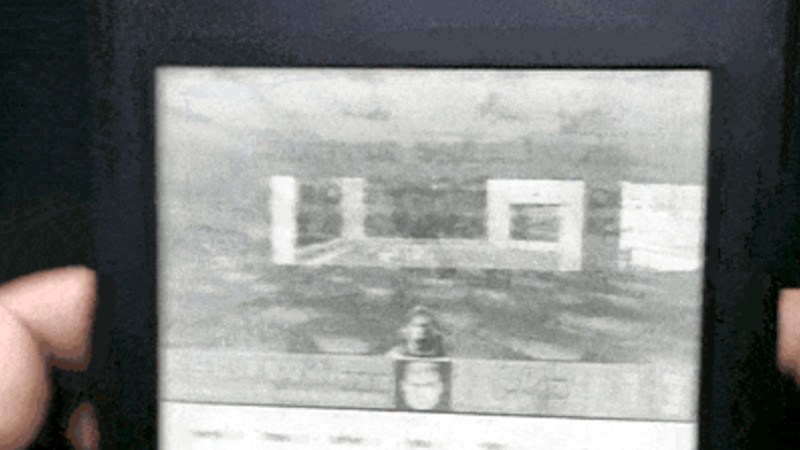
As computing power becomes cheaper and microprocessors become more capable, a steady trend over recent decades has been to see more everyday devices hiding Linux under the hood somewhere. Sadly in most cases that’s where it stays, but some such machines have a level of hackability. One such is the 7th generation Kindle PaperWhite 3, for which [pragyaangaur] has produced a distro that gives it the Alpine Linux userspace and a few other tricks.
As you might expect, the Kindle must be jailbroken, and is limited to the rather ancient Amazon kernel. The distro comes with a few extras for the custom front end. There’s a selection of games, a browser, an ArXiv search client, an ePub reader, and Quill, a local chatbot running SmolLM2 over llama.cpp on the Kindle’s own processor. At 1.7 words per second it may not be the fastest, but the important thing is that everything stays on the device. Best of all, it’s easy enough to return your Kindle to stock should you tire of the distro.
A quick look at everyone’s favourite auction site finds these readers available for well under $100, so should you wish to join the fun it at least shouldn’t cost an arm and a leg. Meanwhile, Kindle hacking is somewhere we’ve taken you before.







Interestingly, it doesn’t appear to be based on the alpine chroot for kindles from a few years back
Hi, I made Inkwell. You’re right, it’s not a chroot. Inkwell adds one upstart job that runs as dbus is starting and holds it there, so Amazon’s userspace (lab126, X, the Java UI) never starts at all. Amazon’s kernel and hardware setup still boot, and everything after that is Alpine. That’s also why the RAM and CPU are free for things like the LLM
I just checked the actual SoC of the Paperwhite 3, and it’s indeed imx6 SoloLite (I knew that lots of e-readers use the excellent imx6, but wasn’t sure for this specific model).
The imx6 is one of the best documented SoC on the market. All the documentation is freely available without signing an NDA. There are lots of developers working on u-boot, buildroot & yocto projects and doing great job supporting the imx6 platform.
Regarding the Paperwhite 3 jailbreaking options – unless the chip is HAB (High Assurance Boot) locked, you can run anything on it (even if the boot-config fuses are burned, you can disturb the DATA line on the SPI boot flash with a 50-100 ohms to GND and thus force the SoC into recovery). Also, absolutely all the code there is reversable, including the boot configuration and DDR initialization.
Personal disclosure: I’ve worked in the past on automotive and consumer multimedia projects with imx6, and was a yocto maintainer for a short while.
Regards.
Hi, I’m the creator, and thanks, that’s really useful. Replacing the kernel too is the next step I’ve been considering, to get off Amazon’s 3.0 kernel. I’d assumed it needs the case opened for a serial console, so the recovery trick on the SPI flash is good to know about.
Hi, I recently added the Paperwhite 3 (PW3) to Nura (previously postmarketOS) running 7.1.10 – https://gitlab.nura.eco/nura/pmaports/-/merge_requests/9690
I’m currently tidying up the installation process as it’s messy but I’m close to being able to install reliably from a jailbreak without needing serial access. hopefully will have it working smoothly in the next week or so.
I had started to look at options for a good eink interface so its great to see Inkwell already out there.
Any chance of something like Crosspoint getting setup on a Kindle? I’m not thoroughly knowledgeable about the dev work you all do but I do know that the micro e-readers are getting a lot of attention lately and I would love to get one of my old kindles to be usable without all the Amazon crap on it
If there’s no SPI FLASH, then there should be an eMMC, so similar approach is possible.
Also, these devices need to be initially provisioned at the factory (e.g. when the SPI/eMMC FLASH is empty), and this is usually done by NXP’s MFGTool (dude, I hate this tool!). In any case, there’s also the (nice) imx_usb_loader from BondaryDevices, it will help with USB bootstrapping.
Check the boot config pins, they’re usually exposed as test-pads on the pcb (and/or sometimes there are SMD resistors attached to these signals, which makes for a poor-man’s test pads!) for the factory test/flashing, so you should also be able to convince the imx6 to enter USB boot.
The DDR initialization data is located in the boot image’s DCD, and can be extracted from there to be reused for the new linux image build. Enjoy :D.