
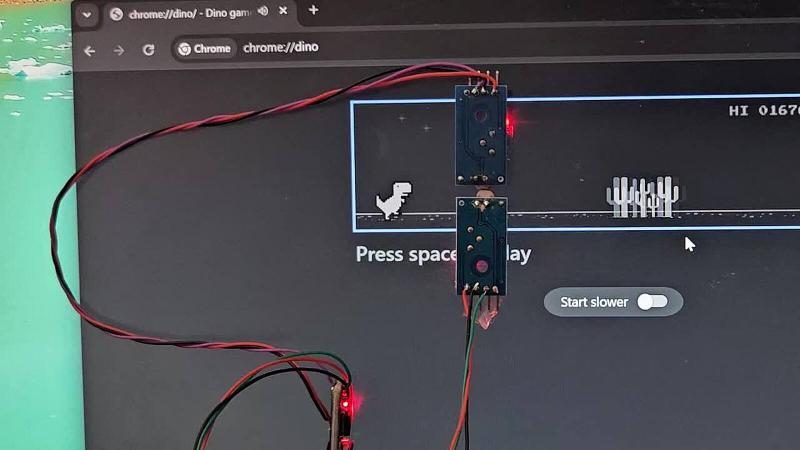
If you’ve ever had your internet connection drop out while running Chrome, you’ve probably seen a little dinosaur pop up to tell you what’s going on. You might have then tapped a key and learned that it’s actually a little mini-game built into the browser where you have to hop your intrepid T-rex over a bunch of cactii. [Albert David] is well familiar with this little Easter egg, and set about building a system to automatically play the game for him.
The build uses an Digispark ATtiny85 microcontroller board to run the show. It’s set up to plug in to a PC and enumerate as a USB HID device, so it can spoof the required key presses to play the game. To sense the game state, the device uses a pair of LM393 light-dependent resistor comparator modules. The bottom sensor is used to detect cactus obstacles in the game, while the upper sensor detects flying bird obstacles. Armed with this information, the microcontroller can deliver keypresses at just the right time to jump over cactuses while dodging birds overhead.
[Albert] does a great job of explaining how the project came together in the write-up. There are also useful calibration instructions that indicate how to place the sensors and tweak their thresholds so they trigger reliably and help you net a suitably high score.
Interestingly enough, this isn’t the first time we’ve seen a microcontroller take Chrome’s hidden game for a spin. The game itself has become popular enough that we’ve also seen it ported to other platforms.












Can be used to mute TV when add play based on logo or pattern on screen
Ads play*
Android TV + Projectivity Launcher + Smart Tube. No ads!
You can pair with Revanced on phone and one click “cast” current video to G TV. Pair with code and there you go. No ads at all.
I’ve played with Attiny85 (and earlier with its older twins, Attiny13, etc) and it should really be nominated as The New Arduino. It is simple, can run on nada, and works well with anything under the sun and some more.
A modern replacement for the ATtiny85 or ATtiny13 would be the CH32V003J4M6 as long as you don’t need super low power operation. It’s much faster and costs less than 15 cents. It only needs a single pin to program and debug it and you can’t brick it by messing up the fuse bits.
I am only now researching my way into using these, so pardon my mental construction dust :]
From what I’ve seen so far CH32V003 needs a programmer, but if I am wrong then I am wrong. If one of those $2 boards can be USB-programmed using something like Thonny I stand corrected.
The low-power specs look darn impressive, ~10ma in active mode, that’s already one-third of old school Arduino Nano while doing something like ~20 times more, and it sure compares favorably with rp2040/2350 that seem to be the easiest (so far) to program. State machines, hm, but maybe if I can learn how to bare-metal program CH32V003 that’s about all I’d ever need for my amateur projects.
Yes, they do need a programmer. It’s a USB dongle called the WCH LinkE. They cost about $5. It also does the debugging. You can set breakpoints in the code, single step through it, and inspect or modify RAM contents and registers.
There is a lightweight set of libraries for the CH32 microcontrollers called ch32fun. The CH32V003 is fairly simple to program bare metal. The reference manual is less than 200 pages. The RP2350 is over 1300 pages.
Good stuff thank you for the pointers : – ]
I meant to do something like this for a long time with the Desert Bus game… dang.