DIY 250 Lb Thrust Liquid Oxygen/Kerosene Rocket

Robert’s Rocket Project has been going on for a long time. It has been around so long that you can go all the way back to posts from 2001, where he talks about getting his first digital camera! The site is dedicated to his pursuit of liquid fueled rocket engine building. It’s a great project log and he has finally come to the point where he will be testing his first flight vehicle soon.

His latest project is a 250lbf regeneratively cooled engine. It uses kerosene as the fuel, and liquid oxygen as the oxidizer. The neat thing is he utilizes the temperature change of the liquid oxygen expanding to cool the chamber and nozzle before being burned. This allows for a very efficient and powerful combustion of the fuel. He has some videos of testing it on his site, we just wonder why he doesn’t host them on YouTube or something…

Anyhow, there’s more than enough info on his site to try and recreate some of his experiments, but perhaps you should start here instead: How to Design, Build and Test Small Liquid-Fuel Rocket Engines.

[Thanks Ray!]

DIY Soda Can Battery

sodaCanBattery

It may not be particularly useful to create some makeshift batteries out of soda and soda cans, but it’s a good introduction to electrodes and electrolytes as well as a welcomed break from lemons and potatoes. The gang at [Go-Repairs] lopped off the can’s lid and temporarily set the soda aside, then took steel wool to the interior of the can to remove the protective plastic coating. The process can be accelerated by grabbing your drill and cramming the steel wool onto the end of a spade bit, although pressing too hard might rip through the can.

With the soda poured back in, you can eek out some voltage by clipping one lead to the can and another to a copper coin that’s dunked into the soda. Stringing along additional cans in series can scale up the juice, but you’ll need a whole six pack before you can get an LED working—and only just. The instructions suggest swapping out the soda for a different electrolyte: drain cleaner, which can pump out an impressive 12 volts from a six pack series. You’ll want to be careful, however, as it’s likely to eat through the can and is one lid away from being dangerous.

Stick around for a quick video after the break, and if you prefer the Instructables format, the [Go-Repairs] folks have kindly reproduced the instructions there.

Continue reading “DIY Soda Can Battery”

Project Thumper Walkthrough

ScreenShot029

The Geek Group is at it again! Many years ago they built Project Thumper, a 1,600V @80,000A electrical impulse … well … “thumper”.

For those of you that don’t know, The Geek Group is the world’s largest not-for-profit Hackerspace. Lately they have been working on developing better videos for their YouTube channel, and have just released a stunning CGI animation of the build, operation, and explanation of Project Thumper.

So what is Project Thumper? In the simplest terms, it’s a giant capacitor, or more specifically, an entire server rack filled with capacitors. The Hackerspace uses it for experiments and demonstrations — but from the looks of their videos, they mostly just use it to blow things up, as shown in their 2008 Project Promo video. I think we would too. They even used it to blow up an iPhone! (Skip to 3:00 for the explosion). We think someone with a high-speed camera really needs to film Thumper in action!

The awesome CGI animation explanation of it is after the break.

Continue reading “Project Thumper Walkthrough”

Electronics Everything Reference Poster

2013-09-26-14-47-35

[Ben] just sent us this great reference sheet. It’s a poster he compiled of datasheets and various electronic references. He made it after spending too much of his time sifting through datasheets while working on projects. It also helped that he realized his school, Georgia Tech, had a poster printing service!

It contains the basics from resistor color codes, typical pinouts of various chips, current capacity of wire gauges, Arduino pinout diagrams, schematic symbols, trace widths for current capacity, and even typical coding functions!

The full image is 9,000 x 6,000 pixels and will print nicely at 30 by 20 inches, just shy of the ANSI D paper size. It’s 6.1MB so only click here if you want it!

Maybe if we ask nicely he’ll share the original MS Publisher file so we can tailor it to our individual needs! Some of the text in the images is a bit blurry, but everything is basically still readable.

Touring Component Markets In Shenzhen

touring-component-markets-in-shenzhen

[Al] recently returned from a trip to China. While there he toured some of the component markets in Shenzhen, the electronics assembly epicenter of the world. While he doesn’t focus too closely on what is actually being sold there, we found his description of the markets themselves and other notable attractions around the area quite interesting.

Shenzhen is different from some of the other component wonderlands we’ve heard about ([Ian Lesnet’s] tour of Akihabara in Japan comes to mind). First of all it may be a bit more difficult to get there. US Citizens need a Visa to enter China, and must fly to Hong Kong and take a ferry to the mainland. [Al] reports that the traffic is horrendous and rush-hour can turn a ten mile ride that usually takes ninety minutes into a three hour tour… a three hour tour!

The side affect of the market being out of the way is that the prices aren’t as inflated as they may be in more geek-tourist-friendly locations. That being said it also sounds like the vendors are interested in selling you a few thousand units rather than a single component. Follow the link at the top for the market tour, a stop at Seeed Studios (who will apparently sell you a map of the best markets to visit), and the rest of the attractions that [Al] encountered.

Mechanical Typewriter Types Your Tweets!

ScreenShot027

While we weren’t able to visit the Toronto Maker Faire this past weekend, a friend let us know about this great hack. A mechanized typewriter that types out tweets directed at the maker, @mschwanzer!

[Michael Schwanzer] has a few blog posts outlining the build, but the first part of this news article and accompanying video explain it quite nicely. The printer-typewriter features an array of solenoids that are controlled by an Arduino using shift registers. A Raspberry Pi collects the information from Twitter and then parses the data to the Arduino for typing. A simple concept, but a complex and relatively expensive build.

During the fair, people could have their own tweets printed and streamed on this site. You can still see it in action though, just check out the video after the break! Continue reading “Mechanical Typewriter Types Your Tweets!”

Maxim App Note Reuses Lithium Ion Cells — Plus Extras

Now we don’t sit around reading application notes for fun. But if hard pressed we would have to admit that we do read quite a few of them even if the concepts aren’t currently on our project list. That’s because they’re a great way to learn stuff and for the most part the information within is trustworthy.

The latest one that we looked at is this Maxim app note 5681 on recycling Lithium-ion batteries. It’s more a reuse than a recycle but you get the point. If you have some Lithium-Ion cells left over from older equipment this resource delivers a lot of good information on how to use them to power something else.

Obviously they’re showing off their own hardware here, but that’s okay. The MAX8677A chips has a ton of features and can be had for $3-5 depending on your vendor. It automatically switches between powering your device from the battery, or from the charging source if connected. This allows you to source up to 500mA when connected to USB or 2A when charging from an external DC supply. There is also all of the protection you would normally want with a Li-ion setup, including temperature monitoring.

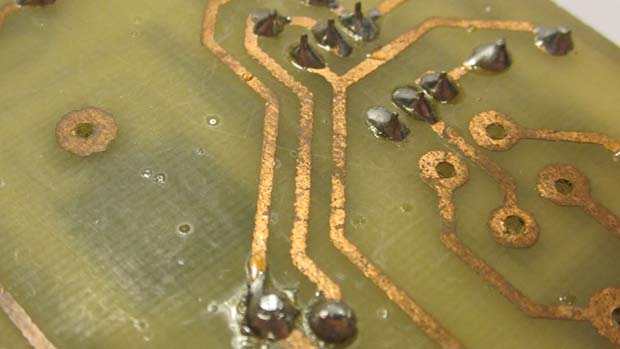
The catch is the not-so-hand-solderable QFN package. They’ve got a solution to this as well. The diagram on the right shows how to hand solder the chip — albeit with a hot air pencil — by drilling through the board to get at the ground pad from the underside of the PCB.

[Thanks Jaded and Amos]