Hackaday Weekly Roundup


In case you missed them, here are our most popular posts from this week:

First up is [Bertho’s] Pointless Switch machine. This machine is yet another take on the ‘most pointless machine’. It looks like his server couldn’t handle the load from his video so he moved it over to youtube. You can find it here.

Next is The DIY nuclear reactor, which links to a project by a fellow who was silly enough to post his nuclear experiments online. You can imagine how that went…

This week’s most popular post was the tutorial created by our writer [Brian Benchoff]. In this tutorial, he shows how you can insert your logo into a still-readable QR code.

After that is this post showing how you can resurrect your IBM model M keyboard to use it as a bluetooth device.

Finally, we wrap up our roundup with a brainwave disruptor. This device allows [Rich] to experiment with light and sound to see how it affects brain waves.
Installing Linux On A 386 Laptop

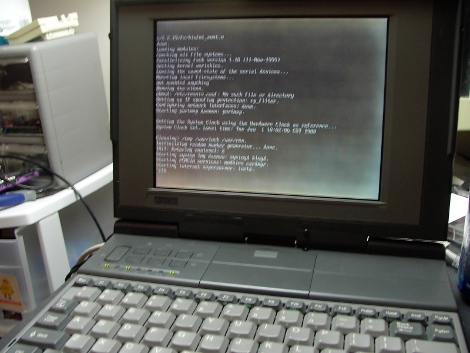
The “cheap” and “easy” way in about an hour! A question that pop’s up from time to time is “I somehow ended up with an archaic old laptop / computer, can it run Linux?” Well of course it can, but that totally depends! On what? Well machine CPU, CPU speed, hard disk space, RAM and most importantly what you are expecting it to do.

Okay, why a Intel 386? Well number one I own a 386, but more importantly its the absolute bottom Intel CPU you can run Linux on. While it wont be able to do much, it will give you a basic system to kick around and “get to know” the insides of Linux without a million things installed and the worry of breaking it.

Unfortunately a 386 requires some special moves as the actual chip was dropped from almost all distributions long ago. All of the modern distributions I have looked at require at least a 486 CPU. This tutorial will be strictly for installing a basic bare bones Linux on a 386. Have a 486? Pentium? Faster? Never fear I will be covering that in a part II later this week.

Linux on a 386 in about an hour? Madness you might think, it probably takes Linux longer to boot on a 386 (and in some cases you are correct)! Want to know the trick? Simple, cheat!

Join me after the break for the parts and steps needed to get you started.

Continue reading “Installing Linux On A 386 Laptop”

Make W7 64 Bit Play Nice With Your Programmer

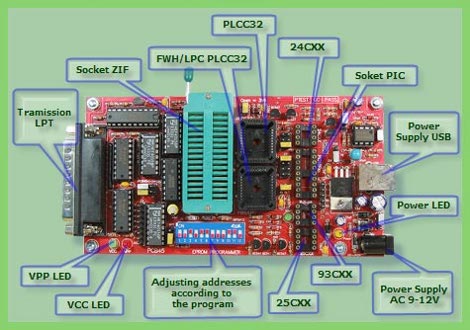
External EPROM burners are pretty handy gadgets to have around. They obviously can read and write EPROMS, but often times they will also handle a pile of PIC’s, some AVR’s, and other programmable logic like PAL/GAL and CLPD’s. While you can often find old models floating around for cheap (or free in my case) there are a few issues to be hammered out.

Typically the models you’re going to get for a song and a dance are old parallel port models that use software in MS-DOS or Windows and hasn’t been updated since. The software typically bit bangs the port using it like a 1 byte wide GPIO line, and this was a common trick, that is long gone from current operating systems by default.

[Doug] sought to find a solution to using one of these gadgets on Windows 7 X64, and lots of Google-fu, poking at libraries, and a little code modification he does just that getting his Sivava Willem EPROM programmer working like a champ on a nice new i7 with a parallel port add in card.

Announcing Hack A Day Themes

High Voltage Theme graphic

Starting next Monday we be adding some themed posts into the mix. Every couple of weeks we will pick a new theme. Our first theme will be about hacks and projects involving high voltage.   Each day we will have a new post based on the current theme. To make this happen though, we need your help.  If you have been working on something that involves high voltage or you know someone who has, hit us up on the tip line.  If you have a cool high-voltage project but haven’t posted it online yet, take a look at this link where we show you some options.

1 Chip USB AVR Development

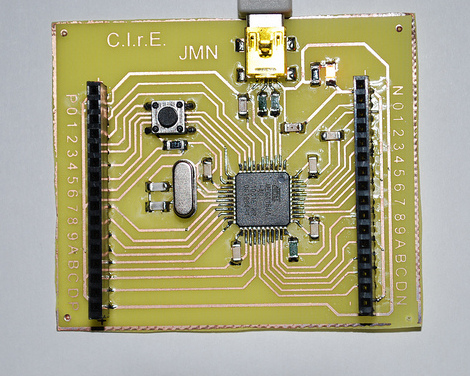
Wouldn’t it be nice if there was an AVR microcontroller with USB device support built in so you would not need a separate programmer or serial link? Well in fact there are quite a few of them, and this awesome tutorial (google translate) is a quick and easy crash course in using the ATMega 16/32U4 micro controllers.

These 8 bit AVR’s (16k and 32k) have the usual list of features you would expect in a Mega AVR. 26 GPIO pins and a pretty easy to solder 44 pin surface mount package, the micro controller also has a USB 2.0 Full-speed/Low Speed Device Module and allows programming though a standard bootloader.

Once you have a pretty standard board assembled you need Atmel’s FLIP RS232, USB, or CAN device programming software (Windows or Linux) and your favorite AVR IDE setup, you’re good to go!

Join us after the break for a quick video.

Continue reading “1 Chip USB AVR Development”

RC Car Hack Saves Lives In War Zone

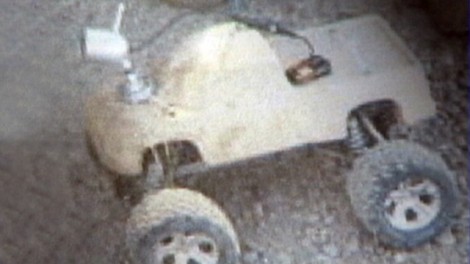
R.I.P sand-colored radio-controlled truck. Your life ended with a bang and in doing so, saved some lives. This little work-horse is a hack that [Ernie Fessenden] put together and sent to his brother [Sergeant Chris Fessenden] who is on a tour of duty in Afghanistan.

[Chris’] team is trained to be on the lookout for roadside bombs, but [Ernie] wanted to sent him something cool that could also keep him safe. By adding a camera to the hood of the Traxxis Stampede and using a gun-mountable LCD screen, the soldiers now have a way to see what’s on the road ahead from their armored Humvee. Sounds like it would work just fine right? Well the hack just got a big endorsement when it tripped an IED made of around 500 pounds of explosives. [Chris] and five other soldiers on patrol were unharmed in the event, and [Ernie] already has a replacement model on the way.

[Thanks Rioexxo and Alex]

More proof that battlefield hacks deserve a place next to some of the high-ticket items you’d usually associate with weapons of war.

Instructables Joins Autodesk

Everyones favorite site, Instructables.com, has announced a big move. They have joined Autodesk along with the same team that is doing Autodesk 123D,

Autodesk is a great cultural fit for Instructables. They make tools for creative people: they’re the world leader in 3D design, engineering, and entertainment software. Even if you don’t recognize the name Autodesk, their software has powered the movies you watch, and designed the cars you drive and the buildings you work in. Instructables will be the community arm of the same team that makes 123D, SketchBook, Homestyler, and Pixlr, which will help provide creative tools, inspiration, and services for all types of creative people. Here’s Carl Bass, Autodesk’s CEO, talking more about his vision for the future of DIY.

Sofar the overall reaction on the site thread is tame, but many comments lean to skeptical, though typical with any transition to “The man” as one commenter called them.

Meanwhile MAKE has posted a in depth article “Autodesk Acquires Instructables: What It Means for Makers”  in their usual (long) format.  What’s your thoughts?