Wireless Animatronic Hand Control

animatronic_hand

[Easton] was looking to enter his local science fair and needed a project that would wow the judges. After considering it for a bit, he decided that an animatronic hand would be a sure winner. Many animatronic projects we have seen are connected to a computer for control purposes, but his is a bit different.

[Easton] wanted to be able to control the hand in real time with his own movements, so he sewed some flex sensors onto a glove and wired them up to a custom Arduino shield he built. The Arduino is also connected to an XBee radio, allowing it to interface with his animatronic hand wirelessly.

He built the hand after studying anatomical drawings to better understand where finger joints were located and how they moved. He cut up pieces of flexible wire tubing to build the fingers, reinforcing them with Lego bricks. He ran fishing wire from the finger tips to five independent servos to provide the hand’s motion. Another Arduino with an XBee shield was used to control the hand and receive wireless signals from the glove.

Check out the video below to see why this project won [Easton] first place in the science fair.

Continue reading “Wireless Animatronic Hand Control”

Kinect Two-fer: MoCap Movie And Robot Control

kinect_twofer

It’s no mystery that we like the Kinect around here, which is why we’re bringing you a Kinect two-fer today.

We have seen video hacks using the Kinect before, and this one ranks up there on the coolness scale. In [Torben’s] short film about an animation student nearly missing his assignment deadline, the Kinect was used to script the animation of a stick figure model. The animation was captured and built in Maya, then overlaid on a separate video clip to complete the movie. The overall quality is great, though you can notice some of the typical “jitter” that the Kinect is known for, and there are a few places where the model sinks into the floor a bit.

If you want to try your hand at animation using the Kinect, all of the scripts used to make the movie are available on the creator’s site for free. [via Kinect-Hacks]

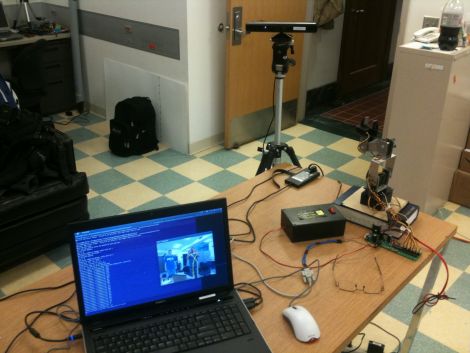
Our second Kinect item comes in the form of a gesture driven Lego MindStorms bot. Using OpenNI along with Primesense for body tracking, [rasomuro] was able to use simple motions to drive his NXT bot around the house. His movements are tracked by the Kinect sensor which are translated into commands relayed to the robot via his laptop’s Bluetooth connection. Since the robot has two motors, he mapped couple of simple arm motions to drive the bot around. We’ll be honest when we say that the motions remind us of Will Farrell’s “Frank the Tank” scene in Old School, but [rasomuro] says that he is trying to simulate the use of levers to drive the bot.  Either way, it’s pretty cool.

Videos of both hacks are embedded below for your perusal.

If you are interested in seeing some more cool Kinect hacks be sure to check out this Minecraft interface trio, this cool Kinect realtime video overlay, and this Kinect-Nerf gun video game interface.

Continue reading “Kinect Two-fer: MoCap Movie And Robot Control”

Remote-controlled Tank Tread Robot Will Walk The Dog For You

remote_controlled_robot

Instructables user [IAMTHEBOT] recently finished building his robot which can be controlled by a human using an R/C transmitter, via a PC, or through its built-in object avoidance system. The robot doesn’t seem to have a name, though Johnny Five might be appropriate.

The robot was built using plenty of erector set parts, as well as a Lynx motion tank tread kit. The robot is crammed full of controllers, including a Propeller USB servo controller which operates the arms, and a pair of Parallax motor controllers to manage the tread movement. A pair of Parallax Stamp controllers are used to drive these controllers as well as to manage the remainder of the robot’s functions.

The robot’s head consists of a custom pan and tilt wireless camera system, which allows him to drive it around from the comfort of his home, while watching the video stream on his PC. The robot also has the ability to roam around autonomously, avoiding objects using a ping sensor that can be mounted where the camera is currently located. It seems all that’s missing is Steve Guttenberg.

As you can see in the videos below, the robot manages pretty well on all sorts of surfaces, and even walks this guy’s dogs.

Continue reading “Remote-controlled Tank Tread Robot Will Walk The Dog For You”

Freedombot Explores Your Fridge

Freedombot is a neat little robot designed for exploring magnetic surfaces. It has two whiskers for detecting objects in its path and two rare earth magnets which allow it to stick to your fridge.

Overall Freedombot may not be anything revolutionary but its builder [skater_j10] does a good job of covering topics which my be interesting to robotics beginners. For example he goes through the process of modifying some HiTec HS- 55 Micro Servos for continuous rotation which allows them to act as the wheels. To control the bot he uses two 555 timers wired up in astable mode to generate the needed PWM for the servos. The proximity sensors are simple limit switches with some wire soldered on to the end.  The end result is a neat little robot for roaming the front of your fridge. See a video of it in action after the break.

This happens to be [skater_j10]’s entry into the 555 timer contest. Unfortunately the deadline has passed for new entries but be sure to swing by and check out some more awesome 555 hacking.

Continue reading “Freedombot Explores Your Fridge”

Simple Robot Knows Its Bounds

table_top_bot

The [Dallas Personal Robotics Group] recently put together a set of tutorials for their members, including the build process of a table-top robot, they call the Tiny Wanderer. The bot can be constructed pretty easily, and is meant as an introduction to robot building.

The small servo-driven bot uses simple edge sensors to ensure that it doesn’t fall off a raised surface. The sensors were built using a small IR LED and photo transistor, which is partially isolated from the LED by a piece of shrink tubing. An ATiny micro-controller takes two measurements of the amount of IR light entering the photo transistor – one with the LED on, the other with the LED off. The difference of these measurements is compared to determine if the edge sensors are hanging off the side of the table. The logic used here is pretty simple – the difference will be high if the sensors are hovering over a surface, due to reflected light, and low if the sensors are hanging over open space.

The writeup contains templates for building the bot’s structure, as well as source code and schematics for all of the electronic bits.

Be sure to stick around to see a video of the robot in action.

Continue reading “Simple Robot Knows Its Bounds”

Tricycle Robot Using Omni-wheels

[Markus Gritsch] built this six-wheeled robot using omni-wheels. Two wheels are used on each axis in order to ensure perpendicular rotation is possible no matter where the axis rotation stops. The wheels have also been improved by dipping the elliptical components to give them a rubbery coating.

The robot gets its commands wirelessly from a separate controller unit. That controller, as well as the bot seen above, uses a Teensy microcontroller board. Two analog sticks take input from the operator and transmit commands using an inexpensive RF pair. The wheel movement is facilitated by three servo motors which may seem like an odd choice. But we think that it simplifies the electronic side of the build because you do not need an H-bridge to control a servo motors. It’s a bit loud, as you can hear in the video after the break, but it certainly works quite well.

One of the commenters on the thread above asks why [Markus] didn’t use mechanum wheels. These would have allowed him to use just one wheel on each axis but the omni-wheels were so inexpensive that he went this route instead.

Continue reading “Tricycle Robot Using Omni-wheels”

Robot Gets Around On Lopsided Wheels

This concept robot uses angular momentum to roll around. You can see that on either end of the robot there are two discs which have been cut on one side to make them off-balance. For locomotion, two DC motors spin the outer discs which are not in contact with the floor. This spinning action exerts a force in the opposite direction on the body of the vehicle, causing it to move.

It’s not a perfect system and there is one major flaw with using this system. When the forces have equalized acceleration will stop and it will eventually come to a standstill. You can’t just stop spinning the motors because that will act as a braking mechanism. But still, it’s a concept we haven’t seen before and we love the experimentation that’s happening here. Take a look at the test footage after the break and don’t hesitate to let us know if this starts causing light bulbs to flip on above your head.

Continue reading “Robot Gets Around On Lopsided Wheels”